
Introducció
The Yaesu FT-25R is a robust and reliable 144 MHz VHF FM handheld transceiver designed for clear and efficient communication. This manual provides essential information for the safe and effective operation of your device, covering setup, basic functions, and maintenance.
Informació de seguretat
- Llegeix totes les instruccions: Before operating the transceiver, thoroughly read and understand all instructions provided in this manual.
- Antenna safety: Never touch the antenna during transmission. Avoid operating the transceiver near unshielded blasting caps or in explosive atmospheres.
- Cura de la bateria: Use only the specified battery pack and charger. Do not short-circuit, incinerate, or disassemble the battery pack.
- Exposició a l'aigua: While the FT-25R has an IP54 rating for dust and splash protection, avoid submerging the unit in water.
- Protecció auditiva: Prolonged exposure to high volume levels can cause hearing damage. Adjust the volume to a comfortable level.
Contingut del paquet
Comproveu que el vostre paquet contingui els elements següents:
- Yaesu FT-25R Transceiver Unit
- Antena
- Paquet de bateries
- Carregador de bateria
- Clip de cinturó
- Manual d'usuari (aquest document)
Producte acabatview
Familiarize yourself with the various parts of your FT-25R transceiver.
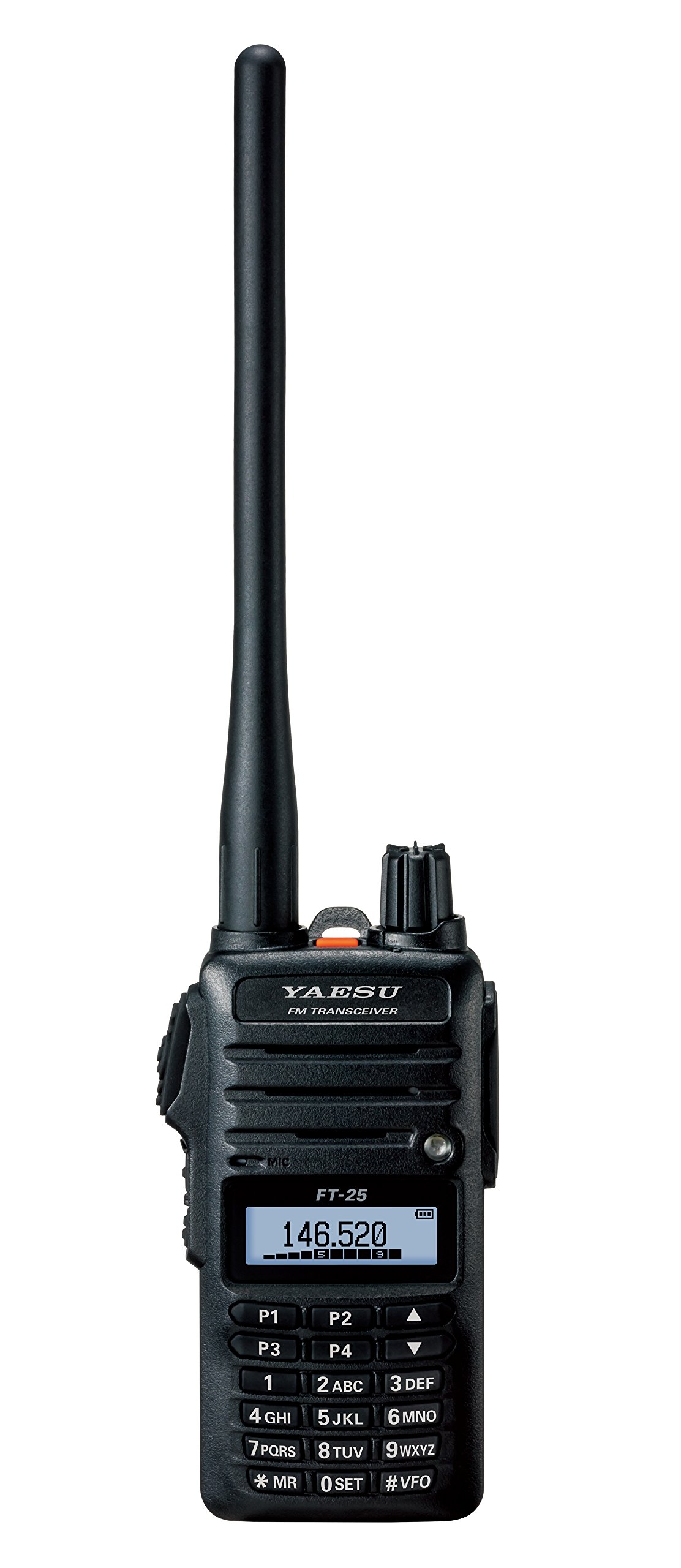
Figura 1: Davant view of the Yaesu FT-25R transceiver, showing the antenna, volume/power knob, display, and keypad. The display shows "146.520" MHz, indicating the current operating frequency. The keypad includes numerical inputs and function keys like P1-P4, MR, SET, and VFO.
Components clau:
- Antena: Per a la transmissió i recepció de senyals de ràdio.
- Control de volum/alimentació: Controls power ON/OFF and audio volume.
- Pantalla LCD: Shows frequency, channel number, battery status, and other operational indicators.
- Teclat: Used for frequency entry, channel selection, and accessing various functions.
- Botó PTT (Premeu per parlar): Located on the side, press to transmit.
- Presa d'altaveu/micròfon: Per a accessoris d'àudio externs.
Configuració
1. Instal·lació i càrrega de la bateria:
- Ensure the transceiver is powered off.
- Align the battery pack with the battery compartment on the back of the transceiver.
- Feu lliscar la bateria al seu lloc fins que faci clic de manera segura.
- Connect the battery charger to a power outlet and then to the charging port on the transceiver or battery pack.
- Allow the battery to charge fully before first use (refer to charger indicator for status).
2. Fixació de l'antena:
- Screw the supplied antenna clockwise onto the antenna connector on the top of the transceiver until it is finger-tight. Do not overtighten.
3. Belt Clip Installation:
- Attach the belt clip to the designated area on the back of the transceiver using the provided screws.
Funcionament bàsic
1. Power On/Off and Volume:
- To power on, rotate the Volume/Power knob clockwise until it clicks.
- Per ajustar el volum, continueu girant el botó.
- Per apagar-lo, gireu el botó en sentit antihorari fins que faci clic.
2. Frequency Selection (VFO Mode):
- Premeu el botó #VFO key to enter VFO (Variable Frequency Oscillator) mode.
- Use the numeric keypad to directly enter the desired frequency (e.g., 146520 for 146.520 MHz).
- Alternativament, utilitzeu el Amunt/Avall arrow keys (above 2ABC and 5JKL) to tune the frequency in steps.
3. Transmissió i recepció:
- To receive, simply listen to the speaker. The display will show the current frequency.
- Per transmetre, premeu i manteniu premut el botó PTT button on the side of the transceiver. Speak clearly into the microphone.
- Allibera el PTT botó per tornar al mode de recepció.
Funcions avançades
1. Memory Channel Programming:
- Tune to the desired frequency in VFO mode.
- Premeu el botó *MR key to enter Memory Recall mode.
- Select an empty memory channel using the Amunt/Avall tecles de fletxa.
- Manteniu premut el botó *MR key again until you hear a beep, indicating the frequency is saved.
2. Escaneig:
- The FT-25R supports various scanning functions (e.g., VFO scan, Memory scan). Consult the full manual for detailed instructions on activating and customizing scan modes.
3. Squelch Adjustment:
- The squelch circuit mutes background noise when no signal is present. Adjust the squelch level via the menu (0 SET key) to an appropriate level where noise is suppressed but weak signals can still be received.
Manteniment
- Neteja: Utilitzeu un suau, damp cloth to clean the exterior of the transceiver. Do not use harsh chemicals or abrasive cleaners.
- Cura de la bateria: To prolong battery life, avoid overcharging or completely discharging the battery frequently. Store the transceiver and battery in a cool, dry place when not in use for extended periods.
- Antena: Comproveu periòdicament que la connexió de l'antena estigui ben ajustada.
Resolució de problemes
| Problema | Causa possible | Solució |
|---|---|---|
| Sense poder | Battery discharged or improperly installed. | Carregueu la bateria o torneu-la a instal·lar correctament. |
| No es pot transmetre ni rebre | Incorrect frequency, squelch too high, or antenna not connected. | Verify frequency, adjust squelch, check antenna connection. |
| Mala qualitat d'àudio | Low battery, weak signal, or external interference. | Charge battery, move to an area with better signal, check for interference sources. |
Especificacions
| Característica | Detall |
|---|---|
| Marca | YAESU |
| Número de model | FT-25R |
| Interval de freqüència | 144 MHz VHF (Mono Band) |
| Pes de l'article | 8.4 unces (aproximadament 238 grams) |
| Dimensions del producte | 3 x 1.5 x 5 polzades (aprox. 7.6 x 3.8 x 12.7 cm) |
| Classificació de protecció internacional | IP54 (Dust and Splash Protection) |
| Nombre de canals | 1 |
| UPC | 702685259222, 788026159512 |
Garantia i Suport
The Yaesu FT-25R transceiver comes with a 3 anys de garantia from the date of purchase. This warranty covers manufacturing defects under normal use. For warranty claims or technical support, please contact your authorized Yaesu dealer or visit the official Yaesu weblloc web per obtenir informació sobre el servei.
For further assistance, refer to the comprehensive user manual available on the Yaesu support portal or contact customer service.