
ZACO V5sPro
ZACO V5sPro Robot Vacuum Cleaner User Manual
Model: V5sPro
Introducció
Thank you for choosing the ZACO V5sPro Robot Vacuum Cleaner. This 2-in-1 device is designed to provide efficient cleaning for your hard floors, offering both vacuuming and mopping functionalities. Its intelligent features, such as automatic charging, fall protection, and anti-collision sensors, ensure a thorough and safe cleaning experience. Please read this manual carefully before using the product to ensure proper operation and maintenance.

The ZACO V5sPro robot vacuum cleaner, showcasing its sleek gold and white design with the 'CLEAN' button visible on top.
Instruccions de seguretat
- Always ensure the power adapter is compatible with your local power supply.
- No utilitzeu el robot en ambients humits ni a prop de l'aigua.
- Keep the robot away from open flames and heat sources.
- No permeteu que els nens ni les mascotes juguin amb el robot.
- Before cleaning, remove loose cables, small objects, and fragile items from the floor.
- Do not use the robot to clean sharp objects, burning materials, or liquids.
- Regularly clean the dustbin and filters to maintain optimal performance.
- If the robot is not in use for a long period, turn it off and store it in a cool, dry place.
Què hi ha a la caixa
The ZACO V5sPro package includes the following components:
- ZACO V5sPro Robot Vacuum Cleaner
- Charging Station with Adapter Cable
- Bateria de ions de liti (2600 mAh)
- Comandament a distància (incloses les piles)
- 300ml Dustbin (pre-installed in the unit)
- 300ml Water Tank Module
- Microfiber Mopping Cloth (1 pre-installed, 1 additional)
- Side Brushes (1 pair pre-installed, 1 additional pair)
- Additional Fine Dust Filter (HEPA filter)
- Eina de neteja
- User Manual (German, but this is the English version)
Producte acabatview
Familiarize yourself with the main components of your ZACO V5sPro robot vacuum cleaner.

The ZACO V5sPro is designed to be ultra-flat (81mm), allowing it to clean effectively under furniture.
A dalt View
- Botó de neteja: Inicia o atura la neteja.
- Dustbin/Water Tank Cover: Access point for dustbin or water tank.
- Llums indicadores: Display status (charging, error, cleaning mode).
A baix View
- Raspalls laterals: Dos raspalls giratoris per escombrar les deixalles a la via d'aspiració.
- Rodes motrius: Rodes grans per navegar per diversos tipus de sòl.
- Roda universal: Provides 360-degree movement.
- Suction Inlet: Where dirt and dust are vacuumed.
- Contactes de càrrega: Connects with the charging station.
- Sensors de penya-segats: Detects drops and prevents falling down stairs.
- Mopping Cloth Attachment: Area for attaching the microfiber mopping cloth.
Configuració
1. Càrrega del robot
- Place the charging station against a wall in an open area, ensuring there are no obstacles within 1 meter to the sides and 2 meters in front.
- Connecteu l'adaptador de corrent a l'estació de càrrega i endolleu-lo a una presa de corrent.
- Place the robot on the charging station, ensuring the charging contacts align. The indicator light will show charging status.
- Allow the robot to fully charge before first use (approximately 4 hours). A full charge provides up to 120 minutes of operating time.

The ZACO V5sPro features automatic charging, returning to its station when the battery is low.
2. Instal·lació dels raspalls laterals
Gently push the side brushes onto the square posts at the bottom of the robot until they click into place. Ensure they are securely fastened.
3. Preparació de la zona de neteja
- Remove any loose cables, small rugs, or fragile items that could obstruct the robot's path or get tangled in its brushes.
- For mopping, ensure the water tank is filled and the microfiber cloth is attached.
Funcionament del robot
The ZACO V5sPro offers various cleaning modes to suit your needs.

The ZACO V5sPro is a versatile 2-in-1 robot, capable of both vacuuming and mopping.
Modes de neteja
- Neteja automàtica: Press the "Clean" button on the robot or remote control. The robot will automatically clean the area using a random path until the battery is low, then return to the charging station.
- Neteja de punts: Place the robot near a specific dirty area and press the "Spot" button on the remote control. The robot will clean in a spiral pattern, covering an area of approximately 1.2 meters in diameter.
- Neteja de vores: Press the "Edge" button on the remote control. The robot will clean along walls and furniture edges.
- Max-Power Cleaning: While in Auto, Spot, or Edge mode, press the "Max" button on the remote control to increase suction power for deeper cleaning.
Ús del comandament a distància
The remote control allows you to manage the robot's functions from a distance.

The remote control for the ZACO V5sPro, featuring buttons for various cleaning modes and scheduling.
- Botons direccionals: Manually control the robot's movement.
- Botó Reproduir/Pausa: Start or pause cleaning.
- Botó d'inici: Send the robot back to the charging station.
- Botó Programació: Set a cleaning schedule for automatic operation. Refer to the detailed instructions in the full manual for setting schedules.
Switching Between Vacuuming and Mopping
The ZACO V5sPro is designed for either vacuuming or mopping, not simultaneously.
- Per aspirar: Ensure the dustbin is installed. The robot will use its suction and side brushes to collect debris.
- Per fregar: Remove the dustbin and insert the water tank module with a damp microfiber cloth attached. The robot will then perform a wet wipe. Ensure the floor type is suitable for wet cleaning.
Manteniment
Regular maintenance ensures optimal performance and extends the lifespan of your ZACO V5sPro.
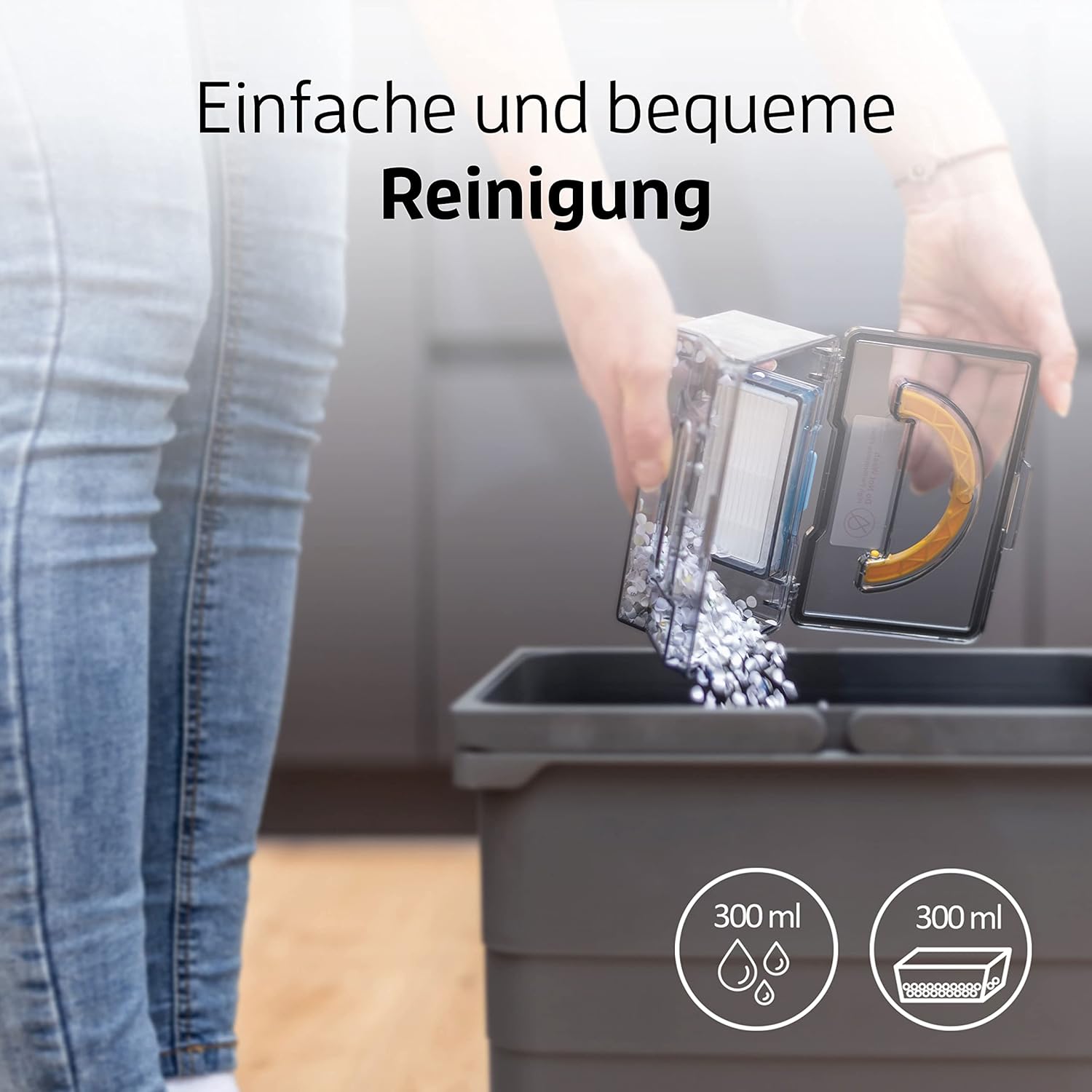
Emptying the dustbin of the ZACO V5sPro is a simple and convenient process.
1. Emptying the Dustbin and Cleaning Filters
- Press the "PUSH" button on the top cover to open it and remove the dustbin.
- Obriu la tapa de la paperera i buideu-ne el contingut en una paperera.
- Remove the primary filter and HEPA filter. Tap them gently to remove dust. The primary filter can be rinsed with water, but ensure it is completely dry before re-installing. The HEPA filter should not be washed.
- Clean the dustbin with water if necessary and let it air dry completely.
- Reassemble the filters and dustbin, then place it back into the robot.
- It is recommended to replace the HEPA filter every 3-6 months, depending on usage.
2. Neteja dels raspalls laterals
Check the side brushes regularly for tangled hair or debris. Pull them off their posts and remove any obstructions. If brushes are worn, replace them with new ones.
3. Cleaning the Water Tank and Mopping Cloth
- After mopping, remove the water tank and empty any remaining water.
- Detach the microfiber mopping cloth and rinse it thoroughly with water. It can also be machine washed. Allow it to air dry completely.
- Clean the water tank with water and let it air dry.
4. Neteja dels sensors i dels contactes de càrrega
Wipe the cliff sensors (located on the bottom of the robot) and the charging contacts (on both the robot and charging station) with a clean, dry cloth to ensure proper function.
Resolució de problemes
| Problema | Causa possible | Solució |
|---|---|---|
| El robot no s'encén. | Bateria baixa; interruptor apagat. | Charge the robot; Ensure the main power switch (usually on the side) is ON. |
| El robot no es carrega. | Charging contacts dirty; Charging station not powered. | Clean charging contacts on robot and station; Ensure charging station is plugged in and has power. |
| El robot es queda encallat sovint. | Obstacles (cables, small rugs); Robot stuck under furniture. | Clear the cleaning area; Use boundary strips if available or block off problematic areas. |
| Mal rendiment de neteja. | Full dustbin; Clogged filters; Worn side brushes. | Buidar el contenidor de pols; netejar/substituir els filtres; netejar/substituir els raspalls laterals. |
| Robot falls down stairs. | Cliff sensors dirty. | Clean the cliff sensors on the bottom of the robot. |
| La funció de fregar no és efectiva. | Water tank empty; Mopping cloth dry or dirty. | Fill water tank; Dampen and clean mopping cloth. |
Especificacions
| Característica | Detall |
|---|---|
| Marca | ZACO |
| Número de model | V5sPro |
| Color | Or |
| Dimensions del producte | 30 x 30 x 8.1 cm |
| Pes | 2.5 quilos |
| Capacitat de la paperera | 300 mil·lilitres |
| Capacitat del dipòsit d'aigua | 300 mil·lilitres |
| Poder | 22 watts |
| Voltage | 14 V |
| Material | Plàstic |
| Temps d'execució | Fins a 2 hores (120 minuts) |
| Nivell de soroll | 60 dB |
| Característiques especials | Automatic Cleaning, Edge Cleaning, Spot Cleaning, Max-Mode, Timer Control, Obstacle Detection, Anti-Drop Sensors, Automatic Return to Charging Station, Quiet Operation, Suitable for Pet Owners and Allergy Sufferers, Cordless, Bagless. |
Garantia i Suport
For warranty information and technical support, please refer to the official ZACO weblloc web o contacteu directament amb el servei d'atenció al client. Conserveu el rebut de compra com a comprovant de compra per a reclamacions de garantia.
This product is from a small or medium-sized company from Germany, Austria, or Switzerland, which is registered with its brand on Amazon.
Ask a question about this manual
Ask about setup, troubleshooting, compatibility, parts, safety, or missing instructions. Manuals+ will review the question and use this page’s manual context to help answer it.