
SHARP LC-40U45
SHARP AQUOS LC-40U45 40-inch 4K HDR LCD TV User Manual
Model: LC-40U45 | Brand: SHARP
1. Introducció
This manual provides essential information for the safe and efficient operation of your SHARP AQUOS LC-40U45 40-inch 4K HDR LCD TV. Please read these instructions thoroughly before using the product and retain them for future reference.
The LC-40U45 features a 4K low-reflection panel to minimize glare, 120-speed backlight technology for smooth motion, and the AQUOS 4K-Master Engine PRO II for high-definition image processing. Experience enhanced audio with the bass-reflex speaker box, Sound by ONKYO collaboration, and Eilex PRISM technology. The TV also includes a swivel stand for flexible viewangles d'ajust.
2. Informació de seguretat
Seguiu sempre les precaucions de seguretat bàsiques quan utilitzeu aquest televisor per reduir el risc d'incendi, descàrrega elèctrica i lesions.
- No exposeu el televisor a la pluja o la humitat.
- No bloquejar les obertures de ventilació.
- Assegureu-vos de la connexió a terra correcta de l'endoll.
- Desendolleu el televisor durant tempestes o quan no l'utilitzeu durant períodes prolongats.
- Mantingueu les peces petites i les piles fora de l'abast dels nens.
3. Què hi ha a la caixa
Verifiqueu que tots els elements següents s'inclouen amb el televisor:
- SHARP AQUOS LC-40U45 4K HDR LCD TV
- Control remot (amb 2 piles AAA)
- Cable d'alimentació
- Suport de sobretaula (si escau)
- AV Terminal Conversion Cable
- Manual d'usuari (aquest document)
4. Configuració
4.1 Col·locació física i dimensions
Ensure the TV is placed on a stable surface or mounted securely. The dimensions of the TV with the stand are approximately 90.1 cm (width) x 27.1 cm (depth) x 55.8 cm (height). The weight is approximately 20.5 kg.

Figure 4.1: TV dimensions (Width: 90.1cm, Height: 55.8cm, Depth: 27.1cm) and recommended viewing distance of approximately 150cm.
4.2 Connexió de perifèrics
Your TV offers various connection ports on the rear panel for external devices.

Figure 4.2: Rear panel connections including HDMI inputs, USB ports, headphone jack, AV input, LAN port, and antenna inputs.
- Entrades HDMI (x4): Connect Blu-ray players, game consoles, or other HDMI-compatible devices. Input 1 supports HDR.
- Ports USB (x2): Connect USB storage devices for media playback or external HDD for recording.
- PC Input (x1): Connecteu un ordinador.
- LAN Port (10BASE-T/100BASE-TX): Per a connexió a Internet per cable.
- Headphone Jack (3.5mm stereo mini-jack): Per a una escolta privada.
- Entrada AV: Use the provided AV terminal conversion cable for older devices.
- Entrades d'antena: Connect terrestrial digital and BS/CS digital antennas.
- B-CAS Card Slot: Insert the B-CAS card to decrypt digital broadcasts.
4.3 Connexió de xarxa
The TV supports both wired and wireless (Wi-Fi) network connections. Built-in Wi-Fi allows for easy connection to your home network.
4.4 Swivel Stand
The TV features a swivel stand that allows you to adjust the screen angle left and right by 30 degrees. This provides flexibility for optimal viewing from various positions in the room and makes accessing rear ports easier for cleaning or connecting devices.

Figure 4.3: The swivel stand allows for 30-degree left/right adjustment, simplifying cleaning and access to rear connections.
5. Funcionament del televisor
5.1 Funcions de control remot
Use the provided remote control to navigate menus, change channels, adjust volume, and access smart TV features. The remote includes dedicated buttons for popular streaming services.
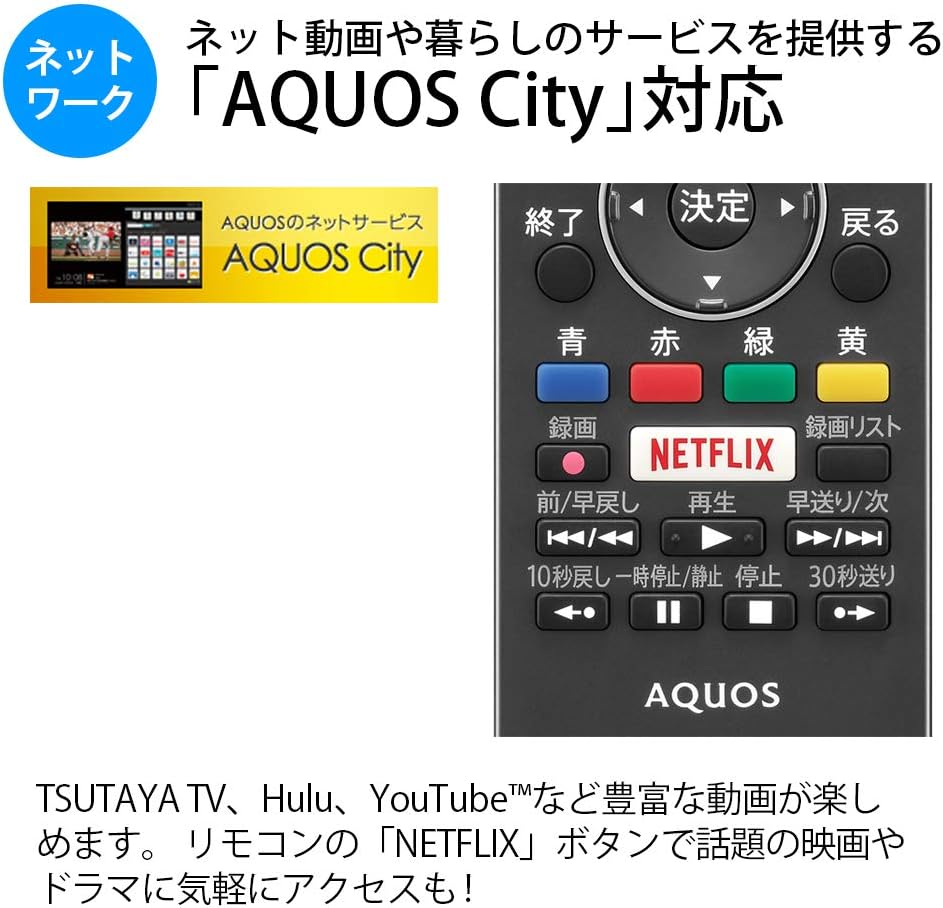
Figure 5.1: Remote control with a dedicated Netflix button and a view of the AQUOS City interface.
5.2 Smart TV Features (AQUOS City)
Your AQUOS TV supports "AQUOS City," providing access to various internet video services and lifestyle applications. Enjoy streaming content from platforms like NETFLIX, YouTube, Hulu, and TSUTAYA TV. Simply press the dedicated "NETFLIX" button on your remote for quick access.
5.3 4K Image Processing
The AQUOS 4K-Master Engine PRO II is a high-definition image processing circuit specifically designed for 4K LCD panels. It reduces noise and enhances contrast for a more immersive 4K viewexperiència.

Figure 5.2: The AQUOS 4K-Master Engine PRO II enhances 4K images by reducing noise and improving contrast.
5.4 Funcions d'àudio
The TV is equipped with a bass-reflex type speaker box, developed in collaboration with ONKYO, to deliver high-quality sound with enhanced high-frequency pressure and rich bass. Eilex PRISM technology expands the listening position and creates a sense of audio depth.

Figure 5.3: Illustration of the bass-reflex speaker box, designed for superior sound quality.
5.5 Low-Reflection Panel
The 4K low-reflection panel minimizes reflections from room lighting and external light sources, ensuring clear and comfortable viewing even in bright environments.

Figure 5.4: Visual comparison demonstrating how the low-reflection panel reduces glare compared to a conventional LCD panel.
5.6 Video Mirroring (Fire TV)
You can mirror your smartphone screen to the TV using Fire TV mirroring. This allows you to display photos, videos, or smartphone apps on the large TV screen. To use this feature, connect a Fire TV device to one of the TV's HDMI ports and ensure both devices are on the same Wi-Fi network. Refer to your Fire TV device's manual for specific mirroring instructions.
6. Manteniment
Per garantir la longevitat i el rendiment òptim del televisor, seguiu aquestes pautes de manteniment:
- Neteja de la pantalla: Netegeu suaument la pantalla amb un drap suau i sense borrissol. Per a marques difícils, netegeu lleugerament.ampNetegeu el drap amb aigua o un netejador de pantalles especialitzat. No ruixeu líquid directament sobre la pantalla.
- Neteja de l'armari: Feu servir un drap suau i sec per netejar el moble del televisor. Eviteu utilitzar productes de neteja o dissolvents abrasius.
- Ventilació: Assegureu-vos que les obertures de ventilació del televisor no estiguin bloquejades per evitar el sobreescalfament.
- Cable d'alimentació: Reviseu regularment el cable d'alimentació per detectar qualsevol dany. Si està malmès, poseu-vos en contacte amb personal de servei qualificat.
7. Solució De Problemes
Si teniu problemes amb el televisor, consulteu els problemes i solucions més comuns següents:
| Problema | Possible causa/solució |
|---|---|
| Sense poder | Check if the power cord is securely plugged into the TV and the wall outlet. Press the power button on the remote or TV. |
| No hi ha imatge, però hi ha so | Assegureu-vos que heu seleccionat la font d'entrada correcta. Comproveu les connexions dels cables als dispositius externs. |
| No hi ha so, però hi ha imatge | Check volume level and mute status. Ensure audio cables are correctly connected. |
| El comandament a distància no funciona | Canvieu les piles. Assegureu-vos que no hi hagi cap obstrucció entre el comandament a distància i el sensor d'infrarojos del televisor. |
| No es pot connectar a la Wi-Fi | Check your Wi-Fi router and network settings. Ensure the TV is within range of the router. |
8. Especificacions
| Característica | Especificació |
|---|---|
| Mida de la pantalla | 40 polzades |
| Tecnologia de visualització | LCD |
| Resolució | 3840 x 2160 (4K) |
| Suport HDR | HDR compatible (HDMI Input 1) |
| Freqüència d'actualització | 120 Hz (120 Speed backlight technology) |
| Sintonitzadors | Terrestrial Digital x3, BS/CS Digital x3 |
| Sortida d'àudio | 20 W (10 W + 10 W) |
| Característiques dels altaveus | Bass-reflex type, Sound by ONKYO, Eilex PRISM |
| Ports HDMI | 4 |
| Ports USB | 2 (USB-HDD recording compatible) |
| Entrada de PC | 1 |
| Connectivitat de xarxa | Wi-Fi built-in, LAN port |
| Tipus sense fil | Bluetooth, Wi-Fi, Miracast |
| Consum d'energia | Approx. 106W (Annual: 96Kwh/year) |
| Dimensions (L x P x A) | 90.1 x 27.1 x 55.8 cm (amb suport) |
| Pes | 20.5 kg |
| Estàndard de muntatge VESA | 600 x 400 mm |
| Recommended Network Services | NETFLIX, YouTube, Hikari TV 4K, Hulu, TSUTAYA TV |
9. Garantia i Suport
Per obtenir informació sobre la garantia, consulteu la targeta de garantia inclosa amb el producte o visiteu el lloc web oficial de SHARP. website. For technical support, troubleshooting assistance, or service requests, please contact SHARP customer service. Contact details can be found on the official SHARP weblloc web o a la documentació del producte.
Ask a question about this manual
Ask about setup, troubleshooting, compatibility, parts, safety, or missing instructions. Manuals+ will review the question and use this page’s manual context to help answer it.