
1. Introducció
This manual provides essential instructions for the safe and effective use of your Nikon AF-S VR Micro-NIKKOR 105mm f/2.8G IF-ED Lens. This high-performance macro lens is designed for both close-up and general photography, featuring advanced Vibration Reduction (VR II) technology and a 1:1 life-size magnification ratio. It incorporates Nano-Crystal coat and Extra-low Dispersion (ED) glass elements for superior image quality by reducing flare and chromatic aberrations.
2. Lens Components
Familiarize yourself with the main components of your lens to ensure proper handling and operation.

Figura 1: Frontal view of the Nikon AF-S VR Micro-NIKKOR 105mm f/2.8G IF-ED Lens, showing the focus ring, distance scale, and control switches.
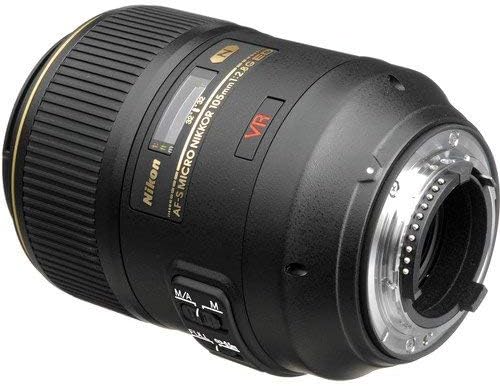
Figura 2: posterior view of the lens, highlighting the Nikon F-mount for camera attachment and electrical contacts.
3. Configuració i instal·lació
3.1 Attaching the Lens to a Camera
- Assegureu-vos que tant la càmera com l'objectiu estiguin apagats.
- Traieu la tapa posterior de l'objectiu i la tapa del cos de la càmera.
- Align the white mounting dot on the lens barrel with the corresponding white dot on the camera body's lens mount.
- Rotate the lens counter-clockwise (when viewed from the front) until it clicks securely into place. Do not force the lens.

Figure 3: Rear lens cap, used to protect the lens mount and rear element when the lens is not attached to a camera.
3.2 Fixació del parasol de l'objectiu (HB-38)
The HB-38 lens hood is designed to reduce lens flare caused by stray light and provides additional protection for the front element of the lens.
- Align the mounting mark on the lens hood with the corresponding mark on the front of the lens barrel.
- Gireu el capó en sentit horari fins que encaixi al seu lloc.
- To reverse the hood for storage, align the marks and rotate it until it locks in the reverse position.
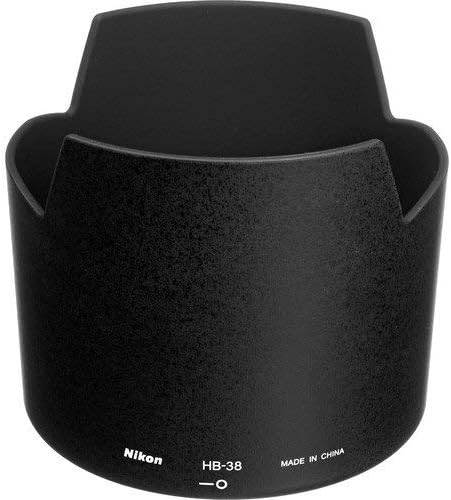
Figure 4: Nikon HB-38 lens hood, designed to minimize stray light and protect the lens.
4. Funcionament de l'objectiu
4.1 Focus Mode Switch (M/A and M)
The lens features a focus mode switch on its barrel with two settings:
- M/A (enfocament automàtic amb accionament manual): This mode allows the camera to autofocus. You can, however, instantly switch to manual focus by rotating the focus ring, even when the camera is in autofocus mode. This is useful for fine-tuning focus after autofocus has been achieved.
- M (Enfocament manual): In this mode, autofocus is disabled. All focusing must be performed manually by rotating the focus ring. This is often preferred for precise macro photography.
4.2 Vibration Reduction (VR) Switch
The VR II system helps reduce blur caused by camera shake, especially beneficial in low light conditions or when shooting handheld. The switch has two positions:
- ACTIVITAT: Activates Vibration Reduction. This is recommended for most handheld shooting situations.
- DESACTIVAT: Deactivates Vibration Reduction. It is generally advisable to turn VR OFF when using a tripod or when shooting at very high shutter speeds.
Note: VR is most effective for static subjects. For panning shots, some cameras may offer a dedicated VR mode for such situations.
4.3 Macro Photography Techniques
This lens is optimized for macro photography, offering a 1:1 (life-size) magnification ratio. Achieving sharp focus in macro photography requires precision:
- Distància mínima d'enfocament: The lens can focus as close as 0.314 meters (1.03 feet) from the sensor plane.
- Distància de treball: Be aware of the distance between the front of the lens and your subject. For 1:1 magnification, this distance can be quite short.
- Enfocament manual: For critical sharpness in macro work, manual focus (M mode) is often preferred. Use Live View on your camera for magnified focusing.
- Tripod Use: A sturdy tripod is highly recommended for macro photography to eliminate camera shake and allow for precise composition and focusing.
5. Manteniment i cura
5.1 Neteja de la lent
- Use a blower brush to gently remove dust and loose particles from the lens surfaces.
- For smudges, fingerprints, or stubborn dirt, use a clean, soft microfiber cloth specifically designed for optical lenses, along with a small amount of lens cleaning fluid. Apply the fluid to the cloth, not directly to the lens surface.
- Never use abrasive materials, paper towels, or household cleaning products, as these can scratch or damage the lens coatings.
5.2 Emmagatzematge
- Always store the lens with both the front and rear caps securely attached.
- Guardeu la lent en un lloc sec i fresc, allunyat de la llum solar directa i de temperatures extremes.
- Avoid storing the lens in areas with high humidity to prevent mold and mildew growth. If storing for extended periods, consider using desiccant packets.

Figure 5: Nikon front lens cap, used to protect the front element from dust and scratches.
6. Solució De Problemes
| Problema | Causa possible | Solució |
|---|---|---|
| L'enfocament automàtic no funciona | Lens focus mode set to M (Manual Focus). Camera focus mode not set to AF. Insufficient light or contrast. | Set lens switch to M/A. Ensure camera is set to an autofocus mode. Focus on a subject with good contrast. |
| Images are blurry or soft | Vibration Reduction (VR) is off. Insufficient shutter speed for handheld shooting. Subject movement. Incorrect focus. | Turn VR ON for handheld shots. Increase shutter speed. Use a tripod for static subjects. Re-focus carefully. |
| Lens not attaching or detaching from camera | Misalignment of mounting marks. Obstruction on mount. Lens release button not fully pressed. | Re-align mounting marks carefully. Check for any debris on the lens or camera mount. Ensure the lens release button is fully depressed when detaching. |
| VR not functioning correctly | VR switch is OFF. Camera settings interfering with VR. | Ensure VR switch on the lens is set to ON. Check camera manual for any specific settings related to lens VR. |
7. Especificacions
| Característica | Detall |
|---|---|
| Marca | Nikon |
| Número de model | 2160 |
| Distància focal | 105 mm |
| Apertura màxima | f/2.8 |
| Distància mínima d'enfocament | 0.314 m (1.03 peus) |
| Maximum Reproduction Ratio | 1.0x (Life-size) |
| Tipus de lent | Telephoto, Macro |
| Muntatges compatibles | Nikon F |
| Estabilització d'imatge | VR II (Vibration Reduction) |
| Tipus d'enfocament | Autofocus with Manual Override (M/A), Manual Focus (M) |
| Recobriment de la lent | Nano-Crystal Coat, Super Integrated Coating |
| Pales de diafragma | 9 (arrodonit) |
| Pes | 1.16 kg (2.55 lliures) |
| Dimensions (Diàmetre x Longitud) | Aprox. 83 x 116 mm (3.3 x 4.5 polzades) |
8. Garantia i Suport
8.1 Informació de la garantia
This Nikon lens typically includes a 5-Year Warranty, comprising a 1-Year International Warranty and a 4-Year USA Extension. Please refer to your purchase documentation and the official Nikon website for complete warranty terms, conditions, and registration procedures. Retain your proof of purchase for warranty claims.
8.2 Atenció al client
For technical assistance, service, or further inquiries regarding your Nikon AF-S VR Micro-NIKKOR 105mm f/2.8G IF-ED Lens, please contact Nikon customer support or visit the official Nikon weblloc.
- Nikon Oficial Weblloc: www.nikonusa.com
- Servei i suport: Navigate to the 'Support' or 'Service & Repair' section on the Nikon website for contact information specific to your region and product.