
Introducció
The Prixton DV660 is a versatile 4K WiFi Aquatic Sports Camera designed to capture your adventures in high definition. Its compact and lightweight design, combined with a 2-inch display, makes it an ideal companion for various outdoor and underwater activities. This manual provides essential information for setting up, operating, maintaining, and troubleshooting your DV660 camera.
Key features include 4K video resolution, integrated Wi-Fi for instant media transfer, and a robust waterproof housing allowing submersion up to 30 meters. The camera supports external Micro SD cards up to 64GB for extensive storage.
Configuració
Contingut del paquet
- Prixton DV660 Action Camera
- Carcassa impermeable
- Adhesive Mounts (for helmet and bicycle)
- Cable USB
- Manual d'usuari
Càmera acabadaview
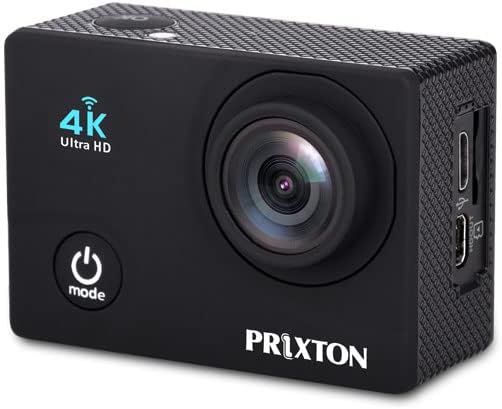
Figura 1: Davant view of the DV660 camera. Features include the lens, power/mode button, and 4K Ultra HD indicator.

Figura 2: Enrere view of the DV660 camera. Shows the 2-inch display and navigation buttons.
Instal·lació i càrrega de la bateria
- Localitzeu el compartiment de la bateria a la part inferior de la càmera.
- Open the compartment cover and insert the Lithium-ion battery, ensuring correct polarity.
- Tanqueu bé la tapa del compartiment de la bateria.
- Per carregar-la, connecteu la càmera a una font d'alimentació USB amb el cable USB proporcionat. L'indicador de càrrega s'il·luminarà.
- Charging is complete when the indicator light turns off or changes color (refer to camera display for exact status).
Instal·lació de la targeta Micro SD
- Assegureu-vos que la càmera estigui apagada.
- Locate the Micro SD card slot on the side of the camera (refer to Figure 3).
- Insert a Micro SD card (up to 64GB, Class 10 or higher recommended) into the slot until it clicks into place.
- Per treure-la, empenyeu suaument la targeta cap a dins fins que surti.
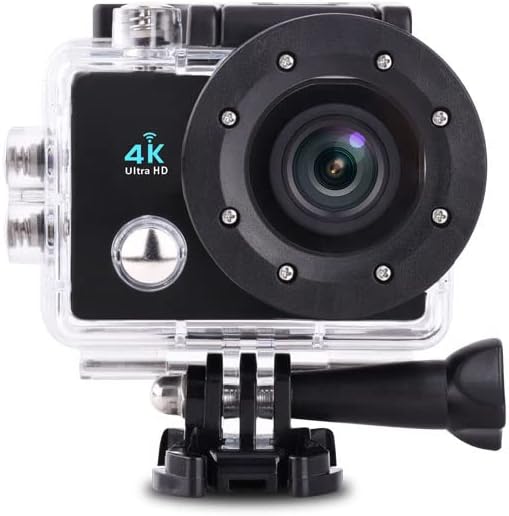
Figura 3: lateral view of the DV660 camera, showing the Micro SD card slot and USB port.
Instruccions de funcionament
Encès/Apagat
- Per encendre: Press and hold the Power/Mode button (refer to Figure 1) for a few seconds until the screen illuminates.
- Per apagar: Press and hold the Power/Mode button again for a few seconds until the screen turns off.
Basic Navigation and Mode Selection
- Premeu el botó Botó d'alimentació / mode repeatedly to cycle through different modes: Video Recording, Photo Capture, Playback, and Settings.
- The selected mode will be displayed on the 2-inch screen.
- Utilitza el Botó de l'obturador/D'acord (usually on top) to confirm selections or start/stop actions within a mode.
Gravació de vídeo
- Switch the camera to Video Recording mode.
- Premeu el botó Botó de l'obturador/D'acord to start recording. A red indicator light or on-screen icon will show that recording is in progress.
- Premeu el botó Botó de l'obturador/D'acord de nou per aturar l'enregistrament. El vídeo file es desarà a la targeta Micro SD.
Captura de fotografies
- Switch the camera to Photo Capture mode.
- Enquadra la teva foto utilitzant la pantalla.
- Premeu el botó Botó de l'obturador/D'acord to take a photo. The image will be saved to the Micro SD card.
Connectivitat Wi-Fi
- Navigate to the camera's settings menu and enable Wi-Fi.
- On your smartphone or tablet, search for available Wi-Fi networks and connect to the network broadcast by the DV660 camera.
- Open the dedicated camera application (if available, check manufacturer's website for download) on your device to view viu footage, control the camera, and transfer files instantly.
Using the Waterproof Housing

Figura 4: The DV660 camera securely enclosed in its waterproof housing, ready for aquatic use.
- Before each use in water, ensure the camera is correctly seated within the waterproof housing and all latches are securely fastened.
- Perform a dry test of the housing without the camera inside to check for leaks.
- The housing provides water resistance up to 30 meters (98 feet). Do not exceed this depth.
- The housing is designed to allow access to all camera controls, enabling seamless switching between photo and video modes underwater.
Manteniment
Neteja de la càmera
- Feu servir un drap suau i sense borrissol per netejar el cos i la pantalla de la càmera.
- Per a la lent, feu servir un drap i una solució especials per netejar lents per evitar ratllades.
- After using the waterproof housing in saltwater, rinse it thoroughly with fresh water and allow it to air dry.
Cura de la bateria
- Eviteu exposar la bateria a temperatures extremes.
- Carregueu la bateria completament abans d'emmagatzemar-la durant un període prolongat.
- If storing for long periods, remove the battery from the camera.
Emmagatzematge
- Guardeu la càmera en un lloc fresc i sec, allunyat de la llum solar directa.
- Keep the camera and accessories in their original packaging or a protective case to prevent damage.
Resolució de problemes
Problemes comuns i solucions
| Problema | Causa possible | Solució |
|---|---|---|
| La càmera no s'encén. | Low battery; Battery incorrectly installed; Camera malfunction. | Charge the battery fully; Reinstall the battery correctly; Contact customer support if issue persists. |
| No es pot gravar vídeo ni fer fotos. | Micro SD card full; Micro SD card error; Incorrect mode. | Elimineu-les innecessàries files or replace Micro SD card; Format Micro SD card (this will erase all data); Ensure camera is in the correct mode. |
| Problemes de connexió Wi-Fi. | Wi-Fi not enabled; Interference; Incorrect password. | Enable Wi-Fi in camera settings; Move closer to the camera; Re-enter Wi-Fi password. |
| Durada de la bateria curta. | Battery degradation; Extreme temperatures; Continuous recording/Wi-Fi use. | Replace battery if old; Operate in moderate temperatures; Minimize continuous Wi-Fi use and recording. |
Especificacions
Especificacions tècniques
| Característica | Detall |
|---|---|
| Número de model | DV660 |
| Marca | Prixton |
| Dimensions (L x A x A) | 50 x 50 x 28 cm |
| Pes | 85 grams |
| Tipus de bateria | 1 bateria de liti-ió (obligatòria) |
| Tecnologia del sensor fotogràfic | CMOS |
| Resolució de gravació de vídeo | Up to 4K (listed as 1080p in some specifications) |
| Effective Capture Resolution | 5 megapíxels |
| Apertura màxima | 2.8 mil·límetres |
| Tipus de memòria flash | Micro SD (admet fins a 64 GB) |
| Format de captura de vídeo | MOV |
| Format d'àudio | AAC |
| Mida de la pantalla | 2 polzades |
| Tecnologia de connectivitat | Wi-Fi (802.11b, 802.11g) |
| Color | Negre |
| Nivell de resistència a l'aigua | Waterproof (up to 30 meters with housing) |
| Estabilització d'imatge | Electronic (Note: May not be available in all modes) |
| Zoom òptic | 1x |
| Usos recomanats del producte | Outdoor activities, sports, underwater filming |
| Modes de tir | Night Portrait, Underwater |
| Dispositius compatibles | Devices with Wi-Fi and USB port |
Garantia i Suport
Informació de la garantia
For detailed warranty information, please refer to the warranty card included with your product or visit the official Prixton weblloc web. Conserveu el comprovant de compra per a qualsevol reclamació de garantia.
Atenció al client
If you encounter any issues not covered in this manual or require further assistance, please contact Prixton customer support through their official website or the contact information provided with your product. Please have your model number (DV660) and purchase details ready when contacting support.


