
Fanvil X3S
Fanvil X3S SIP Phone User Manual
Model: X3S
Producte acabatview
The Fanvil X3S is a 2-line color screen SIP phone designed for efficient communication in office environments. It features an extra-large 320 x 240 2.4-inch color LCD for enhanced visual information and user experience. This model supports HD Voice and offers dual 10/100 Mbps network ports. It is suitable for various network setups and supports secure communication protocols.
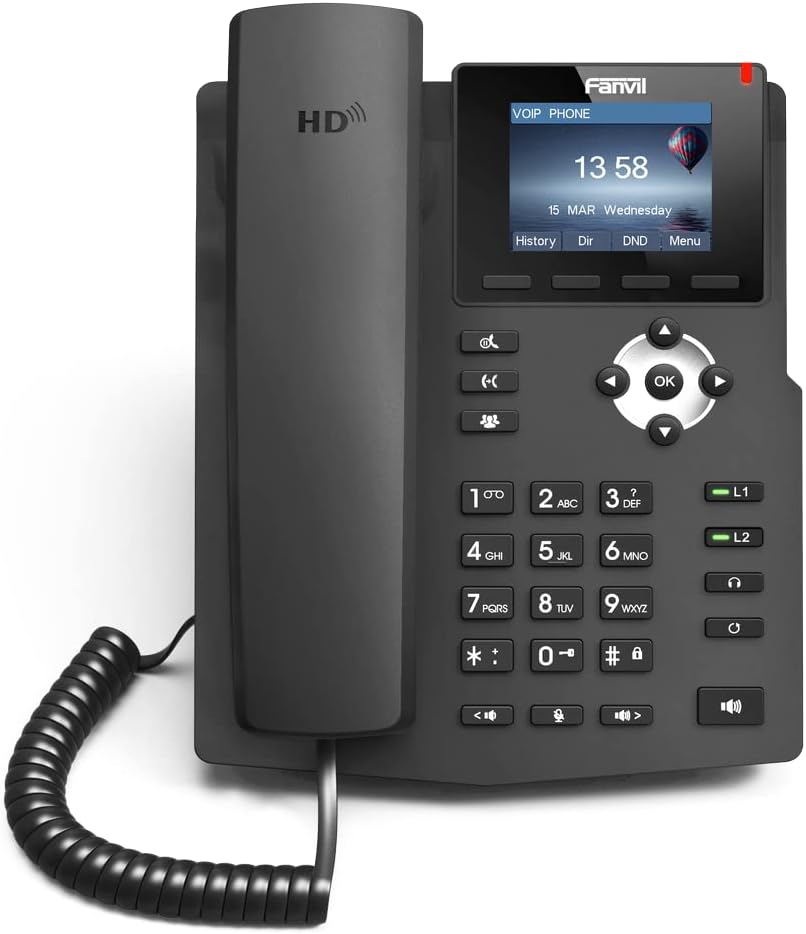
Imatge: Frontal view of the Fanvil X3S SIP Phone, showing the handset, keypad, navigation buttons, and color display screen. The screen displays time and date, with menu options below.
Contingut del paquet
Abans de continuar amb la instal·lació, comproveu que tots els elements siguin presents al paquet:
- Fanvil X3S SIP Phone Unit
- Telèfon
- Cable de l'auricular
- Cable Ethernet
- Power Adapter (for non-PoE models)
- Suport d'escriptori
- Guia d'instal·lació ràpida
Configuració i instal·lació
1. Muntatge del telèfon
- Attach the desk stand to the main unit by aligning the tabs and sliding it into place until it clicks.
- Connect the coiled handset cord to the handset and the designated handset port on the phone base.
2. Connexió a la xarxa i a l'alimentació
- Connexió de xarxa: Connecteu un extrem del cable Ethernet al port LAN del telèfon i l'altre extrem a un commutador o encaminador de xarxa.
- Connexió d'alimentació:
- If using the included power adapter: Connect the power adapter to the power port on the phone and then plug it into an electrical outlet.
- Note: This model (X3S) does not support Power over Ethernet (PoE). A power adapter is required.
3. Configuració Inicial
Upon first boot, the phone will attempt to obtain an IP address via DHCP. You may need to access the phone's web interface or use the phone's menu for SIP account registration and further network settings. Refer to your VoIP service provider's instructions for specific SIP account details.
Instruccions de funcionament
Funcions de trucada bàsiques
- Fer una trucada: Lift the handset, dial the number, and press the Marqueu tecla programable o la # key. Alternatively, dial the number and then lift the handset.
- Respondre una trucada: Aixequeu el telèfon o premeu Altaveu botó.
- Finalització d'una trucada: Pengeu l'auricular o premeu la tecla Finalitzar la trucada tecla suau.
- Torna a marcar: Premeu el botó Reposició tecla programable per trucar a l'últim número marcat.
Funcions avançades
- Manteniu: Durant una trucada, premeu el botó Aguanta soft key. Press it again to resume the call.
- Transferència: Durant una trucada, premeu el botó Transferència soft key, dial the new number, and then press Transferència again (blind transfer) or wait for the party to answer before pressing Transferència (trasllat assistit).
- Silenciar: Premeu el botó Silenciar botó per silenciar el micròfon durant una trucada. Premeu-lo de nou per activar el so.
- Altaveu: Premeu el botó Altaveu button to toggle speakerphone mode.
- Ajust de volum: Utilitza el Volum buttons during a call to adjust handset, headset, or speaker volume.
- BLF (Busy Lamp Field) Buttons: The X3S features 2 BLF buttons. These can be configured to monitor the status of other extensions (busy, ringing, available) and allow for quick dialing or call pickup. Configuration is typically done via the phone's web interfície.
Manteniment
Proper maintenance ensures the longevity and optimal performance of your Fanvil X3S SIP Phone.
- Neteja: Feu servir un drap suau i sec per netejar la superfície del telèfon. Per a marques difícils, fregueu lleugeramentamp cloth with mild, non-abrasive cleaner can be used. Avoid using harsh chemicals, solvents, or abrasive materials.
- Medi ambient: Keep the phone in a dry environment, away from direct sunlight, excessive heat, and moisture. Ensure proper ventilation around the device.
- cables: Periodically check all connected cables (handset cord, Ethernet, power) for any signs of damage or loose connections.
- Actualitzacions de programari: Regularly check the Fanvil official website for firmware updates. Keeping the firmware updated can improve performance, add new features, and address security vulnerabilities. Firmware updates are typically performed via the phone's web interfície.
Resolució de problemes
| Problema | Causa possible | Solució |
|---|---|---|
| El telèfon no s'encén. | No power connection; faulty power adapter. | Ensure power adapter is securely connected to the phone and a working electrical outlet. Test outlet with another device. |
| Sense to de marcatge. | Network connection issue; SIP account not registered. | Check Ethernet cable connection. Verify network connectivity. Ensure SIP account is correctly configured and registered (check phone display for registration status). Restart the phone. |
| No es poden fer ni rebre trucades. | SIP account not registered; network firewall issues; incorrect dial plan. | Confirm SIP account registration. Check network firewall settings (ports 5060 UDP/TCP, RTP ports). Consult your VoIP service provider for dial plan or network specific issues. |
| Poor audio quality (echo, static). | Network congestion; faulty handset/headset; environmental interference. | Check network bandwidth. Try a different handset or headset. Ensure phone is not near strong electromagnetic interference sources. |
| La pantalla està en blanc o congelada. | Error de programari; problema d'alimentació. | Unplug the power adapter, wait 10 seconds, then plug it back in to restart the phone. If issue persists, contact support. |
Especificacions
| Característica | Detall |
|---|---|
| Model | Fanvil X3S |
| SIP Lines | 2 |
| Mostra | 2.4-inch (320x240) Color LCD |
| Veu HD | Admet |
| BLF Buttons | 2 |
| Ports de xarxa | Ethernet dual de 10/100 Mbps |
| Suport PoE | No (External Power Adapter Required) |
| Opcions d'instal·lació | Desktop / Wall-mount |
| Dimensions (L x A x A) | 2.52 x 8.82 x 10.98 polzades (6.4 x 22.4 x 27.9 cm) |
| Pes de l'article | 1.65 lliures (0.75 kg) |
| Fabricant | Fanvil |
Garantia i Suport
For warranty information, please refer to the warranty card included with your product or visit the official Fanvil weblloc. Els termes i condicions de la garantia poden variar segons la regió.
For technical support, firmware updates, and additional resources, please visit the Fanvil support portal:
Fanvil Official Support Weblloc
When contacting support, please have your product model (X3S) and serial number ready.
Documents relacionatsX3S


Ask a question about this manual
Ask about setup, troubleshooting, compatibility, parts, safety, or missing instructions. Manuals+ will review the question and use this page’s manual context to help answer it.