
Scosche WDQ2M
SCOSCHE STUCKUP Qi Car Phone Holder Instruction Manual
Model: WDQ2M
1. Introducció
The SCOSCHE StuckUp mount is designed to securely hold your mobile device and provide wireless charging capabilities in your vehicle or home/office. It features a versatile StickGrip suction cup base for mounting on dashboards, windshields, or other flat surfaces. With up to 10-Watts of Qi wireless charging power, it eliminates the need for direct cable connections to your device. The mount offers 360-degree rotation for optimal viewing angles and adjustable arms to accommodate smartphones, tablets, or GPS devices up to 3.5 inches wide. Its one-touch push-button design allows for easy device insertion and removal, and Foreign Object Detection ensures safe charging.
2. Producte acabatview
2.1 Contingut del paquet
- SCOSCHE StuckUp Qi Car Phone Holder (Model: WDQ2M)
- Car Charger (USB power adapter)
- Cable micro USB
2.2 Característiques clau
- Qi Certified Wireless Charging: Ensures safe and reliable wireless power delivery.
- Detecció d'objectes estrangers (FOD): Safeguards your device by preventing charging when foreign objects are detected on the charging pad.
- Adjustable Cradle: Secures devices up to 3.5 inches wide.
- StickGrip Suction Base: Provides strong adhesion to various flat surfaces.
- 360-Degree Adjustable Design: Allows for unlimited viewangles d'inclinació (retrat o horitzontal).
- One-Touch Release: Easy mechanism to lock and unlock your phone.

Figure 2.1: SCOSCHE StuckUp Qi Car Phone Holder (Model WDQ2M).
3. Configuració i instal·lació
3.1 Selecció d'una ubicació de muntatge
The StuckUp mount can be installed on a windshield, dashboard, or any smooth, flat surface. Ensure the chosen surface is clean and dry for optimal suction.
- Instal·lació del parabrisa: Clean the desired area on the windshield. Press the suction cup firmly against the glass and engage the locking lever.
- Instal·lació del tauler de control: For textured or porous dashboards, use the included adhesive mounting disc (if applicable, though not explicitly listed in contents, it's common for suction mounts on dashboards). Clean the dashboard surface thoroughly. Apply the disc, then attach the suction cup to the disc. Alternatively, for smooth dashboards, apply the suction cup directly.
- Other Flat Surfaces: Ensure the surface is smooth, clean, and non-porous for the suction cup to adhere properly.
3.2 Fixació del suport
- Clean the chosen mounting surface with a damp drap i deixeu-lo assecar completament.
- Traieu la pel·lícula protectora de la ventosa.
- Press the suction cup firmly onto the clean surface.
- Push down the locking lever located at the base of the mount to secure it in place.
- Adjust the flexible neck and cradle angle to your preferred viewposició d'ingrés.

Figure 3.1: The adjustable cradle and flexible neck allow for secure device placement and optimal viewangles d'ajust.
3.3 Connexió de potència
- Connect the Micro USB cable to the charging port on the SCOSCHE StuckUp mount.
- Plug the other end of the Micro USB cable into the included car charger (USB power adapter).
- Introduïu el carregador del cotxe a la presa de corrent de 12 V del vostre vehicle (endoll de l'encenedor de cigarrets).
- Ensure the connection is secure. The mount is now ready for wireless charging.
4. Instruccions de funcionament
4.1 Col·locació del dispositiu
- Press the one-touch release button on the side of the cradle to open the adjustable arms.
- Carefully place your Qi-enabled smartphone or device into the cradle, ensuring it rests on the bottom support.
- Gently push the adjustable arms inward until they securely grip your device. The arms will automatically lock into place.
- Ensure the back of your device is flush against the charging pad for optimal wireless charging.
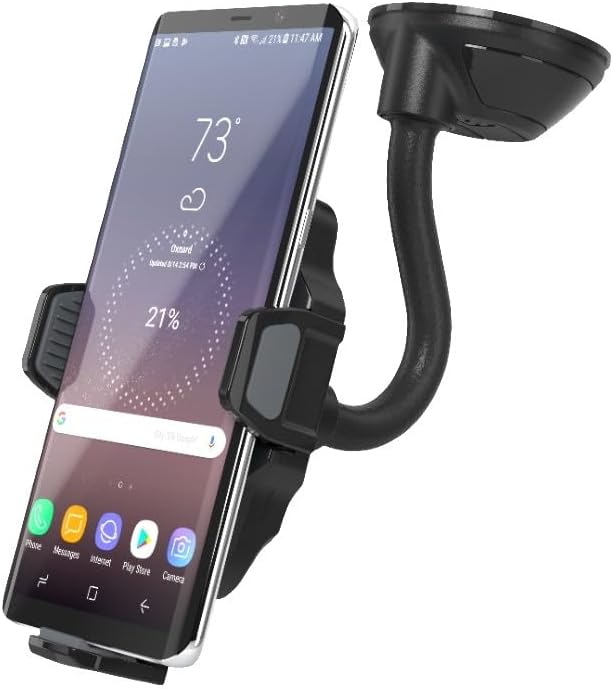
Figure 4.1: A smartphone securely held in the mount, indicating active charging.

Figure 4.2: The transparent view illustrates how the device aligns with the Qi charging coil for efficient power transfer.
4.2 Removing Your Device
To remove your device, simply press the one-touch release button on the side of the cradle. The arms will open, allowing you to safely retrieve your device.
4.3 Ajust Viewangle ing
The mount features a 360-degree rotating neck. Loosen the adjustment knob (if present, or simply rotate the ball joint) to position your device in either portrait or landscape orientation, or any angle in between. Tighten the knob to secure the desired angle.
5. Manteniment
- Neteja: Use a soft, dry cloth to clean the mount and charging surface. Do not use abrasive cleaners or solvents.
- Cura de la ventosa: If the suction cup loses its grip, rinse it with warm water and let it air dry. This can restore its stickiness.
- Emmagatzematge: Quan no l'utilitzeu durant períodes prolongats, guardeu la muntura en un lloc fresc i sec, allunyat de la llum solar directa.
6. Solució De Problemes
| Problema | Causa possible | Solució |
|---|---|---|
| El dispositiu no es carrega sense fil. |
|
|
| Mount not sticking to surface. |
|
|
| Device not held securely. |
|
|
7. Especificacions
| Característica | Detall |
|---|---|
| Número de model | WDQ2M |
| Dimensions del producte | 4.75 x 3.25 x 8 polzades |
| Pes de l'article | 4 unces |
| Color | Negre |
| Tipus de muntatge | Dashboard Mount (also compatible with Windshield, flat surfaces) |
| Entrada Voltage | 12 Volts (via car charger) |
| Sortida de càrrega sense fils | Up to 10 Watts (Qi Certified) |
| Compatible Device Width | Fins a 3.5 polzades |
| Components inclosos | Mount, Car Charger, Micro USB Cable |
8. Garantia i Suport
SCOSCHE products are designed with quality and durability in mind. For specific warranty information regarding your WDQ2M StuckUp Qi Car Phone Holder, please refer to the warranty card included with your product or visit the official Scosche weblloc.
Per a més ajuda, suport tècnic o per a view the full user manual in PDF format, please visit the Scosche support page or contact customer service.
- Manual d'usuari oficial (PDF): Descarregar PDF
- Scosche Brand Store: Visita la botiga
Ask a question about this manual
Ask about setup, troubleshooting, compatibility, parts, safety, or missing instructions. Manuals+ will review the question and use this page’s manual context to help answer it.