
1. Producte acabatview
The GeoVision GV-EFD4700-0F is an indoor, fixed, mini-sized network camera designed for day and night surveillance. It features an automatic IR-cut filter and integrated IR LEDs to ensure clear imaging in various lighting conditions. This model offers an entry-level surveillance solution with essential features and high image quality.
Les característiques clau inclouen:
- 1/3" progressive scan super low lux CMOS sensor for minimal illumination at 0.02 lux.
- Dual streams supporting H.265, H.264, and MJPEG codecs.
- Video resolutions up to 20 fps at 2592 x 1520, 25 fps at 2560 x 1440, and 30 fps at 2048 x 1520.
- Intelligent IR with a distance of up to 15 meters (50 ft).
- Wide Dynamic Range Pro (WDR Pro) for clear images in high-contrast scenes.
- 3D noise reduction for improved image clarity.
- Built-in microphone for audio monitoring.
- 2-axis mechanism (pan / tilt) for flexible positioning.
- Power options: DC 12V or Power over Ethernet (PoE IEEE 802.3af).
2. Contingut del paquet
Si us plau, comproveu que tots els articles estiguin presents i en bon estat en obrir el paquet:
- GeoVision GV-EFD4700-0F Mini Fixed IP Dome Camera
- Kit de cargol de muntatge
- Plantilla d'instal·lació
- Quick Start Guide / Instruction Manual (this document)
3. Informació de seguretat
Read these instructions carefully before installation and operation. Keep this manual for future reference.
- Font d'alimentació: Use only the specified power adapter (DC 12V) or a compliant PoE (IEEE 802.3af) switch. Incorrect voltagi pot danyar el dispositiu.
- Instal·lació: Ensure the camera is securely mounted to prevent it from falling. Installation should be performed by qualified personnel if necessary.
- Medi ambient: This camera is designed for indoor use. Do not expose it to water, moisture, or extreme temperatures.
- Neteja: Desconnecteu l'alimentació abans de netejar. Feu servir un drap suau i sec. No utilitzeu netejadors líquids ni en aerosol.
- Manteniment: No intenteu atendre aquest producte vosaltres mateixos. Consulteu tots els serveis a personal de servei qualificat.
4. Configuració i instal·lació
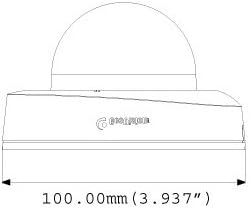
4.1 Dimensions físiques
Understand the camera's dimensions for proper placement and mounting.

4.2 Opcions de muntatge
The GV-EFD4700-0F supports both ceiling and wall-surface mounting.


4.3 Passos d'instal·lació
- Seleccioneu la ubicació: Choose a suitable indoor location for optimal surveillance coverage.
- Prepara la superfície: Use the provided installation template to mark drilling points on the ceiling or wall.
- Forats: Drill pilot holes according to the template. Insert wall anchors if necessary.
- Càmera segura: Attach the camera base to the mounting surface using the supplied screws.
- Connectar els cables: Connect the Ethernet cable for network and PoE, or a DC 12V power adapter and a separate Ethernet cable.
- Ajust d'angle: Loosen the adjustment screws to pan and tilt the camera lens to the desired viewing angle. Tighten screws once adjusted.
4.4 Configuració inicial
After physical installation and power connection, access the camera's web interface for initial setup:
- Connexió de xarxa: Ensure the camera is connected to your network. It will typically obtain an IP address via DHCP.
- Descobreix la càmera: Use GeoVision's IP Device Utility software or a network scanner to find the camera's IP address.
- Accés Web Interfície: Obre a web navegador i introduïu l'adreça IP de la càmera.
- Inici de sessió: Enter the default username and password (refer to the Quick Start Guide or GeoVision documentation for default credentials). Change these immediately for security.
- Configuració bàsica: Configure network settings, date/time, video resolution, and recording preferences.
5. Funcionament de la càmera
5.1 Viu View i Enregistrament
Un cop configurat, podeu accedir al vídeo en directe a través de web interface or compatible NVR/VMS software. The camera supports continuous recording, scheduled recording, and event-triggered recording (e.g., motion detection).
- H.265 Compression: Utilizes H.265 video codec for efficient storage and reduced network bandwidth while maintaining high image quality.
- WDR Pro: Wide Dynamic Range Pro enhances image visibility in scenes with both very bright and very dark areas.
- IR Functionality: The built-in IR LEDs automatically activate in low-light conditions, providing clear black and white images up to 15 meters.
5.2 Detecció de moviment i alertes
Configure motion detection zones and sensitivity within the camera's web interface. The camera can be set to trigger recordings, send email alerts, or notify your VMS upon detecting motion.
5.3 Monitorització d'àudio
The integrated microphone allows for audio monitoring of the surveillance area. Audio settings can be adjusted via the web interfície.
6. Manteniment
6.1 Neteja
Regularly clean the camera lens and housing to ensure optimal image quality. Use a soft, lint-free cloth. For stubborn dirt, a slightly damp Es pot utilitzar un drap amb detergent suau, seguit d'un drap sec. Eviteu netejadors o dissolvents abrasius.
6.2 actualitzacions de microprogramari
Periodically check the GeoVision website for firmware updates. Firmware updates can provide new features, performance improvements, and security enhancements. Follow the instructions provided with the firmware update package carefully to avoid damaging the device.
7. Solució De Problemes
If you encounter issues with your GV-EFD4700-0F camera, refer to the following common problems and solutions:
- Sense energia:
- Check if the power adapter is securely connected and providing 12V DC.
- If using PoE, ensure the Ethernet cable is connected to a PoE-enabled switch or injector and that the switch port is active.
- Sense canal de vídeo:
- Verify network connectivity. Ping the camera's IP address.
- Ensure the camera's IP address, subnet mask, and gateway settings are correct.
- Check if the video stream settings (e.g., resolution, frame rate) are compatible with your viewing software or NVR.
- Restart the camera by disconnecting and reconnecting power.
- Mala qualitat d'imatge:
- Netegeu la lent de la càmera.
- Comproveu si hi ha obstruccions al camp de la càmera view.
- Adjust WDR Pro settings in the web interface for high-contrast scenes.
- Ensure sufficient lighting for optimal color images; IR will provide black and white in low light.
- No es pot accedir Web Interfície:
- Confirm the camera's IP address is correct.
- Assegureu-vos que l'ordinador estigui al mateix segment de xarxa que la càmera.
- Prova una altra web navegador.
- Desactiveu temporalment qualsevol programari de tallafocs de l'ordinador.
If problems persist, contact GeoVision technical support.
8. Especificacions
| Característica | Detall |
|---|---|
| Nom del model | GV-EFD4700-0F |
| Sensor d'imatge | 1/3" progressive scan super low lux CMOS |
| Resolució de fixes efectius | 4 MP |
| Il·luminació mínima | 0.02 lux |
| Compressió de vídeo | H.265, H.264, MJPEG |
| Màx. Velocitat de fotogrames | 30 fps at 2048 x 1520 |
| Distància IR | Fins a 15 m (50 peus) |
| Lent | 2.8 mm (fix) |
| Interval dinàmic | WDR Pro |
| Reducció de soroll | Reducció de soroll 3D |
| Àudio | Micròfon incorporat |
| Pan/Tilt Mechanism | 2 eixos |
| Entrada de potència | DC 12V / PoE (IEEE 802.3af) |
| Tecnologia de connectivitat | Wired (Ethernet), Wi-Fi (for certain functions/protocols) |
| Ús interior/exterior | Interior |
| Dimensions (element) | 3.9 x 3.9 x 2.4 polzades (100 x 100 x 60.8 mm) |
| Pes (article) | 5.28 unces |
| Color | Blanc |
| Fabricant | USA Vision Systems |
9. Informació de la garantia
GeoVision products typically come with a limited manufacturer's warranty. Specific warranty terms, conditions, and duration may vary by region and retailer. Please refer to the warranty card included with your purchase or visit the official GeoVision weblloc web per obtenir informació detallada sobre la garantia i els procediments de registre. Conserveu el comprovant de compra per a reclamacions de garantia.
10. Suport
For technical assistance, product inquiries, or further support, please utilize the following resources:
- GeoVision Official Weblloc: Visita www.geovision.com.tw for product documentation, FAQs, software downloads, and support contact information.
- Suport tècnic: Contact GeoVision's technical support team through their website or the contact details provided in your product's packaging.
- Recursos en línia: Exploreu fòrums i comunitats en línia per obtenir consells i solucions generats pels usuaris.