
DOOGEE F7
DOOGEE F7 Smartphone User Manual
Model: F7
1. Introducció
This user manual provides essential information for the safe and efficient operation of your DOOGEE F7 smartphone. Please read this manual thoroughly before using your device to ensure proper functionality and to prevent damage. Keep this manual for future reference.
2. Informació de seguretat
- Do not attempt to disassemble or modify the device. Unauthorized modifications can void your warranty and may result in damage or injury.
- Use only original or certified accessories (charger, USB cable, etc.) to avoid damage to the device and ensure safety.
- Eviteu exposar el dispositiu a temperatures extremes, llum solar directa o humitat elevada.
- Keep the device away from water and other liquids. If the device gets wet, power it off immediately and do not attempt to use it until it is completely dry.
- Do not use the device while driving or operating heavy machinery. Always prioritize safety.
- Desfeu-vos del dispositiu i de la bateria de manera responsable d'acord amb la normativa local. No el llenceu a les escombraries domèstiques.
3. Contingut del paquet
En obrir el paquet, comproveu que tots els elements que s'enumeren a continuació hi són presents i que es troben en bon estat:
- 1 x DOOGEE F7 Smartphone
- 1 x adaptador de corrent
- 1 x cable USB
If any item is missing or damaged, please contact your retailer or DOOGEE customer support.
4. Dispositiu acabatview
Familiarize yourself with the physical components of your DOOGEE F7 smartphone.

Figura 4.1: Davant, darrere i lateral view of the DOOGEE F7 smartphone. This image provides a comprehensive look at the device's design, including the display, rear camera, fingerprint sensor, and side buttons.

Figura 4.2: Davant view of the DOOGEE F7 smartphone, highlighting the 5.5-inch display and front-facing camera.
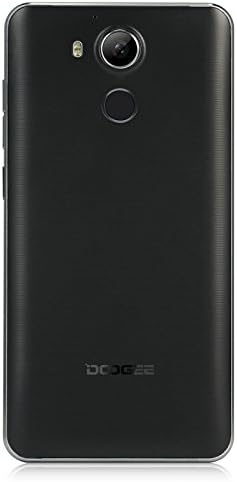
Figura 4.3: Enrere view of the DOOGEE F7 smartphone, showing the rear camera, LED flash, and fingerprint sensor placement.
The DOOGEE F7 features a sleek design with a 5.5-inch display on the front. The rear panel houses the main camera and a circular fingerprint sensor for secure unlocking. Volume and power buttons are located on the side for easy access.
5. Configuració
5.1. Installing SIM Cards and SD Card
The DOOGEE F7 supports dual Micro SIM cards for flexible network usage and a microSD card for expandable storage.
- Localitza la safata de la targeta SIM/SD al lateral del dispositiu.
- Insert the SIM ejector tool (if provided) into the small hole next to the tray to pop it open.
- Traieu la safata amb cura.
- Place your Micro SIM cards and/or microSD card into the designated slots on the tray, ensuring correct orientation as indicated on the tray.
- Empènyer suaument la safata cap al dispositiu fins que encaixi al seu lloc.
5.2. Engegada inicial
To power on your DOOGEE F7 for the first time:
- Press and hold the Power button (located on the side) until the DOOGEE logo appears on the screen.
- Seguiu les instruccions que apareixen a la pantalla per completar la configuració inicial, inclosa la selecció d'idioma, la connexió Wi-Fi i la configuració del compte de Google.
5.3. Carregant la bateria
Abans del primer ús, es recomana carregar completament la bateria del dispositiu.
- Connecteu el cable USB al port de càrrega del telèfon.
- Connecteu l'altre extrem del cable USB a l'adaptador d'alimentació.
- Connecteu l'adaptador de corrent a una presa de corrent.
- L'indicador de càrrega apareixerà a la pantalla. Un cop carregat completament, desconnecteu el carregador.
The DOOGEE F7 is equipped with a 3400mAh Li-polymer battery.
6. Funcionament del vostre dispositiu
6.1. Funcions bàsiques
- Encès/apagat: Press and hold the Power button. Select "Power off" or "Restart" from the options.
- Bloqueig/desbloqueig de pantalla: Premeu breument el botó d'engegada per bloquejar o desbloquejar la pantalla.
- Control de volum: Use the Volume Up and Volume Down buttons on the side to adjust media, call, and alarm volumes.
6.2. Trucades i missatges
Utilize the Phone and Messaging applications for communication. The device supports dual SIM functionality, allowing you to manage two numbers simultaneously.
6.3. Connectivitat a Internet
Connect to the internet via Wi-Fi or mobile data (4G FDD-LTE, 3G WCDMA, 2G GSM). Navigate to Configuració > Wi-Fi or Configuració > Ús de dades to manage your connections.
6.4. Funcions de la càmera
The DOOGEE F7 is equipped with a 13.0MP rear camera with PDAF (Phase Detection Auto Focus) and a 5.0MP front camera.

Figura 6.1: The DOOGEE F7 camera in action, demonstrating its ability to capture dynamic scenes with its 13.0MP PDAF rear camera for faster and more stable focusing.
Open the Camera application to capture photos and videos. The PDAF technology ensures quick and accurate focusing, even in challenging lighting conditions.
6.5. Escàner d'empremtes digitals
The integrated fingerprint scanner provides a secure and convenient way to unlock your device and authorize purchases. It supports 360-degree identification for rapid and accurate recognition.

Figura 6.2: Close-up of the DOOGEE F7's rear fingerprint sensor, illustrating its position relative to the camera. The image also shows the Android 6.0 software interface with various application icons.
To set up your fingerprint, navigate to Configuració > Seguretat > empremta digital i seguiu les instruccions a la pantalla.
6.6. Control de gestos
The DOOGEE F7 incorporates several gesture controls for enhanced usability:
- Doble toc: Double-tap the screen to quickly light it up.
- Gesture Start APP: Configure specific gestures to launch applications directly from the locked screen.
- Contactless Control: Utilize air gestures for certain functions without touching the screen.
- Direct Calling: Initiate calls by bringing the phone to your ear when viewing a contact.
- Contactless Hands-Free Mode: Answer calls or control media with specific hand movements.
6.7. Sistema operatiu Android 6.0
Your DOOGEE F7 runs on Android 6.0, offering a user-friendly interface and access to a wide range of applications via the Google Play Store.
7. Manteniment
- Neteja: Use a soft, dry, lint-free cloth to clean the device. Avoid using harsh chemicals or abrasive materials.
- Emmagatzematge: Guardeu el dispositiu en un lloc fresc i sec, allunyat de la llum solar directa i de temperatures extremes quan no l'utilitzeu durant períodes prolongats.
- Actualitzacions de programari: Comproveu i instal·leu regularment si hi ha actualitzacions de programari per garantir un rendiment i una seguretat òptims.
8. Solució De Problemes
If you encounter issues with your DOOGEE F7, try the following basic troubleshooting steps:
- El dispositiu no s'encén: Assegureu-vos que la bateria estigui carregada. Connecteu el carregador i espereu uns minuts abans d'intentar tornar-lo a engegar.
- Les aplicacions es bloquegen o es bloquegen: Tanca l'aplicació problemàtica i torna-la a obrir. Si el problema persisteix, reinicia el dispositiu.
- Senyal de xarxa deficient: Comproveu la inserció de la targeta SIM. Desplaceu-vos a una zona amb millor cobertura de xarxa.
- La bateria s'esgota ràpidament: Reduce screen brightness, close unused apps, or disable features like Wi-Fi/Bluetooth when not needed.
- Fingerprint recognition issues: Assegureu-vos que el dit estigui net i sec. Torneu a registrar la vostra empremta digital si cal.
For more complex issues, refer to online resources or contact DOOGEE customer support.
9. Especificacions
| Característica | Descripció |
|---|---|
| Model | F7 |
| CPU | Helio X20 (MTK6797) Deca Core |
| Sistema operatiu | Android 6.0 |
| RAM | 3 GB |
| ROM | 32 GB |
| Mostra | 5.5 inch IPS, 1920 x 1080 pixels |
| Càmera frontal | 5.0MP |
| Càmera posterior | 13.0MP (with PDAF) |
| Capacitat de la bateria | Li-polímer 3400mAh |
| SIM Quantity | Dual SIM (Micro SIM) |
| Bandes de xarxa | 2G: GSM 850/900/1800/1900MHz 3G: WCDMA 850/1900/2100MHz 4G: FDD-LTE 800/1800/2100/2600MHz |
| Sensors | G-sensor, Light sensor, Proximity sensor, Gesture Sensor, Hall sensor |
| Dimensions | 153 x 77 x 9.0 mm |
| Color | Negre |
10. Garantia i Suport
Your DOOGEE F7 smartphone is covered by a standard manufacturer's warranty. Please refer to the warranty card included in your package for specific terms and conditions. In general, the product is subject to a return policy of 30 days for refund or replacement, as offered by Amazon.
For technical support, troubleshooting assistance, or warranty claims, please contact DOOGEE customer service or your point of purchase. Keep your purchase receipt as proof of purchase.
Ask a question about this manual
Ask about setup, troubleshooting, compatibility, parts, safety, or missing instructions. Manuals+ will review the question and use this page’s manual context to help answer it.