
1. Introducció
The COUGAR GX-S 750W is an 80-PLUS Gold certified power supply unit (PSU) designed for reliable and efficient power delivery to your personal computer. Its compact design ensures compatibility with various PC cases, while advanced features like fan curve tuning and DC-DC power conversion technology contribute to stable voltage outputs and reduced noise levels. This manual provides essential information for the safe installation, operation, and maintenance of your GX-S 750W PSU.
2. Informació de seguretat
Please read and understand all safety instructions before installing or operating the power supply unit. Failure to comply with these instructions may result in electric shock, fire, or damage to the product and connected components.
- Always disconnect the AC power cord from the wall outlet before installing, removing, or cleaning the PSU.
- No obriu la font d'alimentació casing. Alt volumtage components inside pose a risk of electric shock, even when the unit is unplugged.
- Ensure the PSU is properly grounded.
- This product is intended for indoor use only. Do not expose the PSU to water, moisture, or high humidity.
- Instal·leu la font d'alimentació en una zona ben ventilada, allunyada de fonts de calor i de la llum solar directa.
- Feu servir només els cables que s'inclouen amb la font d'alimentació.
- Do not force connectors. Ensure correct orientation before plugging in cables.
3. Contingut del paquet
Verifiqueu que tots els elements siguin presents al paquet:
- COUGAR GX-S 750W Power Supply Unit
- Cable d'alimentació CA
- Modular and Fixed Cables (24-pin ATX, 4+4-pin CPU, 6+2-pin PCIe, SATA, Molex)
- Cargols de muntatge
- Manual d'usuari
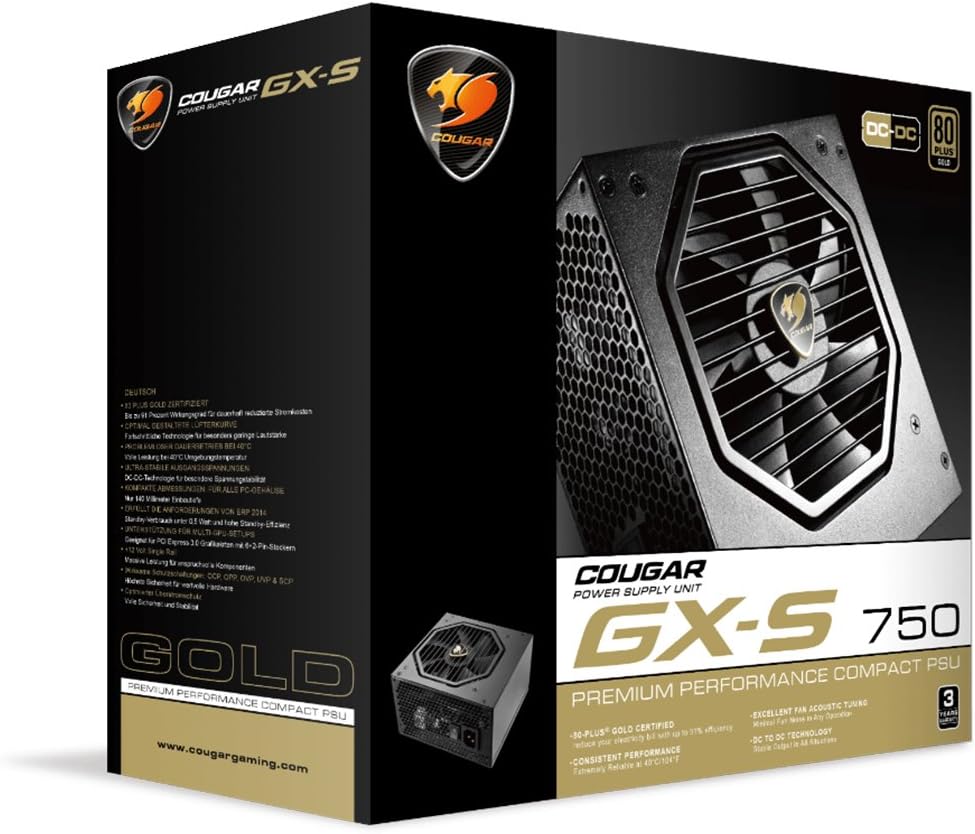
Image 3.1: COUGAR GX-S 750W Power Supply packaging. The image shows the retail box for the COUGAR GX-S 750W PSU, highlighting its 80 PLUS Gold certification and compact design.
4. Configuració i instal·lació
Follow these steps to install your COUGAR GX-S 750W Power Supply:
- Preparació: Assegureu-vos que l'ordinador estigui completament apagat i desendollat de la presa de corrent. Obriu la carcassa de l'ordinador per accedir a la zona de muntatge de la font d'alimentació.
- Muntatge de la font d'alimentació: Carefully place the GX-S 750W PSU into the designated PSU bay in your PC case. Align the screw holes on the PSU with those on the case. Secure the PSU using the provided mounting screws. Ensure the PSU fan is oriented correctly for optimal airflow (typically facing downwards if there's a vent, or upwards if not).
- Connecting Motherboard Power: Connect the 24-pin ATX power cable from the PSU to the corresponding 24-pin connector on your motherboard. Ensure it clicks securely into place.
- Connexió de l'alimentació de la CPU: Connect the 4+4-pin EPS (CPU) power cable to the CPU power connector on your motherboard. This is usually located near the CPU socket. If your motherboard requires an 8-pin connector, combine the two 4-pin halves.
- Connecting PCIe Power (Graphics Cards): If you have a dedicated graphics card, connect the 6+2-pin PCIe power cables from the PSU to your graphics card(s). Some high-end graphics cards may require multiple PCIe power connectors.
- Connecting SATA/Molex Power: Connect SATA power cables to your storage drives (HDDs, SSDs) and optical drives. Use Molex connectors for any other peripherals that require them (e.g., case fans, fan controllers).
- Gestió de cables: Route all cables neatly to improve airflow and aesthetics within your PC case. Use cable ties or straps if necessary.
- Comprovació final: Double-check all connections to ensure they are secure and correctly seated. Close your PC case.
- Encès: Connecteu el cable d'alimentació de CA a la font d'alimentació i després a una presa de corrent. Gireu l'interruptor d'engegada de la part posterior de la font d'alimentació a la posició "ON". Ara podeu engegar l'ordinador.

Image 4.1: COUGAR GX-S 750W Power Supply. This image displays the top-down view of the COUGAR GX-S 750W PSU, showing the fan grille, power input, and power switch, along with various cable connections.

Image 4.2: COUGAR GX-S 750W Power Supply side viewAquesta imatge mostra un costat view of the COUGAR GX-S 750W PSU, illustrating the compact form factor and the exit point for fixed cables.
5. Instruccions de funcionament
The COUGAR GX-S 750W PSU is designed for continuous operation within its specified limits. Once installed, its operation is largely automatic, managing power delivery to your system components.
- Eficiència: The 80-PLUS Gold certification ensures high power efficiency (up to 91%), reducing electricity consumption and heat generation.
- Refrigeració: The PSU features an optimized fan curve tuning designed to minimize noise levels while maintaining effective cooling for internal components. The fan will adjust its speed based on the PSU's temperature and load.
- Potència estable: DC-DC power conversion technology provides stable and reliable voltage outputs to all connected components, crucial for system stability and longevity.
- Condicions ambientals: The PSU is designed to operate reliably even at ambient temperatures up to 40°C (104°F). Ensure adequate ventilation around your PC to prevent overheating.
6. Manteniment
Proper maintenance helps ensure the longevity and optimal performance of your COUGAR GX-S 750W PSU.
- Eliminació de pols: Periodically clean the exterior of the PSU and its fan grille to prevent dust buildup, which can impede airflow and reduce cooling efficiency. Use compressed air or a soft brush. Always disconnect the PSU from power before cleaning.
- Eviteu líquids: Never spray cleaning liquids directly onto the PSU. Use a slightly damp cloth for external cleaning only.
- Connexions de cable: Occasionally check that all power cables are securely connected to the PSU and your components. Loose connections can lead to instability or damage.
7. Solució De Problemes
If you encounter issues with your COUGAR GX-S 750W PSU, refer to the following troubleshooting steps:
- El sistema no s'encén:
- Assegureu-vos que el cable d'alimentació de CA estigui ben connectat tant a la font d'alimentació com a la presa de corrent.
- Comproveu que l'interruptor d'alimentació de la part posterior de la font d'alimentació estigui en la posició "ON".
- Verify that the 24-pin ATX and 4+4-pin CPU power cables are correctly connected to the motherboard.
- Proveu la presa de corrent amb un altre dispositiu per confirmar que tingui corrent.
- El sistema s'encén però s'apaga immediatament:
- This could indicate a short circuit or an overloaded component. Disconnect all non-essential components (e.g., extra drives, graphics card) and try powering on. Reconnect one by one to identify the problematic component.
- Ensure all components are compatible with the PSU's wattage.
- Soroll excessiu del ventilador:
- Check for dust buildup on the fan grille and clean if necessary (after disconnecting power).
- Ensure the PSU is securely mounted and not vibrating against the case.
- High fan speed can be normal under heavy system load. Monitor system temperatures.
- Inestabilitat/Avaries del sistema:
- Ensure all power connectors are firmly seated.
- Verify that your system's power requirements do not exceed the PSU's 750W capacity.
- This could also be related to other components (RAM, CPU, GPU). Test components individually if possible.
If these steps do not resolve the issue, please contact COUGAR customer support for further assistance.
8. Especificacions
| Característica | Especificació |
|---|---|
| Marca | COUGAR |
| Número de model | GXS750 |
| Potència de sortidatage | 750 watts |
| Certificació 80 PLUS | Or |
| Mètode de refrigeració | Aire |
| Dimensions de l'article (L x A x A) | 5.9 x 3.4 x 5.5 polzades (150 x 86 x 140 mm) |
| Pes de l'article | 88.15 unces (aprox. 2.5 kg) |
| Dispositius compatibles | Ordinador personal |
| Tipus de connector | PCI Express |
| UPC | 871520007974 |
9. Garantia i Suport
The COUGAR GX-S 750W Power Supply Unit comes with a 5 any de garantia des de la data de compra, cobrint defectes de materials i fabricació en condicions d'ús normal.
For technical support, warranty claims, or further inquiries, please visit the official COUGAR weblloc web o poseu-vos en contacte amb el seu departament d'atenció al client. Conserveu el comprovant de compra per validar la garantia.
COUGAR Oficial Weblloc: www.cougargaming.com