
Razer RZ04-01590100-R3U1
Razer Thresher Ultimate for PS4 Gaming Headset
Model: RZ04-01590100-R3U1
Introducció
The Razer Thresher for PS4 features a 2.4 GHz wireless connection with on-headset controls. This provides instant access to controls like mic monitoring and controlling master volumes, while the retractable digital mic allows clear and true-to-life communication. Experience total comfort with lightweight, leatherette ear cushions. Audio frequency response 12 to 28,000 Hz.
Característiques principals:
- Dolby Headphones: Industry-leading audio realism for immersive gaming.
- Connexió sense fil sense retard: Reliable long-distance connection up to 40 feet.
- Retractable Digital Microphone: Clear communication even in loud environments.
- Lightweight Memory Foam Ear Cushions: Designed for total comfort during extended gaming sessions.
Producte acabatview
The Razer Thresher Ultimate for PS4 package includes the following components:
- Auriculars sense fil
- Estació base
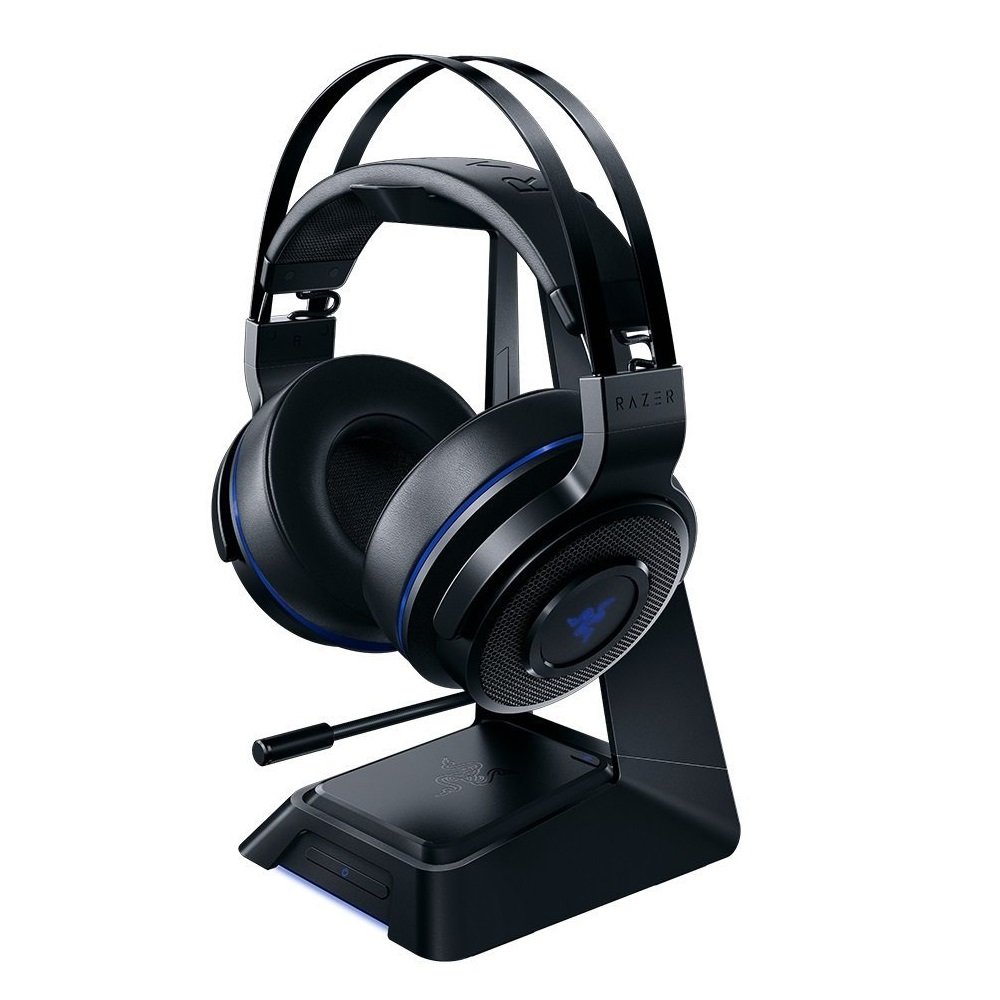
Figure 1: Razer Thresher Ultimate for PS4 headset, showcasing its design and the included base station/stand.
Configuració
Connecting to PlayStation 4/5:
- Connect the base station to your PlayStation console using the provided USB cable.
- Ensure the base station is powered on and the headset is charged.
- Turn on the headset. It should automatically pair with the base station.
- On your PlayStation, navigate to Settings > Devices > Audio Devices.
- Select "Razer Thresher Ultimate" as the Input and Output Device.
- Adjust the volume levels as desired.
Connexió al PC:
- Connect the base station to your PC using the provided USB cable.
- Ensure the base station is powered on and the headset is charged.
- Turn on the headset. It should automatically pair with the base station.
- On your PC, select "Razer Thresher Ultimate" as your default playback and recording device in your sound settings.
- Adjust the volume levels as desired.

Figura 2: Un primer pla view of the Razer Thresher Ultimate for PS4 headset, highlighting its earcups and headband.
Instruccions de funcionament
Controls dels auriculars:
The Razer Thresher Ultimate features intuitive on-headset controls for quick adjustments during gameplay.
- Selector de volum principal: Located on the earcup, rotate to increase or decrease overall audio volume.
- Selector de monitorització del micròfon: Adjusts the level of your own voice heard through the headset.
- Botó de silenci del micròfon: Press to mute or unmute the retractable digital microphone.
Ús del micròfon:
The retractable digital microphone provides clear communication. Extend the microphone boom when needed for voice chat and retract it for storage or when not in use.

Figure 3: This image displays the side profile of the headset, indicating the location of volume and microphone controls on the earcups.
Video 1: Official video demonstrating the features and benefits of the Razer Thresher Ultimate for PS4 headset, including its Dolby 7.1 Surround Sound capabilities and design principles for gaming audio.
Confort i durabilitat
The Razer Thresher Ultimate is engineered for extended gaming comfort and robust durability. The lightweight design and memory foam ear cushions conform to the unique shape of your head, providing a comfortable fit even during long gaming marathons. The headset is constructed with tough materials to withstand regular use.

Figure 4: A user wearing the Razer Thresher Ultimate headset, demonstrating its comfortable fit during a gaming session.
Especificacions tècniques
| Nom del model | Razer |
|---|---|
| Tecnologia de connectivitat | Sense fil |
| Tecnologia de comunicació sense fils | Bluetooth |
| Components inclosos | Wireless headset, base station |
| Interval d'edat (descripció) | Adult |
| Material | Escuma de memòria |
| Usos específics per al producte | Personal, jocs, negocis |
| Usos recomanats per al producte | Jocs |
| Tipus de control | Control de volum |
| Característica del cable | Sense cable, retràctil |
| Pes de l'article | 843 grams (1.86 lliures) |
| Estil | 7.1 Surround Sound w/ Stand |
| Nombre d'articles | 1 |
| UPC | 814855021765 |
| Fabricant | Razer Inc. |
| Data de llançament | 13 de juny de 2017 |
| Dimensions del producte | 4.1 x 7.72 x 8.43 polzades |
| Tipus d'element | Accessori de videojocs |
| Està aturat pel fabricant | No |
| Bateries | Necessita 1 bateria de polímer de liti (inclosa) |
| Data de primera disponibilitat | 12 de juny de 2016 |
Manteniment
To ensure the longevity and optimal performance of your Razer Thresher Ultimate headset, follow these maintenance guidelines:
- Neteja: Use a soft, dry cloth to wipe down the headset and base station. For ear cushions, gently wipe with a damp un drap i sabó suau si cal, i després deixeu-ho assecar completament a l'aire. Eviteu productes químics agressius o materials abrasius.
- Emmagatzematge: Store the headset in a cool, dry place away from direct sunlight and extreme temperatures. Utilize the included base station for proper storage and charging.
- Cura de la bateria: For optimal battery life, avoid fully discharging the headset frequently. Charge it regularly, especially if it will be stored for an extended period.
Resolució de problemes
If you encounter issues with your Razer Thresher Ultimate headset, try the following troubleshooting steps:
- Sense so/Volum baix:
- Assegureu-vos que els auriculars estiguin encesos i completament carregats.
- Check the master volume dial on the headset and your console/PC audio settings.
- Verify the base station is properly connected and powered.
- Confirm "Razer Thresher Ultimate" is selected as the default audio output device.
- El micròfon no funciona:
- Ensure the microphone is extended and not muted (check the mute button).
- Check the mic monitoring dial to ensure it's not set too low.
- Verify "Razer Thresher Ultimate" is selected as the default audio input device on your console/PC.
- Test the microphone in another application or with another device if possible.
- Problemes de connexió:
- Ensure the headset and base station are within range (up to 40 feet).
- Try restarting both the headset and the base station.
- Disconnect and reconnect the base station's USB cable.
- Check for any firmware updates for the headset or base station on the Razer support weblloc.
Garantia i Suport
Informació de la garantia:
For detailed warranty information regarding your Razer Thresher Ultimate for PS4 headset, please refer to the official Razer weblloc web o la targeta de garantia inclosa amb el producte. Els termes i condicions de la garantia poden variar segons la regió.
Suport addicional:
For additional assistance, frequently asked questions, or to download the full user manual in PDF format, please visit the official Razer support page or use the links below: