
Introducció
This manual provides essential information for the safe and efficient use of your SANSUI SCM39-B11 39V High-Vision LCD TV. Please read these instructions thoroughly before operating the television and retain them for future reference. This television features a reliable Japanese design, incorporating a main board developed by Toshiba Visual Solutions Corporation, with evaluation and production management handled by a specialized team in Echizen City, Fukui Prefecture.
The SCM39-B11 model is a 2017 release, designed for terrestrial digital broadcasting, and supports external HDD recording via USB connection.
Informació de seguretat
Seguiu sempre les precaucions de seguretat bàsiques quan utilitzeu aquest televisor per reduir el risc d'incendi, descàrrega elèctrica i lesions.
- No exposeu el televisor a la pluja ni a la humitat.
- Do not block ventilation openings. Ensure adequate space around the television for proper airflow.
- No col·loqueu el televisor sobre un carretó, suport, trípode, suport o taula inestable.
- Desendolleu el televisor durant tempestes o quan no l'utilitzeu durant períodes prolongats.
- Demaneu tot el servei a personal de servei qualificat.
Contingut del paquet
Verifiqueu que tots els elements siguin presents al paquet:
- SANSUI SCM39-B11 39V LCD TV
- Control remot
- Piles (per al comandament a distància)
- MiniB-CAS Card
- B-CAS Card Cover (with screws)
- Stand (with screws)
- Manual d'instruccions (aquest document)
- Targeta de garantia
Guia de configuració
1. Instal·lació de l'estand
Carefully place the television screen-down on a soft, flat surface. Attach the included stand to the bottom of the television using the provided screws. Ensure the stand is securely fastened before placing the television upright.

Imatge: Frontal view of the SANSUI SCM39-B11 TV with its stand, showing the display and the two silver-colored feet.
2. Cables de connexió
Refer to the back panel of the television for connection ports.

Imatge: Part posterior view of the SANSUI SCM39-B11 TV, displaying the back panel with various input ports including HDMI, USB, and antenna connections.
- Connexió d'antena: Connect your terrestrial digital antenna cable to the ANTENNA IN port.
- Dispositius HDMI: Connect DVD players, Blu-ray players, game consoles, or other HDMI-compatible devices to the HDMI 1 or HDMI 2 ports. This model has 2 HDMI ports.
- USB External HDD: For recording, connect a compatible external USB Hard Disk Drive (HDD) to the USB port.
- Potència: Connect the power cord to the AC inlet on the television and then to a wall outlet.
3. Configuració inicial
After connecting all cables and powering on the TV, the initial setup wizard will guide you through the process. This typically includes:
- Selecció de la llengua.
- Region selection.
- Automatic channel scan for terrestrial digital broadcasts. Ensure your antenna is properly connected for this step.
Instruccions de funcionament
Operacions bàsiques
- Encès/apagat: Premeu el botó PODER botó del comandament a distància.
- Selecció de canals: Utilitza el CH +/- buttons or the number buttons on the remote.
- Ajust de volum: Utilitza el VOL +/- botons.
- Font d'entrada: Premeu el botó ENTRADA button to cycle through connected devices (TV, HDMI 1, HDMI 2, etc.).
Recording with External HDD
This TV supports recording terrestrial digital broadcasts to an external USB HDD. Ensure your HDD is connected to the USB port.
- Programació d'enregistraments: Use the Electronic Program Guide (EPG) to select programs for recording. The EPG supports a 1-week display.
- Automatic Chapter Marking: The TV can detect commercials during recording and automatically set chapter marks, allowing for easier navigation during playback.
Funcions de reproducció
When playing back recorded content from an external HDD, the following functions are available:
- Repetició de reproducció: Replay a section or the entire program.
- Chase Playback: Watch a program from the beginning while it is still being recorded.
- 1.5x Speed Playback: Watch recorded content at an accelerated speed.
Millores d'imatge i so
- Blue Light Guard: Activate this function via the remote control to reduce blue light emission by up to approximately 50%, which may help reduce eye strain.
- Picture Enhancer: This feature automatically adjusts the super-resolution processing level according to the input content, ensuring optimal image display at all times.
- Japanese Paper Speakers: The integrated speakers utilize Japanese paper for clear sound reproduction across high to low frequencies.
Característiques addicionals
- Screen Freeze Function: Pause the live broadcast or current display.
- HDMI Connected Device Linkage: Control compatible HDMI-connected devices using the TV remote.
- Bi-directional Data Communication: Supports two-way data communication.
Manteniment
Neteja del televisor
- Pantalla: Netegeu suaument la pantalla amb un drap suau, sec i sense borrissol. Per a marques difícils, netegeu suaument.ampen the cloth with water or a specialized screen cleaner (ensure it is safe for LCD screens) and wipe carefully. Do not spray liquid directly onto the screen.
- Cos: Wipe the television body with a soft, dry cloth. Avoid using abrasive cleaners, waxes, or solvents as they can damage the finish.
Atenció al control remot
- Replace batteries when the remote control's response becomes slow or inconsistent.
- No barregeu piles velles i noves, o diferents tipus de piles.
- Keep the remote control away from moisture and direct sunlight.
Resolució de problemes
If you encounter issues with your television, refer to the following common problems and solutions before contacting support.
| Problema | Possible causa/solució |
|---|---|
| Sense poder | Ensure the power cord is securely plugged into both the TV and the wall outlet. Check if the outlet is functioning. |
| No picture / No signal | Verify antenna connection. Check the input source selection (e.g., HDMI 1, HDMI 2, TV). Perform a channel scan if necessary. |
| Sense so | Check volume level and mute status. Ensure external audio devices are properly connected if used. |
| El comandament a distància no funciona | Revisa i substitueix les piles. Assegura't que no hi hagi cap obstrucció entre el comandament a distància i el sensor d'infrarojos del televisor. |
| External HDD recording issues | Ensure the USB HDD is properly connected and formatted for the TV. Some HDDs may have compatibility issues. Try a different USB port or HDD if available. |
| HDMI device not recognized | Ensure the HDMI cable is securely connected. Try a different HDMI port or cable. Power cycle both the TV and the HDMI device. |
Especificacions del producte

Image: A table detailing the specifications of the SANSUI SCM39-B11 TV, including screen size, resolution, tuner type, recording capabilities, connectivity, and power consumption.
| Característica | Especificació |
|---|---|
| Nom del model | SCM39-B11 |
| Mida de la pantalla | 39V-type (39 inches) |
| Tecnologia de visualització | LCD |
| Resolució | High-Vision (HD 1366 x 768) |
| Sintonitzadors | Terrestrial Digital x1, BS Digital: None, CS Digital: None |
| External HDD Recording | Supported via USB |
| Ports HDMI | 2 sistemes |
| Ports USB | Sistema 1 |
| Compatible amb muntatge a la paret | VESA 200 mm x 200 mm |
| Pes del producte | 6.1 kg |
| Dimensions (A x A x P) | Approx. 88.8 cm x 57.5 cm x 21.0 cm (with stand) |
| Consum d'energia | 61W |
| Any de llançament | 2017 |

Imatge: Frontal view of the SANSUI SCM39-B11 TV with overlaid measurements for width (88.8cm), height (57.5cm), and weight (6.1kg).

Imatge: Lateral view of the SANSUI SCM39-B11 TV, illustrating the depth of the television body (9.9cm) and the total depth including the stand (21cm).
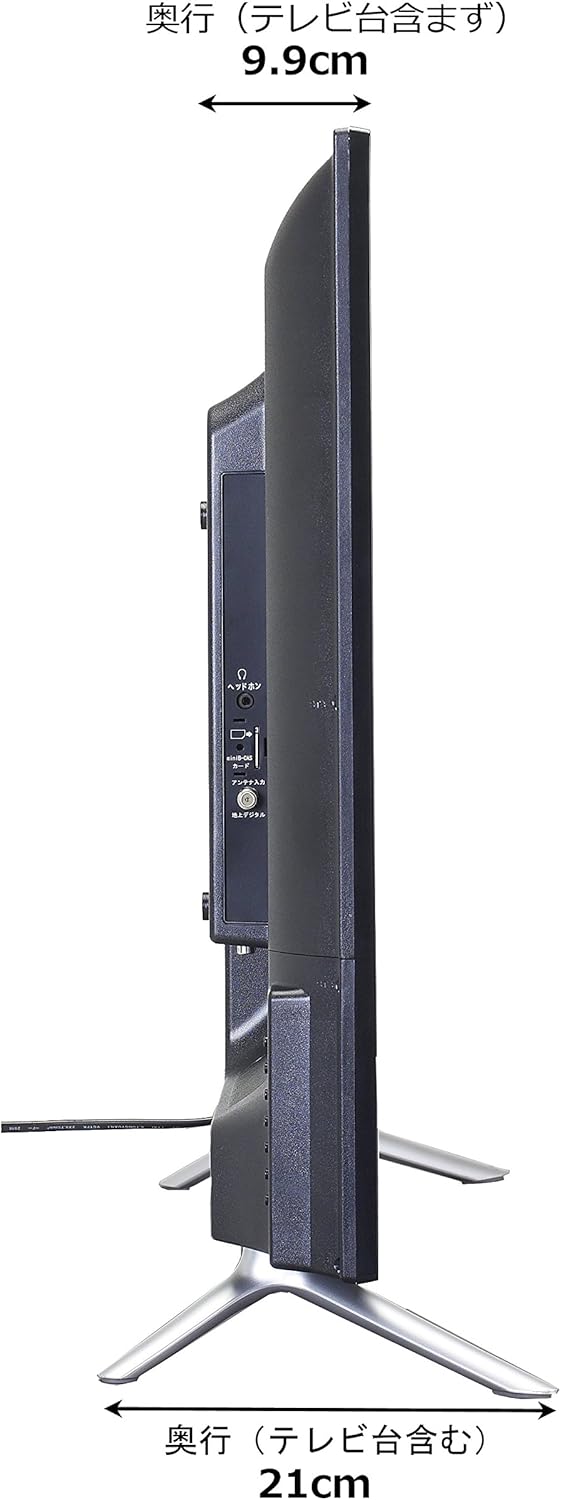
Image: Diagram showing the SANSUI SCM39-B11 TV on a stand next to a human figure (approx. 160cm tall) for visual scale, with TV dimensions indicated.
Garantia i Suport
Your SANSUI SCM39-B11 television comes with a warranty. Please refer to the included warranty card for details regarding coverage period and terms. Keep your purchase receipt as proof of purchase.
For technical support, service, or inquiries not covered in this manual, please contact SANSUI customer service. Contact information can typically be found on the warranty card or the official SANSUI weblloc.