
1. Introducció
The DBPOWER D104 Dash Cam is a compact and reliable vehicle video recorder designed to capture high-definition footage of your journeys. Featuring a 1.5-inch screen, 120-degree wide-angle lens, G-Sensor for emergency recording, and loop recording functionality, it provides essential documentation for your driving experience. This manual provides detailed instructions for the proper installation, operation, and maintenance of your dash cam.
2. Contingut del paquet
Marqueu la casella per als elements següents:
- DBPOWER Dash Camera
- Muntatge de la ventosa
- Carregador de cotxe
- Cable USB
- Manual d'usuari
- Guia d'instal·lació ràpida
Note: A 32GB Class 10 Micro SD card is required for operation and is not included in the package.
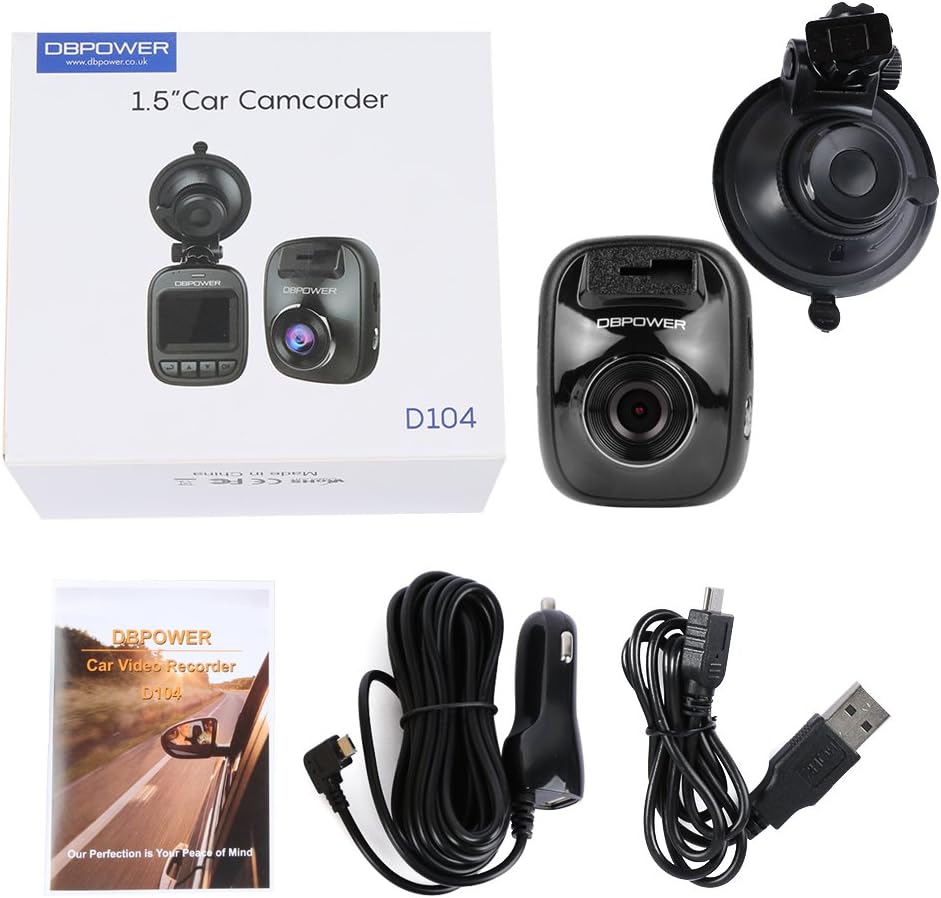
Figure 2.1: Contents of the DBPOWER D104 Dash Cam package.
3. Producte acabatview
Familiarize yourself with the physical components and dimensions of your DBPOWER D104 Dash Cam.

Figure 3.1: DBPOWER D104 Dash Cam dimensions.

Figura 3.2: Frontal, lateral i superior views of the DBPOWER D104 Dash Cam with labeled components.
- Ranura per a targeta SD
- Botó d'encesa/apagada
- Botó de menú
- Botó amunt
- Botó avall
- botó D'acord
- Interfície USB
- Botó de restabliment
- Ranura de suport
- Lent
4. Instruccions de configuració
- Inseriu la targeta Micro SD: Insert a Class 10 or higher Micro SD/TF card (up to 32GB, not included) into the SD card slot (1). Ensure it is inserted correctly until it clicks into place.
- Format de la targeta SD: It is recommended to format the SD card before first use to ensure smooth operation. This can typically be done through the camera's menu settings.
- Muntar la càmera del salpicadero: Attach the suction cup mount to the windshield, ideally behind the rearview mirall per evitar obstruir-vos view. Secure the dash cam into the holder slot (9) on the mount.
- Connectar l'alimentació: Connect the car charger to the USB interface (7) on the dash cam and plug the other end into your vehicle's 12V power outlet.
- Ajusta l'angle de la lent: Adjust the lens (10) to ensure it captures the road ahead clearly. The 120-degree wide viewing angle covers a broad area.
- Establir data i hora: Power on the device and navigate through the menu to set the correct date, time, and any other desired settings like license ID.
Note: The battery is primarily for saving files in emergencies. Always connect the dash cam to your car charger while in use.
5. Instruccions de funcionament
5.1 Automatic On/Off Recording
The DBPOWER D104 Dash Cam features an automatic on/off function. Once the vehicle powers on, the dash cam will automatically turn on and begin recording. It will automatically shut off when the vehicle is turned off.
5.2 Funcionament manual
- Encès/apagat: Press and hold the Power on/off button (2) to manually turn the device on or off.
- Navegació del menú: Use the Menu button (3) to access settings. Use the Up (4) and Down (5) buttons to navigate through options, and the OK button (6) to confirm selections.
- Quick Snapshot: While recording, press a designated button (refer to Quick Installation Guide if not explicitly labeled on device diagram) to take a high-definition picture.
5.3 Reproducció
A view foo gravattage or pictures:
- Al dispositiu: Use the menu and navigation buttons to access the playback mode and select files.
- A la televisió: Connect your DBPOWER Dash Cam to any TV via an HDMI cable (not included) to view your video footage or pictures on a larger screen.
- A l'ordinador: Remove the Micro SD card and insert it into a card reader connected to your computer to transfer and view files.
6. Característiques clau explicades
6.1 Sensor G (bloqueig d'emergència)
The G-Sensor function detects sudden movements or impacts, such as those from a collision. When activated, it automatically locks the current video file, evitant que es sobreescrigui amb l'enregistrament en bucle. Aquests files are typically saved in a dedicated "Event" folder for easy retrieval as evidence.

Figure 6.1: G-Sensor activation during an impact event.
6.2 Enregistrament en bucle
Loop recording ensures continuous recording by overwriting the oldest footage with the newest when the memory card reaches its capacity. You can set the loop recording duration to 1, 3, or 5 minutes through the camera's settings. This eliminates the need to manually clear the memory card.

Figure 6.2: Visual representation of the loop recording function.
6.3 Detecció de moviment
When enabled, motion detection allows the dash cam to automatically start recording if it detects movement in front of the vehicle while parked. This feature helps capture incidents that occur when you are not in the car. Ensure the dash cam has a continuous power supply for this feature to work effectively.
6.4 Vol baixtage Alerta
The dash cam is equipped with a low voltage alert system. It will automatically power off and save current video files if the voltage drops below 3.65V. The camera will also prompt you to recharge if the working voltage falls below 3.7V, preventing unexpected shutdowns and loss of recordings due to insufficient power.
6.5 Ample Viewangle ing
The 120-degree wide viewing angle captures a broad perspective of the road, ensuring that important details, such as license plates and surrounding traffic, are recorded. This wide coverage enhances the effectiveness of the dash cam as an incident recorder.

Figure 6.3: The 120-degree wide field of vision.

Figure 6.4: Dash Cam view from inside a vehicle, demonstrating 1080P HD recording.
7. Vídeo oficial del producte
Watch the official product video for a visual guide on the DBPOWER D104 Dash Cam's features and operation.
Video 7.1: Official DBPOWER D104 Dash Cam overview and feature demonstration.
8. Especificacions
| Característica | Detall |
|---|---|
| Marca | DBPOWER |
| Número de model | D104 |
| Mida de la pantalla | 1.5 polzades |
| Tipus de visualització | LCD |
| Resolució de captura de vídeo | 1080p |
| Angle real de View | 120 graus |
| Característiques especials | G-Sensor, Night Vision, Parking Monitor (Motion Detection) |
| Tecnologia de connectivitat | HDMI, USB |
| Tipus de memòria flash | MicroSD (Supports up to 32GB Class 10) |
| Tipus de muntatge | Muntatge de succió |
| Pes de l'article | 0.55 lliures |
| S'inclouen les piles | No (Internal battery for emergency file saving) |
9. Solució De Problemes
- La càmera no s'encén: Ensure the car charger is properly connected and the vehicle's power outlet is functioning. The internal battery is for emergency file saving, not primary operation.
- La gravació s'atura de manera inesperada:
- Check if the Micro SD card is Class 10 or higher. Lower class cards may not keep up with the recording speed.
- Format the SD card regularly (e.g., monthly) to prevent data corruption and ensure optimal performance.
- Ensure the card is not full. Loop recording should prevent this, but check if G-Sensor events are filling the card.
- La qualitat del vídeo és deficient:
- Netegeu la lent de la càmera.
- Assegureu-vos que s'hagi tret la pel·lícula protectora de la lent.
- Check the video resolution settings in the menu.
- El sensor G és massa sensible/no prou sensible: Adjust the G-Sensor sensitivity setting in the camera's menu.
- Dash cam gets hot: It is normal for the dash cam to become warm during operation. If it becomes excessively hot or emits smoke, disconnect power immediately and contact support.
10. Garantia i Suport
For warranty information and technical support, please refer to the official DBPOWER website or contact their customer service directly. Details are typically provided in the Quick Installation Guide or on the product packaging.
També podeu visitar el DBPOWER Store on Amazon per obtenir més informació sobre el producte i recursos d'assistència.