
1. Introducció
This manual provides comprehensive instructions for the installation, operation, and maintenance of the Datakom DKM-0224 Alarm Annunciator. The DKM-0224 is a 24-channel alarm annunciator designed for use in generator sets and industrial automation systems, providing visual and audible alerts for various operational conditions.
It features optically isolated digital inputs with noise-cancelling filters and adjustable detection delay. The module includes 3 relay outputs for horn, bell, and internal failure, and supports RS-485 Modbus RTU communication for remote monitoring.

Figura 1.1: Front panel of the Datakom DKM-0224 Alarm Annunciator, showing 24 alarm channels with red/green LEDs, and control buttons for Reset, Horn, Test, and Acknowledge (ACK).
2. Característiques clau
- 24 optically isolated digital inputs with noise-cancelling filters.
- Adjustable detection delay for inputs (2ms to 500ms).
- 3 configurable relay outputs (Horn, Bell, Internal Failure) rated at 5A/250V.
- Bicolor (red/green) LED indicators for each channel, indicating alarm status.
- Front panel pushbuttons for alarm acknowledgment, reset, and test.
- RS-485 Modbus RTU communication for remote monitoring and control.
- Ampli oferta voltage range: 19-150VDC or 85-305VAC.
- Designed for front panel mounting.
- Generator protection features with built-in alarms and warnings.
3. Configuració i instal·lació
3.1 Muntatge en panell
The DKM-0224 is designed for front panel mounting. Ensure adequate space for installation and ventilation.

Figura 3.1: Panel cut-out dimensions (140mm x 140mm) and side view with minimum depth requirement (55mm) for the DKM-0224.
The required panel cut-out dimensions are 140mm x 140mm. The minimum depth required behind the panel is 55mm.
3.2 Connexions de cablejat
Consulteu la part posterior view diagram for detailed wiring instructions. All connections should be made by qualified personnel.
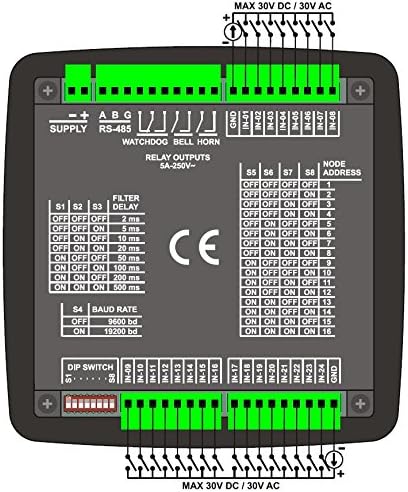
Figura 3.2: Enrere view of the DKM-0224 showing power supply terminals, RS-485 connections, relay outputs, and 24 digital input terminals (IN-01 to IN-24).
- Font d'alimentació: Connect the main power supply to the designated terminals. The unit accepts 19-150VDC or 85-305VAC.
- Digital Inputs (IN-01 to IN-24): Connect your alarm sources to these 24 optically isolated inputs. Each input can handle up to 30V DC/AC.
- Sortides de relé: Connect external devices like horns or bells to the "WATCHDOG", "BELL", and "HORN" relay output terminals. These are rated 5A/250V.
- EL-485: For Modbus RTU communication, connect the RS-485 A, B, and G terminals to your communication network.
3.3 Configuració del commutador DIP
The DKM-0224 features DIP switches on the back panel for configuring input filter delay and RS-485 baud rate.
- Filter Delay (S1-S3): Adjust the input detection delay from 2ms to 500ms to prevent false alarms from transient signals. Refer to the back panel diagram for specific switch combinations.
- Baud Rate (S4): Set the RS-485 communication baud rate to either 9600 bd or 19200 bd to match your system.
- Node Address (S5-S8): Configure the Modbus node address using DIP switches S5-S8.
4. Funcionament
The DKM-0224 provides clear visual and audible indications for alarm conditions. Understanding the LED states and pushbutton functions is crucial for proper operation.

Figura 4.1: Detailed operational guide for the DKM-0224, explaining LED behaviors, audible warnings, relay functions, and pushbutton controls.
4.1 Alarm LEDs
- FAST FLASH (Red): Indicates the first detection of a fault.
- SLOW FLASH (Red): Activated when the ACK (acknowledge) pushbutton is pressed and the fault signal is still active.
- STEADY ON (Red): Activated if the fault signal disappears at SLOW FLASH condition.
- LED APAGAT: The alarm LED turns off when the RESET pushbutton is pressed and the fault signal is not present.
4.2 Audible Warnings
- When a fault signal is detected, the internal buzzer turns on with a period of 1 second. If the ACK pushbutton is pressed, the buzzer turns off. If ACK is not pressed within 1 minute, it switches to slow sound mode (beeps once every 10 seconds).
4.3 sortides de relé
- HORN RELAY: If any "red" alarm LED turns on, then the horn relay also turns on. The relay turns off when the HORN pushbutton is pressed.
- BELL RELAY: If any "green" alarm LED turns on, then the bell relay also turns on. The relay turns off when the ACK pushbutton is pressed.
- WATCHDOG RELAY: A watchdog relay turns on. If the board fails, then the watchdog relay turns off.
4.4 Other LEDs
- HORN/BELL LED: The HORN relay turns on if the red LEDs are active. If the HORN relay is not on and the BELL relay is on, then the green LEDs are active. Both are off when no alarms are active.
- SAFE/FAIL LED: If an internal fault condition is detected in the unit, this LED will turn on "red", otherwise it turns on "green".
4.5 Pushbutton Functions
- ACK (Acknowledge): When ACK is pressed, fast flashing LEDs switch to slow flash (or steady on) mode, and the internal buzzer turns off.
- RESET: When RESET is pressed, all alarm LEDs turn off and both relay bells turn off. If a fault signal is present, the alarm will occur again.
- PROVA: When pressed, all LEDs will turn on and green, alternatively and the buzzer sounds.
- corn: When pressed, HORN and BELL relays will turn on alternatively for 1 second.
5. Manteniment
The Datakom DKM-0224 is designed for reliable operation with minimal maintenance. Regular checks can help ensure its longevity and proper function.
- Neteja: Keep the front panel clean and free of dust. Use a soft, dry cloth for cleaning. Avoid abrasive cleaners or solvents.
- Comprovacions de connexió: Inspeccioneu periòdicament totes les connexions del cablejat per assegurar-vos que estiguin ben fixades i que no presentin corrosió.
- Condicions ambientals: Assegureu-vos que l'entorn de funcionament es mantingui dins dels rangs de temperatura i humitat especificats per evitar danys.
6. Solució De Problemes
If the DKM-0224 is not functioning as expected, consider the following common issues:
- Sense energia:
- Verify the power supply connections are correct and secure.
- Ensure the power source is providing the correct voltage (19-150VDC or 85-305VAC).
- Alarm Not Activating:
- Check the input wiring for the specific channel.
- Ensure the alarm source is active and providing the correct signal to the input.
- Verify DIP switch settings for filter delay are not excessively long, potentially delaying alarm detection.
- Audible Alarm Not Sounding:
- Check if the internal buzzer is enabled (if configurable).
- Ensure the ACK button has not been pressed, silencing the buzzer.
- Relay Output Not Activating:
- Verify the relay output wiring is correct.
- Ensure the associated alarm condition is active and the relay logic is met (e.g., red LED for Horn relay).
- Check the WATCHDOG relay for internal fault indications (SAFE/FAIL LED).
- Communication Issues (RS-485):
- Check RS-485 wiring (A, B, G).
- Verify DIP switch settings for baud rate and node address match the communication system.
- Ensure proper termination resistors are used on the RS-485 bus if applicable.
7. Especificacions tècniques
The following table details the technical specifications of the Datakom DKM-0224 Alarm Annunciator.
Figura 7.1: Acabatview of technical specifications, back view wiring, and panel cut-out dimensions for the DKM-0224.
| Paràmetre | Valor |
|---|---|
| Entrada de subministrament | 19-150VDC (optional 88-400VDC, 85-270VAC) |
| Consum d'energia | < 4 VA |
| Fault Inputs | 24 opto-isolated inputs, with positive inputs and common negative terminals, protected against high voltage and electrical noise. |
| Impedància d'entrada | 40k-ohms (opt. 130k-ohms) |
| Corrent d'entrada | Màx. 30mA @ 1VDC |
| Protecció contra sobretensions | 1000V / 50us |
| Aïllament | 1000 V AC, 1 minut |
| Filter Delay | 2-5-10-20-50-100-200-500ms selectable |
| Visual Warnings | 26 ultra-bright and bicolor LEDs (red-green) |
| Advertència audible | Internal 23mm buzzer, 80dB |
| Sortides del relé | 3 outputs, 5A @ 250V AC |
| Port sèrie | RS-485 |
| Tipus de senyal | RS-485 |
| Protocol | Modbus RTU |
| Velocitat de transmissió | 9600 / 19200 baud |
| Aïllament | 1000 V AC, 1 minut |
| Temp. de funcionament. Interval | -20°C ... +70°C |
| Temp d'emmagatzematge Rang | -40°C ... +85°C |
| Màx. Humitat relativa | %95 non-condensing. |
| Grau de Protecció | IP 65 (Front, with gasket), IP 30 (Rear panel) |
| Tancament | Flame retardant ROHS compliant, high temperature ABS/PC (UL94 V0) |
| Instal·lació | Flush mount with rear retaining plastic brackets. |
| Connectors | Two part connection system. |
| Secció de cables | màx. 2.5 mm² |
| Dimensions | 164x164x60mm (AxAxP) |
| Retall del panell | 140x140mm |
| Pes | 400 gr |
| Directives de la UE | 2006/95/EC (LVD), 2004/108/EC (EMC) |
| Normes de referència | EN 61010 (safety), EN 61326 (EMC) |
8. Garantia i Suport
Information regarding the product warranty and technical support is typically provided by the manufacturer, Datakom, or your authorized reseller at the time of purchase. Please refer to your purchase documentation or contact Datakom directly for details on warranty coverage, service, and technical assistance.
For further information, you may visit the official Datakom weblloc o poseu-vos en contacte amb el seu servei d'atenció al client.