
ALIGATOR A321
Aligator A321 Mobile Phone for Seniors User Manual
Model: A321 | Brand: ALIGATOR
1. Introducció
This manual provides comprehensive instructions for the safe and efficient use of your Aligator A321 mobile phone. Designed with seniors in mind, the A321 features large buttons, a clear display, and an essential SOS function for emergencies. Please read this manual thoroughly before operating your device.
2. Contingut del paquet
Marqueu la casella per als elements següents:
- Aligator A321 Mobile Phone
- Bateria
- Adaptador de càrrega
- Cable de càrrega USB
- Manual d'usuari (aquest document)
Si falta algun article o està malmès, poseu-vos en contacte amb el vostre distribuïdor.
3. Trucada telefònicaview
Familiarize yourself with the key components of your Aligator A321 phone.

Image 1: Aligator A321 Front View. This image displays the front of the Aligator A321 mobile phone, showing the screen, large numeric keypad, call and end call buttons, and navigation keys. The brand "ALIGATOR" is visible below the screen.
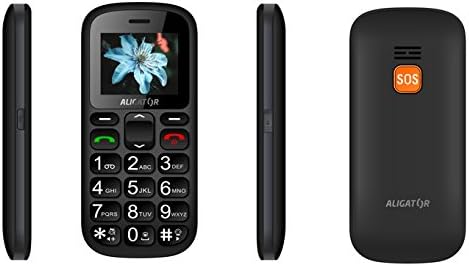
Image 2: Aligator A321 Side and Back View. This image shows multiple views of the Aligator A321. From left to right: left side profile, davant view, right side profile, and the back of the phone. The back view prominently features the orange SOS button and the "ALIGATOR" logo.
Components clau:
- Pantalla de visualització: 1.8-inch color screen for viewing menus, contacts, and messages.
- Teclat numèric: Large, easy-to-press buttons for dialing numbers and typing messages.
- Call/End Call Buttons: Green button to initiate calls, red button to end calls or return to the home screen.
- Tecles de navegació: Up, Down, Left, Right, and OK/Confirm button for menu navigation.
- Botó SOS: Located on the back of the phone, used for emergency calls and SMS (see Section 5.4).
- Llanterna: Integrated light for convenience.
- Port de càrrega: Located at the bottom for connecting the charging cable.
4. Configuració
4.1. Inserció de la targeta o targetes SIM i la bateria
- Traieu amb cura la tapa posterior del telèfon.
- If the battery is already inserted, remove it by gently lifting it from the notch.
- Locate the SIM card slot(s). The Aligator A321 supports Dual SIM. Insert your SIM card(s) into the designated slot(s) with the gold contacts facing down, ensuring it clicks into place.
- Insert the battery, aligning the gold contacts on the battery with those in the phone.
- Replace the back cover, pressing firmly until it snaps securely.
4.2. Inserció d'una targeta MicroSD (opcional)
The phone supports MicroSD cards for additional storage (e.g., for photos or music).
- Remove the back cover and battery as described above.
- Localitza la ranura per a la targeta MicroSD.
- Insert the MicroSD card with the gold contacts facing down until it is securely in place.
- Substituïu la bateria i la coberta posterior.
4.3. Carregant la bateria
Abans del primer ús, carregueu completament la bateria del telèfon.
- Connect the USB charging cable to the charging adapter.
- Connecteu l'adaptador de càrrega a una presa de corrent estàndard.
- Connect the other end of the USB cable to the charging port at the bottom of your phone.
- The battery indicator on the screen will show charging status. Disconnect the charger once the battery is full.
4.4. Encès / apagat
- Per encendre: Manteniu premut el botó Botó de trucada (green button) until the screen lights up.
- Per apagar: Manteniu premut el botó Botó Finalitzar trucada (red button) until the power-off options appear, then confirm.
5. Instruccions de funcionament
5.1. Fer i rebre trucades
- Per fer una trucada: Introduïu el número de telèfon amb el teclat numèric i premeu la tecla Botó de trucada.
- Per respondre una trucada: Quan soni el telèfon, premeu la tecla Botó de trucada.
- Per finalitzar una trucada: Premeu el botó Botó Finalitzar trucada.
5.2. Sending and Receiving SMS Messages
- Per enviar un SMS: Navigate to the "Messages" menu, select "New Message," enter the recipient's number and your message, then send.
- Per llegir un SMS: New messages will typically display a notification. Navigate to the "Messages" menu to view la teva safata d'entrada.
5.3. Managing Contacts (Phonebook)
The phonebook can store up to 500 entries.
- Per afegir un contacte: Go to "Contacts" or "Phonebook," select "Add New," enter the name and phone number, then save.
- Per trucar a un contacte: Go to "Contacts," select the desired contact, and press the Botó de trucada.
5.4. SOS Emergency Function
The SOS button is a critical safety feature. It allows you to quickly contact pre-set emergency numbers and send an SOS message with your location.
- Setting Up SOS Numbers: Access the "SOS Settings" menu. You can typically add up to 5 emergency contact numbers. These numbers will be called sequentially until one answers.
- Activació de SOS: En cas d'emergència, premeu i manteniu premut el botó Botó SOS a la part posterior del telèfon durant uns segons.
- SOS Action: The phone will automatically:
- Send an emergency SMS message to all pre-set SOS numbers.
- Initiate calls to the pre-set SOS numbers in a loop until one is answered.
- Activate the SOS Locator function (see Section 5.5).
5.5. SOS Locator
The SOS Locator feature sends your phone's approximate location via SMS to your emergency contacts when the SOS button is activated. This allows the recipient to view your location on a map (if their device supports it).
- This function is automatically triggered when the SOS button is pressed.
- Ensure your phone has network coverage for the SMS to be sent successfully.
5.6. Altres característiques
- Llanterna: Often activated by a dedicated side button or through the menu.
- Ràdio FM: Requires headphones (not included) to be plugged in as an antenna. Access via the "Multimedia" or "Tools" menu.
- Despertador: Set multiple alarms through the "Tools" or "Settings" menu.
- Calculadora: Basic arithmetic functions available in the "Tools" menu.
6. Manteniment i cura
- Neteja: Feu servir un drap suau i sec per netejar la superfície del telèfon. Eviteu els netejadors líquids.
- Cura de la bateria:
- No exposeu la bateria a temperatures extremes.
- Eviteu descarregar completament la bateria amb freqüència.
- If the phone will not be used for an extended period, charge it partially before storing.
- Resistència a l'aigua: This phone is not waterproof. Keep it away from water and moisture.
- Impacte: Eviteu deixar caure el telèfon o sotmetre'l a impactes forts.
7. Solució De Problemes
| Problema | Causa possible | Solució |
|---|---|---|
| El telèfon no s'encén. | Battery is discharged or not inserted correctly. | Carregueu la bateria. Assegureu-vos que la bateria estigui inserida correctament. |
| No es poden fer ni rebre trucades. | No hi ha senyal de xarxa, no hi ha targeta SIM inserida o problema amb la targeta SIM. | Comproveu la intensitat del senyal de xarxa. Torneu a inserir la targeta SIM. Poseu-vos en contacte amb el vostre proveïdor de serveis. |
| SOS function not working. | SOS numbers not set, no network, or button not pressed long enough. | Ensure SOS numbers are configured. Check network coverage. Press and hold the SOS button for several seconds. |
| La bateria s'esgota ràpidament. | Heavy usage, old battery, or background processes. | Reduce usage. Consider replacing the battery if it's old. Close unused applications. |
8. Especificacions
| Característica | Detall |
|---|---|
| Marca | ALIGADOR |
| Nom del model | A321 |
| Color | Negre |
| Tipus de producte | Mobile Phone (Feature Phone) |
| Sistema operatiu | KaiOS |
| Mida de la pantalla | 1.8 polzades |
| Tecnologia cel·lular | 2G (GSM) |
| Tecnologia de connectivitat | 2G (GSM) |
| Number of SIM Slots | Doble SIM |
| Capacitat de l'agenda | 500 entrades |
| Temps de conversa | Fins a 4 hores |
| Temps d'espera | Fins a 240 hores |
| Característiques especials | SOS Button, SOS Locator, Large Keys, Flashlight, FM Radio, Alarm Clock, Calculator, Micro SD Card Support |
| Dispositius compatibles | A321 |
9. Garantia i Suport
Your Aligator A321 mobile phone comes with a standard manufacturer's warranty. Please refer to the warranty card included in your package for specific terms and conditions, including the warranty period and coverage details.
Atenció al client:
For technical assistance, troubleshooting beyond this manual, or warranty claims, please contact your retailer or the official ALIGATOR customer support. Contact information can usually be found on the manufacturer's weblloc web o a l'embalatge.
When contacting support, please have your product model (A321) and purchase details ready.
Ask a question about this manual
Ask about setup, troubleshooting, compatibility, parts, safety, or missing instructions. Manuals+ will review the question and use this page’s manual context to help answer it.