
Rii RK202
Rii RK202 Gaming Keyboard User Manual
Model: RK202
1. Introducció
The Rii RK202 Gaming Keyboard is designed to provide an enhanced experience for both gaming and general typing. It features a full-size layout with 105 keys, multi-color LED backlighting, and dedicated multimedia functions. This manual provides detailed instructions for setup, operation, maintenance, and troubleshooting to ensure optimal performance and longevity of your keyboard.
2. Configuració
2.1 Contingut del paquet
- Rii RK202 Gaming Keyboard (with integrated USB cable)
2.2 Connexió del teclat
- Locate an available USB port on your computer, laptop, gaming console (PS4, Xbox One), Smart TV, or other compatible device.
- Insert the USB connector of the Rii RK202 keyboard firmly into the USB port.
- El teclat és plug-and-play. El sistema operatiu hauria de detectar i instal·lar automàticament els controladors necessaris. Normalment no cal instal·lar cap programari addicional.
The keyboard is compatible with Windows 95/98/XP/2000/ME/VISTA/7/8/9/10, Google Android TV Box, HTPC, IPTV, Mac OS (with limited backlight functionality), Chrome OS, and all versions of Raspberry Pi.

Image: The Rii RK202 Gaming Keyboard connected to a device via its integrated USB cable.
3. Instruccions de funcionament
3.1 Funcions bàsiques del teclat
The Rii RK202 features a standard QWERTY layout with 105 keys, including a numeric keypad and function keys (F1-F12). It supports 19-key anti-ghosting for accurate input during fast-paced gaming.
3.2 Tecles multimèdia
El teclat inclou funcions multimèdia dedicades accessibles a través de Fn key combined with the F-keys. These shortcuts allow quick control over media playback and system functions.

Image: A visual guide to the multimedia functions (Fn + F1-F12) on the Rii RK202 keyboard.
- Fn+F1: Reproductor de música
- Fn+F2: Baixa el volum
- Fn+F3: Puja el volum
- Fn+F4: Silenciar
- Fn+F5: Atura la reproducció
- Fn+F6: Pista anterior
- Fn+F7: Reproduir/Pausa
- Fn+F8: Pista següent
- Fn+F9: Correu electrònic
- Fn+F10: Web Pàgina d'inici
- Fn+F11: Bloquejar l'ordinador
- Fn+F12: Calculadora
Control de retroiluminació 3.3
The Rii RK202 keyboard features 7-color LED backlighting with adjustable brightness and various lighting modes.

Image: A visual guide to controlling the LED backlight, including brightness adjustment and mode changes.
- Turn Backlight ON/OFF: Premeu Fn + * (asterisk key, located near the right Shift key).
- Ajusta la brillantor: Premeu Fn + Pàg to increase brightness (4 levels). Press Fn + PgDn per disminuir la brillantor.
- Canvia el mode d'il·luminació: Premeu Fn + Light Bulb Key (located next to the right Shift key) to cycle through static color, breathing mode, and off.
Nota: The backlight function is not supported on MacOS systems.
3.4 Mode de repòs automàtic
To conserve energy, the keyboard will automatically enter a sleep mode if there is no interaction for approximately 10 minutes. The backlight will turn off. To reactivate the keyboard, simply press any key, and it will return to operational mode.
3.5 Integrated Smartphone Holder
The keyboard features a built-in slot designed to hold a smartphone, providing convenient access to your device while using the keyboard.
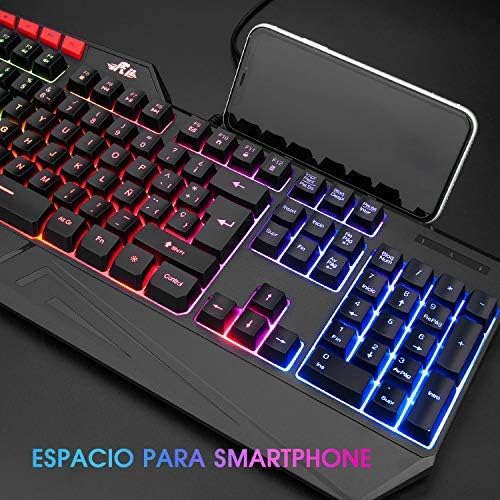
Image: The Rii RK202 keyboard featuring its integrated smartphone holder, with a phone placed in the slot.
4. Manteniment
4.1 Neteja del teclat
- Desconnecta el teclat del dispositiu abans de netejar-lo.
- Use a soft, dry, lint-free cloth to gently wipe the surface of the keys and the keyboard body.
- Per a la brutícia o la pols persistents, fregueu lleugeramentampen the cloth with water or a mild, non-abrasive cleaning solution. Ensure the cloth is not dripping wet.
- Avoid spraying cleaning solutions directly onto the keyboard. Do not allow any liquid to seep into the key switches or internal components.
- Feu servir aire comprimit per eliminar la pols i les restes que hi ha entre les tecles.
- Ensure the keyboard is completely dry before reconnecting it to your device.
4.2 Atenció general
- Avoid exposing the keyboard to extreme temperatures, direct sunlight, or high humidity.
- No deixeu caure el teclat ni el sotmeteu a impactes forts.
- Keep liquids away from the keyboard to prevent damage.
5. Solució De Problemes
5.1 El teclat no respon
- Comprova la connexió USB: Ensure the USB cable is securely plugged into both the keyboard and the device. Try unplugging and re-plugging the cable.
- Prova un port USB diferent: Connect the keyboard to a different USB port on your device.
- Prova en un altre dispositiu: If possible, test the keyboard on another computer or compatible device to determine if the issue is with the keyboard or your original device.
- Reinicieu el dispositiu: Reinicieu l'ordinador o el dispositiu.
5.2 La retroiluminació no funciona
- Activa la retroiluminació: Ensure the backlight is turned on by pressing Fn + *.
- Ajusta la brillantor: Augmenta la brillantor amb Fn + Pàg.
- Check Lighting Mode: Canvieu pels modes d'il·luminació utilitzant Fn + Light Bulb Key.
- MacOS Compatibility: Remember that backlight functionality is not supported on MacOS systems.
5.3 Specific Keys Not Registering
- Clean Under Keys: Use compressed air to remove any debris or dust that might be lodged under the unresponsive keys.
- Conflicte de programari: Check if any recently installed software or drivers are causing conflicts.
- If the issue persists after trying these steps, contact customer support for further assistance.
6. Especificacions
| Característica | Detall |
|---|---|
| Número de model | RK202 |
| Dimensions (L x A x A) | 47.5 x 21.49 x 3 cm (18.7 x 8.46 x 1.18 polzades) |
| Pes | 840 g (1.85 lliures) |
| Connectivitat | USB per cable |
| Recompte de claus | 105 claus |
| Anti-fantasma | 19 claus |
| Llum de fons | 7-color LED with adjustable brightness and modes |
| Material | Plàstic ABS |
| Vida útil de la clau | Fins a 50 milions de clics |
| Compatibilitat | Windows (95/98/XP/2000/ME/VISTA/7/8/9/10), PC, Laptop, Google Android TV Box, HTPC, IPTV, Smart TV, Mac OS (limited backlight), Chrome OS, Raspberry Pi |
7. Informació de la garantia
Please refer to the warranty policy provided by your retailer or the manufacturer's official website for detailed information regarding warranty coverage, terms, and conditions. Keep your proof of purchase for any warranty claims.
8. Atenció al client
For technical assistance, troubleshooting not covered in this manual, or other inquiries, please visit the official Rii website or contact your point of purchase. Ensure you have your product model number (RK202) available when seeking support.
Ask a question about this manual
Ask about setup, troubleshooting, compatibility, parts, safety, or missing instructions. Manuals+ will review the question and use this page’s manual context to help answer it.