
Introducció
This manual provides instructions for setting up, operating, maintaining, and troubleshooting your Logitech Slim Folio Keyboard Case for iPad (5th and 6th Generation). Please read this manual thoroughly before using the product to ensure optimal performance and longevity.
Configuració
1. Check iPad Compatibility
Ensure your iPad is a 5th or 6th Generation model. The model numbers for compatible iPads are A1822 and A1823.
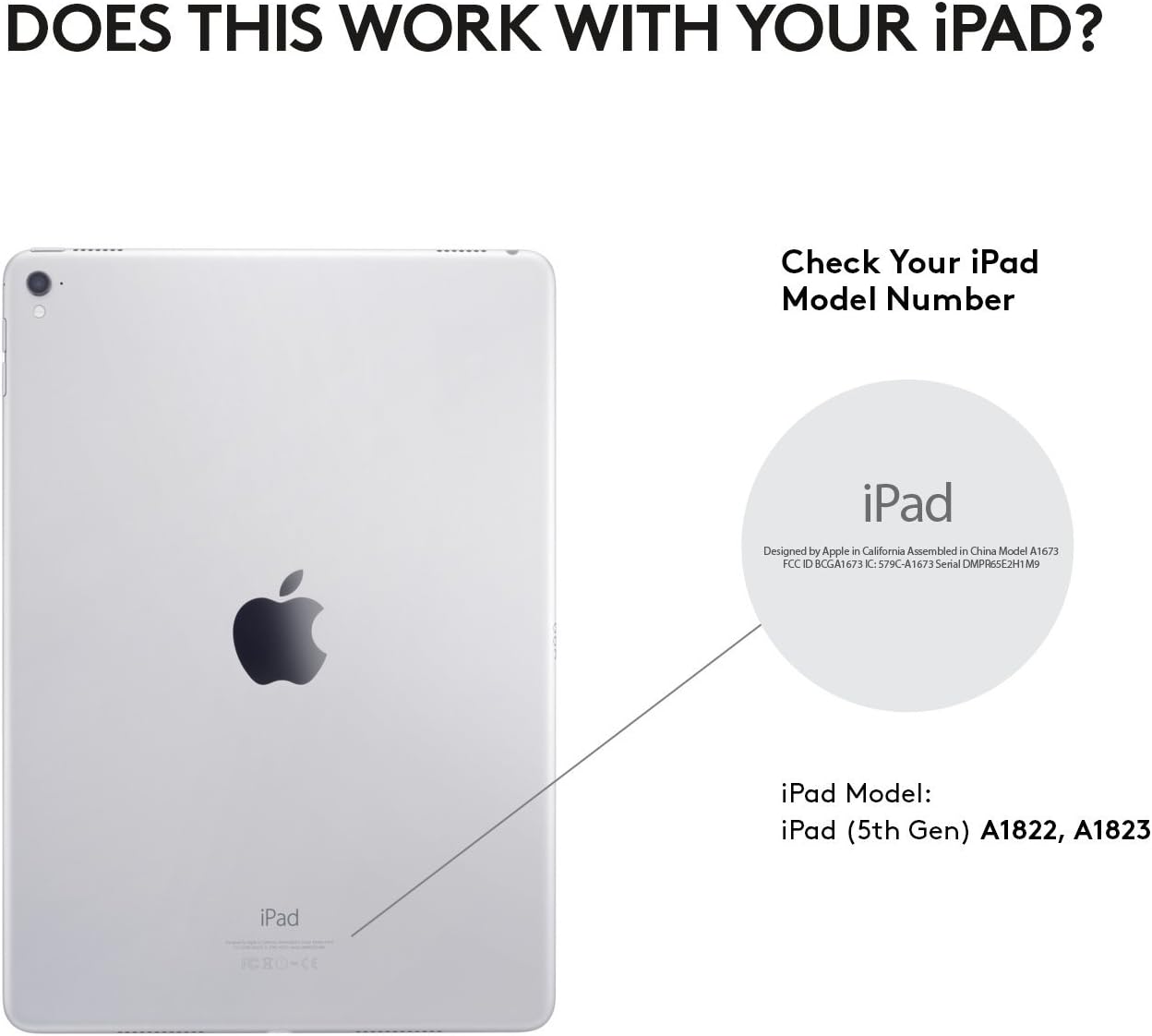
Figura 1: Locate your iPad model number on the back of your device to confirm compatibility.
2. Insert iPad into the Case
Carefully align your iPad with the case and press it firmly into place. Ensure all ports, buttons, and the camera are accessible through the case's cutouts.

Figura 2: The Slim Folio case provides comprehensive front and back protection for your iPad, with precise cutouts for all functionalities.
3. Initial Keyboard Activation and Bluetooth Pairing
The keyboard is powered by replaceable coin cell batteries, designed for a long lifespan. To activate the keyboard and pair it with your iPad:
- Open the Slim Folio case and place your iPad into the typing position. The keyboard will automatically power on.
- Al teu iPad, vés a Configuració > Bluetooth.
- Select "Logitech Slim Folio" from the list of available devices to pair.
- A green light on the keyboard indicates it is powered on and ready for connection.

Figura 3: The Slim Folio features a replaceable battery with up to 4 years of life (based on 2 hours daily use) and an auto sleep/wake function.
For a visual guide on setting up your Logitech Slim Folio, please watch the official video below:
Vídeo 1: Official Logitech video demonstrating the setup process for the iPad Keyboard Case.
Instruccions de funcionament
Typing Mode
To use the keyboard, simply open the case and position your iPad in the magnetic typing stand. The keyboard will automatically activate, allowing you to type comfortably. The keys are well-spaced for a laptop-like typing experience.

Figura 4: The Slim Folio transforms your iPad into a laptop-like device, offering a comfortable typing experience with perfectly spaced keys and iOS shortcut keys.
ViewMode de funcionament
For media consumption or browsing, you can fold the keyboard behind the iPad. The case is designed to hold the iPad securely at an optimal viewing angle. The keyboard will automatically deactivate in this mode to prevent accidental key presses and conserve battery.

Figura 5: The Slim Folio offers versatile modes for typing, viewing, and protecting your iPad.
iOS Shortcut Keys
The keyboard features a dedicated row of iOS shortcut keys for quick access to common functions:
- Inici: Torna a la pantalla d'inici.
- Siri: Activeu Siri.
- Brillantor de la pantalla: Ajusteu la brillantor de la pantalla.
- Cerca: Open the search function.
- Controls de mitjans: Reproduir/pausar, saltar pistes.
- Controls de volum: Ajusta el volum de l'àudio.
- I més.
Manteniment
Neteja de la caixa
The Slim Folio case is made from water-repellent, easy-to-clean fabric and durable plastic material. To clean, gently wipe with a damp drap. Eviteu productes químics agressius o netejadors abrasius.
Canvi de bateria
The keyboard uses replaceable coin cell batteries (CR2032). The battery life is approximately 4 years based on 2 hours of daily use. When the battery is low, the indicator light on the keyboard may flash. To replace the battery:
- Locate the battery compartment on the side of the keyboard.
- Use a small coin or tool to open the compartment.
- Remove the old batteries and insert new CR2032 batteries, ensuring correct polarity.
- Tanqueu el compartiment de la bateria de manera segura.
Resolució de problemes
El teclat no respon
- Comproveu la bateria: Ensure the batteries are not depleted. Replace if necessary.
- Torna a emparellar el Bluetooth: Go to iPad Settings > Bluetooth, forget the "Logitech Slim Folio" device, and then re-pair it.
- Reinicia l'iPad: Sometimes a simple restart of your iPad can resolve connectivity issues.
Les tecles no funcionen correctament
- Claus netes: Assegureu-vos que no hi hagi deixalles enganxades sota les claus.
- Actualització de programari: Check if your iPad's iOS is up to date.
iPad Not Staying in Typing Position
The magnetic strip that holds the iPad in typing position is strong. If your iPad is not staying securely, ensure it is correctly aligned with the magnetic strip and that no foreign objects are interfering with the connection.
Especificacions
| Marca | Logitech |
| Número de model | 920-008617 |
| Dispositius compatibles | iPad 5th Generation, iPad 6th Generation (Models A1822, A1823) |
| Tecnologia de connectivitat | Bluetooth LE |
| Descripció del teclat | Membrana |
| Nombre de claus | 78 |
| Tipus de bateria | Replaceable Coin Cell (CR2032) |
| Durada estimada de la bateria | Fins a 4 anys (basat en un ús diari de 2 hores) |
| Material | Plastic, Water-repellent Fabric |
| Color | Negre de carbó |
| Pes de l'article | 1 lliures |
Garantia i Suport
The Logitech Slim Folio Keyboard Case comes with a Garantia limitada d'1 any. For warranty claims, technical support, or further assistance, please visit the official Logitech support weblloc o poseu-vos en contacte amb el seu servei d'atenció al client.
For additional information and resources, please visit: www.logitech.com