
ARTIX XJR
ARTIX Sport Workout Earbuds Headphones XJR User Manual
Model: XJR
Brand: ARTIX
Introducció
The ARTIX Sport Workout Earbuds Headphones XJR are designed for active individuals seeking high-quality audio performance during workouts, travel, running, and exercise. These lightweight, in-ear stereo wired earphones feature a built-in microphone and sweat-proof construction, ensuring durability and clear communication.
Key features include enhanced high-quality sound with natural clear acoustics and powerful bass, an ergonomic and stylish design with comfortable over-ear hooks, and integrated controls for music and calls. The noise-isolating earpods help minimize ambient background noise, providing an immersive listening experience.

Imatge: Frontal view of the ARTIX Sport Workout Earbuds XJR, highlighting their vibrant green color and ergonomic over-ear design.
Guia de configuració
1. Selecció de les puntes d'orella adequades
For optimal sound quality and comfort, it is crucial to select the correct size of silicone ear tips. The ARTIX XJR earbuds come with three sizes (Small, Medium, Large). Experiment with each size to find the one that provides a secure fit and good seal in your ear canal.
- Gently pull on the edge of the current ear tip to remove it from the earbud nozzle.
- Select a new ear tip size and firmly push it onto the nozzle until it clicks into place.
- Test the fit by inserting the earbuds into your ears. A good fit will block out most external noise and provide rich bass.
2. Posar-se els auriculars
The ARTIX XJR earbuds feature ergonomic over-ear hooks for a secure and comfortable fit, especially during physical activity. These hooks are removable if preferred, but are recommended for active use.
- Identifiqueu els auriculars esquerre (L) i dret (R).
- Place the earbud into your ear canal and gently loop the over-ear hook behind your ear.
- Ajusteu els auriculars i el ganxo fins que estiguin ben ajustats i còmodes.
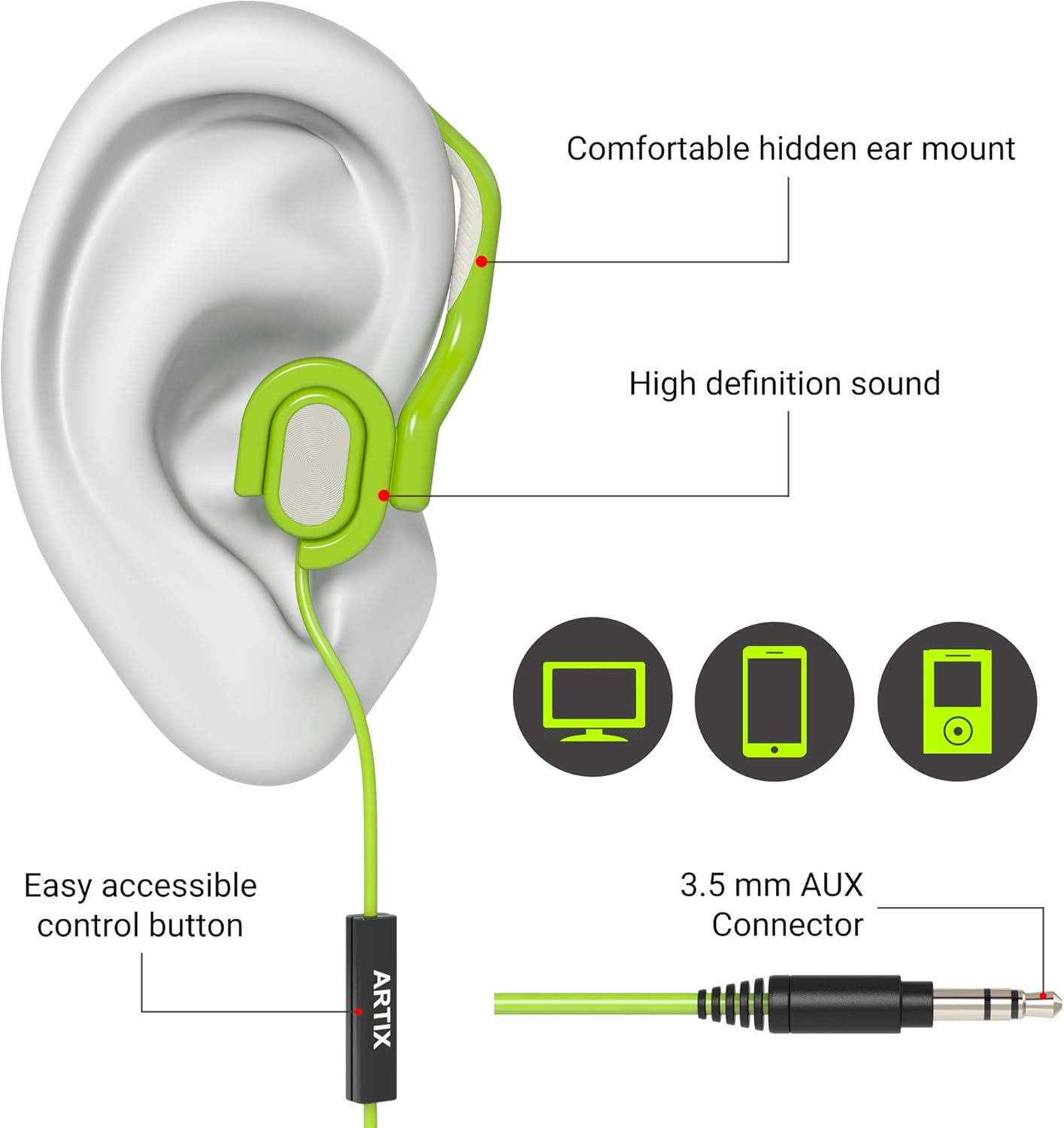
Image: A diagram illustrating the proper way to wear the earbud, showing the ear tip inserted into the ear canal and the over-ear hook securely positioned behind the ear. Labels point to the "Comfortable hidden ear mount" and "High definition sound".
3. Connexió al vostre dispositiu
The ARTIX XJR earbuds connect via a standard 3.5mm audio jack. They are compatible with a wide range of devices.
- Locate the 3.5mm audio jack on your smartphone, tablet, MP3 player, laptop, or computer.
- Insert the 3.5mm connector of the earbud cable firmly into the device's audio jack.
- Ensure the connection is secure for uninterrupted audio.

Image: The ARTIX Sport Workout Earbuds XJR are shown connected to a smartphone, with running shoes in the background, illustrating their use with mobile devices for active lifestyles.
Instruccions de funcionament
The ARTIX XJR earbuds feature an inline remote with a built-in microphone for convenient control of music playback and phone calls.
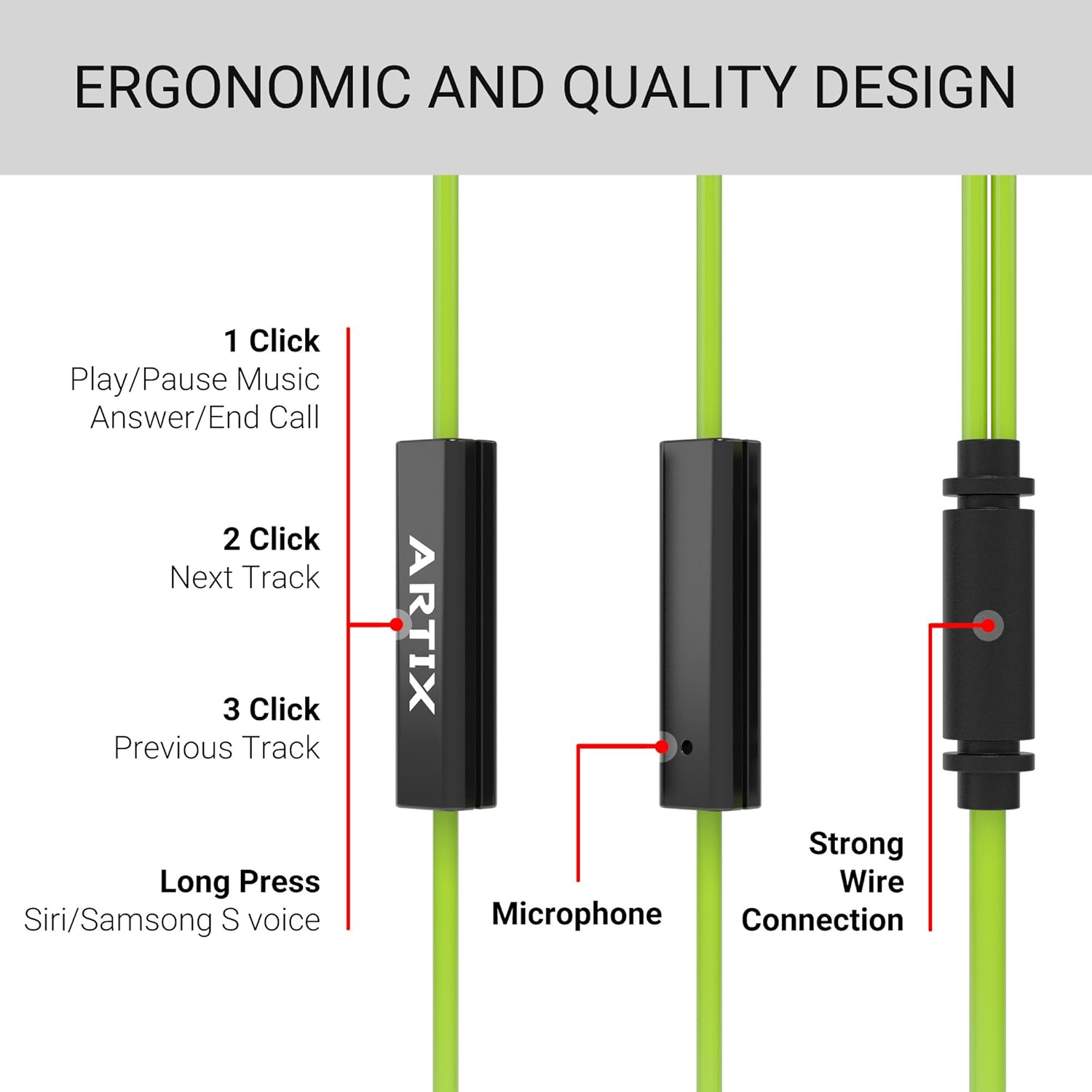
Image: A detailed diagram of the inline remote control, showing the single button and its various functions based on the number of clicks or duration of press.
Control de música:
- 1 Feu clic a: Reproducció/pausa de música.
- 2 clics: Saltar a la pista següent.
- 3 clics: Torna a la pista anterior.
Control de trucades:
- 1 Feu clic a: Contesteu una trucada entrant o finalitzeu una trucada en curs.
- Premsa llarga: Activate voice assistant (Siri/Samsung S voice) on compatible devices.
El micròfon integrat garanteix una transmissió de veu clara durant les trucades.
Manteniment i cura
To ensure the longevity and optimal performance of your ARTIX Sport Workout Earbuds XJR, follow these maintenance guidelines:
- Neteja: Regularly wipe the earbuds, especially the ear tips and over-ear hooks, with a soft, dry cloth. For sweat or dirt, use a slightly damp cloth and ensure they are completely dry before storage.
- Higiene de les puntes de les orelles: Remove the silicone ear tips periodically and clean them with mild soap and water. Rinse thoroughly and allow them to air dry completely before reattaching.
- Cura del cable: Avoid sharp bends or excessive pulling on the cable, as this can damage the internal wiring. Store the earbuds neatly to prevent tangling.
- Emmagatzematge: When not in use, store the earbuds in a clean, dry place, away from extreme temperatures and direct sunlight.
- Resistència a l'aigua: While sweat-resistant, these earbuds are not fully waterproof. Avoid submerging them in water or exposing them to heavy rain.
Resolució de problemes
If you encounter any issues with your ARTIX Sport Workout Earbuds XJR, please refer to the following common troubleshooting steps:
| Problema | Causa possible | Solució |
|---|---|---|
| Sense so ni volum baix |
|
|
| El micròfon no funciona |
|
|
| Earbuds fall out during activity |
|
|
If the problem persists after trying these solutions, please refer to the Support section.
Especificacions
| Característica | Detall |
|---|---|
| Número de model | XJR |
| Tecnologia de connectivitat | Amb cable |
| Conector d'auriculars | 3.5 mm Jack |
| Components inclosos | Cable, Ear Cushions |
| Material | Silicona |
| Usos específics per al producte | Travel, Sports and Exercise, Studio |
| Dispositius compatibles | Laptops, Desktops, Tablets, Cellphones, and other devices with a 3.5mm audio jack or compatible adapter |
| Tipus de control | Control de suports |
| Característica del cable | Retractable |
| Nivell de resistència a l'aigua | Water Resistant (Sweat-proof) |
| Interval de freqüència | 20 Hz a 20,000 Hz |
| Dimensions del producte | 5.12 x 5.12 x 1.57 polzades |
| Pes de l'article | 3.84 unces |
| Color | Verd |
| Col·locació de l'orella | A l'orella |
| Factor de forma | A l'orella |
| Control de soroll | Aïllament acústic |
Producte acabatview Vídeo
Mireu aquest vídeo oficial del producte per obtenir una visió generalview of the ARTIX Sport Workout Earbuds XJR, demonstrating key features and usage scenarios.
Vídeo: Un funcionari ha acabatview of the ARTIX Sport Workout Earbuds XJR, showcasing their design, features, and suitability for active use.
Garantia i Suport
Informació de la garantia:
Please refer to the product packaging or the official ARTIX website for detailed warranty information regarding your ARTIX Sport Workout Earbuds XJR. Warranty terms and conditions may vary by region and purchase date.
Atenció al client:
For further assistance, technical support, or inquiries not covered in this manual, please visit the official ARTIX website or contact their customer service department. Contact details can typically be found on the product packaging or the brand's online presence.
També podeu visitar el ARTIX Store on Amazon per obtenir més informació sobre el producte i recursos d'assistència.
Ask a question about this manual
Ask about setup, troubleshooting, compatibility, parts, safety, or missing instructions. Manuals+ will review the question and use this page’s manual context to help answer it.