
1. Introducció
The AAXA Technologies P2-A is a compact and versatile Android Smart LED Pico Projector designed for various applications, including business presentations, educational purposes, gaming, and home cinema. This ultra-portable device features an integrated Android operating system, Wi-Fi, and Bluetooth connectivity, allowing for direct streaming and smartphone mirroring. It supports up to 1080p resolution input and utilizes a durable LED light source.
Key features include 130 LED Lumens brightness, Vibrant Color Technology for clear images, and a built-in battery providing up to 2.5 hours of operation. Its small form factor makes it an ideal companion for on-the-go projection needs.
2. Què hi ha a la caixa
Si us plau, verifiqueu que tots els elements siguin presents al paquet:
- AAXA P2-A Smart Pico Projector
- Control remot
- Cable AV compost
- Adaptador d'alimentació
- Mini trípode
- Manual d'usuari
3. Producte acabatview
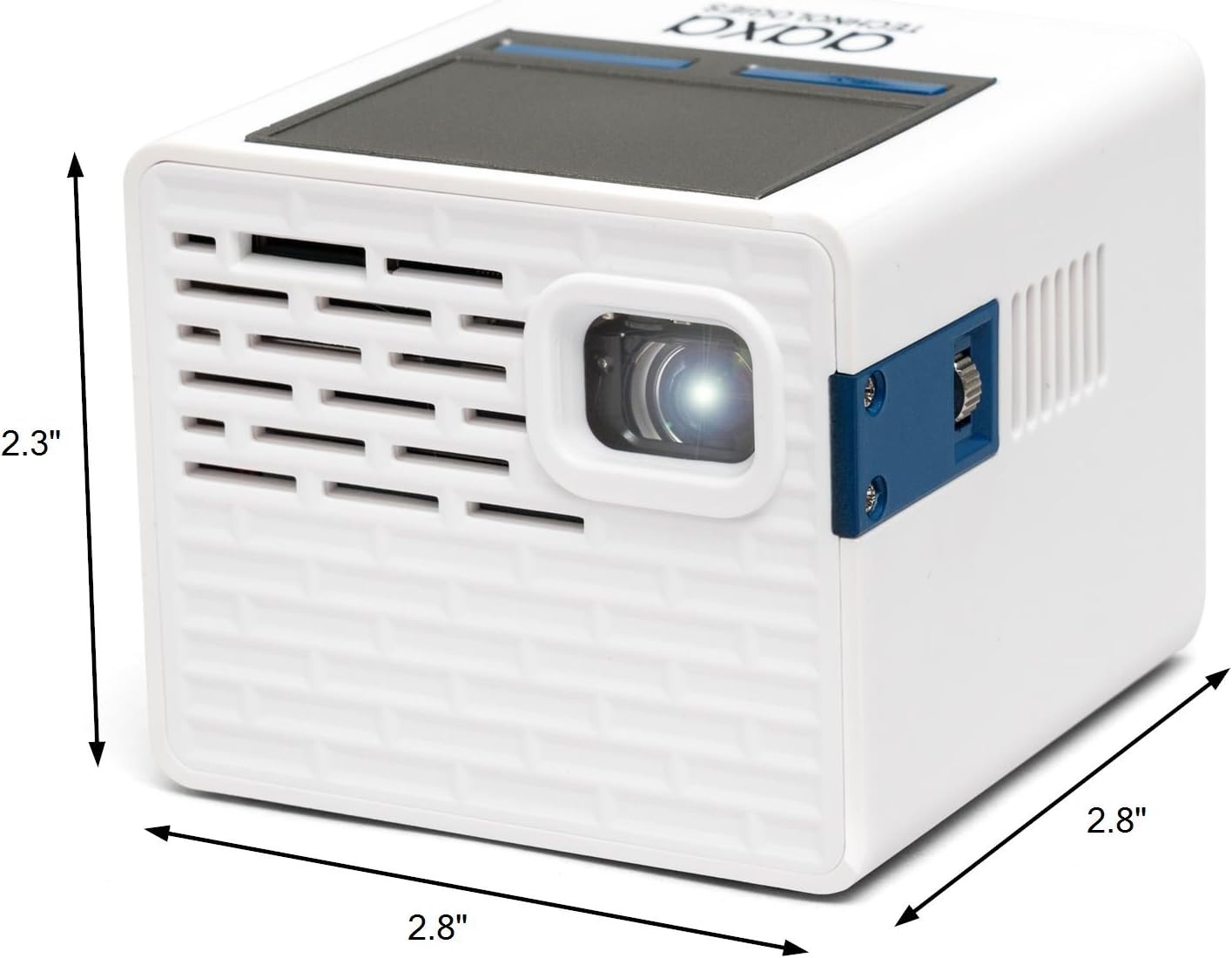
Figure 3.1: The AAXA P2-A Pico Projector, showcasing its compact dimensions of 2.8 inches by 2.8 inches by 2.3 inches.

Figura 3.2: superior view of the projector, illustrating the integrated trackpad for navigation.
The P2-A projector is designed for portability and ease of use. It features a robust set of connectivity options and an intuitive interface powered by Android.
3.1 Característiques físiques
- Disseny compacte: Small cube form factor for maximum portability.
- Integrated Trackpad: Located on the top surface for easy navigation of the Android interface.
- Roda de focus: Manual focus adjustment for image clarity.
- Altaveu integrat: Provides audio output directly from the projector.
3.2 Ports de connectivitat

Figure 3.3: Detailed diagram of the P2-A's input and output ports.
- Mini HDMI: For connecting external video sources such as laptops, gaming consoles, and streaming devices.
- Composite A/V (3.5mm Jack): For connecting older video sources.
- USB 2.0: Per connectar dispositius d'emmagatzematge USB per reproduir contingut multimèdia directament.
- Ranura per a targeta MicroSD: For playing media from microSD cards.
- Sortida d'àudio de 3.5 mm: Per connectar altaveus externs o auriculars.
- Entrada d'alimentació de CC: For connecting the power adapter to charge the device and operate it.
- MicroUSB: For firmware reflash only.
3.3 Connectivitat sense fil
- Wi-Fi: Wi-Fi integrat per a accés a Internet i transmissió en temps real.
- Bluetooth: For connecting wireless audio devices like speakers or headphones.
4. Configuració
4.1 Càrrega inicial
- Connect the provided power adapter to the DC Power input port on the projector.
- Connecteu l'adaptador de corrent a una presa de corrent.
- Allow the projector to charge fully before first use. The charging indicator light will change color (e.g., from red to green or orange to blue) when charging is complete.
4.2 Engegada/apagada
- To power on, press and hold the Power Button located on the rear of the projector until the device starts.
- To power off, press and hold the Power Button until a shutdown prompt appears on the screen, then confirm. Alternatively, a quick press may initiate shutdown depending on settings.
4.3 Ajust del focus
After powering on, adjust the focus wheel located on the side of the projector until the projected image appears sharp and clear on your screen or surface.
4.4 Connexió Wi-Fi
- Navigate to the 'Settings' menu on the Android interface.
- Select 'Wi-Fi' and turn it on.
- Trieu la xarxa Wi-Fi que vulgueu de la llista.
- Enter the network password if prompted and connect.

Figure 4.1: The P2-A projector positioned on its included mini tripod for stable projection.
5. Instruccions de funcionament
5.1 Navegació
Use the integrated trackpad on the top of the projector or the provided remote control to navigate the Android interface. The trackpad functions like a mouse, allowing you to move a cursor and select items. The remote control offers direct button access for common functions.
5.2 Reproducció multimèdia
The P2-A supports direct media playback from USB drives and MicroSD cards.
- Insert your USB drive into the USB 2.0 port or your MicroSD card into the MicroSD slot.
- Accedeix al file manager application from the Android home screen.
- Browse to your media files (videos, photos, music) and select to play.
5.3 Aplicacions de transmissió en temps real

Figure 5.1: The Netflix application interface projected by the P2-A, demonstrating streaming capabilities.
With built-in Wi-Fi and Android OS, you can download and use various streaming applications directly on the projector.
- Ensure the projector is connected to a Wi-Fi network.
- Access the app store (e.g., Google Play Store or pre-installed app store) from the home screen.
- Download and install your preferred streaming applications (e.g., Netflix, YouTube).
- Launch the application and log in with your credentials to begin streaming content.
5.4 Smartphone Mirroring
The P2-A supports mirroring content from smartphones and tablets.
- For iOS devices (iPhone, iPad): Use Airplay functionality. Ensure both the projector and your iOS device are on the same Wi-Fi network. Select the projector from your device's Airplay options.
- Per a dispositius Android: Third-party Android mirroring applications may be required. Refer to the AAXA Technologies website for recommended applications and instructions.

Figure 5.2: The P2-A projecting a movie outdoors, demonstrating its versatility.
6. Manteniment
6.1 Neteja de lents
To maintain optimal image quality, keep the projector lens clean.
- Feu servir un drap suau i sense borrissol dissenyat específicament per a lents òptiques.
- Netegeu suaument la lent amb moviments circulars.
- Avoid using abrasive cleaners or excessive force, which can scratch the lens.
6.2 Ventilació
Assegureu-vos una ventilació adequada per evitar el sobreescalfament.
- Do not block the ventilation openings on the projector.
- Operate the projector on a stable, flat surface with adequate airflow.
- Avoid placing the projector on soft surfaces like bedding or carpets that can obstruct airflow.
6.3 Cura de la bateria
Per allargar la durada de la bateria:
- Eviteu descarregar completament la bateria amb freqüència.
- Guardeu el projector en un lloc fresc i sec quan no l'utilitzeu durant períodes prolongats.
- Carregueu la bateria periòdicament si la guardeu durant molt de temps per evitar una descàrrega profunda.
7. Solució De Problemes
| Problema | Causa possible | Solució |
|---|---|---|
| El projector no s'encén | Low battery or power adapter issue | Ensure the projector is fully charged or connected to a working power outlet. Verify the power adapter is functioning correctly. |
| La imatge està borrosa o desenfocada | Focus wheel not adjusted | Rotate the focus wheel on the side of the projector until the image becomes clear. |
| Sense sortida de so | Volume too low, external audio not connected, or incorrect audio settings | Increase the volume. Check if external speakers/headphones are properly connected to the 3.5mm Audio Out or paired via Bluetooth. Verify audio output settings in the Android menu. |
| Cannot connect to Wi-Fi or Bluetooth | Incorrect settings, out of range, or network issue | Ensure Wi-Fi/Bluetooth is enabled in settings. Confirm correct network password. Move closer to the Wi-Fi router or Bluetooth device. Restart the projector and router. |
| El comandament a distància no respon | Low battery in remote, obstructed IR sensor | Replace the batteries in the remote control. Ensure there is a clear line of sight between the remote and the projector's IR sensor. |
| Smartphone mirroring not working | Network issues, incompatible app, or device settings | Ensure both devices are on the same Wi-Fi network. For Android, verify the correct mirroring app is installed and configured. For iOS, check Airplay settings. |
8. Especificacions
| Característica | Especificació |
|---|---|
| Marca | AAXA Technologies |
| Nom del model | P2 A |
| Número de model | KP-200-03 |
| Tecnologia de visualització | DLP |
| Resolució nativa | 854x480 (WVGA) |
| Resolució de visualització màxima | 1920 x 1080 (1080p input support) |
| Brillantor | 130 lúmens LED |
| Relació de contrast | 1000:1 |
| Vida operativa de la font de llum | 30,000 hores |
| Mida màxima de la imatge | 100 polzades |
| Distància mínima de llançament | 1 peus |
| Distància màxima de llançament | 10 peus |
| Tecnologia de connectivitat | Mini-HDMI, Composite A/V (3.5mm Jack), USB 2.0, MicroSD, Wireless (Wi-Fi, Bluetooth) |
| Tipus de controlador | Control d'aplicacions, control remot |
| Durada de la bateria | Up to 2.5 Hours (internal Lithium-ion) |
| Pes de l'article | 8.8 unces |
| Certificació de proves externes | CE, FCC |
9. Garantia i Suport
The AAXA Technologies P2-A Pico Projector is backed by a Garantia limitada del fabricant de 1 anys. Aquesta garantia cobreix els defectes de materials i de mà d'obra en ús normal.
For technical support, warranty claims, or further assistance, please contact AAXA Technologies customer service. Contact information can typically be found on the official AAXA Technologies weblloc web o dins de l'embalatge del producte.
You can visit the official AAXA Technologies store for more information: AAXA Technologies Store


