
DOBE TI-465
Manual d'instruccions del controlador de joc sense fil DOBE TI-465
Model: TI-465
1. Introducció
This manual provides comprehensive instructions for the DOBE TI-465 Wireless Gamepad Controller. This device is designed to enhance your gaming experience on various platforms, including Android smartphones, tablets, and PCs. It features wireless Bluetooth connectivity, a built-in rechargeable battery, and a telescopic holder for mobile devices. Please read this manual thoroughly before use to ensure proper operation and maintenance.
2. Informació de seguretat
- No exposeu el dispositiu a temperatures extremes, llum solar directa ni humitat elevada.
- Eviteu deixar caure o sotmetre el dispositiu a forts impactes.
- Mantingueu el dispositiu allunyat de l'aigua i altres líquids.
- No intenteu desmuntar ni modificar el dispositiu. Això anul·larà la garantia i pot causar danys.
- Utilitzeu només el volum de càrrega especificattage (DC 5V) to prevent damage to the battery and device.
- Mantenir fora de l'abast dels nens.
3. Contingut del paquet
Si us plau, comproveu el contingut del paquet en obrir-lo. Si falta algun article o hi ha algun dany, poseu-vos en contacte amb el vostre distribuïdor.
- DOBE TI-465 Wireless Gamepad Controller
- Cable de càrrega USB
- Manual d'usuari (aquest document)
4. Producte acabatview
The DOBE TI-465 is a versatile wireless gamepad designed for comfortable and precise control across various gaming platforms. It features a standard controller layout with dual analog sticks, a D-pad, action buttons, and shoulder buttons. A built-in telescopic holder allows for direct attachment of smartphones.

Imatge 4.1: Davant view of the DOBE TI-465 Wireless Gamepad Controller with all buttons labeled. This image illustrates the layout of the Cross function button (D-pad), Left Analog Stick, Right Analog Stick, HOME button, SELECT button, START button, L1/L2 Shoulder Buttons, R1/R2 Shoulder Buttons, X emission button, Y emission button, B emission button, and A emission button.
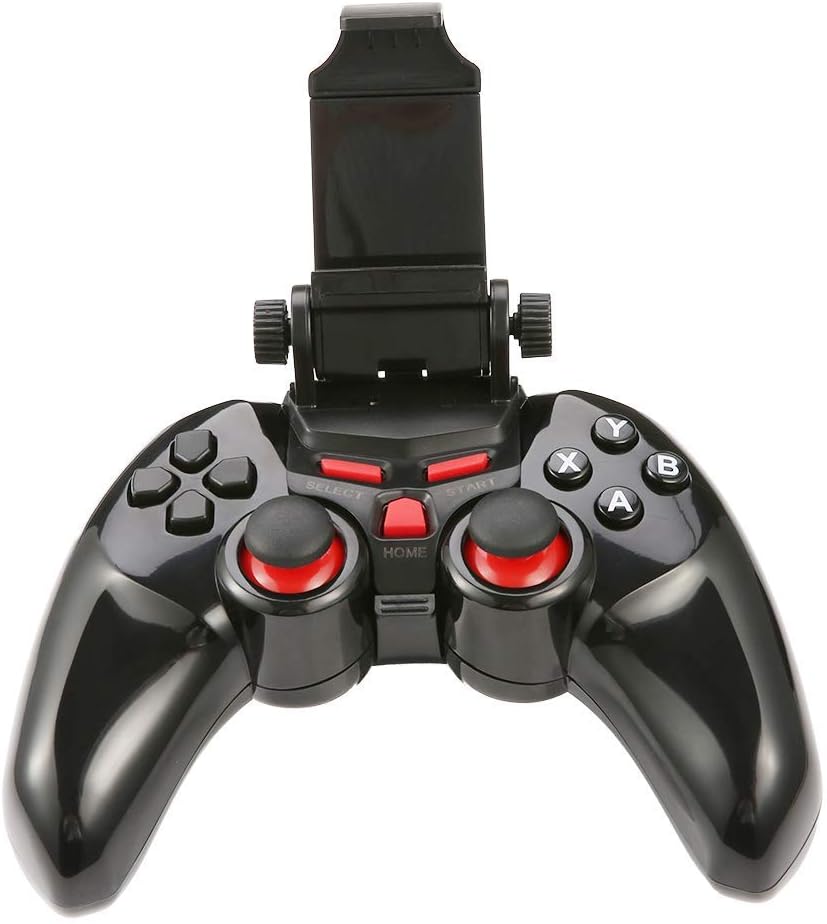
Imatge 4.2: The DOBE TI-465 Gamepad Controller with its integrated telescopic smartphone holder extended upwards, ready to securely hold a mobile device.
Disseny de 4.1 botons
- Cross Function Button (D-pad): Entrada direccional.
- Manets analògics esquerre/dret: 360-degree movement control.
- Botons A/B/X/Y: Botons d'acció.
- L1/L2/R1/R2 Shoulder Buttons: Additional action inputs.
- Botó SELECCIÓ: Game-specific function.
- Botó INICI: Game-specific function, often for pausing or menu access.
- Botó HOME: Returns to the main menu or exits the game.
5. Configuració
5.1 Càrrega del controlador
Before initial use, fully charge the controller.
- Connect the small end of the USB charging cable to the charging port on the controller.
- Connect the large end of the USB charging cable to a USB power source (e.g., computer USB port, USB wall adapter).
- El llum indicador de càrrega s'il·luminarà. Un cop completament carregat (aproximadament 2 hores), el llum canviarà o s'apagarà.
- Una càrrega completa proporciona aproximadament 20 hores d'ús continu.
5.2 Vinculació Bluetooth
The DOBE TI-465 uses Bluetooth 3.0 for wireless connection. Ensure your device's Bluetooth is enabled.
5.2.1 Pairing with Android Devices (Smartphones/Tablets/Android TV)
- Assegureu-vos que el controlador estigui apagat.
- Manteniu premut el botó CASA button until the indicator light starts flashing rapidly, indicating pairing mode.
- Al teu dispositiu Android, vés a Configuració > Bluetooth.
- Scan for available devices. The controller should appear as "TI-465" or similar.
- Select "TI-465" to pair. The indicator light on the controller will become solid once connected.
5.2.2 Pairing with PC (Windows XP/7/8)
- Assegureu-vos que el controlador estigui apagat.
- Manteniu premut el botó CASA button until the indicator light starts flashing rapidly.
- Al vostre ordinador, aneu a Bluetooth & other devices settings.
- Feu clic Afegeix Bluetooth o un altre dispositiu > Bluetooth.
- Select "TI-465" from the list of available devices.
- Follow any on-screen prompts to complete the pairing. The indicator light on the controller will become solid once connected.
5.3 Installing a Smartphone
The integrated telescopic holder supports smartphones up to 6 inches in size.
- Gently pull the top part of the holder upwards to extend it.
- Carefully place your smartphone into the holder, ensuring it is securely gripped by both the top and bottom clamps.
- Ajusteu l'angle per a l'òptim viewing.

Imatge 5.1: The DOBE TI-465 Gamepad Controller with a smartphone securely mounted in its telescopic holder, demonstrating its use for mobile gaming.
5.4 Game Hall Application
For optimal compatibility and access to a wide range of games, it is recommended to download a compatible game hall application.
- Scan the QR code provided in the original product manual (not included here) to download the recommended game hall APP (e.g., Chicken Simulator, Grape Game Hall).
- Install the application on your Android device.
- Launch the game hall APP and download games compatible with external controllers.
- Ensure your controller is connected via Bluetooth before launching games from the application.
6. Funcionament del controlador
6.1 Encès/Apagat
- Encès: Premeu el botó CASA button. The indicator light will flash and then become solid if connected to a previously paired device.
- Apagar: Manteniu premut el botó CASA button for approximately 5 seconds until the indicator light turns off. The controller will also automatically enter power-saving mode if idle for an extended period without a connection.
6.2 Compatibilitat del joc
The DOBE TI-465 is compatible with Android 3.2 and above systems, including various Android smartphones (e.g., Samsung Galaxy S9/S9+, S10/S10+, HUAWEI Mate 20/P30, OPPO R17, VIVO NEX X23 X27pro), Android TV BOX, Android TV, and PC (Win XP/7/8). It supports simulator games and iTunes compatible controller games.

Imatge 6.1: A user operating the DOBE TI-465 Gamepad Controller while connected to a television, demonstrating its use for TV gaming.
6.3 Mode d'estalvi d'energia
The controller is designed with user-friendly software to enter a power-saving mode automatically when not connected or idle for a period. To reactivate, press the CASA botó.
7. Manteniment
7.1 Neteja
- Wipe the controller with a soft, dry cloth.
- Do not use abrasive cleaners, solvents, or strong chemicals, as these may damage the surface.
- Eviteu que entri humitat a cap obertura.
7.2 Cura de la bateria
- Per allargar la durada de la bateria, eviteu descarregar-la completament amb freqüència.
- Charge the controller regularly, even if not in use for extended periods (e.g., once every 3 months).
- Store the controller in a cool, dry place.
8. Solució De Problemes
| Problema | Causa possible | Solució |
|---|---|---|
| El controlador no s'encén. | La bateria està esgotada. | Carregueu el controlador completament. |
| No es pot connectar per Bluetooth. | Controller not in pairing mode. El Bluetooth del dispositiu està desactivat. Interferència. | Ensure controller is in pairing mode (flashing light). Activa el Bluetooth al teu dispositiu. Move closer to the device; avoid other wireless devices. |
| Controller connects but does not respond in game. | Game not compatible. Game hall app not used. | Verify game compatibility. Use the recommended game hall app for supported titles. |
| Durada de la bateria curta. | La bateria no està completament carregada. Bateria envellida. | Ensure controller is fully charged before use. If battery life significantly degrades, consider contacting support. |
9. Especificacions
| Característica | Detall |
|---|---|
| Model | TI-465 |
| Connectivitat | Bluetooth 3.0 |
| abast sense fils | 6-8 meters (19.68-26.24 ft) |
| Voltage | DC 3.7V |
| Corrent de treball | 38 mA |
| Corrent Quiesc | <2uA |
| Volum d'entrada de càrregatage | DC 5V |
| Corrent de càrrega | <500 mA |
| Capacitat de la bateria | 400 mAh |
| Temps de treball | Aprox. 20 hores |
| Temps de càrrega | Aprox. 2 hores |
| Telescopic Holder Support | Up to 6-inch mobile phone |
| Sistema operatiu compatible | Android 3.2+, Windows XP/7/8 |
| Dimensions (aprox.) | 155mm (6.1 inch) x 105mm (4.1 inch) x 70mm (2.7 inch) (folded) |
| Número de model de l'article | 611864732190 |

Imatge 9.1: The DOBE TI-465 Gamepad Controller with its telescopic holder extended, showing approximate dimensions: 155mm (6.1 inches) width, 105mm (4.1 inches) height (controller body), and 70mm (2.7 inches) height (extended holder).
10. Garantia i Suport
Per obtenir informació sobre la garantia i assistència tècnica, consulteu la documentació proporcionada en el moment de la compra o poseu-vos en contacte amb el vostre distribuïdor. Conserveu el comprovant de compra per a reclamacions de garantia.
Ask a question about this manual
Ask about setup, troubleshooting, compatibility, parts, safety, or missing instructions. Manuals+ will review the question and use this page’s manual context to help answer it.