
Ergonomia sense gàbia RUb
Manual d'usuari
Estructura d'escriptori elèctrica de doble motor Uncaged Ergonomics
Model: RUb
Introducció
Gràcies per triar l'estructura d'escriptori elèctrica de doble motor Uncaged Ergonomics. Aquesta estructura d'escriptori ajustable de primera qualitat està dissenyada per millorar el vostre espai de treball permetent transicions fluides entre les posicions asseguda i dreta, promovent un entorn de treball més saludable i productiu. Aquest manual proporciona instruccions detallades per al muntatge, el funcionament, el manteniment i la resolució de problemes per garantir un rendiment i una longevitat òptims de l'estructura de l'escriptori.

Imatge: El marc d'escriptori elèctric de peu de doble motor Uncaged Ergonomics amb el seu panell de control, mostrantasinel disseny robust i la interfície intuïtiva.
Informació de seguretat
Llegiu atentament totes les instruccions de seguretat abans del muntatge i l'ús per evitar lesions o danys al producte.
- Límit de pes: No supereu la capacitat màxima de pes de 113 kg (250 lliures) a l'estructura de l'escriptori. La sobrecàrrega pot causar danys i representar un risc per a la seguretat.
- Tecnologia anti-colisió: L'estructura de l'escriptori està equipada amb tecnologia anticol·lisió. Aquesta característica ajuda a evitar que l'escriptori baixi sobre un objecte aturant el moviment si es detecta una obstrucció. Tanmateix, assegureu-vos sempre que el camí estigui lliure durant els ajustos d'alçada.
- Seguretat elèctrica:
- Assegureu-vos que el cable d'alimentació estigui connectat correctament a una presa de corrent amb connexió a terra.
- No feu servir l'escriptori amb un cable d'alimentació o un endoll danyats.
- Mantingueu els líquids allunyats dels components elèctrics.
- Desconnecteu l'alimentació abans de la neteja o el manteniment.
- Nens i animals de companyia: Mantingueu els nens i les mascotes allunyats de l'escriptori durant el funcionament per evitar accidents.
- Muntatge: Assegureu-vos que tots els components estiguin ben fixats segons les instruccions de muntatge. Les peces soltes poden provocar inestabilitat.
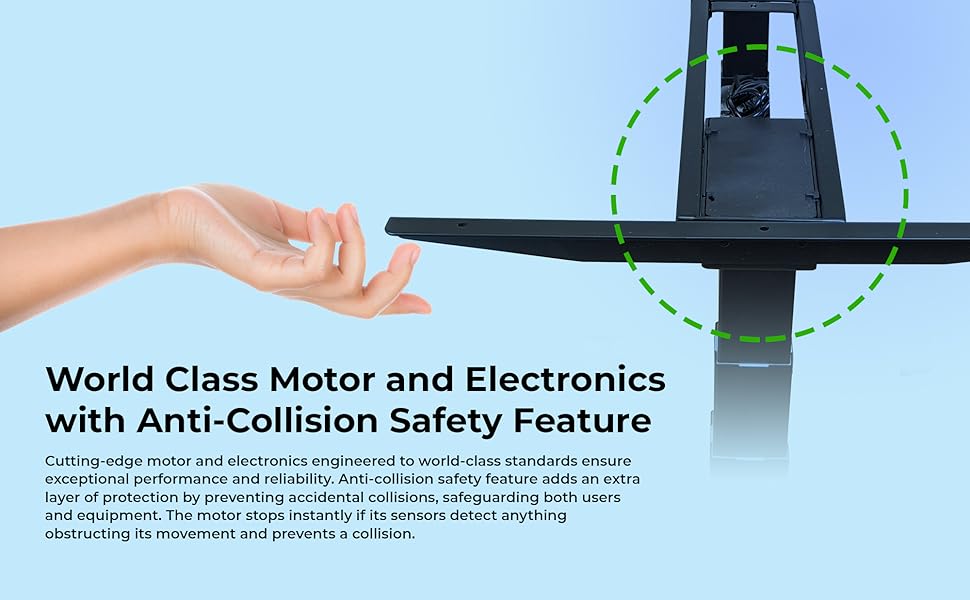
Imatge: Il·lustració de la funció de seguretat anticol·lisió, que mostra com s'atura l'escriptori si es detecta una obstrucció durant el moviment.
Contingut del paquet
Abans de començar el muntatge, verifiqueu que tots els components siguin presents i no estiguin danyats. Si hi ha alguna peça que falti o que estigui danyada, poseu-vos en contacte amb el servei d'atenció al client.
- 1 x Estructura d'escriptori elèctrica (inclou potes, travesser i peus)
- 1 x Panell de control amb pantalla LED
- 1 adaptador de corrent i cable
- Maquinari de muntatge (cargols, perns, volanderes)
- Clau Allen (per al muntatge)
- Lligaments de gestió de cables
- Espaciadors de goma (per a muntatge sobre taula)
- Manual d'usuari (aquest document)
Instruccions de muntatge (Configuració)
Segueix aquests passos per muntar el teu marc d'escriptori elèctric Uncaged Ergonomics. Es recomana que una segona persona t'ajudi amb el muntatge, sobretot quan manipulis components més grans o el taulell de la taula.
- Desempaquetar components: Traieu amb cura totes les peces de l'embalatge. L'embalatge està dissenyat per protegir els components durant el transport.
- Uneix els peus a les cames: Fixeu fermament els peus a la part inferior de cada pota de l'escriptori amb els cargols proporcionats.
- Connecta la barra transversal: Connecteu la barra transversal ajustable entre les dues potes de l'escriptori. Assegureu-vos que la barra transversal estigui estesa a l'amplada desitjada per al taulell de la taula.
- Caixa de control de muntatge: Fixeu la caixa de control a la zona designada del marc, normalment sota la barra transversal, utilitzant els accessoris proporcionats.
- Connecteu els motors i el panell de control: Connecteu els cables del motor de cada pota a la caixa de control. Connecteu el cable del panell de control a la caixa de control.
- Preparació de la taula: Col·loca el taulell que has triat cap per avall sobre una superfície suau i protegida. Col·loca el marc de l'escriptori muntat sobre el taulell, assegurant-te que estigui centrat i alineat.
- Muntar sobretaula: Feu servir els cargols i els separadors de goma proporcionats per fixar fermament el marc de l'escriptori al taulell. Pot ser necessari fer forats pilot al taulell segons el material.
- Gestió de cables: Feu servir les brides de cable incloses per passar i fixar tots els cables de manera ordenada, evitant que pengin o s'enganxin durant els ajustos d'alçada.
- Encès: Gireu l'escriptori amb cura cap amunt. Connecteu el cable d'alimentació a la caixa de control i després a una presa de corrent amb connexió a terra.
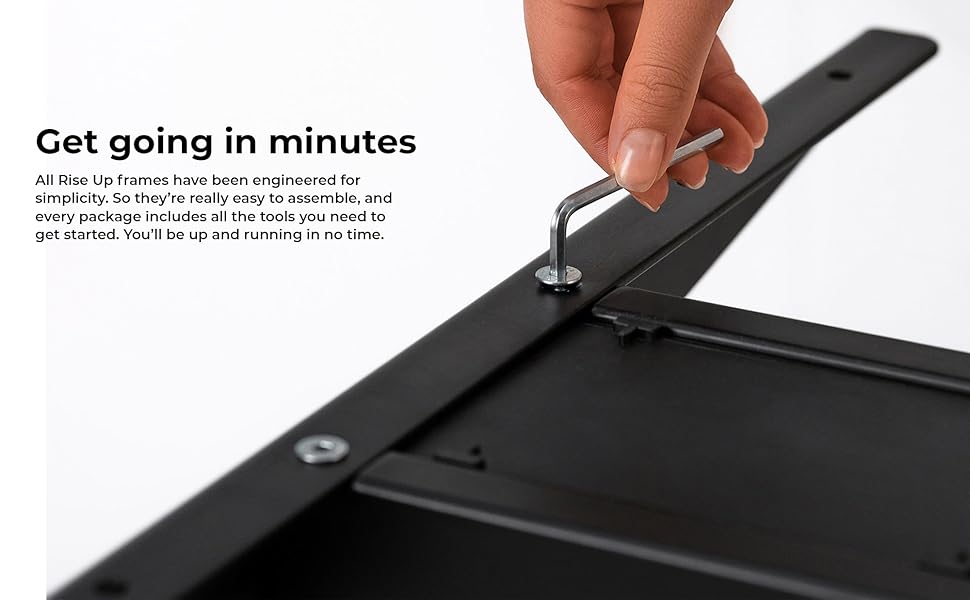
Imatge: Un primer pla view d'un pas de muntatge, que mostra l'ús d'una clau Allen per fixar un component de l'estructura de l'escriptori.
Instruccions de funcionament
El panell de control permet ajustaments d'alçada fàcils i precisos, juntament amb configuracions de memòria pràctiques.
Tauler de control acabatview
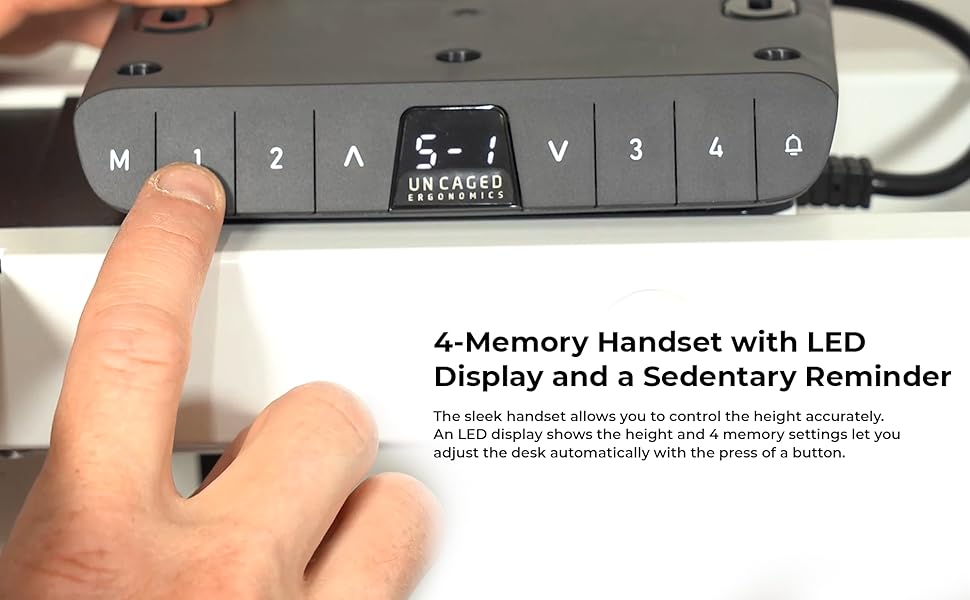
Imatge: El panell de control de l'escriptori amb una pantalla LED per a les lectures d'alçada i botons per a l'ajust manual i els preajustaments de memòria.
- Botons amunt/avall (▲ / ▼): Premeu i manteniu premut els botons de fletxa amunt o avall per ajustar manualment l'alçada de l'escriptori. Deixeu anar el botó per aturar-vos a l'alçada desitjada. La pantalla LED mostrarà l'alçada actual.
- Configuració de memòria (1, 2, 3, 4): L'estructura de l'escriptori compta amb quatre preajustos de memòria programables per a ajustaments ràpids d'alçada.
- Ajusteu l'escriptori a l'alçada desitjada amb els botons Amunt/Avall.
- Premeu el botó "M". La pantalla LED mostrarà "S-".
- En 3 segons, premeu el botó de memòria desitjat (1, 2, 3 o 4). La pantalla mostrarà "S-1", "S-2", etc., indicant que l'alçada s'ha desat.
- Per recuperar una alçada desada, simplement premeu el botó de memòria corresponent (1, 2, 3 o 4). L'escriptori es mourà automàticament a la posició desada.
- Funció anticol·lisió: Durant l'ajust d'alçada, si l'escriptori troba un obstacle, s'aturarà automàticament i girarà lleugerament per evitar danys.

Imatge: Un usuari treballant còmodament a l'escriptori en posició de peu, demostrant els avantatges ergonòmics de l'ajust d'alçada.
Característiques
El marc d'escriptori elèctric Uncaged Ergonomics està dissenyat amb funcions avançades per a un rendiment i una experiència d'usuari superiors.
- Sistema de motor dual: Equipat amb dos potents motors per a ajustos d'alçada ràpids, suaus i silenciosos. Cada motor està situat en una pota, cosa que garanteix un moviment sincronitzat i estabilitat.
- Ampli rang d'ajust d'alçada: Ajusteu l'alçada de l'escriptori sense problemes de 66 cm (26.1 polzades) a 131 cm (51.6 polzades), adaptant-se a una àmplia gamma d'altures i preferències d'usuari.
- Marc d'amplada ajustable: L'amplada del marc es pot ajustar de 107 cm (42.3 polzades) a 152 cm (71 polzades), cosa que permet la compatibilitat amb diverses mides de taulell.
- 3-StagColumnes elevadores: El tres-stagEl disseny de la pota proporciona un major rang d'alçada i una major estabilitat, fins i tot a la màxima extensió.
- Tecnologia anti-colisió: Sensors avançats detecten obstacles durant el moviment, aturant i invertint automàticament la posició de l'escriptori per evitar danys.
- 4 preajustos de memòria: Desa les altures preferides per seure i estar dret per a ajustos ràpids amb un sol toc.
- Pantalla d'alçada LED: La pantalla LED integrada al panell de control mostra l'alçada actual precisa de l'escriptori.
- Construcció robusta: Fet d'acer d'alta resistència amb recobriment en pols per a una durabilitat excepcional i un acabat elegant.
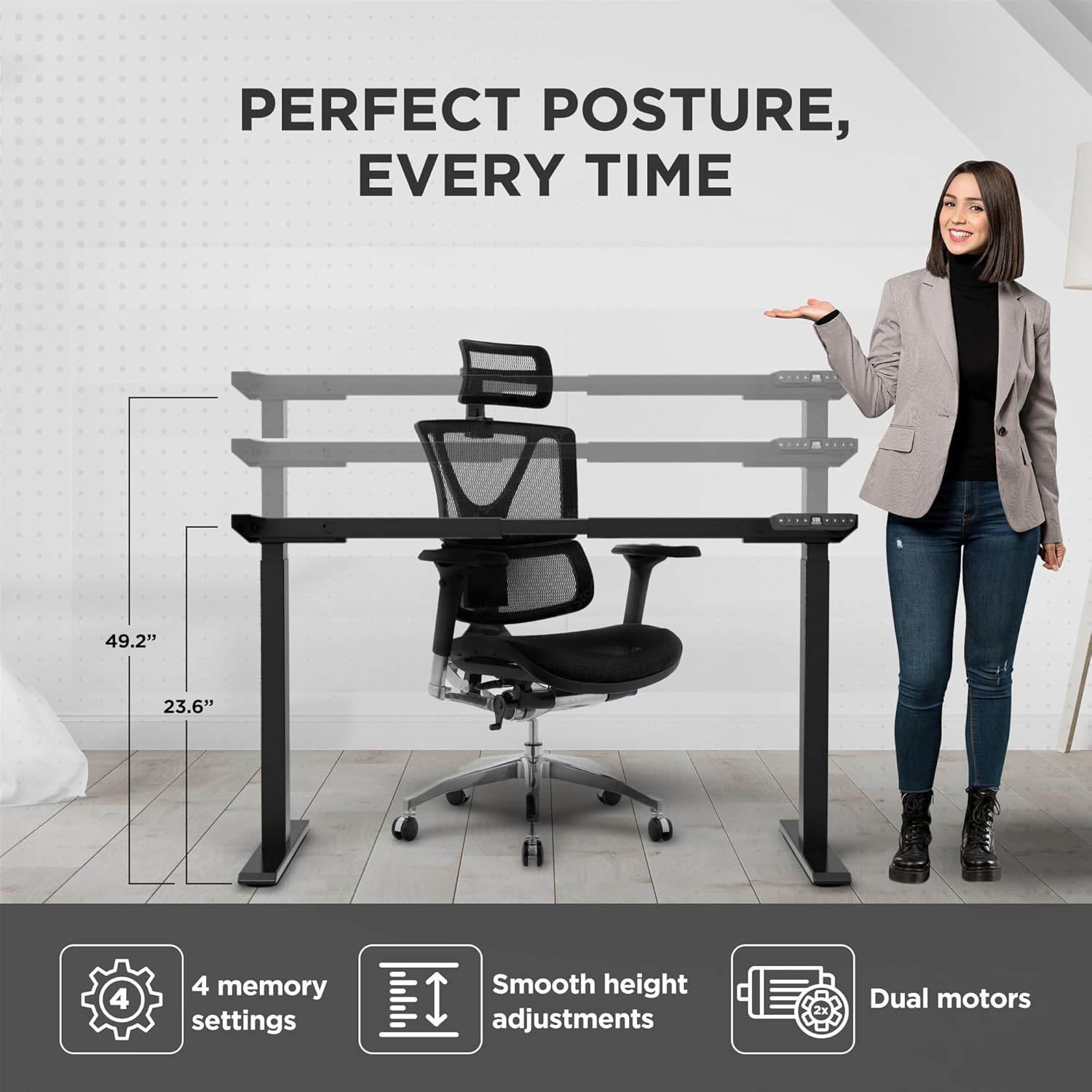
Imatge: Representació visual de l'alçada ajustable de l'estructura de l'escriptori i les seves funcions principals, com ara 4 configuracions de memòria, ajustaments suaus i motors duals.

Imatge: Dues persones, una dreta i l'altra asseguda, que il·lustren l'àmplia gamma d'ajust d'alçada que ofereix l'estructura de l'escriptori.
Especificacions
| Número de model | FREGAR |
| Marca | Ergonomia sense gabia |
| Color | Negre |
| Interval d'ajust d'altura | 66 - 131 cm (26.1 - 51.6 polzades) |
| Rang d'ajust d'amplada | 107 - 152 cm (42.3 - 71 polzades) |
| Capacitat màxima de pes | 113 kg (250 lliures) |
| Material | Acer d'alta resistència |
| Acabar | Recobert de pols |
| Motors | Motors duals |
| Cama Stages | 3-Stage |
| Presets de memòria | 4 |
| Característiques especials | Tecnologia anticol·lisió, pantalla LED d'alçada |
| Dimensions del producte (muntat) | 69.85 x 152.4 x 131.06 cm (27.5 x 60 x 51.6 polzades) |
| Pes de l'article | 22.68 kg (50 lliures) |

Imatge: El marc de l'escriptori que il·lustra la seva compatibilitat amb diverses mides de taulell, que van des de 42.3 fins a 71 polzades d'amplada.
Manteniment
Un manteniment regular ajudarà a garantir el rendiment i l'aspecte a llarg termini del marc del vostre escriptori.
- Neteja: Netegeu el marc de l'escriptori amb un drap suauamp drap. Eviteu utilitzar productes químics agressius o netejadors abrasius, ja que poden danyar l'acabat.
- Comproveu les connexions: Reviseu periòdicament tots els cargols i perns per assegurar-vos que estiguin ben ajustats. Torneu a apretar-los si cal.
- Gestió de cables: Assegureu-vos que els cables estiguin ben organitzats i que no estiguin pinçats ni enredats, ja que això podria afectar el moviment o causar danys.
- Cura del motor: Els motors duals estan dissenyats per a la seva durabilitat i no requereixen cap lubricació especial. Eviteu exposar-los a un excés de pols o humitat.
Resolució de problemes
Si teniu algun problema amb l'estructura de l'escriptori, consulteu els problemes i solucions més comuns que s'indiquen a continuació. Si el problema persisteix, poseu-vos en contacte amb el servei d'atenció al client.
| Problema | Causa possible | Solució |
|---|---|---|
| L'escriptori no es mou ni respon als controls. | Cable d'alimentació desconnectat; caixa de control no connectada correctament; error del sistema. |
|
| L'escriptori es mou de manera irregular o fa sorolls estranys. | Càrrega desigual; connexions fluixes; obstrucció. |
|
| La configuració de la memòria no es desa ni es recupera correctament. | Procediment de desament incorrecte; error temporal del sistema. |
|
| La funció anticol·lisió s'activa massa sovint o no s'activa en absolut. | Configuració de sensibilitat; obstrucció física. |
|
Garantia i Suport
Uncaged Ergonomics es compromet a proporcionar productes d'alta qualitat dissenyats per a la seva durabilitat i longevitat. Els nostres marcs d'escriptori estan dissenyats per complir amb els estàndards de qualitat comercial, reflectint més d'una dècada d'experiència demostrada en la fabricació de solucions ergonòmiques.
Tot i que els detalls específics de la garantia poden variar segons la regió o el punt de compra, Uncaged Ergonomics garanteix la qualitat dels seus productes. Per a qualsevol pregunta, assistència tècnica o necessitats de suport, poseu-vos en contacte amb el servei d'atenció al client d'Uncaged Ergonomics. El nostre equip es dedica a garantir la vostra satisfacció i a ajudar-vos amb qualsevol problema que pugueu tenir.
Visiteu la pàgina oficial d'Uncaged Ergonomics. weblloc web o consulteu la documentació de compra per obtenir la informació de garantia i les dades de contacte més actualitzades.
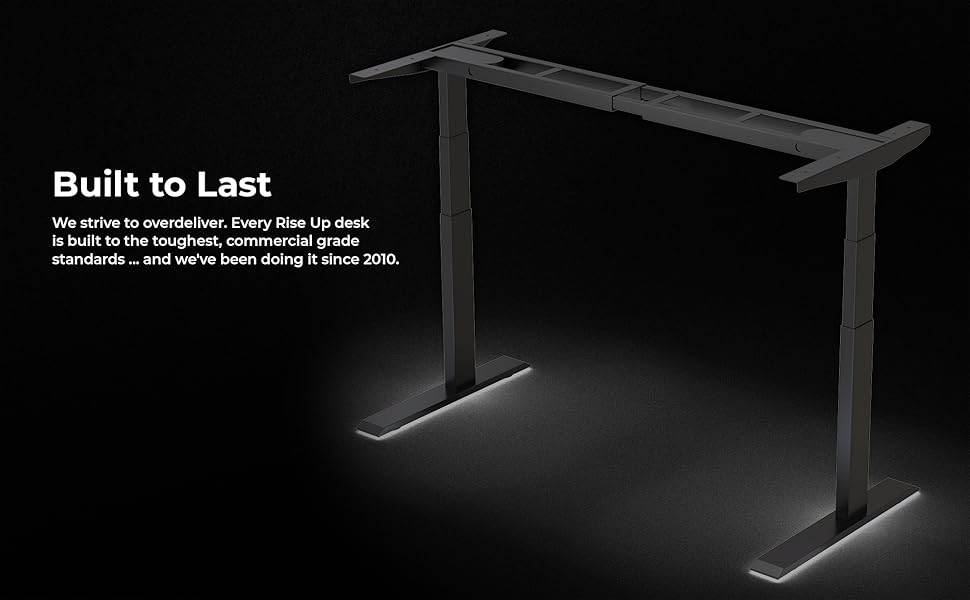
Imatge: L'estructura de l'escriptori il·luminada, cosa que emfatitza la seva construcció robusta i el compromís de la marca amb la creació de productes "Construïts per durar" des del 2010.
Ask a question about this manual
Ask about setup, troubleshooting, compatibility, parts, safety, or missing instructions. Manuals+ will review the question and use this page’s manual context to help answer it.