
Alarm.com ADC-V723x
Alarm.com ADC-V723 Outdoor Wi-Fi Camera User Manual
Model: ADC-V723x
1. Producte acabatview
The Alarm.com ADC-V723 is a high-definition 1080p outdoor Wi-Fi camera designed to provide reliable surveillance for your property. Featuring High Dynamic Range (HDR) and powerful Video Analytics, it can detect and alert you to people, vehicles, and animals. Its robust design ensures performance in various lighting conditions and environments. This manual provides comprehensive instructions for installation, operation, and maintenance.
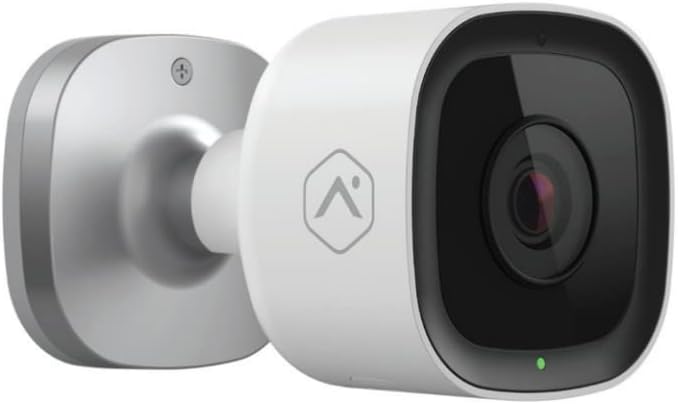
Imatge: Frontal view of the Alarm.com ADC-V723 Outdoor Wi-Fi Camera, showing its compact, bullet-style design and lens.
2. Informació de seguretat
- Ensure the camera is installed in a location that complies with local building codes and regulations.
- Use only the power adapter supplied with the camera.
- No exposeu la càmera a temperatures extremes fora del seu rang de funcionament.
- Avoid placing the camera near sources of strong electromagnetic interference.
- Desconnecteu l'alimentació abans de netejar o realitzar qualsevol manteniment.
3. Contingut del paquet
Verifiqueu que tots els elements siguin presents al vostre paquet:
- Alarm.com ADC-V723 Outdoor Wi-Fi Camera
- Placa de muntatge
- Cargols de muntatge i ancoratges de paret
- Adaptador d'alimentació
- Guia d'instal·lació (aquest document)
4. Configuració i instal·lació
4.1 Selecció d'una ubicació
Select an outdoor location that provides the desired viewing angle and is within range of your Wi-Fi network. The camera is designed for outdoor use and is IP67 rated for weather resistance. Consider areas with good lighting or where the camera's night vision capabilities can be maximized.
4.2 Muntatge de la càmera
- Secure the mounting plate to the desired surface using the provided screws and wall anchors. Ensure the plate is level.
- Attach the camera to the mounting plate by aligning the camera with the plate and twisting until it locks securely.
- Adjust the camera's angle to achieve the optimal field of view.
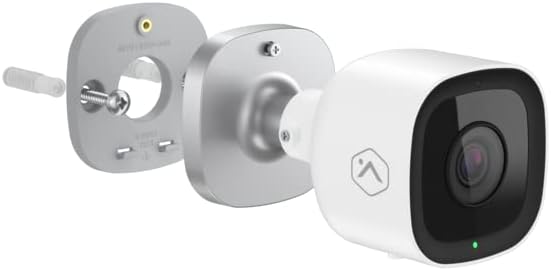
Imatge: Explosió view showing the Alarm.com ADC-V723 camera, its mounting plate, and a screw with wall anchor, illustrating the assembly process.
4.3 Powering On and Connecting to Wi-Fi
- Connect the power adapter to the camera and plug it into a suitable outdoor power outlet.
- Wait for the camera's LED indicator to show a specific status (refer to the LED status guide in Section 5.2).
- Download the Alarm.com mobile application from your device's app store.
- Follow the in-app instructions to add the ADC-V723 camera to your Alarm.com system and connect it to your Wi-Fi network. This typically involves scanning a QR code on the camera or entering its MAC address.
5. Funcionament de la càmera
5.1 Viu View i Enregistrament
Access live video feeds and recorded clips through the Alarm.com mobile app or web portal. You can view foo en temps realtage, initiate manual recordings, and review event-triggered clips.
5.2 indicadors d'estat LED
The camera features an LED indicator that communicates its current status:
- Verd sòlid: Connected to Wi-Fi and operating normally.
- Verd intermitent: Attempting to connect to Wi-Fi.
- Vermell sòlid: Not connected to Wi-Fi or an error has occurred.
- Vermell intermitent: Firmware update in progress or factory reset.
5.3 Video Analytics and Alerts
The ADC-V723 supports advanced Video Analytics. Configure detection zones and rules within the Alarm.com app to receive specific alerts for people, vehicles, or animals entering designated areas. Alerts can be customized to send notifications to your mobile device.
5.4 Night Vision and HDR
The camera is equipped with infrared night vision, allowing clear video capture up to 40 feet in low-light conditions. High Dynamic Range (HDR) technology enhances video quality by balancing bright and dark areas, providing clearer images in challenging lighting environments.
6. Manteniment
- Netegeu regularment la lent de la càmera amb un drap suau iamp drap per garantir una qualitat d'imatge nítida. No utilitzeu productes químics agressius.
- Periodically check the mounting hardware to ensure the camera remains securely fastened.
- Ensure the power cable is free from damage and properly secured.
- Keep the camera's firmware updated through the Alarm.com app to ensure optimal performance and access to new features.
7. Solució De Problemes
| Problema | Causa possible | Solució |
|---|---|---|
| La càmera no s'encén | Sense corrent, adaptador defectuós, connexió fluixa. | Check power outlet, ensure connections are secure, try a different outlet. |
| No es pot connectar a la Wi-Fi | Incorrect Wi-Fi password, camera too far from router, network interference. | Verify Wi-Fi password, move camera closer to router, reduce interference, restart router. |
| Poca qualitat de vídeo | Lent bruta, poca amplada de banda, mala il·luminació. | Clean lens, check internet speed, ensure adequate lighting or rely on night vision. |
| Sense alertes de moviment | Incorrect Video Analytics settings, notifications disabled. | Review and adjust Video Analytics rules in the app, enable notifications for the camera. |
8. Especificacions
| Característica | Detall |
|---|---|
| Número de model | ADC-V723x |
| Resolució de captura de vídeo | 1080p (1920x1080) |
| Connectivitat | Wi-Fi |
| Font d'alimentació | Elèctric amb cable |
| Ús interior/exterior | A l'aire lliure |
| Viewangle ing | 167 graus |
| Gamma de visió nocturna | 40 peus |
| Material | Metall |
| Dimensions (L x A x A) | 2.5 x 2.5 x 4.5 polzades |
| Pes de l'article | 1.32 lliures |
| Classificació de protecció internacional | IP67 |
| Característica especial | Motion Sensor, HDR |
9. Garantia i Suport
For warranty information and technical support, please contact your Alarm.com service provider or visit the official Alarm.com weblloc web. No intenteu reparar el dispositiu vosaltres mateixos, ja que això podria anul·lar la garantia.
For additional resources and FAQs, please refer to the Alarm.com support portal.
Documents relacionatsADC-V723x


Ask a question about this manual
Ask about setup, troubleshooting, compatibility, parts, safety, or missing instructions. Manuals+ will review the question and use this page’s manual context to help answer it.