
Cambridge Soundworks SWOA3UBLK
Manual d'usuari de l'altaveu Bluetooth ultraportàtil OontZ Angle 3
Model: SWOA3UBLK
Introducció
Gràcies per la compraasing the OontZ Angle 3 Ultra Portable Bluetooth Speaker by Cambridge Soundworks. This manual provides essential information for setting up, operating, maintaining, and troubleshooting your speaker. Designed for superior sound quality and durability, the OontZ Angle 3 Ultra features a 14-watt output, rich bass, IPX7 waterproofing, and an impressive 30-meter Bluetooth range. Enjoy up to 20 hours of playtime on a single charge.

Image: The OontZ Angle 3 Ultra Portable Bluetooth Speaker, showcasing its sleek black, triangular design with control buttons on one end.
Configuració
1. Articles inclosos
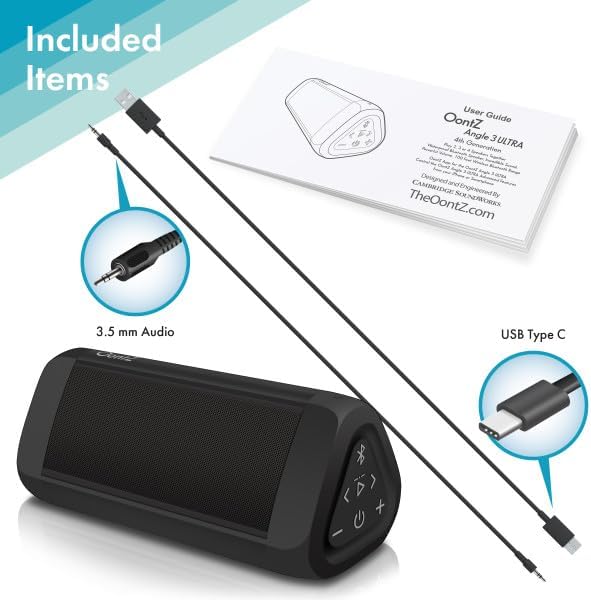
Image: The OontZ Angle 3 Ultra speaker along with its accessories: a Quick Start Guide, a 3.5mm audio cable, and a USB Type-C charging cable.
Before first use, ensure all components are present:
- OontZ Angle 3 Ultra Bluetooth Speaker
- Quick Start Guide (Full manual available online)
- Cable d'àudio de 3.5 mm
- Cable de càrrega USB tipus C
2. Carregant l’altaveu
The speaker comes with a built-in rechargeable Lithium-ion battery. For optimal performance, fully charge the speaker before first use.
- Locate the charging port on the side of the speaker, protected by a rubber flap.
- Connect the supplied USB Type-C charging cable to the speaker's charging port.
- Connect the other end of the USB cable to a USB wall charger (not included) or a computer USB port.
- The charging indicator light will illuminate. A full charge takes approximately 20 hours for the first charge, and subsequent charges will be faster.

Imatge: Un primer pla view of the speaker's side, showing the 3.5mm AUX input and the USB-C charging port, typically protected by a waterproof flap.
3. Emparellament Bluetooth
Pair your OontZ Angle 3 Ultra with your Bluetooth-enabled device (smartphone, tablet, laptop).
- Enceneu l'altaveu mantenint premut el botó d'engegada (⏻) until the indicator light flashes blue.
- Al dispositiu, vés a la configuració de Bluetooth i assegura't que el Bluetooth estigui activat.
- Look for "OontZ Angle 3 Ultra" in the list of available devices and select it.
- Once paired, the speaker will emit a confirmation tone, and the indicator light will turn solid blue.
4. Connecting via AUX Input
You can connect non-Bluetooth devices using the 3.5mm audio cable.
- Connecteu un extrem del cable d'àudio de 3.5 mm al port AUX IN de l'altaveu.
- Connecteu l'altre extrem a la presa d'auriculars o a la sortida d'àudio del dispositiu.
- L'altaveu canviarà automàticament al mode AUX.
5. Pairing Two Speakers for Stereo Sound (OontZ Dual Wireless Stereo)
Enhance your audio experience by wirelessly connecting two OontZ Angle 3 Ultra speakers for impressive stereo separation.

Image: Two OontZ Angle 3 Ultra speakers positioned to provide stereo sound, with two individuals enjoying music in an outdoor setting.
- Ensure both OontZ Angle 3 Ultra speakers are charged and powered on.
- Disconnect both speakers from any previously paired Bluetooth devices.
- On one speaker (this will be the Left Channel), press and hold the Bluetooth button (Ⓑ) for 3 seconds until you hear a tone.
- On the second speaker (this will be the Right Channel), press and hold the Bluetooth button (Ⓑ) for 3 seconds until you hear a tone.
- The speakers will automatically connect to each other. Once connected, you will hear a confirmation tone, and the indicator lights on both speakers will turn solid blue.
- Now, connect your audio device to the Left Channel speaker via Bluetooth as described in "Bluetooth Pairing" above.
- For video audio, connect your device or TV to the Left Channel speaker using the 3.5mm audio cable.
Instruccions de funcionament
1. Controls sobreview
| Botó/indicador | Funció |
|---|---|
| ⏻ (Potència) | Premeu i manteniu premut per encendre/apagar. |
| + (Pujar el volum) | Premeu per augmentar el volum. |
| - (Baixar el volum) | Premeu per reduir el volum. |
| ▷ (Reproduir/Pausa) | Premeu per reproduir/pausar música. |
| < (Previous Track) | Premeu per anar a la pista anterior. |
| > (Next Track) | Premeu per anar a la pista següent. |
| Ⓑ (Bluetooth) | Press to disconnect current Bluetooth device and enter pairing mode. Press and hold for 3 seconds to initiate OontZ Dual Wireless Stereo pairing. |
| Llum indicadora | Flashes blue for pairing, solid blue for connected, red for charging. |
2. Trucades mans lliures
The OontZ Angle 3 Ultra has a built-in microphone for hands-free calls.
- Quan entri una trucada, la música es posarà en pausa. Prem el botó ▷ botó per respondre la trucada.
- Per finalitzar una trucada, premeu el botó ▷ botó de nou.
- Per rebutjar una trucada, manteniu premut el botó ▷ botó durant 2 segons.
- To activate Siri or Google Assistant, press and hold the ▷ button for 2 seconds when not on a call.
3. Waterproof Features (IPX7)
The OontZ Angle 3 Ultra is IPX7 certified, meaning it is fully waterproof and can be immersed in water up to 1 meter (3.3 feet) for up to 30 minutes.
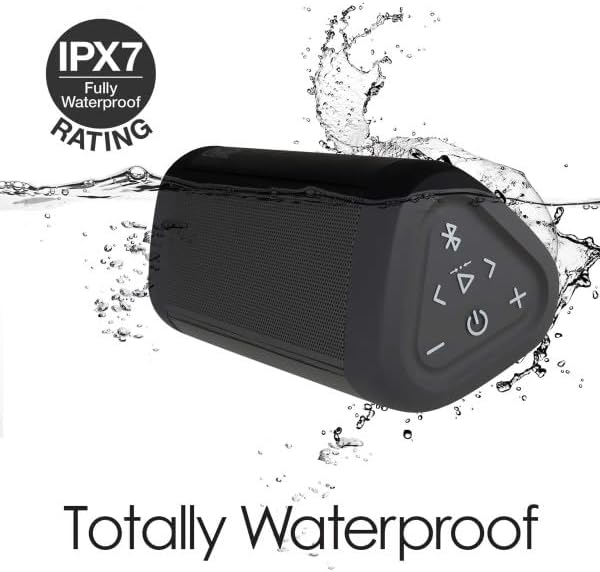
Image: The OontZ Angle 3 Ultra speaker shown partially submerged in water, illustrating its IPX7 waterproof capability.
- Ensure the rubber flap covering the charging and AUX ports is securely closed before exposing the speaker to water.
- Ideal for use by the pool, at the beach, or in the shower.
- Do not expose to salt water or chemicals. Rinse with fresh water after exposure to chlorinated water.
Manteniment
1. Neteja
Per netejar l'altaveu, feu servir un drap suau iamp tela. No utilitzeu netejadors abrasius ni dissolvents.
2. Emmagatzematge
Guardeu l'altaveu en un lloc fresc i sec, allunyat de la llum solar directa i de temperatures extremes.
3. Cura de la bateria
Per allargar la durada de la bateria:
- Eviteu descarregar completament la bateria amb freqüència.
- Carregueu l'altaveu regularment, fins i tot si no l'esteu fent servir, per mantenir la bateria en bon estat.
- Do not expose the speaker to temperatures above 60°C (140°F).
Resolució de problemes
| Problema | Solució |
|---|---|
| L'altaveu no s'encén. | Assegureu-vos que la bateria estigui carregada. Connecteu l'altaveu a una font d'alimentació amb el cable USB-C. |
| Sense so o amb un volum baix. | Check the volume level on both the speaker and your connected device. Ensure the speaker is properly paired via Bluetooth or connected via AUX. |
| No es pot emparellar per Bluetooth. | Ensure the speaker is in pairing mode (flashing blue light). Turn off and on Bluetooth on your device. Move the speaker closer to your device. Disconnect from other Bluetooth devices. |
| Distorsió del so a un volum alt. | Reduce the volume on the speaker or your connected device. Ensure the audio source is not distorted. |
| OontZ Dual Wireless Stereo not connecting. | Ensure both speakers are disconnected from other Bluetooth devices. Follow the pairing steps carefully, ensuring both speakers are in pairing mode for stereo connection. |
Especificacions
Key technical specifications for the OontZ Angle 3 Ultra Portable Bluetooth Speaker:
- Número de model: SWOA3UBLK
- Dimensions (L x A x A): 16.26 x 7.11 x 7.11 cm (6.4 x 2.8 x 2.8 polzades)
- Pes: 480 grams (1.06 lliures)
- Potència de sortida dels altaveus: 14 watts
- Versió Bluetooth: 4.2
- Interval sense fil: Up to 30 meters (100 feet) unobstructed
- Durada de la bateria: Up to 20 hours (at 2/3 volume)
- Classificació impermeable: IPX7 (Submergible fins a 1 metre durant 30 minuts)
- Connectivitat: Bluetooth, 3.5mm AUX Input, USB-C Charging
- Components inclosos: Speaker, 3.5mm Audio Cable, USB-C Charging Cable, Quick Start Guide

Image: Diagram showing the dimensions of the OontZ Angle 3 Ultra speaker: 6.5 inches in length, 3 inches in width, and 2.75 inches in height.
Garantia i Suport
For detailed warranty information and customer support, please visit the official OontZ website. The full localized manual is also available there.
Oficial Weblloc: www.theoontz.com
Cambridge Soundworks is committed to providing high-quality audio products and customer satisfaction.
Ask a question about this manual
Ask about setup, troubleshooting, compatibility, parts, safety, or missing instructions. Manuals+ will review the question and use this page’s manual context to help answer it.