
1. Producte acabatview
The Teltonika RUT240 is an industrial 4G LTE Wi-Fi router designed for reliable cellular communication in various environments. This manual provides essential information for its proper installation, configuration, and use.
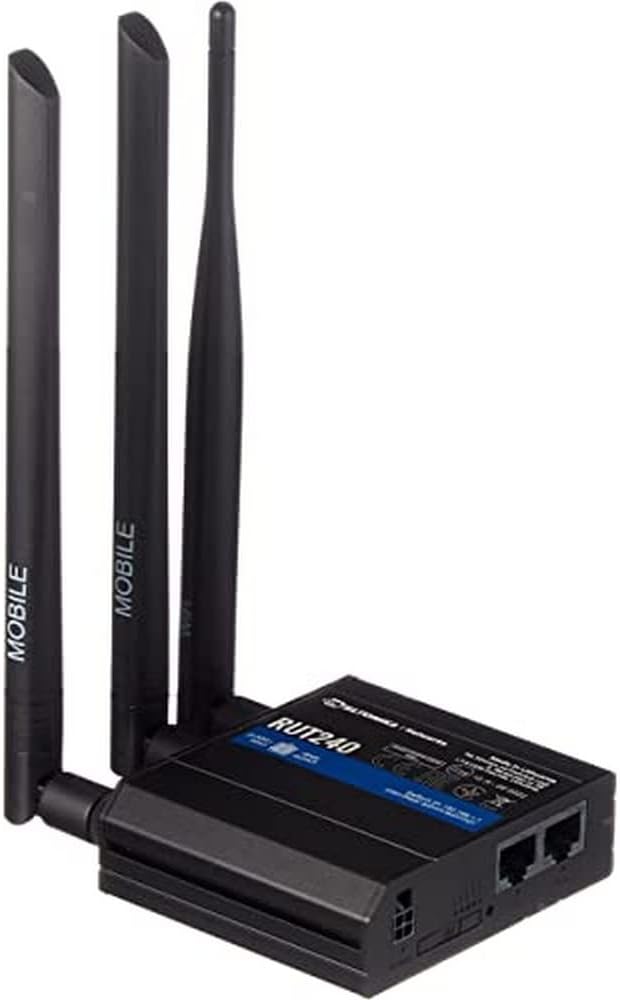
Figura 1: Davant view of the Teltonika RUT240 LTE Router with its three attached antennas, illustrating its compact design.
2. Contingut del paquet
Abans de continuar amb la instal·lació, comproveu que tots els elements siguin presents al paquet:
- Encaminador Teltonika RUT240 LTE
- Adaptador d'alimentació
- Cable Ethernet
- Two LTE Antennas (magnetic mount, SMA male)
- One Wi-Fi Antenna (magnetic mount, RP-SMA male)
- Guia d'inici ràpid

Figura 2: The Teltonika RUT240 router displayed with its standard accessories, including the power adapter and an Ethernet cable.
3. Configuració
3.1 Instal·lació de maquinari
- Insereix la targeta SIM: Locate the SIM card slot on the side of the router. Insert your activated Mini-SIM card into the slot until it clicks into place. Ensure the SIM card is correctly oriented as indicated on the device.
- Col·loca les antenes: Screw the two LTE antennas onto the SMA connectors labeled "MOBILE" and the Wi-Fi antenna onto the RP-SMA connector labeled "WLAN" on the router. Ensure they are securely tightened.
- Connectar l'alimentació: Connect the power adapter to the power socket on the router and then plug the adapter into a power outlet. The router will begin to power on.
- Optional: Ethernet Connection: For initial configuration or wired network access, connect one end of the Ethernet cable to the LAN port on the router and the other end to your computer's Ethernet port.

Figura 3: lateral view of the Teltonika RUT240, highlighting the SIM card slot and the antenna connection points for mobile and Wi-Fi signals.

Figura 4: posterior view of the Teltonika RUT240, showing the power input, SIM card slot, and the LAN/WAN Ethernet ports.
3.2 Configuració inicial
- Accés Web Interfície: Obre a web browser on your connected computer and navigate to http://192.168.1.1.
- Inici de sessió: Enter the default username "admin" and the password found on the device label or packaging. You will be prompted to change the password for security.
- Assistent de configuració ràpida: Follow the on-screen Quick Setup Wizard to configure basic settings such as mobile data connection (APN settings), Wi-Fi network name (SSID), and password.
4. Instruccions de funcionament
4.1 Indicadors LED
The RUT240 features several LED indicators to provide status information:
- LED d'alimentació: Indica l'estat de l'alimentació. Verd fix quan està encès.
- Mobile Signal Strength LEDs: Multiple LEDs indicate the strength of the cellular signal. More illuminated LEDs mean stronger signal.
- Network Type LEDs: Indicate the active cellular network type (e.g., 2G, 3G, 4G/LTE).
- LED Wi-Fi: Indica l'estat del mòdul Wi-Fi.
- LED LAN/WAN: Indiqueu l'activitat als ports Ethernet respectius.
4.2 Connexió a Wi-Fi
- On your device (smartphone, laptop), search for available Wi-Fi networks.
- Select the network name (SSID) configured during the initial setup.
- Enter the Wi-Fi password (WPA2 key) when prompted.
- Once connected, your device should have internet access via the RUT240.
4.3 Configuració avançada
El del router web interface (RutOS) offers extensive configuration options for advanced users, including VPN, firewall rules, SMS utilities, and more. Refer to the official Teltonika documentation for detailed guides on advanced features.
5. Manteniment
- Actualitzacions de firmware: Regularly check for and install firmware updates from the official Teltonika website to ensure optimal performance, security, and access to new features. This can typically be done via the router's web interfície.
- Neteja: Keep the router clean and free from dust. Use a soft, dry cloth. Do not use liquid cleaners.
- Condicions ambientals: Ensure the router is operated within its specified temperature and humidity ranges to prevent damage. Avoid direct sunlight and excessive heat.
- Contrasenyes segures: Periodically change your router's login password and Wi-Fi password to maintain network security.
6. Solució De Problemes
| Problema | Causa possible | Solució |
|---|---|---|
| Sense accés a Internet |
|
|
| No es pot accedir Web Interfície |
|
|
| Wi-Fi Not Visible or Connectable |
|
|
6.1 Restabliment de fàbrica
If you encounter persistent issues, a factory reset may resolve them. To perform a factory reset:
- Assegureu-vos que l'encaminador estigui encès.
- Locate the reset button (often recessed) on the router.
- Feu servir un objecte prim (per exemple, un clip) per prémer i mantenir premut el botó de reinici durant aproximadament 10 segons.
- Release the button when the LEDs indicate a reset (e.g., all LEDs flash). The router will reboot with factory default settings.
7. Especificacions
| Característica | Detall |
|---|---|
| Nom del model | Teltonika RUT240 |
| Número de model de l'article | RUT24006B000 |
| Dimensions del producte | 2.91 x 3.27 x 0.98 polzades |
| Pes de l'article | 4 mil·ligrams |
| Sistema operatiu | RutOS |
| Tecnologia de connectivitat | LAN, Wi-Fi |
| Comunicació sense fils estàndard | 802.11n |
| Classe de banda de freqüència | Quadrupanda |
| Característica especial | WPS |
| Dispositius compatibles | Ordinador personal |
| Usos recomanats | Seguiment |
| Fabricant | JSC Teltonika |
8. Garantia i Suport
For detailed warranty information, please refer to the official Teltonika website or the warranty card included with your product. Technical support is available through Teltonika's official support channels, including their website and dedicated support portal.
Recursos en línia:
- Teltonika RUT240 Wiki (for comprehensive documentation and guides)
- Teltonika Networks Support