
1. Introducció
Gràcies per la compraasing the Ivation Portable Digital HD LCD Microscope. This device is designed for detailed observation and analysis, offering up to 220x optical and 500x digital magnification. Featuring a 3.5-inch LCD screen, 14MP HD sensor, and photo/video capture capabilities, it is suitable for various applications including education, inspection, and hobby use. Please read this manual thoroughly before use to ensure proper operation and to maximize the lifespan of your microscope.
Precaucions de seguretat
- Do not expose the device to extreme temperatures, humidity, or corrosive substances.
- Avoid dropping or subjecting the microscope to strong impacts.
- Keep the lens clean and free from dust. Use a soft, lint-free cloth for cleaning.
- Do not attempt to disassemble or modify the microscope, as this will void the warranty.
- Use only the provided power adapter and battery.
2. Components del producte
Familiarize yourself with the various parts of your Ivation Digital Microscope:
- 3.5-inch LCD Display Screen
- Control Buttons (Power, Menu, OK, Navigation)
- Roda d'enfocament
- Il·luminació LED ajustable
- Adjustable Specimen Stage with Clips
- Stage Adjustment Knob (Up/Down)
- Ranura de targeta MicroSD
- USB Port (for PC connection and charging)
- Port de sortida HDMI
- Rechargeable Li-ion Battery (pre-installed or included)
- Adaptador d'alimentació
- Cable USB
- Cable HDMI
- Software CD (for Windows XP SP2 driver, other OS are driver-free)

Davant view of the Ivation Digital Microscope, highlighting the LCD screen and control buttons.

lateral view of the Ivation Digital Microscope, showing the adjustable stage and focus knob.
3. Configuració
3.1 Instal·lació i càrrega de la bateria
- Ensure the microscope is powered off.
- Locate the battery compartment on the underside of the base.
- Open the compartment cover and insert the provided Li-ion battery, ensuring correct polarity.
- Tanqueu bé la tapa del compartiment de la bateria.
- Connect the power adapter to the microscope's USB port and plug it into a power outlet to charge the battery. The charging indicator light will illuminate. A full charge takes approximately 3 hours and provides about 2 hours of operation.
Official product demonstration video for the Ivation Portable Digital HD LCD Microscope, showcasing its features and usage, including battery installation.
3.2 Engegada/apagada
- To power on, press and hold the Power button (usually marked with a circle and vertical line) on the LCD screen panel until the screen illuminates.
- Per apagar l'aparell, premeu i manteniu premut el botó d'engegada de nou fins que la pantalla s'apagui.
3.3 Instal·lació de la targeta MicroSD
- Insert a MicroSD card (not included, up to 32GB recommended) into the MicroSD card slot on the side of the LCD unit. Ensure the card is inserted in the correct orientation until it clicks into place.
- Per treure-la, empenyeu suaument la targeta cap a dins fins que surti.
3.4 Connexió a un ordinador (USB)
- Connect the microscope to your computer using the supplied USB cable.
- Enceneu el microscopi.
- On the microscope's LCD screen, navigate to the menu and select 'PC Camera' mode. For Windows XP SP2, you may need to install the driver from the included CD. For Windows 7/8 and Mac OS 10.5-10.9, it is typically driver-free.
- Open a compatible camera application on your computer to view el feed en directe.
3.5 Connecting to a Television/Monitor (HDMI)
- Connect the microscope to an HDMI-enabled display using the supplied HDMI cable.
- Power on the microscope and the external display.
- Select the correct HDMI input on your television or monitor. The microscope's display will mirror on the external screen.
4. Funcionament
4.1 Col·locació d'una mostra
- Place the specimen directly onto the adjustable stage.
- Use the metal clips to secure slides or other flat objects if necessary.
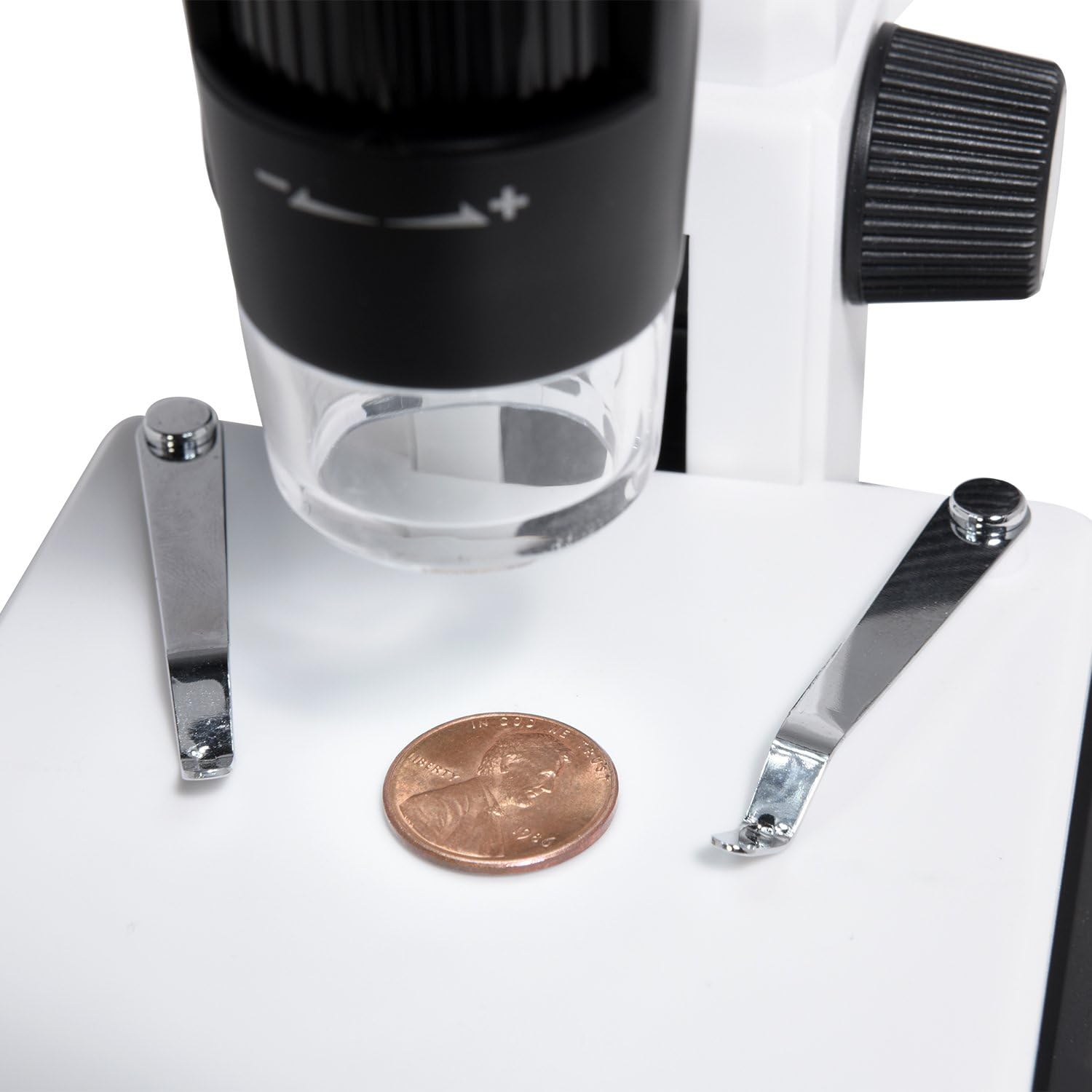
A penny placed on the adjustable stage for microscopic examination.
4.2 Adjusting Focus and Magnification
- Use the large focus wheel on the side of the microscope to bring the image into sharp focus on the LCD screen.
- The microscope offers 220x optical magnification. For additional magnification up to 500x, use the digital zoom function via the control buttons on the LCD panel.
- Adjust the height of the specimen stage utilitzant el stage adjustment knob (Up/Down) for larger or smaller objects, or to achieve initial focus before fine-tuning with the focus wheel.

Adjusting the focus wheel for clear observation.

Close-up of the LCD screen displaying a highly magnified section of a dollar bill.
4.3 Ajust de la il·luminació del LED
- The microscope features 8 adjustable LED lights.
- Use the LED brightness control dial (typically on the side of the LCD unit) to increase or decrease the illumination intensity for optimal viewing.
4.4 Captura de fotos i vídeos
- Assegureu-vos que hi hagi una targeta MicroSD inserida.
- En directe view mode, press the 'OK' button to capture a still image.
- To record video, press the 'Menu' button to enter video mode, then press 'OK' to start/stop recording.
- Captured photos and videos are saved to the MicroSD card.
5. Manteniment
5.1 Neteja
- Lent: Use a soft, lint-free cloth or lens paper to gently wipe the lens. For stubborn smudges, a small amount of lens cleaning solution can be applied to the cloth, not directly to the lens.
- Cos: Wipe the microscope body with a soft, dry cloth. Avoid using harsh chemicals or abrasive cleaners.
- Pantalla: Clean the LCD screen with a soft, dry, anti-static cloth.
5.2 Emmagatzematge
- Store the microscope in a cool, dry place away from direct sunlight and dust.
- Si l'emmagatzemeu durant un període prolongat, retireu la bateria per evitar fuites.
- Keep the microscope in its original packaging or a protective case to prevent damage.
6. Solució De Problemes
- Sense energia:
- Assegureu-vos que la bateria estigui correctament instal·lada i carregada.
- Verify the power adapter is securely connected if operating via AC power. - Sense imatge a la pantalla:
- Check if the microscope is powered on.
- Adjust the focus wheel.
- Ensure the LED lights are on and adjusted to an appropriate brightness. - Imatge borrosa:
- Adjust the focus wheel carefully.
- Ensure the specimen is properly positioned on the stage.
- Clean the lens if smudges are visible. - Cannot Capture Photos/Videos:
- Verify a MicroSD card is inserted and has sufficient free space.
- Ensure the MicroSD card is not locked (read-only).
- Format the MicroSD card if issues persist (this will erase all data). - No Image on PC/TV:
- For PC connection, ensure 'PC Camera' mode is selected on the microscope and the correct software is running on the computer. Check USB cable connection.
- For TV connection, ensure the HDMI cable is securely connected to both devices and the correct HDMI input is selected on the TV.
7. Especificacions
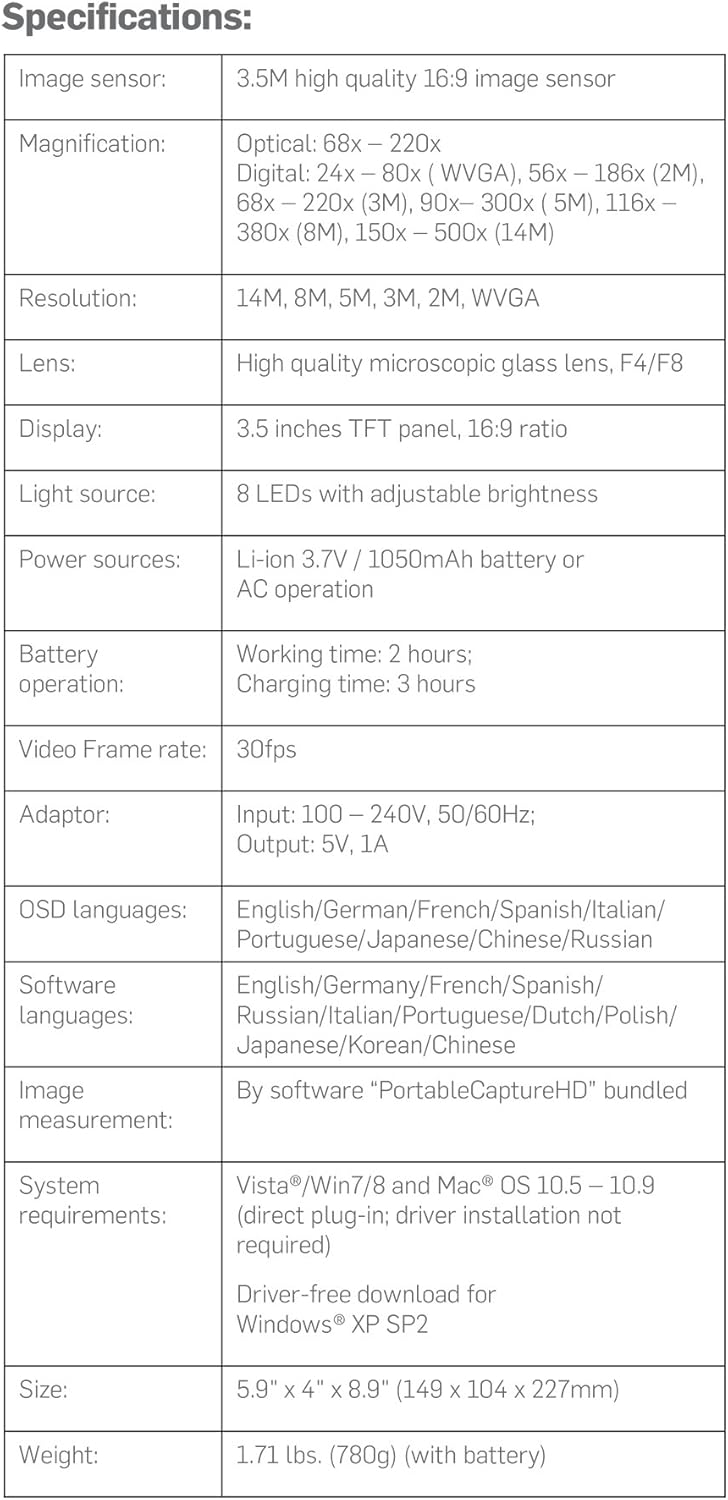
Detailed technical specifications of the Ivation Digital Microscope.
| Característica | Detall |
|---|---|
| Sensor d'imatge | 3.5M high quality 16:9 image sensor |
| Ampliació | Optical: 68x – 220x; Digital: 24x – 80x (WVGA), 56x – 186x (2M), 68x – 220x (3M), 90x – 300x (5M), 116x – 380x (8M), 150x – 500x (14M) |
| Resolució | 14M, 8M, 5M, 3M, 2M, WVGA |
| Lent | High quality microscopic glass lens, F4/F8 |
| Mostra | 3.5 inches TFT panel, 16:9 ratio |
| Font de llum | 8 LEDs with adjustable brightness |
| Fonts d'alimentació | Li-ion 3.7V / 1050mAh battery or AC operation |
| Funcionament amb bateria | Working time: 2 hours; Charging time: 3 hours |
| Velocitat de fotogrames de vídeo | 30 fps |
| Adaptador | Input: 100 – 240V, 50/60Hz; Output: 5V, 1A |
| Idiomes OSD | English, German, French, Spanish, Italian, Portuguese, Japanese, Chinese, Russian |
| Llenguatges de programari | Anglès, alemany, francès, espanyol, rus, italià, portuguès, holandès, polonès, japonès, coreà i xinès |
| Image Measurement | By software "PortableCaptureHD" bundled |
| Requisits del sistema | Vista/Win7/8 and Mac® OS 10.5 – 10.9 (direct plug-in; driver installation not required); Driver-free download for Windows® XP SP2 |
| Mida | 5.9" x 4" x 8.9" (149 x 104 x 227 mm) |
| Pes | 1.71 lbs. (780g) (with battery) |
8. Garantia i assistència
Ivation products are designed to provide reliable performance. For specific warranty information regarding your Ivation Portable Digital HD LCD Microscope, please refer to the warranty card included in your product packaging or visit the official Ivation weblloc.
If you encounter any issues or have questions not covered in this manual, please contact Ivation Customer Support:
- Weblloc: Ivation Store on Amazon
- Correu electrònic: Consulteu l'embalatge del producte o weblloc per obtenir dades de contacte.
- Telèfon: Consulteu l'embalatge del producte o weblloc per obtenir dades de contacte.
Please have your model number (IVAMS04HD) and purchase date ready when contacting support.