
1. Introducció
This manual provides essential information for the safe and effective operation of your CEM LDM-100 Digital Laser Distance Meter. Please read this manual thoroughly before using the device and keep it for future reference. The LDM-100 is designed for precise distance, area, and volume measurements using laser technology.
2. Informació de seguretat
ADVERTÈNCIA: Radiació làser
The LDM-100 emits Class 2 laser radiation. Do not stare into the laser beam or direct it at other people or animals. Avoid direct eye exposure. Use of controls or adjustments or performance of procedures other than those specified herein may result in hazardous radiation exposure.
- No intenteu modificar el dispositiu.
- Mantingueu el dispositiu fora de l'abast dels nens.
- No utilitzeu el dispositiu en ambients explosius.
- Protegiu el dispositiu de la humitat i de la llum solar directa.
- Assegureu-vos que les piles estiguin inserides amb la polaritat correcta.
3. Producte acabatview
The CEM LDM-100 is a compact and robust laser distance meter. Familiarize yourself with its components:

Figura 1: Davant view of the CEM LDM-100 Digital Laser Distance Meter, showing the display, measurement buttons, and function keys.

Figura 2: Close-up of the LDM-100 display, showing measurement readings and icons for various functions like area, volume, and Pythagorean calculations.
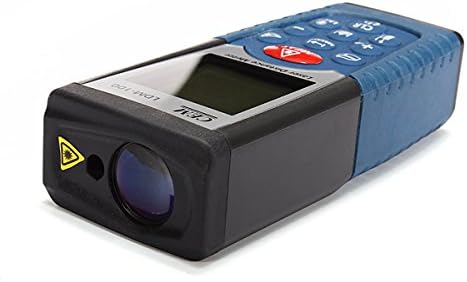
Figura 3: lateral view of the LDM-100, highlighting the laser emission aperture and the receiving lens.
Components clau:
- Laser Emission Aperture: Where the laser beam exits.
- Receiving Lens: Detects the reflected laser beam.
- Pantalla de visualització: Shows measurements, battery status, and function indicators.
- Botó MEAS: Activates laser and initiates measurements.
- Botons de funció: For area, volume, Pythagorean calculations, and continuous measurement.
- Botó d'unitat: Canvia les unitats de mesura (m, ft, in).
- CLR/OFF Button: Clears current measurement or turns off the device.
- Botons +/-: For adding/subtracting measurements or navigating menus.
4. Configuració
4.1 Instal·lació de la bateria
The LDM-100 requires batteries for operation. Batteries are not included with the device.
- Localitzeu la tapa del compartiment de la bateria a la part posterior del dispositiu.
- Feu lliscar o desenganxeu la tapa per obrir el compartiment.
- Insert the required batteries (e.g., AAA batteries, refer to the compartment for specific type) ensuring correct polarity (+/-).
- Tanqueu bé la tapa del compartiment de la bateria.
Nota: Traieu les piles si no heu d'utilitzar el dispositiu durant un període prolongat per evitar fuites.
5. Instruccions de funcionament
5.1 Encès/Apagat
- Per encendre: premeu el botó MEAS botó. El làser s'activarà.
- Per apagar: premeu i manteniu premut el botó CLR/OFF button for a few seconds. The device will also automatically power off after a period of inactivity.
5.2 Mesura bàsica de distàncies
- Turn on the device by pressing MEAS.
- Apunteu el làser a la superfície objectiu.
- Premeu MEAS again to take a measurement. The distance will be displayed on the screen.
5.3 Canvi d'unitats de mesura
Premeu el botó Unitat button repeatedly to cycle through available units: meters (m), feet (ft), inches (in).
5.4 Mesura de l'àrea
- Premeu el botó Funció button (often indicated by a square icon) until the area icon appears on the display.
- Measure the first side (e.g., length) by pressing MEAS.
- Measure the second side (e.g., width) by pressing MEAS de nou.
- Es mostrarà l'àrea calculada.
5.5 Mesura del volum
- Premeu el botó Funció button until the volume icon (cube) appears.
- Mesura la longitud prement MEAS.
- Mesura l'amplada prement MEAS.
- Mesura l'alçada prement MEAS.
- Es mostrarà el volum calculat.
5.6 Mesura pitagòrica (mesura indirecta)
This function allows indirect measurement of heights or distances using the Pythagorean theorem.
- Premeu el botó Funció button until the Pythagorean icon appears (e.g., a triangle).
- Follow the on-screen prompts or diagram to measure the required sides (e.g., hypotenuse, base).
- El dispositiu calcularà i mostrarà el costat desconegut.
5.7 Mesura contínua (seguiment)
- Manteniu premut el botó MEAS button or activate the continuous measurement function (often indicated by a MAX/MIN icon).
- Move the device slowly towards or away from the target. The display will update measurements in real-time, often showing current, maximum, and minimum distances.
- Premeu MEAS de nou per aturar la mesura contínua.
6. Manteniment
- Neteja: Utilitzeu un suau, damp cloth to clean the device. Do not use abrasive cleaners or solvents. Clean the laser lens with a soft cloth, similar to cleaning eyeglasses.
- Emmagatzematge: Store the device in a dry, cool place, away from direct sunlight and extreme temperatures. If storing for extended periods, remove the batteries.
- Calibració: The device is factory calibrated. If you suspect inaccuracies, contact customer support.
7. Solució De Problemes
| Problema | Causa possible | Solució |
|---|---|---|
| El dispositiu no s’encén. | Piles gastades o incorrectament inserides. | Canvieu les piles o comproveu la polaritat. |
| Mesures inexactes. | Dirty laser lens; unstable measuring surface; extreme temperatures. | Clean lens; ensure stable position; operate within specified temperature range. |
| Laser not visible. | Llum ambiental brillant; làser no activat. | Use in lower light conditions; press MEAS to activate laser. |
| Missatge d'error a la pantalla. | Mesura fora de rang; error intern. | Ensure target is within measuring range; restart device. If error persists, contact support. |
8. Especificacions
| Característica | Detall |
|---|---|
| Model | LDM-100 |
| Marca | CEM |
| Interval de mesura | Up to 50m (as per product title) |
| Classificació de protecció internacional | IP54 |
| Pes de l'article | 0.31 lliures (aprox. 140.61 g) |
| Bateries | Not included (type typically AAA, refer to device) |
| Classe làser | Classe 2 |
9. Garantia i Suport
Per obtenir informació sobre la garantia o assistència tècnica, consulteu la documentació proporcionada en el moment de la compra o poseu-vos en contacte amb el vostre distribuïdor. Conserveu el rebut de compra com a comprovant de compra.