
Introducció
This manual provides detailed instructions for the setup, operation, maintenance, and troubleshooting of your DIGITNOW! M503 Multi-Function Turntable System. Please read this manual thoroughly before using the product to ensure proper function and longevity.
Característiques clau
- 3-speed turntable (33, 45, and 78 RPM) with Bluetooth connectivity and built-in stereo speakers (3W RMS x 2).
- Integrated CD player, MP3 player, cassette deck, and analog AM/FM stereo tuner.
- USB port, SD/MMC card reader, and Aux-in for versatile audio input.
- Direct recording function (from turntable, CD, USB, SD, MMC) and encoding feature for digital conversion of songs to MP3 format.
Contingut del paquet
Assegureu-vos que hi hagi tots els articles presents en desempaquetar:
- DIGITNOW! M503 Multi-Function Turntable System
- Cable d'alimentació
- Control remot
- Manual d'usuari
- External Speakers (if included with your specific model)
Producte acabatview
Familiarize yourself with the components and controls of your M503 system.

Figura 1: Frontal view of the DIGITNOW! M503 Multi-Function Turntable System, showcasing the turntable, control panel, and CD tray.
Front Panel Controls and Inputs

Figure 2: Close-up of the front panel, showing the display, control buttons, USB port, SD/MMC slot, and volume/tuning knobs.
- AUX IN: Entrada de 3.5 mm per a dispositius d'àudio externs.
- Port USB: For USB flash drives (playback and recording).
- Ranura SD/MMC: For SD or MMC memory cards (playback and recording).
- Auriculars Jack: Sortida de 3.5 mm per a escolta privada.
- Pantalla de visualització: Shows current mode, track information, and radio frequency.
- Botons de control: Play/Pause, Stop, Skip Forward/Backward, Mode selection, Folder navigation, Delete, Record.
- Pom d'afinació: Ajusta la freqüència de ràdio.
- Control de potència/volum: Encén/apaga la unitat i ajusta el volum.
- Safata de CD: Per inserir CD d'àudio.
Entrada/sortida sobreview

Figure 3: Visual representation of various input and output options, including Aux In, USB, Headphone, SD Card, CD Tray, and Cassette Holder.
Configuració
- Desembalatge: Traieu amb cura la unitat del seu embalatge. Conserveu l'embalatge per a futurs transports o emmagatzematge.
- Col·locació: Place the system on a stable, level surface away from direct sunlight, heat sources, and excessive dust or moisture. Ensure adequate ventilation around the unit.
- Connexió d'alimentació: Connect the power cable to the AC inlet on the rear of the unit and then to a standard wall outlet.
- Speaker Connection (if applicable): If your model includes external speakers, connect them to the speaker output jacks on the rear of the main unit.
- Funda antipols: Ensure the dust cover is properly seated on the turntable.
Instruccions de funcionament
Funcionament de la plataforma giratòria
- Obriu la coberta antipols.
- Col·loqueu un disc de vinil al plat del tocadiscos.
- Select the appropriate speed (33, 45, or 78 RPM) using the speed selector switch. For 45 RPM records, place the included 45 RPM adapter on the center spindle.
- Deixeu anar el bloqueig del braç de to.
- Gently lift the tone arm using the cue lever and position the stylus over the desired track on the record.
- Lower the tone arm slowly using the cue lever. The record will begin to play.
- Ajusteu el volum amb el botó d'engegada/volum.
- To stop playback, lift the tone arm using the cue lever and return it to the tone arm rest. Secure the tone arm lock.
Funcionament del reproductor de CD
- Press the MODE button until "CD" appears on the display.
- Premeu el botó OPEN/CLOSE per obrir la safata de CD.
- Col·loqueu un CD d'àudio a la safata amb el costat de l'etiqueta cap amunt.
- Press the OPEN/CLOSE button again to close the tray. The system will read the CD and begin playback automatically.
- Use the Play/Pause, Stop, and Skip buttons to control playback.
Funcionament del reproductor de cassets
- Insert a cassette tape into the cassette holder on the side of the unit.
- Press the MODE button until "TAPE" appears on the display.
- Press the Play button on the cassette deck to begin playback.
- Use the Fast Forward and Rewind buttons as needed. Note that advanced controls like pause or track skip may not be available on all cassette decks.
Funcionament de la ràdio AM/FM
- Press the MODE button until "RADIO" appears on the display.
- Select AM or FM band using the band selector switch (if available, otherwise it might cycle through modes).
- Gireu el botó TUNING per cercar emissores de ràdio.
- Esteneu l'antena FM (si escau) per a una millor recepció.
USB/SD/MMC Playback
- Insert a USB flash drive into the USB port or an SD/MMC card into the corresponding slot.
- Press the MODE button until "USB" or "SD" appears on the display. The system will automatically detect and begin playing compatible audio files (per exemple, MP3).
- Use the Play/Pause, Stop, Skip, and Folder buttons to navigate and control playback.
Connectivitat Bluetooth

Figure 4: The M503 system wirelessly connected to a smartphone via Bluetooth, enabling audio streaming.
- Press the MODE button until "BLUETOOTH" or "BT" appears on the display. The unit will enter pairing mode.
- Al telèfon intel·ligent o a un altre dispositiu amb Bluetooth, activeu el Bluetooth i cerqueu els dispositius disponibles.
- Select "DIGITNOW M503" (or similar) from the list of devices to pair.
- Once paired, you can stream audio from your device to the M503 system.
Connexió d'entrada auxiliar
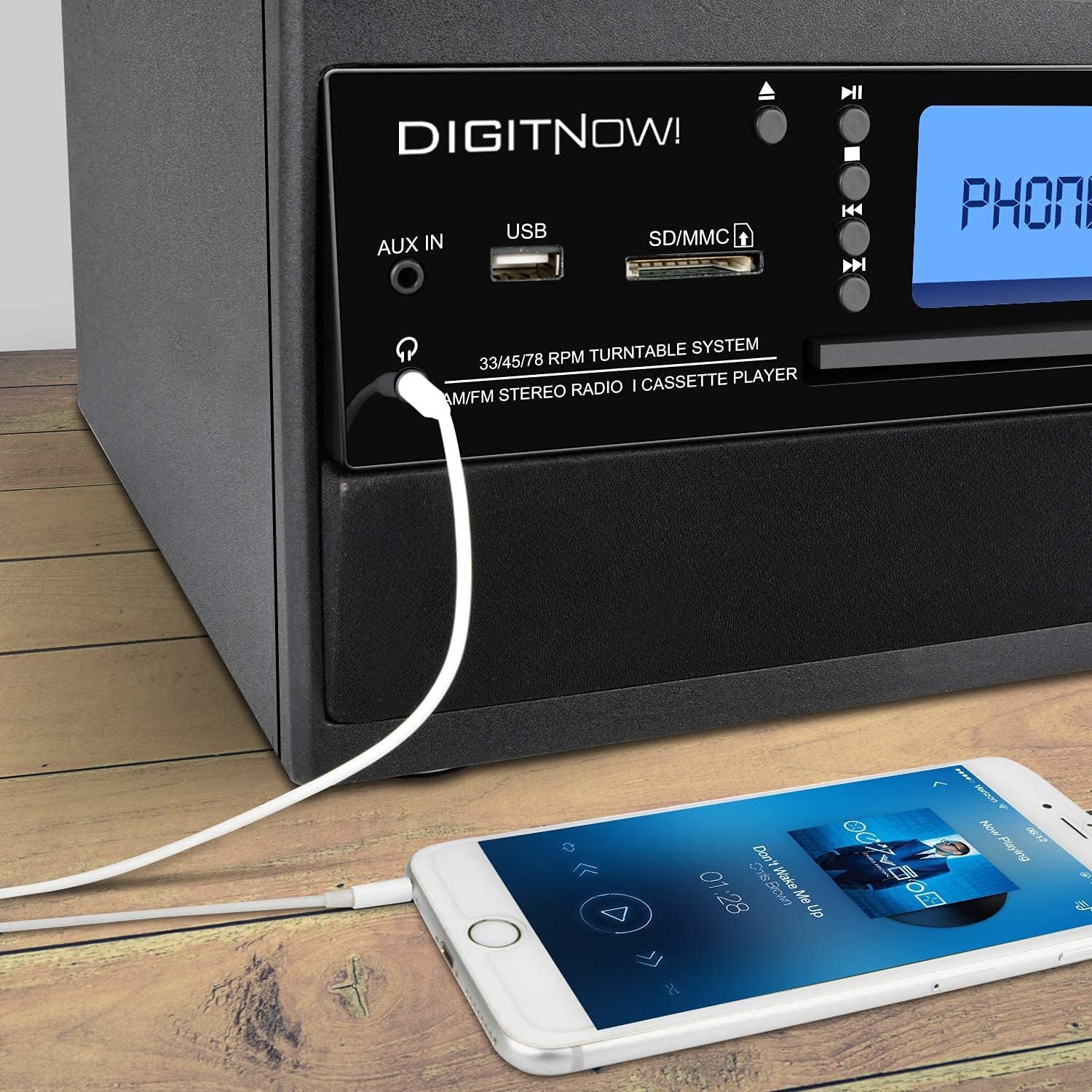
Figure 5: A smartphone connected to the M503 system using a 3.5mm Aux-In cable for wired audio playback.
- Connect one end of a 3.5mm audio cable (not included) to the AUX IN jack on the front panel of the M503.
- Connecteu l'altre extrem del cable a la presa d'auriculars o a la sortida d'àudio del vostre dispositiu extern (per exemple, un telèfon intel·ligent o un reproductor MP3).
- Press the MODE button until "AUX" appears on the display.
- Start playback on your external device and adjust the volume on both the device and the M503.
Direct Recording (Encoding to MP3)
The M503 allows you to record audio from the turntable, CD, or cassette directly to a USB flash drive or SD/MMC card in MP3 format.
- Inseriu una unitat flash USB o una targeta SD/MMC a la ranura corresponent.
- Select the desired source (Turntable, CD, or Cassette) using the MODE button and prepare it for playback (e.g., place a record, insert a CD/cassette).
- Press the REC button on the front panel. The display will indicate recording mode.
- Start playback on your chosen source. The system will begin recording the audio to the USB drive or SD/MMC card.
- Press the REC button again to stop recording. The recorded file will be saved as an MP3.
Manteniment
- Neteja de la unitat: Feu servir un drap suau i sec per netejar l'exterior de la unitat. No utilitzeu productes de neteja abrasius ni dissolvents.
- Cura del stylus: Gently clean the stylus regularly with a soft brush designed for turntable styli. Avoid touching the stylus with your fingers.
- Funda antipols: Mantingueu la tapa antipols tancada quan no feu servir el plat giratori per evitar l'acumulació de pols.
- Cura de CD/casset: Handle CDs by the edges and store them in their cases. Keep cassette tapes away from magnetic fields.
Resolució de problemes
| Problema | Causa possible | Solució |
|---|---|---|
| Sense poder | Cable d'alimentació no connectat; presa de corrent no activa. | Ensure power cable is securely connected and the outlet is functional. |
| Sense so | Volume too low; incorrect mode selected; external speakers not connected. | Increase volume; select correct input mode; check speaker connections. |
| Turntable not spinning or playing slowly | Incorrect speed selected; drive belt issue; stylus dirty or damaged. | Verify speed setting (33/45/78 RPM); check drive belt; clean or replace stylus. |
| S'ha produït un error en l'aparellament de Bluetooth | Device too far; Bluetooth not enabled on external device; unit not in pairing mode. | Ensure devices are close; enable Bluetooth on external device; set M503 to Bluetooth mode. |
| CD/USB/SD not reading | Disc/media dirty or damaged; incompatible file format. | Clean disc/media; try different media; ensure files are compatible (e.g., MP3). |
Especificacions
| Número de model | M503 |
| Marca | DIGITNOW |
| Dimensions (L x A x A) | 31.7 x 20 x 29 cm |
| Pes | 3.71 kg |
| Font d'alimentació | Electric Cable (220 Volts) |
| Velocitats de la placa giratòria | 33/45/78 RPM |
| Sortida d'àudio | Built-in Stereo Speakers (3W RMS x 2), Headphone Jack |
| Connectivitat | Bluetooth Receiver, USB, SD/MMC Card Reader, Aux-In |
| Mitjans suportats | Vinyl Records, Audio CDs, Cassette Tapes, USB drives, SD/MMC cards |
| Característiques especials | MP3 Encoding (from Vinyl, CD, Cassette to USB/SD) |
Garantia i Suport
For warranty information, technical support, or service inquiries, please refer to the warranty card included with your product or contact DIGITNOW! customer service directly. Keep your proof of purchase for warranty claims.
This product is designed for home use. Any unauthorized modifications or repairs will void the warranty.