
Enermax EGN1200P
ENERMAX PlatiGemini 1200W ATX 3.1 & ATX12VO Power Supply User Manual
Model: EGN1200P
1. Introducció
Thank you for choosing the ENERMAX PlatiGemini 1200W Power Supply. This unit is designed to provide stable and efficient power for high-performance computing systems, supporting both Intel ATX 3.1 and ATX12VO standards. It features 80 PLUS Platinum certification, a fully modular design with a native 600W 12V-2x6 connector, and advanced Dust-Free Rotation (D.F.R.) technology for enhanced longevity and maintenance. Please read this manual thoroughly before installation and operation to ensure proper usage and safety.

Image 1.1: ENERMAX PlatiGemini 1200W Power Supply Overview
2. Informació de seguretat
WARNING: Improper installation or use can lead to serious injury or damage to your system. Always follow these safety guidelines:
- Assegureu-vos que el subministrament d'alimentació estigui desconnectat de la presa de corrent de CA abans de la instal·lació o el manteniment.
- No obriu la font d'alimentació casing. Alt volumtages are present inside, and there are no user-serviceable parts.
- Instal·leu la font d'alimentació en una zona ben ventilada, allunyada de fonts de calor, llum solar directa i humitat.
- Use only the modular cables provided with this power supply. Using incompatible cables can damage the unit and connected components.
- Assegureu-vos que tots els connectors estiguin ben col·locats abans d'encendre el sistema.
- This product is designed for use in personal computers. Do not use it for any other application.
3. Contingut del paquet
Verifiqueu que tots els elements siguin presents al vostre paquet:
- ENERMAX PlatiGemini 1200W Power Supply Unit
- Conjunt de cables modulars:
- 1x ATX Motherboard 24 (20+4)pin cable [60cm]
- 1x 12VO Motherboard 10pin cable [60cm]
- 2x CPU 4+4 Pin cables [70cm each]
- 1x 12V-2x6 12+4 pin (600W) cable [60cm]
- 3x PCIe 6+2 pin cables [65cm each]
- 8x SATA power cables [60cm each]
- 4x 4P Molex cables [60cm each]
- Cable d'alimentació CA
- Cargols de muntatge
- Manual d'usuari

Image 3.1: Fully Modular Cables Included
4. Característiques clau
- Dual-Standard Compatibility: Integrated with both Intel ATX 3.1 and ATX12VO standards for broad system compatibility.
- Certificació 80 PLUS Platinum: Achieves up to 94% efficiency at typical load and 74% efficiency at 2% load, reducing energy waste and operating costs.
- Disseny totalment modular: Permet una gestió neta dels cables i un millor flux d'aire dins de la carcassa del PC.
- Native 600W 12V-2x6 Connector: Directly supports high-power PCIe 5.0 graphics cards without the need for additional adapters.
- Components de grau industrial: Utilizes 100% Japanese 105°C-rated capacitors for superior stability, reliability, and extended lifespan.
- Semi-Fanless Technology: The fan remains off under 60% load, providing silent operation during low-power tasks.
- Dust-Free Rotation (D.F.R.) Technology: An innovative self-cleaning mechanism that reverses fan rotation to blow away accumulated dust, enhancing system longevity and reducing maintenance.
- Up to 235% Power Excursion: Designed to handle transient power spikes for high-end systems.

Image 4.1: PlatiGemini Feature Highlights
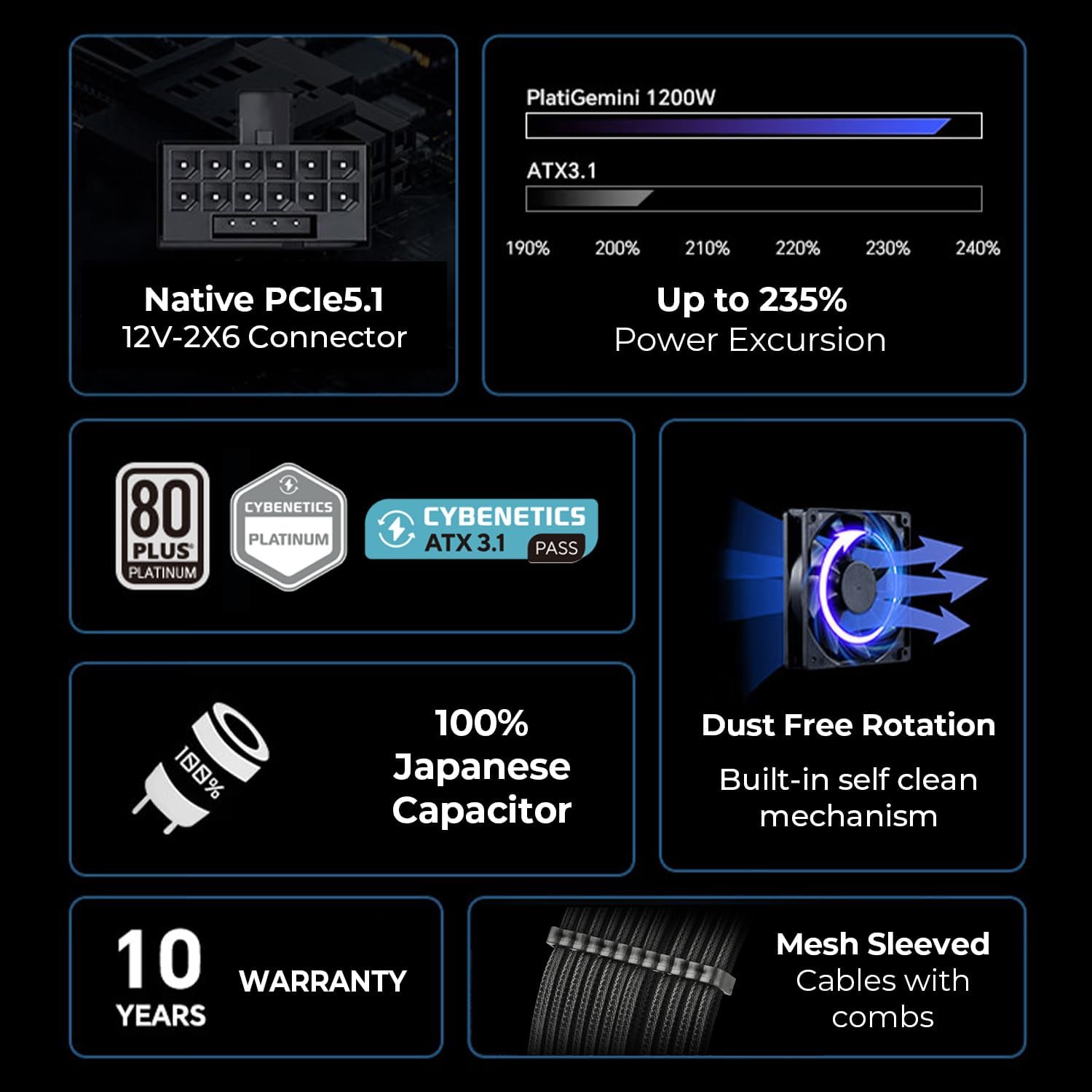
Image 4.2: Dual-Standard Compatibility (ATX 3.1 & ATX12VO)
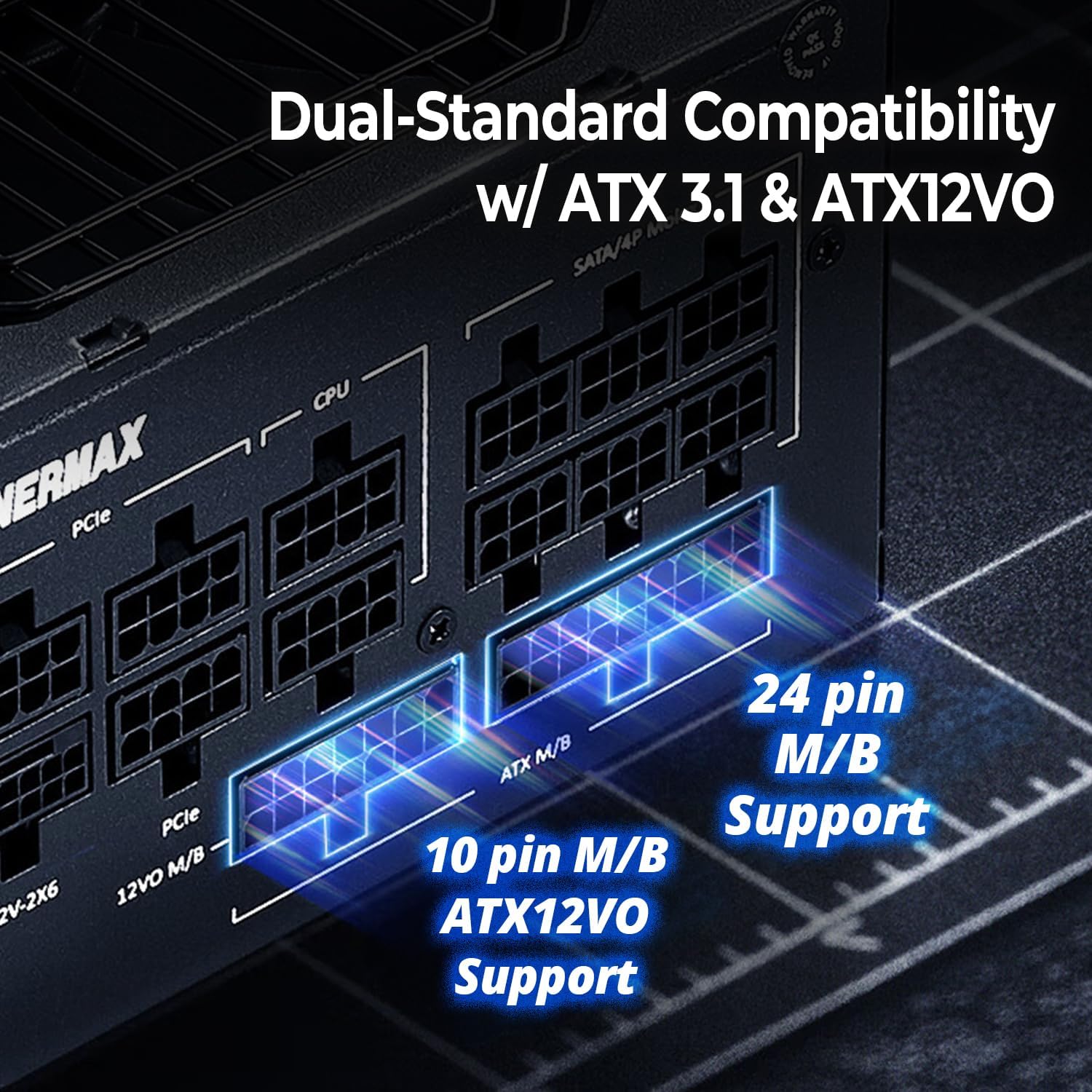
Image 4.3: 100% Japanese Industrial-Grade Capacitors

Image 4.4: Semi-Fanless Technology Fan Curve
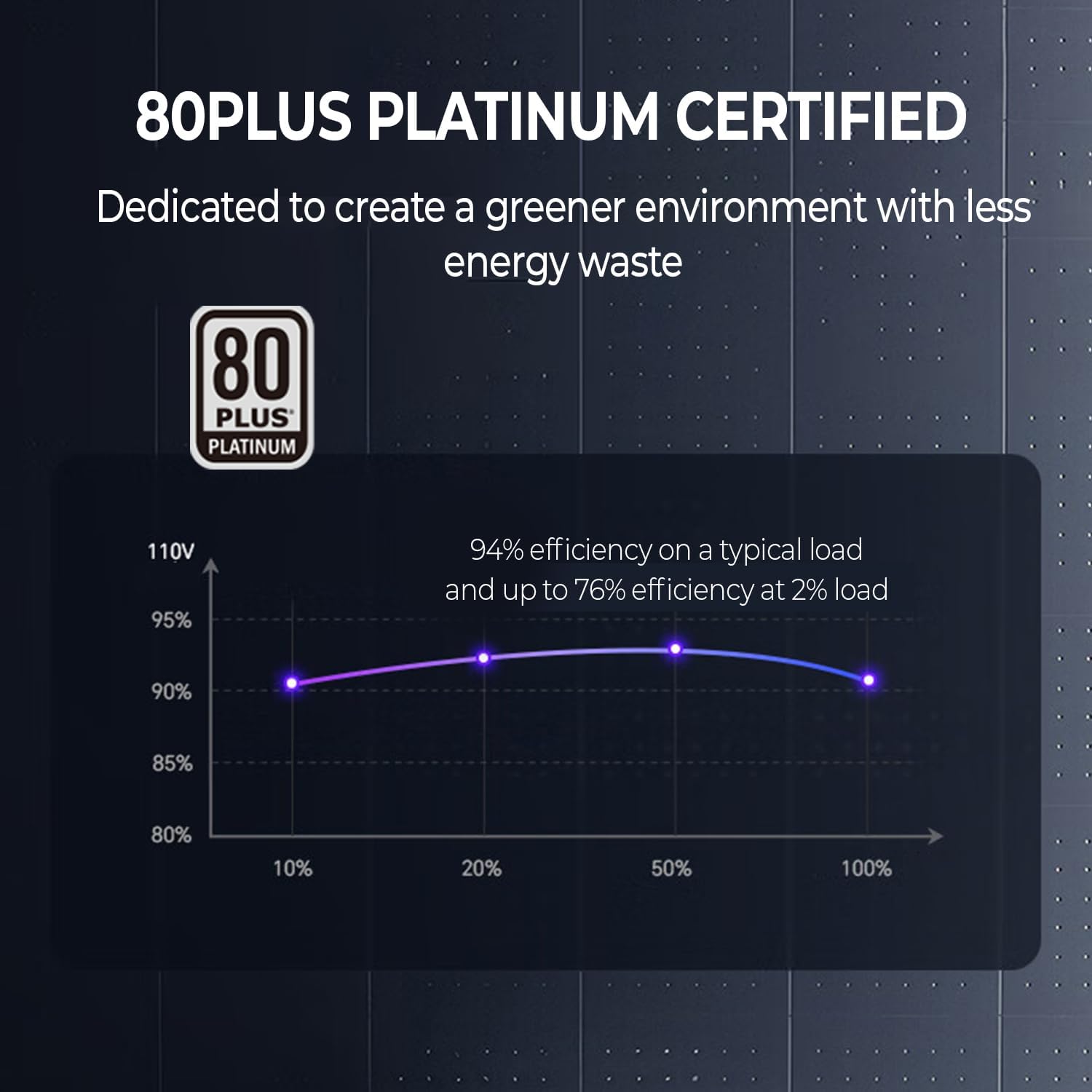
Image 4.5: 80 PLUS Platinum Efficiency
5. Configuració i instal·lació
- Prepareu el vostre sistema: Assegureu-vos que l'ordinador estigui apagat i desendollat de la presa de corrent. Obriu la carcassa de l'ordinador per accedir a la zona de muntatge de la font d'alimentació.
- Muntar la font d'alimentació: Insert the ENERMAX PlatiGemini 1200W into the power supply bay of your PC case. Secure it with the provided mounting screws.
- Connecteu els cables modulars: Identify the necessary cables for your motherboard, CPU, graphics card(s), and other peripherals. Connect them to the corresponding modular ports on the power supply. Ensure firm connections.
- For motherboards, use either the 24-pin ATX cable or the 10-pin ATX12VO cable, depending on your motherboard's standard.
- For PCIe 5.0 graphics cards, use the native 600W 12V-2x6 cable.
- Gestió de cables: Route the cables neatly to improve airflow and aesthetics within your case.
- Tanca el cas: Once all connections are secure and cables are managed, close your PC case.
- Connecteu l'alimentació de CA: Connecteu el cable d'alimentació de CA a la font d'alimentació i després a una presa de corrent.
Video 5.1: Installation and Features of PlatiGemini 1200W Power Supply. This video demonstrates the physical installation and highlights key features like ATX 3.1, ATX12VO, 12V-2x6 connector, power excursion, and D.F.R. technology.
6. Instruccions de funcionament
6.1. Funcionament semisense ventilador
The PlatiGemini 1200W features a semi-fanless mode. The power supply fan will remain off when the system load is below 60% and the internal temperature is low. This ensures silent operation during light workloads. The fan will automatically activate and adjust its speed as the load and temperature increase to maintain optimal cooling.
6.2. Dust-Free Rotation (D.F.R.) Technology
The D.F.R. function helps to prevent dust accumulation inside the power supply by reversing the fan's rotation direction for a short period. This self-cleaning mechanism can be activated in two ways:
- Upon Power On: When you power on your PC, the D.F.R. function will automatically activate for 20 seconds. The fan will spin in reverse (clockwise) to expel dust, then return to its regular counter-clockwise direction for another 20 seconds before stopping (if under 60% load) or continuing normal operation.
- Using the D.F. Switch Button: If the power supply is under 60% load and the fan is not spinning, press the D.F. Switch button on the power supply. The fan will spin clockwise for 20 seconds, then return to counter-clockwise for 20 seconds, and then stop. If the power supply is over 60% load or the fan is already spinning, pressing the D.F. Switch will immediately stop the fan, spin it clockwise for 20 seconds, and then return to its regular counter-clockwise direction.

Image 6.1: D.F. Switch Button
Video 6.2: ENERMAX Dust-Free Rotation (D.F.R.) Self-Cleaning Technology. This video explains how the D.F.R. function works to clean the power supply fan and its benefits.
7. Manteniment
The ENERMAX PlatiGemini 1200W power supply is designed for minimal maintenance thanks to its Dust-Free Rotation (D.F.R.) technology. This feature helps to keep the fan and internal components free from dust accumulation, which is crucial for maintaining optimal performance and extending the lifespan of the unit and other PC components.
- Regularly activate the D.F.R. function using the D.F. Switch button, especially if your PC operates in a dusty environment or if you notice increased fan noise.
- Periodically inspect the power supply's exterior for any visible dust buildup. While D.F.R. helps with internal cleaning, external surfaces may still require occasional wiping with a soft, dry cloth.
- Ensure adequate airflow around the power supply by keeping the PC case free of obstructions.
8. Solució De Problemes
If you encounter issues with your ENERMAX PlatiGemini 1200W power supply, please refer to the following common troubleshooting steps:
- Sense energia: Ensure the AC power cord is securely plugged into both the power supply and the wall outlet. Check the power switch on the back of the PSU is in the 'ON' position. Verify all modular cables are correctly and firmly connected.
- Inestabilitat/Avaries del sistema: This could be due to various factors. Ensure your system's power requirements do not exceed the PSU's capacity. Check all cable connections, especially to the motherboard and graphics card. If issues persist, test components individually if possible.
- El ventilador no gira: The power supply features a semi-fanless mode, meaning the fan will not spin under low load (below 60%) or low temperature. This is normal operation. If the fan does not spin under heavy load or high temperature, ensure the D.F.R. switch is not stuck and contact support.
- Soroll excessiu: While the D.F.R. technology helps, if you experience unusual or excessive fan noise, activate the D.F.R. function to clear any potential dust. If the noise persists, it may indicate an issue with the fan.
For further assistance, please contact ENERMAX customer support.
9. Especificacions
| Característica | Especificació |
|---|---|
| Nom del model | PlatiGemini 1200W |
| Número de model de l'article | EGN1200P |
| Wattage | 1200 watts |
| Certificació d'eficiència | 80 PLUS Platí |
| Factor de forma | ATX |
| Disseny de fonts d'alimentació | Completament Modular |
| Estàndards compatibles | ATX 3.1, ATX12VO |
| Connector PCIe | Native 600W 12V-2x6 |
| Condensadors | 100% Japanese 105°C-rated |
| Mètode de refrigeració | Air (Semi-Fanless) |
| Pes de l'article | 7.3 lliures |
| Dimensions del producte (L x A x A) | 5.91 x 5.91 x 3.39 polzades |
10. Garantia i assistència
The ENERMAX PlatiGemini 1200W power supply comes with a 10 any de garantia, ensuring long-term reliability and peace of mind. For warranty claims, technical support, or any product-related inquiries, please contact ENERMAX USA directly.
ENERMAX USA Support: Visit Enermax USA Weblloc
Si us plau, conserveu el comprovant de compra per al servei de garantia.
Ask a question about this manual
Ask about setup, troubleshooting, compatibility, parts, safety, or missing instructions. Manuals+ will review the question and use this page’s manual context to help answer it.