
Instruccions importants de seguretat
Si us plau, llegiu i comprengui totes les instruccions de seguretat abans d'utilitzar aquest producte. Conservi aquestes instruccions per a futures consultes.
- No utilitzeu aquest aparell a prop d'aigua o humitat.
- Netegeu només amb un drap sec.
- No bloquegeu cap obertura de ventilació. Instal·leu-ho d'acord amb les instruccions del fabricant.
- No instal·leu a prop de cap font de calor com ara radiadors, registres de calor, estufes o altres aparells (inclosos amplificadors) que produeixen calor.
- Eviteu que el cable d'alimentació sigui trepitjat o pessigat, especialment als endolls, els endolls i el punt on surten de l'aparell.
- Utilitzeu només accessoris/accessoris especificats pel fabricant.
- Desendolleu aquest aparell durant les tempestes amb llamps o quan no l'utilitzeu durant llargs períodes de temps.
- Demaneu tot el servei a personal de servei qualificat. El manteniment és necessari quan l'aparell s'ha fet malbé d'alguna manera, com ara el cable d'alimentació o l'endoll està danyat, s'ha vessat líquid o han caigut objectes a l'aparell, l'aparell ha estat exposat a la pluja o la humitat, no funciona amb normalitat. , o s'ha deixat caure.
Producte acabatview
The AUNA Roadie KIDS Boombox is a versatile audio system featuring a top-loading CD player, Bluetooth connectivity, USB playback, AUX input, and AM/FM radio. It is designed for portable use with both AC power and battery options, and includes integrated LED lights.

Figura 1: Frontal view of the AUNA Roadie KIDS Boombox with active red LED lights.

Figura 2: Detall frontal view showing the display, USB port, and control panel.
Controls i components
- Compartiment de CD: Top-loading tray for audio CDs.
- Visualització: LED screen showing track number, mode, and radio frequency.
- Botons de control: Play/Pause, Stop, Skip Forward/Backward, Program, Album.
- Ponents: Integrated stereo speakers with LED illumination.
- Port USB: Per reproduir MP3/WMA files d'una unitat flash USB.
- Jack AUX IN: Entrada de 3.5 mm per connectar dispositius d'àudio externs.
- Auriculars Jack: Sortida de 3.5 mm per a escolta privada.
- AM/FM Antenna: Extendable antenna for radio reception.
- Pom de volum: Ajusta el nivell de sortida d'àudio.
- Interruptor selector de mode: Toggles between CD, USB, Bluetooth, AUX, AM, and FM modes.
- Interruptor de llum: Turns the LED speaker lights on or off.
- Presa d'entrada de CA: Per connectar l'adaptador de corrent altern.
- Compartiment de la bateria: Located on the bottom for C-type batteries.
- Nansa de transport: Per a una fàcil portabilitat.
Configuració
Font d'alimentació
The AUNA Roadie KIDS Boombox can be powered by either the included AC power adapter or by batteries.
Connexió d'alimentació de CA.
- Assegureu-vos que el boombox estigui apagat.
- Connect the small end of the AC power adapter to the AC IN jack on the back of the boombox.
- Plug the other end of the AC power adapter into a standard wall outlet (110-120V ~ / 50-60 Hz).

Figura 3: posterior view with AC power input and antenna.
Instal·lació de la bateria
For portable use, the boombox requires 6 x C-type batteries (not included).
- Assegureu-vos que el boombox estigui apagat i desconnectat de la xarxa elèctrica.
- Localitzeu el compartiment de la bateria a la part inferior de la unitat.
- Obriu la tapa del compartiment de la bateria.
- Insert 6 C-type batteries, ensuring correct polarity (+/-) as indicated inside the compartment.
- Tanqueu bé la tapa del compartiment de la bateria.
Instruccions de funcionament
Funcionament general
- Encès/apagat: Use the main power switch located on the side of the unit.
- Control de volum: Gira el VOLUM knob on the side of the unit to adjust the sound level.
- Selecció del mode: Utilitza el MODE selector switch on the side to choose between CD/USB/BT/AUX and AM/FM radio functions.

Figura 4: lateral view showing Volume and Mode controls.
Funcionament del reproductor de CD
The boombox supports Audio CD, CD-R, CD-RW, and MP3-CDs.
- Canvia el MODE selector a CD.
- Gently press the 'OPEN' area on the CD compartment lid to open it.
- Col·loqueu un CD a l'eix amb l'etiqueta cap amunt.
- Close the CD compartment lid firmly until it clicks. The display will show 'CD' and then the total number of tracks.
- Premeu el botó REPRODUCCIÓ/PAUSA per iniciar la reproducció.
- Premeu REPRODUCCIÓ/PAUSA again to pause, and press STOP per finalitzar la reproducció.
- Utilitza el Saltar endavant (>>|) o SALTAR ENRERE (|<) botons per navegar entre pistes.
- Reproducció programada: En el mode d'aturada, premeu el botó PROGRAMA button. The display will show '01'. Use ENDAVANT/ENDARRERE per seleccionar una pista i, a continuació, premeu PROGRAMA again to confirm. Repeat for up to 20 tracks (CD) or 99 tracks (MP3). Press JUGAR per iniciar la reproducció programada.
- Funcions de repetició: Durant la reproducció, premeu REPETIR button to cycle through repeat modes (e.g., repeat one track, repeat all tracks, repeat folder for MP3 CDs).
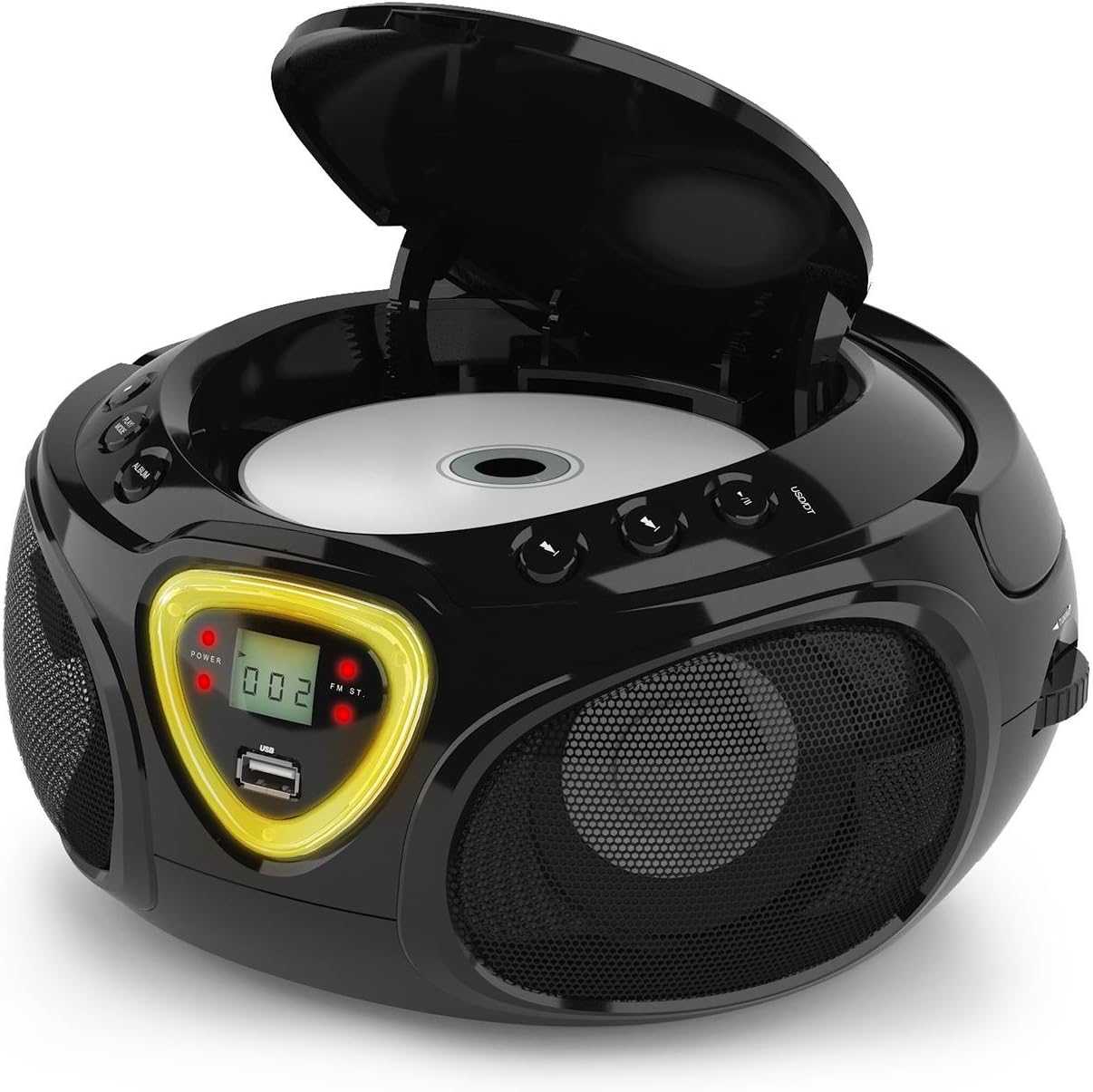
Figure 5: CD compartment open for disc insertion.
Funcionament Bluetooth
- Canvia el MODE selector a BT (Bluetooth). The display will show 'BT' and flash, indicating pairing mode.
- Activeu el Bluetooth al vostre telèfon intel·ligent, tauleta o altre dispositiu compatible amb Bluetooth.
- Cerca available devices and select 'AUNA Roadie' from the list.
- Once successfully paired, the 'BT' indicator on the boombox display will stop flashing and remain solid.
- You can now play audio from your connected device through the boombox. Use the controls on your device or the boombox's Play/Pause and Skip buttons to manage playback.
Reproducció USB
El boombox admet MP3 i WMA file formats from USB flash drives.
- Inseriu una unitat flaix USB al USB port on the front of the boombox.
- Canvia el MODE selector a USB. The unit will automatically detect and begin playing compatible audio files.
- Utilitza el REPRODUCCIÓ/PAUSA, STOP, i ENDAVANT/ENDARRERE botons per controlar la reproducció.
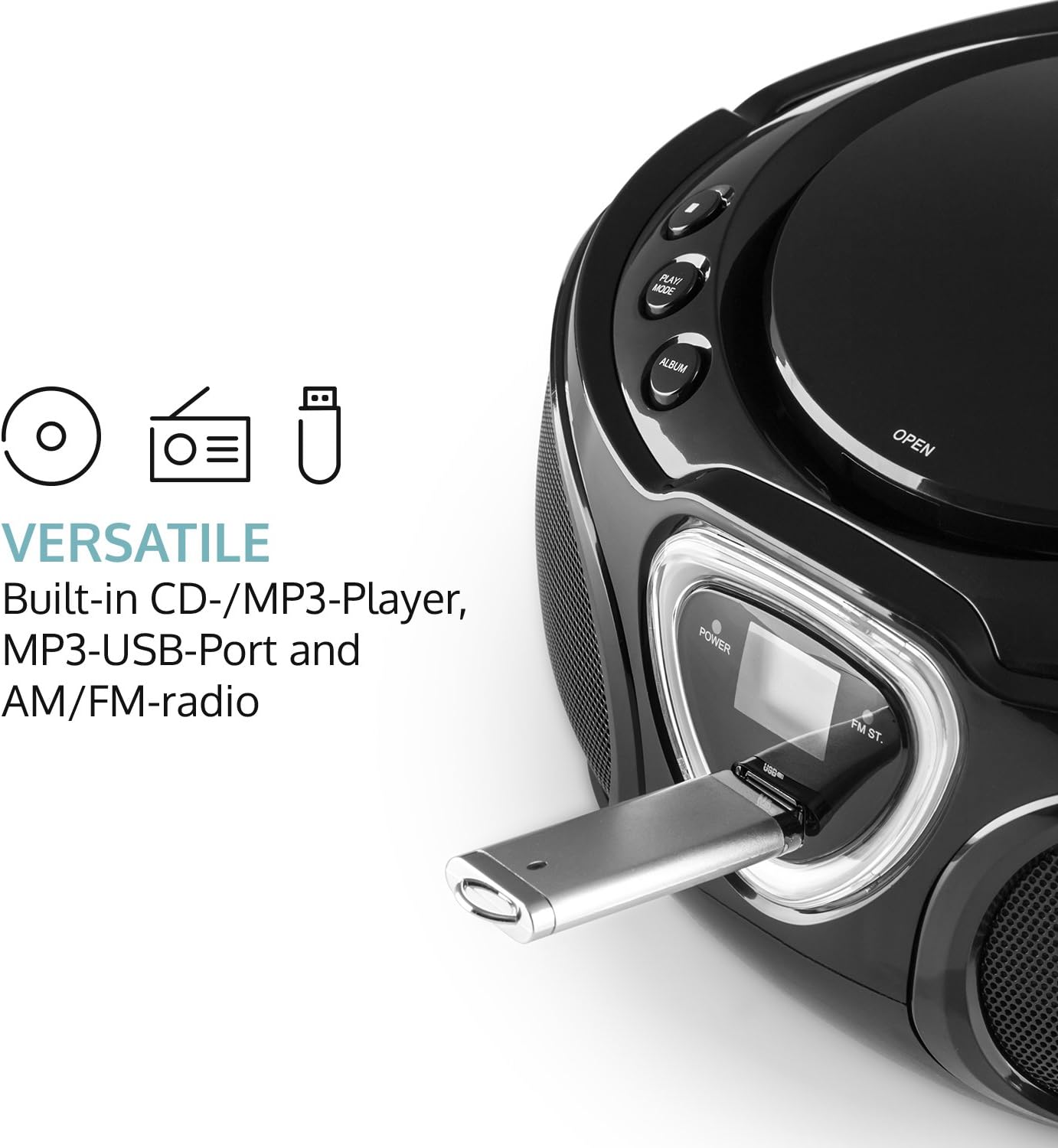
Figure 6: USB port with a flash drive inserted.
Entrada AUX
- Connect one end of a 3.5mm audio cable (not included) to the AUX IN jack on the boombox.
- Connect the other end of the audio cable to the headphone jack or audio output of your external audio device (e.g., MP3 player, smartphone).
- Canvia el MODE selector a AUX.
- Control playback and volume directly from your external audio device.
Funcionament de ràdio (AM/FM)
- Canvia el MODE selector to either AM or FM.
- Extend the telescopic antenna for optimal FM reception. For AM, rotate the unit for best reception.
- Gira el TUNING dial on the side of the unit to scan for radio stations.

Figura 7: lateral view with Tuning dial and Light switch.
Funció de llum LED
The boombox features multi-color LED lights that illuminate the speakers.
- Utilitza el LLUM ON/OFF switch on the side of the unit to turn the LED lights on or off.
- The lights will typically pulse and change color with the rhythm of the music when active.

Figure 8: Boombox with active LED lights.
Ús d'auriculars
For private listening, connect any standard 3.5mm headphones (not included) to the AURICULAR jack. The main speakers will automatically mute when headphones are connected.
Manteniment
Neteja de la unitat
- Netegeu l'exterior del boombox amb un drap suau i sec.
- No utilitzeu netejadors abrasius, ceres o dissolvents, ja que poden danyar l'acabat.
- For the CD lens, use a specialized CD lens cleaning kit if necessary. Avoid touching the lens directly.
Emmagatzematge
- Guardeu el boombox en un lloc fresc i sec, allunyat de la llum solar directa i de temperatures extremes.
- Si l'emmagatzemeu durant un període prolongat, traieu les piles per evitar fuites i danys a la unitat.
Resolució de problemes
If you encounter any issues with your AUNA Roadie KIDS Boombox, please refer to the following common problems and solutions:
| Problema | Causa possible | Solució |
|---|---|---|
| Sense poder | AC adapter not connected, batteries depleted or incorrectly inserted. | Check AC adapter connection. Replace or correctly insert batteries. |
| Sense so | Volume too low, incorrect mode selected, headphones connected. | Increase volume. Select correct mode (CD, BT, USB, AUX, AM/FM). Disconnect headphones if using speakers. |
| El CD no es reprodueix | CD inserted incorrectly, CD dirty/scratched, incompatible CD format. | Ensure CD is label-side up. Clean CD. Use compatible CD format. |
| Bluetooth no connectat | Boombox not in BT mode, device too far, already paired to another device. | Switch to BT mode. Ensure device is within 10 meters. Disconnect from other devices. |
| Mala recepció de ràdio | Antenna not extended/adjusted, weak signal. | Extend and adjust FM antenna. Rotate unit for AM. Try a different location. |
Especificacions
| Característica | Detall |
|---|---|
| Marca | AUNA |
| Tecnologia de connectivitat | Auxiliar, Bluetooth, USB |
| Color | Negre |
| Tipus d'altaveu | estèreo |
| Dimensions de l'article (L x A x A) | 7.9 x 9.5 x 5.2 polzades |
| Font d'alimentació | AC (110-120V ~ / 50-60 Hz) or 6 x C-type batteries (9V DC) |
| Dispositius compatibles | Ordinador portàtil, telèfon intel·ligent, tauleta |
| Wattage | 3 watts (2 x 1.5W speakers) |
| Mode de sortida d'àudio | estèreo |
| Formats d'àudio compatibles | CD, MP3, WMA |
| Versió Bluetooth | 2.1 + EDR (Profiles: A2DP, AVRCP) |
| Formats de CD compatibles | CD d'àudio, CD-R, CD-RW, CD-MP3 |
| Programmable Playback | 20 tracks (CD), 99 tracks (MP3) |
| Pes de l'article | 3.4 lliures |
Garantia i Suport
This product comes with a manufacturer's warranty. For detailed warranty information, please refer to the documentation included with your purchase or visit the official AUNA website. If you require technical assistance, troubleshooting beyond this manual, or have questions regarding your product, please contact AUNA customer support.