
Homtime 4336301751
Manual d'usuari de la ràdio despertador Homtime
Model: 4336301751
Introducció
Gràcies per la compraasing the Homtime Alarm Clock Radio. This device combines a digital alarm clock, wireless Bluetooth speaker, FM radio, and dual USB charging station, designed to enhance your bedroom or office environment. Please read this manual carefully before use to ensure proper operation and to fully utilize all features.
Informació important de seguretat
- No exposeu la unitat a la pluja ni a la humitat per evitar incendis o descàrregues elèctriques.
- No exposeu la unitat a la llum solar directa, a fonts de calor ni a un excés de pols.
- Assegureu-vos que la ventilació sigui adequada i no obstruïu cap obertura de ventilació.
- Utilitzeu només l'adaptador d'alimentació subministrat amb la unitat.
- No intenteu desmuntar ni modificar la unitat. Encarregueu tot el manteniment a personal qualificat.
- Mantingueu la unitat allunyada de camps magnètics forts.
- Desfeu-vos de les piles correctament, seguint la normativa local.
Contingut del paquet
Si us plau, comproveu el paquet per veure si hi ha els elements següents:
- Homtime Alarm Clock Radio Unit
- Adaptador d'alimentació
- Manual d'usuari (aquest document)
Producte acabatview
Familiarize yourself with the various parts and controls of your Homtime Alarm Clock Radio.

Figura 1: Davant view of the Homtime Alarm Clock Radio, showing the digital display, dual USB charging ports, and top control panel with phone stand.

Figura 2: Various perspectives of the alarm clock radio, highlighting the top control panel, front display, side speaker grilles, and bottom battery compartment.
Disseny del tauler de control
- Pantalla de visualització: Shows time, alarm status, FM frequency, and Bluetooth indicator.
- SNOOZE / DIMMER Button: Activates snooze during alarm, adjusts display brightness.
- Botons de pujar / baixar de volum: Ajusta el volum de l'àudio.
- Botó Bluetooth: Inicia el mode d'emparellament Bluetooth.
- Botó de ràdio FM: Activa o desactiva el mode de ràdio FM.
- Botó de configuració de l'alarma: Entra al mode de configuració de l'alarma.
- Botó de configuració de l'hora: Entra al mode de configuració de l'hora.
- Ports de càrrega USB duals: Per carregar dispositius externs.
- Suport del telèfon: Integrated slot for holding a smartphone.
- AUX-in Port (Rear): Per connectar dispositius d'àudio externs mitjançant cable.
- FM Antenna (Rear): Extendable antenna for FM reception.
Configuració
1. Connexió d'alimentació
- Connect the provided power adapter to the DC 5V input port on the back of the unit.
- Connecteu l'adaptador de corrent a una presa de corrent estàndard. La pantalla s'il·luminarà.
2. Bateria de reserva (opcional)
The unit supports 3 AAA batteries (not included) for time and alarm settings backup during power outages. This feature does not power the display or audio functions.
- Localitzeu el compartiment de la bateria a la part inferior de la unitat.
- Obriu la coberta del compartiment.
- Introduïu 3 piles AAA, respectant la polaritat correcta (+/-) tal com s'indica a l'interior del compartiment.
- Tanqueu bé la tapa del compartiment de la bateria.
Instruccions de funcionament
Establiment de l'hora
- Manteniu premut el botó Temps establert fins que els dígits de les hores comencin a parpellejar.
- Utilitza el Pujar/Bajar el volum botons per ajustar l'hora.
- Premeu el botó Temps establert button again to move to the minute digits.
- Utilitza el Pujar/Bajar el volum botons per ajustar els minuts.
- Premeu el botó Temps establert Premeu el botó una vegada més per confirmar i sortir del mode de configuració de l'hora.
Configuració de l'Alarma
- Manteniu premut el botó Conjunt d'alarma fins que els dígits de l'hora de l'alarma comencin a parpellejar.
- Utilitza el Pujar/Bajar el volum botons per ajustar l'hora de l'alarma.
- Premeu el botó Conjunt d'alarma button again to move to the alarm minute digits.
- Utilitza el Pujar/Bajar el volum botons per ajustar els minuts de l'alarma.
- Premeu el botó Conjunt d'alarma button again to select the alarm source (Buzzer or FM Radio). Use Pujar/Bajar el volum per triar.
- Premeu el botó Conjunt d'alarma button one more time to confirm and exit alarm setting mode. The alarm icon will appear on the display.
Nota: The alarm volume starts low and gradually increases to gently wake you up.
Funció de posposar
Quan soni l'alarma, premeu el botó gran SNOOZE / DIMMER button on the top of the unit to temporarily silence the alarm. The alarm will sound again after a few minutes.
Dimmer de la pantalla
Premeu el botó SNOOZE / DIMMER button (when the alarm is not sounding) to cycle through different brightness levels for the display, including an option to turn it off completely.
Funcionament de la ràdio FM

Figura 3: The alarm clock radio actively receiving FM radio signals, indicated by graphic waves.
- Esteneu l'antena FM situada a la part posterior de la unitat per obtenir una recepció òptima.
- Premeu el botó Ràdio FM button to enter FM radio mode. The current frequency will be displayed.
- Manteniu premut el botó Ràdio FM button to auto-scan and save available stations.
- Utilitza el Pujar/Bajar el volum botons per ajustar el volum de la ràdio.
- Per sintonitzar manualment, premeu breument el botó Pujar/Bajar el volum botons.
- To exit FM radio mode, press the Ràdio FM botó de nou.
Temporitzador per dormir amb música
While in FM radio mode, you can set a sleep timer (15-60 minutes) to automatically turn off the radio after a set duration. Consult the full manual for specific button presses for this feature.
Emparellament Bluetooth

Figura 4: The alarm clock radio wirelessly connected to a smartphone via Bluetooth, ready for audio streaming.
- Premeu el botó Bluetooth button on the top panel. The Bluetooth indicator on the display will flash, indicating pairing mode.
- Al dispositiu amb Bluetooth (per exemple, un telèfon intel·ligent o una tauleta), activeu el Bluetooth i cerqueu els dispositius disponibles.
- Select "Homtime" (or similar name) from the list of devices.
- Once connected, the Bluetooth indicator on the clock's display will stop flashing and remain solid. You can now stream audio from your device to the alarm clock radio.
Càrrega USB

Figura 5: A smartphone connected to one of the two front USB ports on the alarm clock radio, illustrating the charging capability.
The unit features dual USB charging ports (1 x 2.1A, 1 x 1.0A) on the front for convenient charging of your mobile devices.
- Connect your device's USB charging cable to one of the USB ports on the front of the alarm clock radio.
- Connecteu l'altre extrem del cable al vostre telèfon intel·ligent, tauleta o altre dispositiu alimentat per USB.
- El dispositiu començarà a carregar-se automàticament.
Nota: Built-in surge protection helps prevent overcharging and overheating.
Ús del suport del telèfon
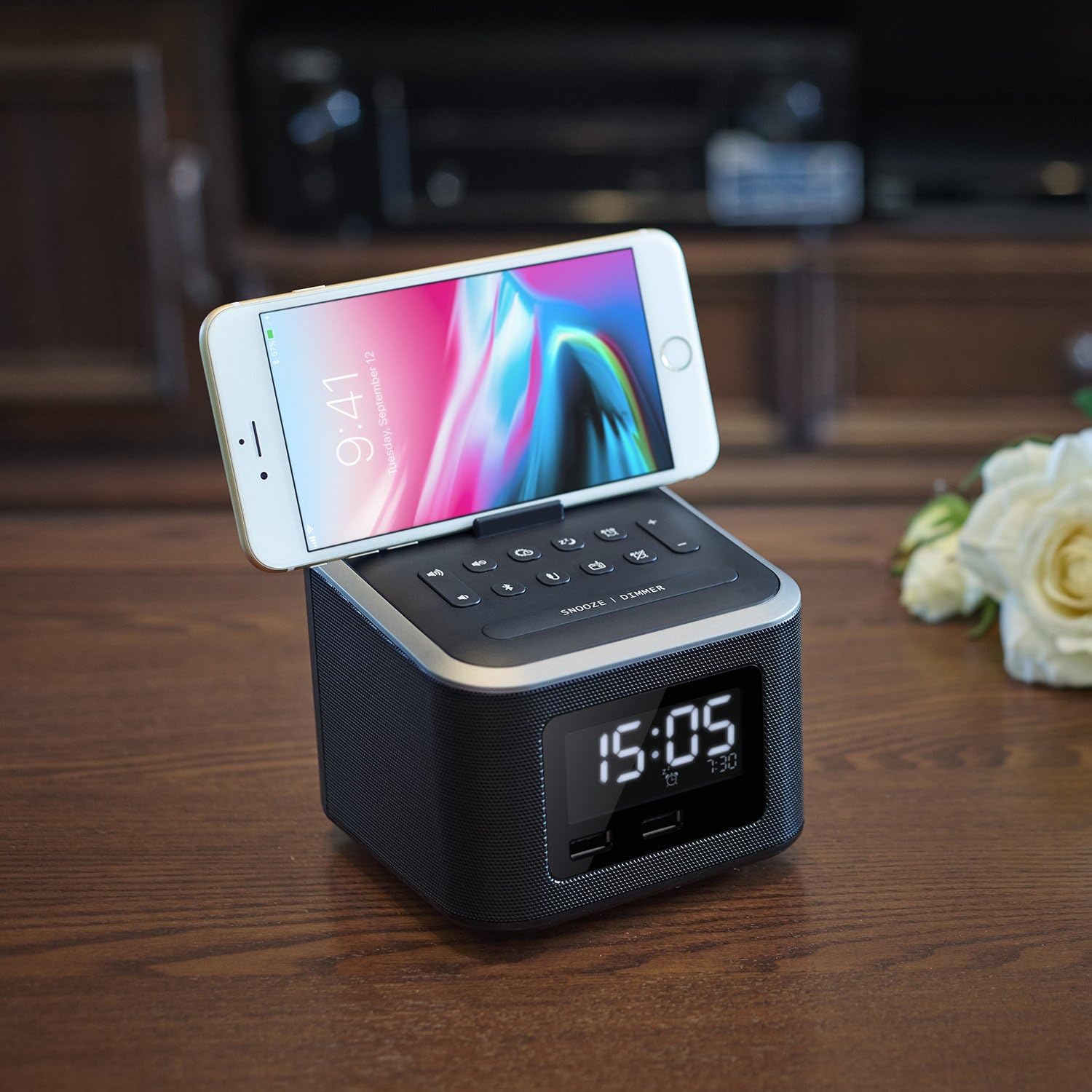
Figura 6: A smartphone securely resting in the dedicated stand on the top surface of the alarm clock radio, ideal for hands-free viewing.
The integrated phone stand on the top of the unit allows you to conveniently dock your smartphone while charging or watching videos.
AUX-in Connection
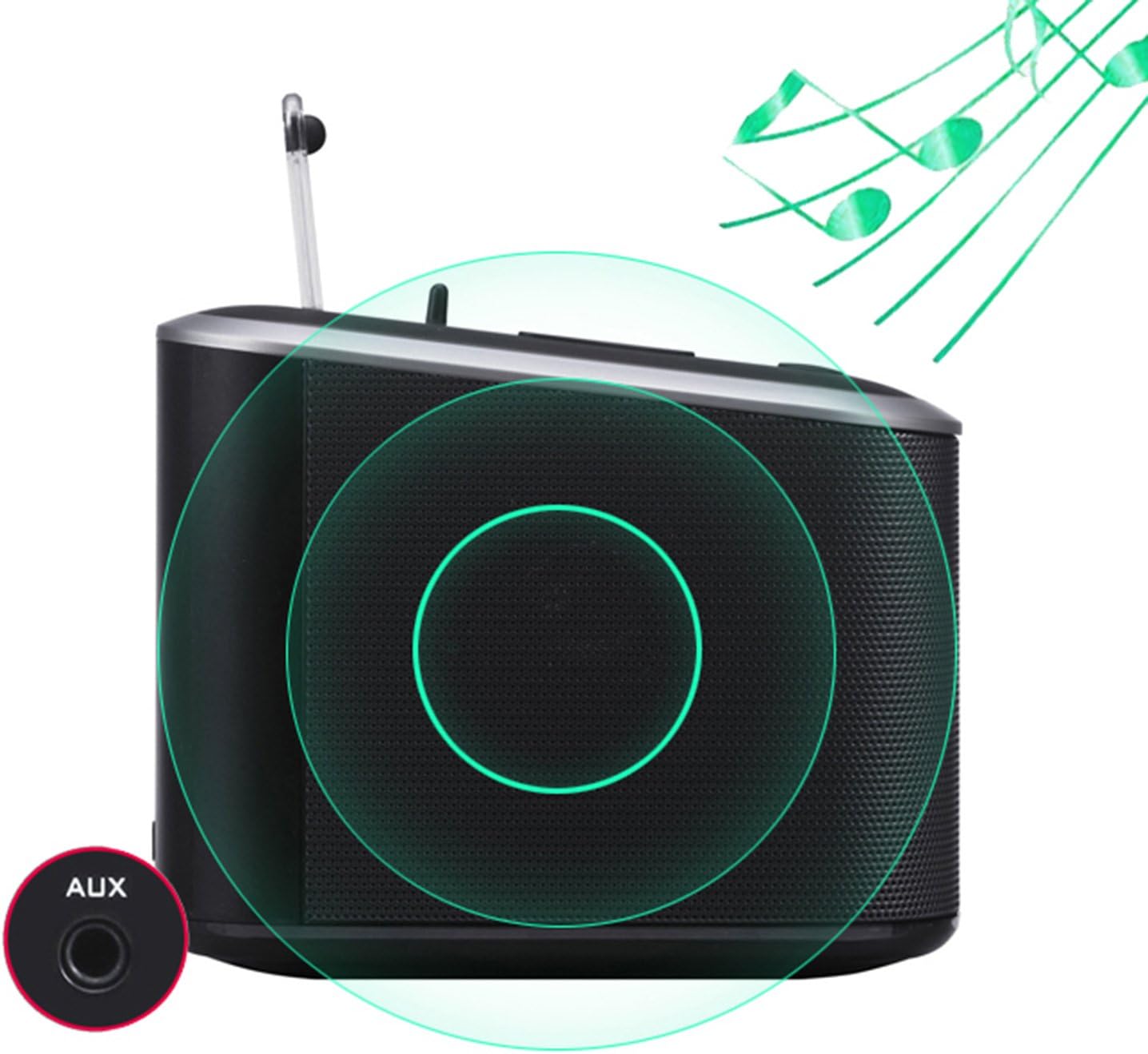
Figura 7: La part posterior view of the alarm clock radio, specifically highlighting the AUX-in port for connecting external audio devices with a 3.5mm cable.
Connect any audio device with a 3.5mm audio output (e.g., MP3 player, older smartphone) to the AUX-in port on the back of the unit using a 3.5mm audio cable (not included).
- Connect one end of a 3.5mm audio cable to the AUX-in port on the back of the alarm clock radio.
- Connecteu l'altre extrem del cable a la presa d'auriculars o a la sortida d'àudio del dispositiu extern.
- The unit will automatically switch to AUX-in mode, or you may need to select it using the mode button (if applicable, otherwise Bluetooth/FM will be off).
- Controla la reproducció i el volum des del dispositiu connectat.
Manteniment
- Neteja: Netegeu la unitat amb un drap suau i sec. No utilitzeu productes de neteja abrasius ni dissolvents.
- Emmagatzematge: If storing for an extended period, disconnect from power and remove backup batteries. Store in a cool, dry place.
- Cura de l'antena: Handle the FM antenna gently to avoid damage.
Resolució de problemes
| Problema | Possible causa/solució |
|---|---|
| Sense alimentació / Pantalla apagada |
|
| No hi ha so dels altaveus |
|
| L'aparellament de Bluetooth falla |
|
| La càrrega USB no funciona |
|
| L'alarma no sona |
|
Especificacions
| Característica | Detall |
|---|---|
| Marca | Hora local |
| Número de model | 4336301751 |
| Color | Negre |
| Tipus de visualització | Digital (LCD Panel) |
| Font d'alimentació | Elèctric amb cable, alimentat per bateria (reserva) |
| Tipus de bateria (de reserva) | 3 piles AAA (no incloses) |
| Ports de càrrega USB | 2 (1 x 2.1A, 1 x 1.0A total 3.1A) |
| Sortida de l'altaveu | 6W (Dual high-performance drivers) |
| Connectivitat | Bluetooth, FM Radio, AUX-in |
| Material | Plàstic (acrilonitril butadiè estirè) |
| Dimensions del producte | 4.7 x 4.7 x 5.2 polzades |
| Pes de l'article | 1.06 lliures |
Garantia i Suport
Homtime products are designed and manufactured to the highest quality standards. For information regarding warranty coverage, technical support, or service inquiries, please refer to the contact information provided with your purchase or visit the official Homtime weblloc.
Si us plau, conserveu el comprovant de compra per motius de garantia.
Ask a question about this manual
Ask about setup, troubleshooting, compatibility, parts, safety, or missing instructions. Manuals+ will review the question and use this page’s manual context to help answer it.