
1. Introducció
Thank you for choosing the WINGONEER LP-168 Plus Bluetooth 2.1 Channel Audio Power Amplifier. This device is designed to provide a high-quality audio experience with versatile connectivity options. Please read this manual carefully before use to ensure proper operation and to maximize the performance of your ampmés viu.
Característiques principals:
- High-quality integrated Bluetooth module for wireless audio streaming.
- 2.1 Channel output: 2 x 45W RMS for main speakers and 1 x 68W for subwoofer.
- Supports USB playback for MP3 files.
- RCA audio input for connecting external devices like DVD/CD/VCD/TV/PC.
- Electronic volume control with dedicated Bass and Treble adjustments.
- Bright LED display for mode and track information.
- Includes a compact IR remote control for convenient operation.
2. Informació de seguretat
To prevent fire, electric shock, and other hazards, please observe the following safety precautions:
- No exposeu aquest aparell a la pluja o la humitat.
- No obriu el amplificador casing. Demaneu totes les tasques de manteniment a personal qualificat.
- Assegureu-vos que el vol de l'adaptador de correnttage coincideix amb la vostra font d'alimentació local.
- Mantenir el amplifier away from direct sunlight, heat sources, and excessive dust.
- Assegureu-vos que hi hagi una ventilació adequada al voltant de la unitat per evitar el sobreescalfament.
- Desconnecteu l'adaptador de corrent durant tempestes amb llamps o quan no l'utilitzeu durant períodes prolongats.
3. Contingut del paquet
Si us plau, comproveu el paquet per veure si hi ha els elements següents:
- 1 x WINGONEER LP-168 Plus Audio Power Ampmés viu
- 1 x Power Adapter (AC 100-240V to DC 19V-24V)
- 1 x Signal Cable (RCA to 3.5mm or similar)
- 1 control remot IR
- 1 x WINGONEER USB LED Light

Image: Contents of the WINGONEER LP-168 Plus package, showing the amplifier, remote, power supply, and manual.

Image: The included WINGONEER USB LED Light.
4. Producte acabatview
Panell frontal:
- Botó MODE: Switches between input sources (Bluetooth, USB, RCA).
- Botons ANTERIOR/SEGÜENT: For USB playback, navigates tracks.
- Botó REPRODUCIR/PAUSA: For USB playback, controls playback.
- Port USB: Per connectar unitats flaix USB.
- Receptor IR: Per a senyals de comandament a distància.
- Botó de VOLUM: Adjusts overall volume.
- Controlador TREBLE: Ajusta el so d'alta freqüència.
- Pom BASS: Ajusta el so de baixa freqüència.
- Pantalla LED: Shows current mode, track information, etc.
Panell posterior:
- ENTRADA D'ÀUDIO (RCA E/D): Connect external audio sources.
- +R OUT - / +L OUT -: Speaker terminals for right and left main speakers.
- + SUB SPEAKER -: Subwoofer output terminals.
- FORMIGA: Bluetooth antenna connector.
- POWER INPUT (DC 19V-24V): Connecteu l'adaptador de corrent proporcionat.
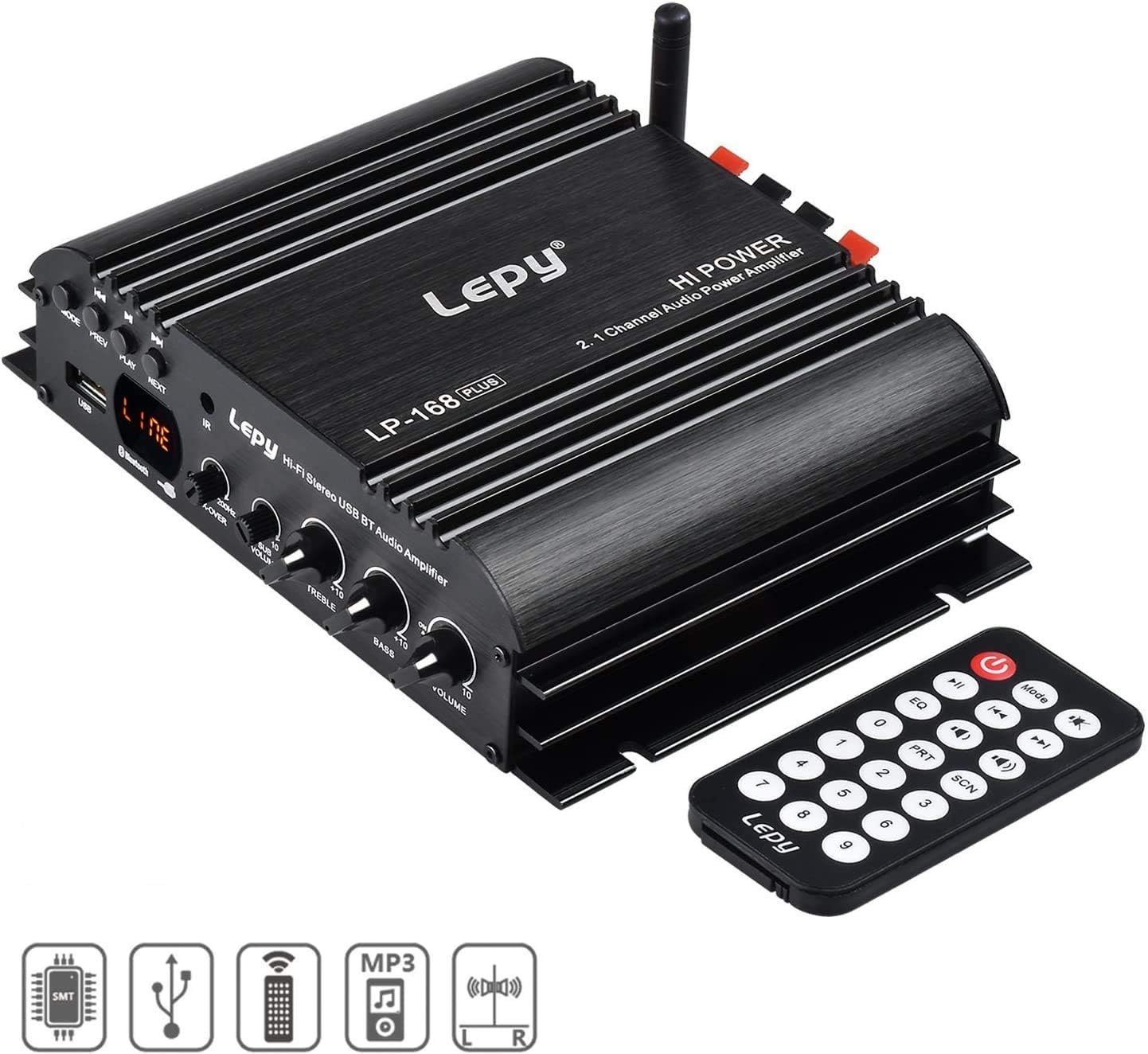
Image: Front panel of the LP-168 Plus amplificador amb comandament a distància.

Image: Rear panel connections of the LP-168 Plus ampmés viu.
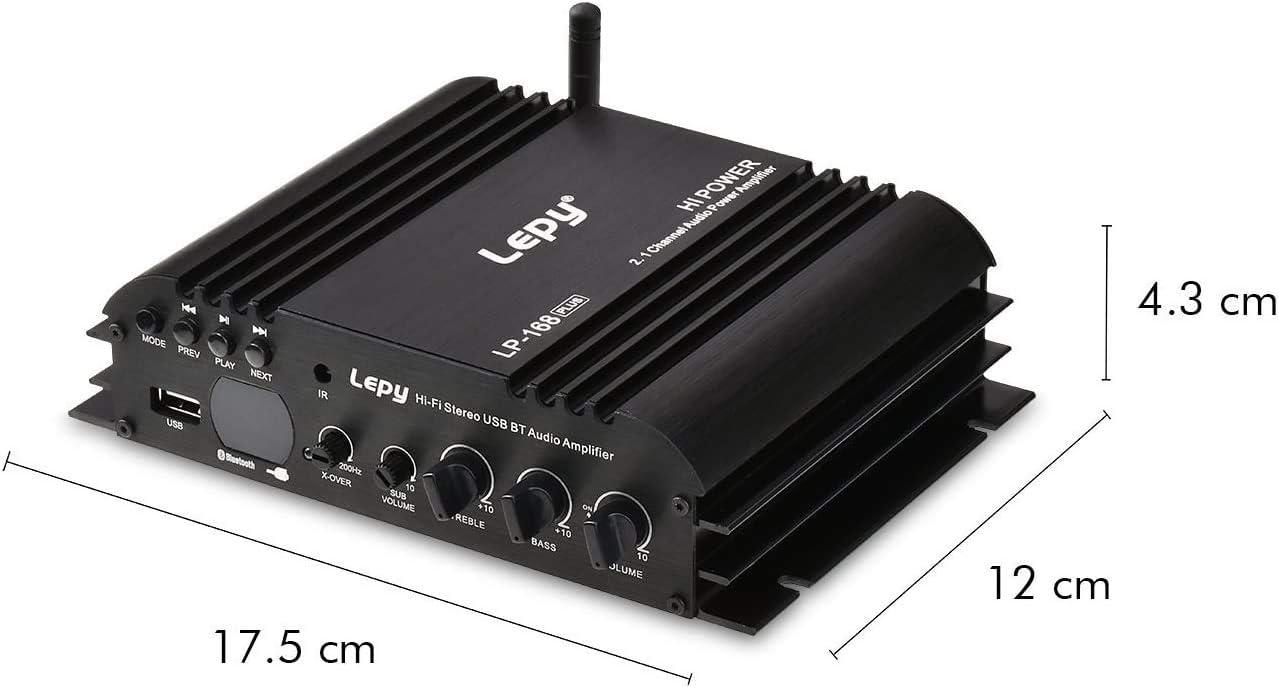
Image: Dimensions of the LP-168 Plus ampmés viu.
5. Configuració
Follow these steps to set up your WINGONEER LP-168 Plus ampmés viu:
- Connectar els altaveus: Connect your passive main speakers to the +R OUT - i +L OUT - terminals. Ensure correct polarity (+ to + and - to -). For the subwoofer, connect it to the + SUB SPEAKER - terminals. The amplifier supports 4-8 Ohm speakers.
- Connect Audio Source (RCA): If using an external device (e.g., DVD, CD player, PC), connect its audio output to the AUDIO INPUT (RCA L/R) a la amplifier's rear panel using an RCA cable.
- Connect Bluetooth Antenna: Screw the provided Bluetooth antenna into the ANT connector on the rear panel.
- Connectar l'alimentació: Plug the DC output of the provided power adapter into the POWER INPUT (DC 19V-24V) a la amplifier. Then, plug the AC input of the power adapter into a wall outlet (AC 100-240V, 50/60Hz).

Image: Connection diagram for the LP-168 Plus ampmés viu.
6. Instruccions de funcionament
Encès/apagat:
Un cop connectat, el amplifier will power on automatically. There is no dedicated power button on the unit; power is controlled by connecting/disconnecting the power adapter or using the remote control's power button.
Selecció de la font d'entrada:
Premeu el botó MODE button on the front panel or the remote control to cycle through available input sources: Bluetooth, USB, and RCA (Audio Input).
Volume, Bass, and Treble Control:
- Gira el VOLUM knob on the front panel or use the volume buttons on the remote control to adjust the overall sound level.
- Gira el BASS knob to increase or decrease low-frequency sounds.
- Gira el AGUTS knob to increase or decrease high-frequency sounds.
Funcionament Bluetooth:
- Canvia el amplifier to Bluetooth mode using the MODE button. The LED display will indicate "BT".
- On your Bluetooth-enabled device (smartphone, tablet, computer), search for available Bluetooth devices.
- Select "LP-168 Plus" from the list to pair. Once paired, the amplifier will emit a confirmation sound.
- You can now play audio from your device wirelessly through the ampmés viu.
Reproducció USB:
- Inseriu una unitat flash USB que contingui àudio MP3 files a la Port USB al panell frontal.
- Canvia el amplifier to USB mode using the MODE button. The LED display will show track information.
- Utilitza el REPRODUCCIÓ/PAUSA, PREV, i SEGÜENT buttons on the front panel or remote control to manage playback.
Funcions de control remot:
The included IR remote control allows you to conveniently manage the amplifier from a distance. Functions include power on/off, mode selection, volume control, track navigation (USB), EQ presets, and more.
7. Manteniment
- Neteja: Utilitzeu un drap suau i sec per netejar-lo ampl'exterior del lificador. No utilitzeu netejadors líquids ni dissolvents.
- Emmagatzematge: When not in use for extended periods, disconnect the power adapter and store the amplifier in a cool, dry place.
- Ventilació: Ensure that the ventilation fins on the amplifier are not blocked to prevent overheating.
8. Solució De Problemes
| Problema | Causa possible | Solució |
|---|---|---|
| Sense sortida de so. |
|
|
| El Bluetooth no es connecta. |
|
|
| La reproducció per USB no funciona. |
|
|
| El comandament a distància no funciona. |
|
|
9. Especificacions
| Model | LP-168 Plus |
| Potència de sortida | 2 x 45W RMS (Main Channels), 1 x 68W (Subwoofer) |
| Impedància de l'altaveu | 4-8 Ohm |
| Distorsió harmònica total (THD) | <0.1% |
| Relació senyal/soroll (SNR) | >80 dB |
| Resposta de freqüència | 20Hz-20kHz |
| Impedància d'entrada | 47K |
| Entrada Voltage | DC 19V-24V |
| AC Input (Power Adapter) | 100-240V 50/60Hz |
| Dimensions (L x A x A) | 17.6 x 15.5 x 4.3 cm |
| Pes net | 495 g |
| Color | Negre |
10. Garantia i Suport
This WINGONEER product comes with a standard manufacturer's warranty. Please refer to the warranty card included in your package for specific terms and conditions. For technical support, troubleshooting assistance, or warranty claims, please contact your retailer or the WINGONEER customer service department.
Si us plau, conserveu el comprovant de compra per motius de garantia.