
Introducció
This manual provides comprehensive instructions for the setup, operation, and maintenance of your NETUM NT-R3 Mini 1D CCD Bluetooth Barcode Scanner. Please read this guide thoroughly to ensure proper use and to maximize the performance of your device.
Contingut del paquet
En desempaquetar, comproveu que tots els elements que s'enumeren a continuació hi són presents i en bon estat:
- 1 x NETUM Mini Bluetooth Barcode Scanner (NT-R3)
- 1 x cable de càrrega USB
- 1 x Guia d'inici ràpid
- 1 x 2.4 GHz Adapter
Producte acabatview
The NETUM NT-R3 is a compact and versatile 1D CCD barcode scanner designed for portability and ease of use. Its ring-style design allows for comfortable wear, enhancing productivity in various environments.

Image: The NETUM NT-R3 Mini Barcode Scanner, a small black electronic device with a screen and button, designed to be worn on a finger with an adjustable ring structure.
Característiques principals:
- Ring Design: Aliatge de magnesi casing and trigger for durability and ease of use.
- Rotació de 180°: Unique rotatable design for scanning from various angles.
- CCD Scanning: Reads 1D barcodes directly from LCD screens of computers or mobile devices, including poorly printed or damaged barcodes.
- Connectivitat sense fils: Supports Bluetooth (SPP, HID) and 2.4 GHz wireless connections.
- Àmplia compatibilitat: Compatible with Windows XP/7/8/8.1/10, Google Android, iOS, and Mac OS X.
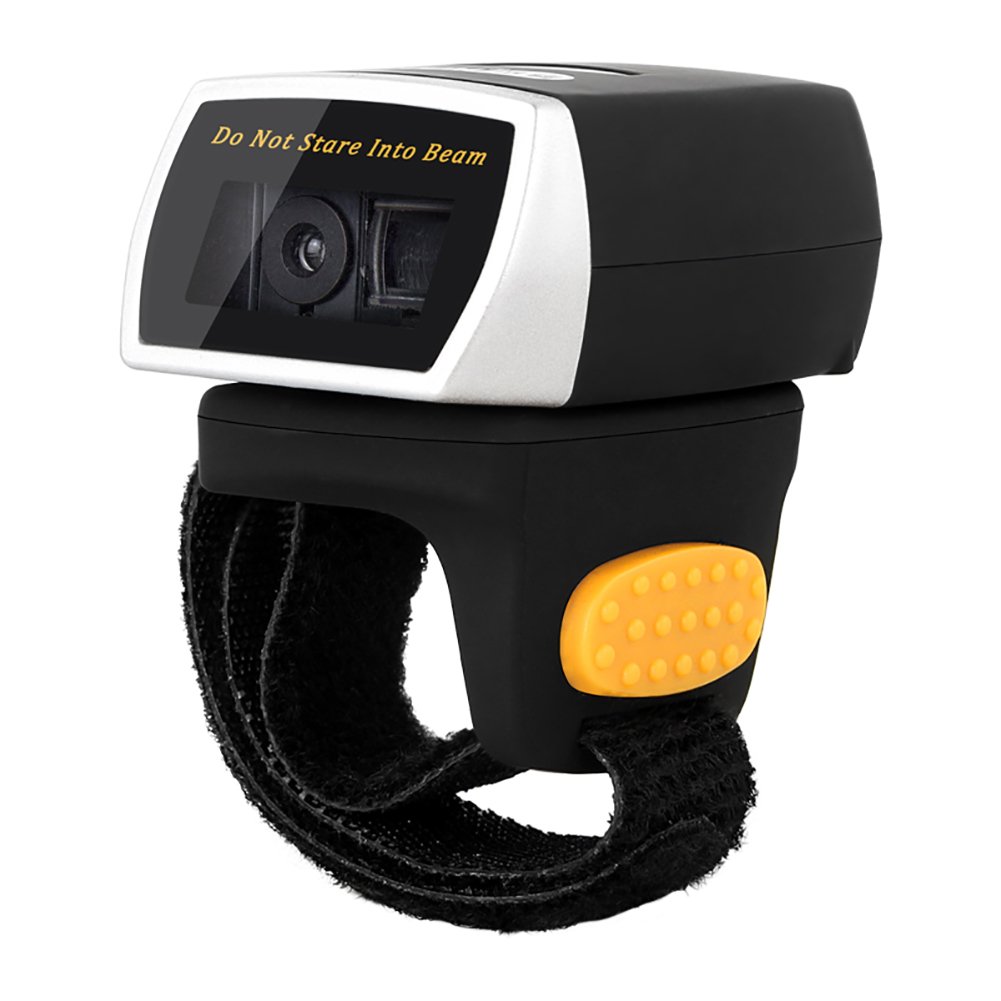
Image: The NETUM NT-R3 Mini Barcode Scanner demonstrating its 180-degree rotation design, allowing for flexible scanning angles.

Image: The NETUM NT-R3 Mini Barcode Scanner held in a hand, illustrating its compact dimensions (50mm x 44mm x 38mm) and light weight (50g), emphasizing its strong compatibility with various devices.
Configuració i connectivitat
1. Càrrega de l'escàner
Before initial use, fully charge the scanner using the provided USB charging cable. Connect the small end of the USB cable to the scanner's charging port and the other end to a USB power source (e.g., computer, USB wall adapter). The charging indicator light will show the charging status.
2. Encès / apagat
To power on the scanner, press and hold the trigger button for a few seconds until you hear a beep and see the indicator light. To power off, press and hold the trigger button again until the indicator light turns off.
3. Opcions de connectivitat
The NT-R3 scanner offers two primary connectivity methods:
Bluetooth Connection (HID Mode - Keyboard Emulation)
- Assegureu-vos que l'escàner estigui engegat.
- Scan the "Bluetooth HID Mode" barcode (refer to the Quick Start Guide for specific barcodes).
- Al dispositiu amfitrió (telèfon intel·ligent, tauleta, ordinador), activeu el Bluetooth i cerqueu els dispositius disponibles.
- Select "NETUM Barcode Scanner" or a similar name from the list of devices.
- The scanner will beep to confirm successful pairing.
In HID mode, scanned barcodes are input directly as keyboard entries into any active text field.
Bluetooth Connection (SPP Mode - Serial Port Profile)
SPP mode is typically used for applications that require direct data communication with the scanner. This mode requires specific software on the host device to interpret the data. Refer to your application's documentation for SPP setup.
- Assegureu-vos que l'escàner estigui engegat.
- Scan the "Bluetooth SPP Mode" barcode (refer to the Quick Start Guide).
- Follow the instructions provided by your specific application for connecting to an SPP device.
Connexió sense fil de 2.4 GHz
- Plug the provided 2.4 GHz adapter into a USB port on your computer.
- Assegureu-vos que l'escàner estigui engegat.
- Scan the "2.4G Wireless Mode" barcode (refer to the Quick Start Guide).
- The scanner will automatically connect to the adapter. A successful connection is indicated by a specific beep or light pattern (refer to the Quick Start Guide for details).
The 2.4 GHz connection offers a wireless range of up to 10 meters (30 feet).
Modes de funcionament
The NETUM NT-R3 scanner supports two data upload modes:
1. Instant Upload Mode
In this mode, scanned barcodes are immediately transmitted to your connected device. This is suitable for real-time data entry.
2. Mode d'emmagatzematge
The scanner can store up to 2000 barcodes in its built-in flash memory. This mode is useful when working out of range of your host device. Barcodes can be uploaded later when a connection is established.
Image: A visual representation of the two upload modes. Instant Upload Mode shows barcodes being sent directly to a device. Storage Mode shows barcodes being stored internally and then uploaded later.
To switch between modes, scan the corresponding configuration barcodes found in the Quick Start Guide.
Escaneig de codis de barres
Per escanejar un codi de barres:
- Hold the scanner with the scanning window facing the barcode.
- Press the trigger button. A red scanning line will appear.
- Align the red scanning line across the entire barcode.
- Once successfully scanned, the scanner will emit a beep, and the indicator light will flash.
The NT-R3 is capable of reading 1D barcodes from various surfaces, including:
- Etiquetes impreses
- LCD screens (computers, smartphones, tablets)
- Poorly printed or damaged barcodes
Manteniment
Cura de la bateria
- Per allargar la durada de la bateria, eviteu descarregar-la completament amb freqüència.
- Charge the scanner regularly, even if not in constant use.
- Guardeu l'escàner en un lloc fresc i sec quan no l'utilitzeu durant períodes prolongats.
Neteja
- Use a soft, dry, lint-free cloth to clean the scanner's exterior.
- For the scanning window, use a lens cleaning cloth or a soft cloth lightly dampnetejat amb aigua o un netejador suau i no abrasiu.
- No utilitzeu productes químics agressius, dissolvents ni materials abrasius, ja que poden danyar el dispositiu.
Resolució de problemes
| Problema | Causa possible | Solució |
|---|---|---|
| L'escàner no s'encén. | Bateria baixa. | Charge the scanner for at least 2 hours. |
| L'escàner no es connecta per Bluetooth. | Incorrect mode selected; device not discoverable; out of range. | Ensure "Bluetooth HID Mode" or "SPP Mode" is scanned. Make sure Bluetooth is enabled on the host device and the scanner is within 10 meters. Try re-pairing. |
| Scanner does not connect via 2.4 GHz adapter. | Adapter not properly inserted; incorrect mode selected. | Ensure the 2.4 GHz adapter is securely plugged in. Scan the "2.4G Wireless Mode" barcode. |
| L'escàner no llegeix codis de barres. | Barcode is unreadable; scanner not aligned; scanner in storage mode. | Ensure the barcode is clear and well-lit. Align the red line across the entire barcode. If in storage mode, switch to instant upload mode or upload stored data. |
| Les dades escanejades apareixen incorrectament. | Keyboard layout mismatch (for HID mode). | Scan the appropriate keyboard layout barcode (e.g., US, UK, French) from the Quick Start Guide. |
Especificacions tècniques
| Característica | Detall |
|---|---|
| Número de model | NT-R3 |
| Tecnologia d'escaneig | CCD 1D |
| Connectivitat | Bluetooth (SPP, HID), 2.4 GHz Wireless, USB |
| Sistemes operatius compatibles | Windows XP/7/8/8.1/10, Google Android, iOS, Mac OS X |
| Taxa d'escaneig | 260 samples per segon |
| Capacitat d'emmagatzematge | Up to 2000 barcodes (in Storage Mode) |
| Tipus de bateria | 1 Lithium metal battery (included) |
| Font d'alimentació | Funciona amb bateria |
| Vol. Operatiutage | 5 Volts |
| Temperatura màxima d'emmagatzematge | 45 graus centígrads |
| Certificacions | CE, ISO, RoHS |
| Fabricant | Guangzhou Netum Electronic Technology Co.,Ltd. |
| País d'origen | Xina |
Garantia i Suport
Política de devolució
Aquest producte pot ser reemborsat o substituït en un termini de 30 dies des de la compra, d'acord amb la política de devolucions del venedor.
Informació del fabricant
Manufacturer: Guangzhou Netum Electronic Technology Co.,Ltd.
For further assistance or technical support, please refer to the contact information provided in your Quick Start Guide or visit the official NETUM weblloc.
Note: Information regarding spare parts availability and guaranteed software updates is not available at this time.