
Propel Zipp Nano 2.0
Propel Zipp Nano 2.0 Drone User Manual
Model: Zipp Nano 2.0
Marca: Propel
1. Introducció
This manual provides essential information for the safe and effective operation of your Propel Zipp Nano 2.0 Drone. Please read this manual thoroughly before operating the drone to ensure proper usage and to prevent damage or injury.
The Propel Zipp Nano 2.0 is a high-performance 2.4 GHz indoor/outdoor drone designed for stable flight and exciting aerial maneuvers. It features a built-in 6-axis gyroscopic chip for stability, multiple speed settings, and the ability to perform 360-degree stunt rolls.
2. Precaucions de seguretat
Always prioritize safety when operating the drone. Failure to follow these guidelines may result in injury or damage to the drone or property.
- Do not operate the drone near people, animals, or obstacles.
- Keep hands, hair, and loose clothing away from rotating propellers.
- Ensure the drone is fully charged before each flight.
- No voli amb vents forts o condicions meteorològiques adverses.
- Supervise children during operation. This product contains small parts and is not suitable for children under 3 years due to choking hazard.
- Do not attempt to modify or repair the drone yourself. Contact customer support for assistance.

Image: Back of the product packaging, highlighting features and a warning about small parts.
3. Contingut del paquet
Verifiqueu que tots els elements siguin presents al vostre paquet:
- Propel Zipp Nano 2.0 Drone (Red)
- 2.4 GHz Digital Remote Control
- Cable de càrrega USB
- Spare Replacement Parts (Propellers)

Image: The Propel Zipp Nano 2.0 Drone and its remote control visible within the clear retail packaging.
4. Configuració
4.1 Càrrega de la bateria del dron
The drone is powered by an internal rechargeable battery. Use the provided USB charging cable to charge the drone.
- Connect the small end of the USB charging cable to the drone's charging port.
- Connect the large end of the USB charging cable to a USB power source (e.g., computer USB port, USB wall adapter).
- El llum indicador de càrrega del cable USB s'il·luminarà durant la càrrega i s'apagarà quan estigui completament carregat.
- La càrrega sol trigar aproximadament entre 30 i 45 minuts. No la carregueu massa.
4.2 Instal·lació de les piles del comandament a distància
The remote control requires 2 "AAA" batteries (not included).
- Localitzeu el compartiment de la bateria a la part posterior del comandament a distància.
- Obriu la tapa del compartiment de la bateria.
- Insert 2 "AAA" batteries, ensuring correct polarity (+/-).
- Tanqueu bé la tapa del compartiment de la bateria.

Image: The remote control for the Propel Zipp Nano 2.0 Drone, showing its various buttons and joysticks.
4.3 Emparellar el dron i el comandament a distància
To establish a connection between the drone and the remote control:
- Col·loqueu el drone sobre una superfície plana i plana.
- Turn on the drone by sliding the power switch. The drone's LED lights will flash.
- Engegueu el comandament a distància.
- Push the left joystick (throttle) all the way up, then pull it all the way down.
- The drone's LED lights will turn solid, indicating successful pairing.
5. Funcionament del dron
5.1 Controls de vol
Familiaritzeu-vos amb la disposició i les funcions del comandament a distància:
- Joystick esquerre (accelerador/guinyada):
- Push up to increase altitude (throttle).
- Push down to decrease altitude.
- Push left/right to rotate the drone (yaw).
- Joystick dret (Pitch/Roll):
- Push up/down to move forward/backward (pitch).
- Push left/right to move left/right (roll).
- Botó de velocitat: Cycles through 3 different speed settings (slow, medium, high).
- Stunt Button: Press to initiate 360-degree stunt rolls (see 5.4).
- T-Mode Button: Activates T-Mode for beginner pilots, providing more stable and controlled flight.
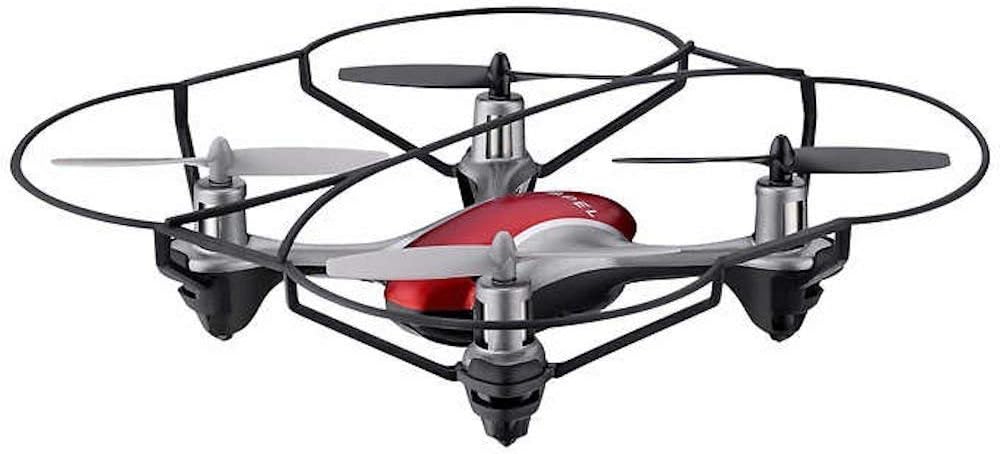
Image: The Propel Zipp Nano 2.0 Drone, showcasinel seu disseny compacte i les proteccions de l'hèlix.
5.2 Enlairament i aterratge
- Enlairament: After pairing, slowly push the left joystick (throttle) up to lift off.
- Aterratge: Slowly pull the left joystick (throttle) down until the drone lands gently.
5.3 Altitude Hold
The Zipp Nano 2.0 features an air pressure sensor that helps lock altitude in mid-air, making it easier to control and hover stably.
5.4 360-Degree Stunt Rolls
To perform a stunt roll:
- Ensure the drone is flying at a sufficient height (at least 6-8 feet).
- Press the dedicated Stunt Button on the remote control.
- Immediately push the right joystick in the desired direction (forward, backward, left, or right) to execute the roll.

Imatge: Un angle view of the Propel Zipp Nano 2.0 Drone, highlighting its sleek design and protective frame.
6. Manteniment
- Neteja: Use a soft, dry cloth to clean the drone and remote control. Do not use harsh chemicals or water.
- Substitució de l'hèlix: If propellers become damaged, replace them with the provided spare parts. Carefully remove the damaged propeller and snap the new one into place, ensuring correct orientation.
- Emmagatzematge: When not in use, store the drone and remote control in a cool, dry place away from direct sunlight.
7. Solució De Problemes
| Problema | Causa possible | Solució |
|---|---|---|
| El dron no respon al comandament a distància. | Not paired, low drone battery, low remote control batteries. | Re-pair the drone and remote. Charge drone battery. Replace remote control batteries. |
| El dron vola de manera erràtica o a la deriva. | Not calibrated on a level surface, damaged propeller, strong wind. | Ensure drone is placed on a flat surface for pairing. Check for damaged propellers and replace if necessary. Fly in calm conditions. |
| Drone does not lift off. | Low drone battery, propellers not spinning correctly. | Charge drone battery fully. Check for obstructions around propellers. |
8. Especificacions
| Característica | Detall |
|---|---|
| Marca | Propulsar |
| Nom del model | Propel 2.4 ghz (Zipp Nano 2.0) |
| Tecnologia de connectivitat | Radio Frequency (2.4 GHz) |
| Interval operatiu | Fins a 200 peus |
| Giroscopi | Built-in 6-axis gyroscopic chip |
| Configuració de velocitat | 3 (Slow, Medium, High) |
| Característiques especials | 360-degree stunt rolls, Altitude Hold, T-Mode for beginners |
| Tipus de material | Plastic, Carbon Fibre |
| Dimensions del producte | 13.97 x 3.81 x 13.97 cm |
| Pes de l'article | 453.59 g (1 lliura) |
| Color | Vermell |
| Nivell d'habilitat | Principiant |
9. Garantia i Suport
Propel offers unlimited replacement parts for one year from the date of purchase. For warranty claims, technical support, or to order replacement parts, please refer to the contact information provided on the product packaging or the official Propel weblloc.
Conserveu el tiquet de compra com a comprovant de compra a efectes de garantia.
Ask a question about this manual
Ask about setup, troubleshooting, compatibility, parts, safety, or missing instructions. Manuals+ will review the question and use this page’s manual context to help answer it.