
ARGOM TECH A00251
Manual d'usuari del ratolí per a jocs de combat ARGOM TECH
Model: A00251
Producte acabatview
The ARGOM TECH Combat Gaming Mouse is designed for an enhanced gaming experience, featuring a robust structure, ergonomic design, and dynamic lighting. It offers precise control and comfort for extended use.
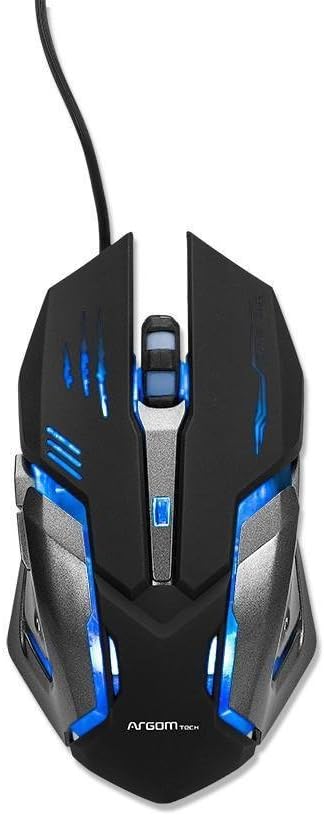
Figura 1: superior view of the Combat Gaming Mouse, highlighting its illuminated design and USB connection.
Característiques principals:
- Robust structure and ergonomic design for gamers. Background rainbow changing light.
- Plug & Play compatible with most Operating Systems.
- DPI switch (1000/1200/1600/2400 DPI) for adjustable sensitivity.
- Built-in weighted Iron Plate for enhanced stability.
- 1.5m extra long and durable braided USB cable.
Guia de configuració
- Desempaqueta el ratolí: Carefully remove the Combat Gaming Mouse from its packaging.
- Connexió a l'ordinador: Locate an available USB port on your computer. Insert the USB connector of the mouse firmly into the USB port.
- Instal·lació del controlador (Plug & Play): The mouse is designed for Plug & Play functionality. Your operating system (Windows, macOS, Linux, etc.) should automatically detect and install the necessary drivers. This process typically takes a few seconds.
- Verificació de la funcionalitat: Once connected, the mouse's rainbow lights should illuminate, indicating it is powered on. Move the mouse to confirm cursor movement on your screen.
No additional software installation is required for basic functionality.
Instruccions de funcionament
Ajust de DPI:
The Combat Gaming Mouse features a dedicated DPI switch button, usually located behind the scroll wheel. Pressing this button allows you to cycle through different sensitivity settings:
- 1000 DPI (predeterminat)
- 1200 DPI
- 1600 DPI
- 2400 DPI
Adjusting the DPI allows you to change the cursor speed to suit your preference for different tasks, from precise aiming in games to fast navigation on the desktop.
Efectes d'il·luminació:
The mouse features a background rainbow changing light effect, which activates automatically upon connection. This provides an aesthetic enhancement to your gaming setup.
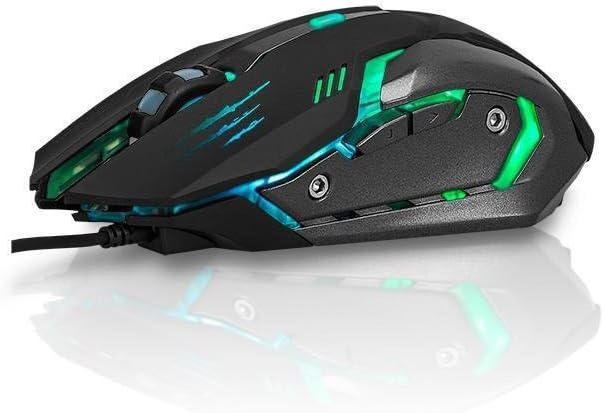
Figura 2: lateral view of the Combat Gaming Mouse, illustrating its ergonomic design and dynamic lighting.
Manteniment
To ensure the longevity and optimal performance of your Combat Gaming Mouse, follow these simple maintenance guidelines:
- Neteja: Feu servir un drap suau, sec i sense borrissol per netejar la superfície del ratolí. Per a la brutícia persistent, netegeu lleugeramentampNetegeu el drap amb aigua o una solució de neteja suau i, a continuació, eixugueu-lo immediatament. Eviteu utilitzar productes químics agressius o materials abrasius.
- Cura del sensor: Keep the optical sensor on the underside of the mouse clean and free from dust or debris. A cotton swab can be used gently if needed.
- Gestió de cables: Eviteu doblegar bruscament o estirar excessivament el cable USB per evitar danys.
- Emmagatzematge: Quan no l'utilitzeu durant períodes prolongats, guardeu el ratolí en un entorn net i sec, allunyat de temperatures extremes.
Resolució de problemes
| Problema | Causa possible | Solució |
|---|---|---|
| El ratolí no respon / El cursor no es mou. |
|
|
| Els llums estan apagats. |
|
|
| Cursor movement is erratic. |
|
|
Especificacions
| Característica | Detall |
|---|---|
| Número de model | A00251 |
| Marca | ARGOM TECH |
| Tecnologia de connectivitat | USB (per cable) |
| Tecnologia de detecció de moviment | Òptic |
| Configuració de DPI | 1000/1200/1600/2400 DPI |
| Longitud del cable | 1.5 metres (trenat) |
| Color | Negre |
| Dimensions del producte (L x A x A) | 7.48 x 2.36 x 5.51 polzades |
| Pes de l'article | 0.011 ounces (approx. 0.34 lbs as per feature bullets) |
| Característica especial | Ergonomic Design, Built-in Weighted Iron Plate, Rainbow Changing Light |
| Compatibilitat | Most Operating Systems (Plug & Play) |
Garantia i Suport
Informació de la garantia:
Specific warranty terms and conditions for the ARGOM TECH Combat Gaming Mouse are typically provided with your purchase documentation or can be found on the official ARGOM TECH weblloc web. Si us plau, conserveu el comprovant de compra per a reclamacions de garantia.
Atenció al client:
For further assistance, technical support, or inquiries regarding your ARGOM TECH Combat Gaming Mouse, please visit the official ARGOM TECH website or contact their customer service department through the channels provided on their site. Always refer to the manufacturer's official resources for the most accurate and up-to-date support information.
Vídeos oficials de productes
No official product videos from the seller were found for this product in the provided data.
Ask a question about this manual
Ask about setup, troubleshooting, compatibility, parts, safety, or missing instructions. Manuals+ will review the question and use this page’s manual context to help answer it.