
1. Instruccions de seguretat importants
Llegiu totes les advertències, instruccions, il·lustracions i especificacions de seguretat proporcionades amb aquesta eina elèctrica. L'incompliment de totes les instruccions que s'indiquen a continuació pot provocar descàrregues elèctriques, incendis i/o lesions greus.
- Seguretat de l'àrea de treball: Mantingueu la zona de treball neta i ben il·luminada. Les zones desordenades o fosques conviden als accidents. No feu servir eines elèctriques en atmosferes explosives, com ara en presència de líquids, gasos o pols inflamables.
- Seguretat elèctrica: Els endolls de les eines elèctriques han de coincidir amb la presa de corrent. No modifiqueu mai l'endoll de cap manera. No exposeu les eines elèctriques a la pluja ni a condicions humides. L'entrada d'aigua a una eina elèctrica augmentarà el risc de descàrrega elèctrica.
- Seguretat personal: Always wear eye protection. Use safety glasses, goggles, or a face shield. Wear hearing protection when operating noisy tools. Stay alert, watch what you are doing, and use common sense when operating a power tool.
- Ús i cura de l'eina: No forceu l'eina elèctrica. Feu servir l'eina elèctrica adequada per a la vostra aplicació. Desconnecteu l'endoll de la font d'alimentació i/o traieu la bateria, si és extraïble, de l'eina elèctrica abans de fer qualsevol ajust, canviar accessoris o guardar eines elèctriques.
- Ús i cura de l'eina de la bateria: Recarregueu només amb el carregador especificat pel fabricant. Un carregador adequat per a un tipus de bateria pot generar un risc d'incendi quan s'utilitza amb un altre paquet de bateries. Utilitzeu eines elèctriques només amb paquets de bateries específicament designats.
2. Producte acabatview
Familiarize yourself with the components of your DEKO GCD3.6DKB Cordless Electric Screwdriver before operation.

Figura 2.1: Labeled diagram of the DEKO GCD3.6DKB Cordless Electric Screwdriver, showing its main parts.
- Self-lock Chuck: Per a canvis de broques ràpids i segurs.
- 6+1 Torque Setting: Adjusts the amount of rotational force for different applications.
- Llum de treball LED: Illuminates the work area automatically when the trigger is pressed.
- Interruptor d'alimentació: Activates the screwdriver.
- Llanterna: Separate light source located at the base for general illumination.
- Body Spin Button: Releases the handle for twisting into different positions.
- Interruptor d'avanç i marxa enrere: Controls the direction of rotation (clockwise/counter-clockwise).
- Indicador LED d'alimentació: Mostra el nivell de càrrega actual de la bateria.
3. Especificacions
Technical specifications for the DEKO GCD3.6DKB Cordless Electric Screwdriver.
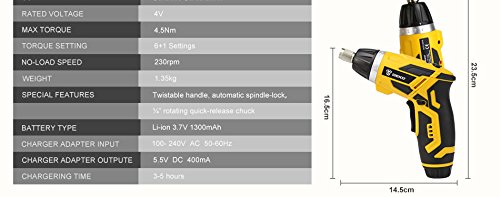
Figura 3.1: Detailed specifications and dimensions of the screwdriver.
| Característica | Especificació |
|---|---|
| Voltage | 4V |
| Màx. Parell | 4.5 Nm |
| Velocitat sense càrrega | 230 rpm |
| Configuració del parell | 6 + 1 Settings |
| Pes | 1.35 kg |
| Tipus de bateria | Li-ion de 3.7 V, 1300 mAh |
| Charger Adapter Input | AC 100~240V, 50Hz/60Hz |
| Sortida de l'adaptador del carregador | DC 5.5V, 400mA |
| Temps de càrrega | 3-5 hores |
| Dimensions (aprox.) | Longitud: 23.5 cm, Alçada: 16.5 cm, Amplada: 14.5 cm |
| Característiques especials | Twistable handle, Automatic spindle-lock, 1/4" rotating quick-release chuck |
4. Configuració
4.1 Càrrega de la bateria
The screwdriver is powered by a built-in Li-ion battery. Before first use, or if the battery is low, charge the screwdriver fully.
- Connect the charger adapter to a standard AC power outlet (100-240V).
- Plug the charger cable into the charging port on the screwdriver.
- The LED Power Indicator will show the charging status. Allow 3-5 hours for a full charge.
- Once fully charged, disconnect the charger. Do not overcharge the battery.
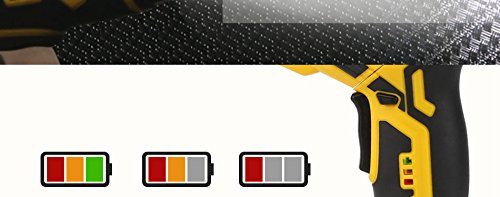
Figura 4.1: The LED power indicator displays the battery charge level.
4.2 Installing and Changing Screwdriver Bits
The screwdriver comes with a 1/4" rotating quick-release chuck for easy bit changes.
- Ensure the screwdriver is turned off and the forward/reverse switch is in the neutral (locked) position.
- Pull the self-lock chuck forward to open it.
- Insert the desired 1/4" hex shank screwdriver bit firmly into the chuck.
- Release the self-lock chuck. The bit should be securely held in place.
- To remove a bit, pull the chuck forward and pull out the bit.
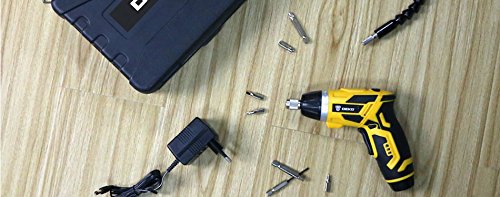
Figura 4.2: The screwdriver comes with a variety of bits and accessories for different tasks.
4.3 Adjusting the Handle Position
The screwdriver features a twistable handle for improved access in tight spaces.
- Locate the Body Spin Button on the top of the screwdriver.
- Press and hold the Body Spin Button.
- Rotate the handle to your desired position (straight or pistol grip).
- Release the Body Spin Button to lock the handle in place. Ensure it is securely locked before use.

Figura 4.3: The twistable handle allows for both straight and pistol grip configurations.
5. Instruccions de funcionament
5.1 Engegada/Apagada i Control de Direcció
- Encès: Press the Power Switch (trigger) to activate the screwdriver. The LED Working Light will illuminate.
- Apagar: Release the Power Switch.
- Rotació cap endavant: Push the Forward and Reverse Switch to the left for clockwise rotation (tightening screws).
- Rotació inversa: Push the Forward and Reverse Switch to the right for counter-clockwise rotation (loosening screws).
- Posició de bloqueig: When the switch is in the center position, the screwdriver is locked, preventing accidental activation.
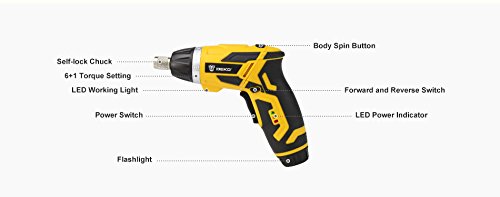
Figura 5.1: The screwdriver in use, demonstrating its application for driving screws.
5.2 Ajust dels paràmetres de parell de torsió
The 6+1 torque settings allow you to control the amount of force applied, preventing overtightening or damage to fasteners and materials.
- Rotate the torque adjustment collar, located behind the chuck, to select the desired setting.
- Settings 1-6 are for driving screws into various materials, with higher numbers indicating more torque.
- The "+" (drill) setting provides maximum torque for drilling applications or when full power is needed.
- Start with a lower torque setting and increase it as needed to avoid stripping screws or damaging surfaces.
5.3 Ús de la llanterna
The screwdriver includes a separate flashlight function for illuminating darker work areas independently of the main power switch.
- Locate the flashlight button, typically near the base of the handle.
- Press the button to turn the flashlight on.
- Press it again to turn the flashlight off.
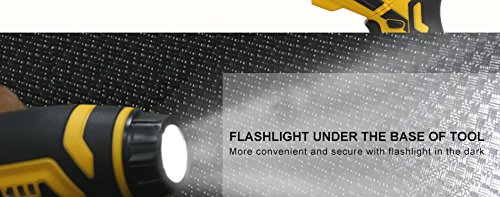
Figura 5.2: The integrated flashlight provides additional illumination for dark work environments.
6. Manteniment
Proper maintenance ensures the longevity and optimal performance of your screwdriver.
- Neteja: Mantingueu netes les ranures de ventilació de l'eina per evitar el sobreescalfament. Feu servir un drap suau i sec.amp drap per netejar l'exterior. No utilitzeu productes químics agressius ni netejadors abrasius.
- Cura de la bateria: Store the screwdriver with a partially charged battery (around 50%) if not used for extended periods. Avoid fully discharging the battery before recharging. Do not expose the battery to extreme temperatures.
- Emmagatzematge: Store the tool and its accessories in a dry, secure place, out of reach of children. The provided carrying case is ideal for storage.
- Manteniment de broques: Keep screwdriver bits clean and free of rust. Replace worn or damaged bits to ensure efficient operation and prevent damage to fasteners.
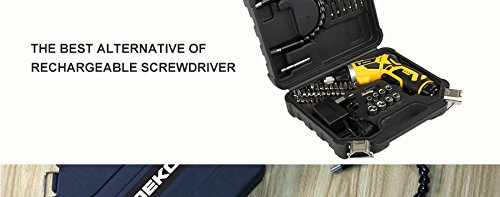
Figura 6.1: Storing the screwdriver and its accessories in the provided case helps protect them.
7. Solució De Problemes
Consulteu aquesta secció per conèixer els problemes comuns i les seves solucions.
| Problema | Causa possible | Solució |
|---|---|---|
| El tornavís no s'engega. | La bateria està descarregada. Forward/Reverse switch is in the locked (center) position. | Carregueu la bateria completament. Move the switch to the forward or reverse position. |
| Screwdriver lacks power or stops during use. | Baixa càrrega de la bateria. Torque setting is too low for the task. | Recarregueu la bateria. Augmenteu el parell de gir. |
| Bit slips or strips screw head. | Incorrect bit size. Torque setting is too high or too low. Worn bit. | Use the correct bit for the screw. Adjust the torque setting appropriately. Substituïu la broca. |
| Handle does not lock in position. | Body Spin Button not fully released. Debris in locking mechanism. | Ensure the button is fully released after adjusting. Clean the area around the button and pivot point. |
8. Garantia i Suport
DEKO products are manufactured to high-quality standards. In the unlikely event of a defect due to materials or workmanship, please contact your retailer or DEKO customer support for assistance.
Please retain your proof of purchase for any warranty claims. Specific warranty terms and conditions may vary by region and retailer.
For further assistance or inquiries, please refer to the contact information provided with your purchase or visit the official DEKO weblloc.