
1. Introducció
This manual provides essential information for the safe and efficient operation of your Rigol DS1104Z-S Plus 100 MHz Digital Oscilloscope. Please read this manual thoroughly before using the instrument to ensure proper functionality and to prevent damage. The Rigol DS1104Z-S Plus is a 4-channel digital storage oscilloscope designed for precise signal analysis with a 100 MHz bandwidth and a 1 GSa/s real-time sampli taxa.
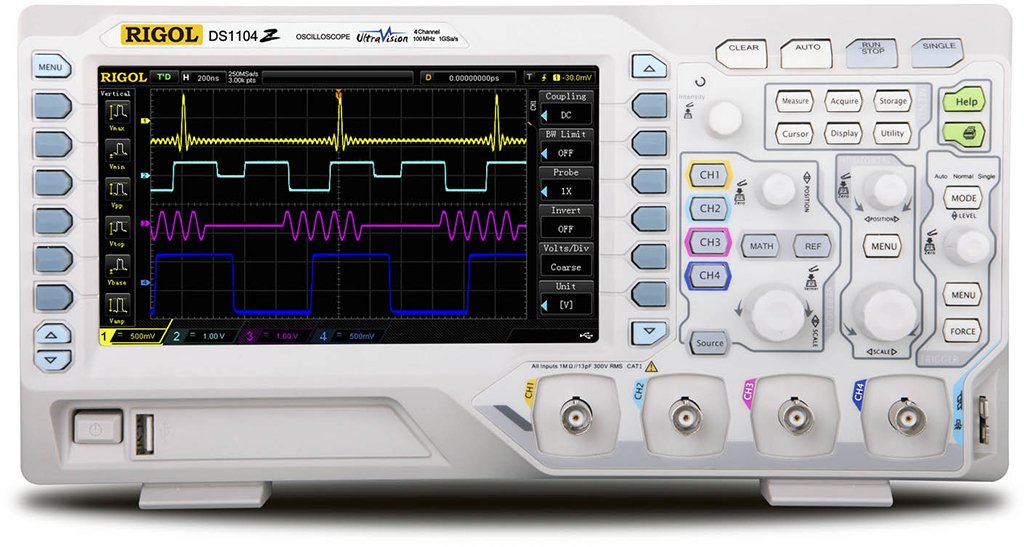
Figure 1: Rigol DS1104Z-S Plus Digital Oscilloscope. This image shows the front panel of the oscilloscope with its display, control knobs, and input channels.
2. Informació de seguretat
Observeu sempre les següents precaucions de seguretat per evitar lesions i danys a l'instrument:
- Font d'alimentació: Connecteu l'instrument només a una font d'alimentació amb el volum especificat.tage i freqüència.
- Posada a terra: Ensure the instrument is properly grounded to prevent electric shock.
- Ventilació: No bloquegeu les obertures de ventilació. Assegureu-vos que hi hagi un flux d'aire adequat al voltant de l'instrument.
- Medi ambient: Operate the oscilloscope in a dry, well-ventilated area, away from direct sunlight, high temperatures, and excessive dust.
- Sondes: Use only probes designed for the specified voltage i classificacions de freqüència.
- Manteniment: Refer all servicing to qualified service personnel. Do not attempt to repair the instrument yourself.
- Neteja: Desconnecteu l'alimentació abans de netejar. Feu servir un drap suau i sec.amp tela. No utilitzeu netejadors abrasius ni dissolvents.
3. Contingut del paquet
Comproveu que el vostre paquet contingui els elements següents:
- Rigol DS1104Z-S Plus Digital Oscilloscope
- Cable d'alimentació
- Passive Probes (4 units)
- Cable USB
- Guia ràpida
- Resource CD (User Manual, Programming Manual, Software)
4. Producte acabatview
The Rigol DS1104Z-S Plus features a user-friendly interface and robust design for various measurement applications.
4.1 Tauler frontal
The front panel includes the display, control knobs, function buttons, and input connectors for channels 1-4.
- Pantalla de visualització: Shows waveforms, measurement results, and menu options.
- Controls verticals: Ajusta el voltage per division and position for each channel.
- Controls horitzontals: Adjust time per division and horizontal position.
- Controls de disparador: Set trigger level, mode, and type.
- Botons de funció: Access various menus such as Acquire, Measure, Storage, Utility, etc.
- Channel Inputs (CH1-CH4): BNC connectors for probe connection.
4.2 Panell posterior
The rear panel provides power input, USB host/device ports, and LAN port for connectivity.
- Entrada d'alimentació de CA: Per connectar el cable d'alimentació.
- Port d'amfitrió USB: Per connectar dispositius d'emmagatzematge USB.
- USB Device Port: For connecting to a PC.
- Port LAN: Per a la connectivitat de xarxa i el control remot.
5. Configuració
5.1 Connexió d'alimentació
- Assegureu-vos que l'interruptor d'alimentació del panell posterior estigui en la posició OFF.
- Connect the provided power cord to the AC power input on the rear panel of the oscilloscope.
- Connecteu l'altre extrem del cable d'alimentació a una presa de corrent de CA amb connexió a terra.
5.2 Connexió de la sonda
- Connect the BNC connector of a passive probe to one of the input channels (CH1, CH2, CH3, or CH4) on the front panel.
- Connect the probe's ground clip to the circuit's ground reference.
- Set the attenuation ratio on the probe to match the setting on the oscilloscope (e.g., 1X or 10X).
5.3 Encès inicial
- Press the power switch on the rear panel to the ON position.
- The oscilloscope will perform a self-test and display the Rigol logo.
- After startup, the default waveform display will appear.
6. Instruccions de funcionament
This section covers basic operations for acquiring and analyzing waveforms.
6.1 Basic Waveform Display
- Vertical Scale (VOLTS/DIV): Use the vertical scale knob for the active channel to adjust the voltage sensibilitat.
- Posició vertical: Use the vertical position knob to move the waveform up or down on the screen.
- Horizontal Scale (SEC/DIV): Use the horizontal scale knob to adjust the time base.
- Posició horitzontal: Use the horizontal position knob to shift the waveform left or right.
6.2 Activació
Triggering stabilizes repetitive waveforms and captures single-shot events.
- Nivell d'activació: Adjust the trigger level knob to set the voltage point at which the trigger occurs.
- Trigger Menu: Premeu el botó Trigger Menu button to configure trigger type (Edge, Pulse, Video, etc.), source, and slope.
- Mode de commutació: Select between Auto, Normal, and Single modes.
6.3 Funcions de mesura
The oscilloscope offers various automatic measurement functions.
- Premeu el botó Mesura button to display the measurement menu.
- Select desired measurements such as Vpp, Vmax, Vmin, Freq, Period, Rise Time, etc.
- The results will be displayed on the screen.
6.4 Desar dades
Waveforms and settings can be saved to internal memory or a USB storage device.
- Premeu el botó Emmagatzematge botó.
- Select the storage type (Waveform, Setup, Image) and destination (Internal, USB).
- Follow the on-screen prompts to save the data.
7. Manteniment
7.1 Neteja
To maintain the instrument's appearance and performance:
- Desconnecteu el cable d'alimentació abans de netejar.
- Utilitzeu un drap suau dampened with mild detergent and water to clean the exterior.
- No utilitzeu netejadors abrasius, dissolvents ni productes químics agressius.
- Assegureu-vos que no entri líquid a l'instrument.
7.2 Calibració
The oscilloscope is factory calibrated. For optimal performance, periodic calibration by qualified service personnel is recommended, typically every 1-2 years, depending on usage.
7.3 Emmagatzematge
When not in use for extended periods, store the oscilloscope in a dry, dust-free environment within the specified operating temperature range.
8. Solució De Problemes
This section lists common problems and their solutions. If the problem persists, contact Rigol customer support.
| Problema | Causa possible | Solució |
|---|---|---|
| Sense pantalla després de l’encesa | Power cord not connected; Power switch off; Faulty power outlet | Check power cord connection; Ensure power switch is ON; Test power outlet with another device |
| No es mostra cap forma d'ona | Probe not connected; Incorrect channel settings; Trigger level incorrect; Input signal too small/large | Connect probe to active channel; Adjust vertical scale and position; Adjust trigger level; Check input signal source |
| Unstable waveform | Incorrect trigger settings; Noisy signal | Adjust trigger level and mode; Check signal source for noise; Use averaging acquisition mode |
| Cannot save data to USB | USB drive not formatted correctly; USB drive full; USB drive faulty | Format USB drive to FAT32; Delete unnecessary files; Try a different USB drive |
9. Especificacions
Key technical specifications for the Rigol DS1104Z-S Plus Digital Oscilloscope:
- Ample de banda: 100 MHz
- Canals: 4 canals analògics
- S en temps realampli Rate: Up to 1 GSa/s
- Profunditat de memòria: 12 Mpts (Standard), 24 Mpts (Optional)
- Waveform Capture Rate: Up to 30,000 wfms/s
- Visualització: 7-inch TFT LCD (800x480 resolution)
- Sensibilitat vertical: 1 mV/div a 10 V/div
- Time Base Range: 2 ns/div to 50 s/div
- Trigger Types: Edge, Pulse, Video, Slope, Alternate, Runt, Window, Delay, Setup/Hold, Nth Edge
- Interfície: USB Host, USB Device, LAN, Pass/Fail, Trigger Out
- Font d'alimentació: Elèctric amb cable
- Pes de l'article: 1 quilos
- Compliment: CE
10. Garantia i Suport
Rigol Technologies provides a standard warranty for its products. For detailed warranty terms and conditions, please refer to the warranty card included with your product or visit the official Rigol website. For technical support, service, or inquiries, please contact your local Rigol distributor or Rigol customer service. Contact information can typically be found on the Rigol website or in the documentation provided with your oscilloscope.
Oficial Weblloc: www.rigol.com