
Introducció
This manual provides instructions for the proper use and maintenance of your Ipega Tomahawk PG-9068 Bluetooth 3.0 Joystick Controller. Please read this manual carefully before use to ensure optimal performance and longevity of the device. This controller is designed for use with Android and iPhone smartphones and tablets.
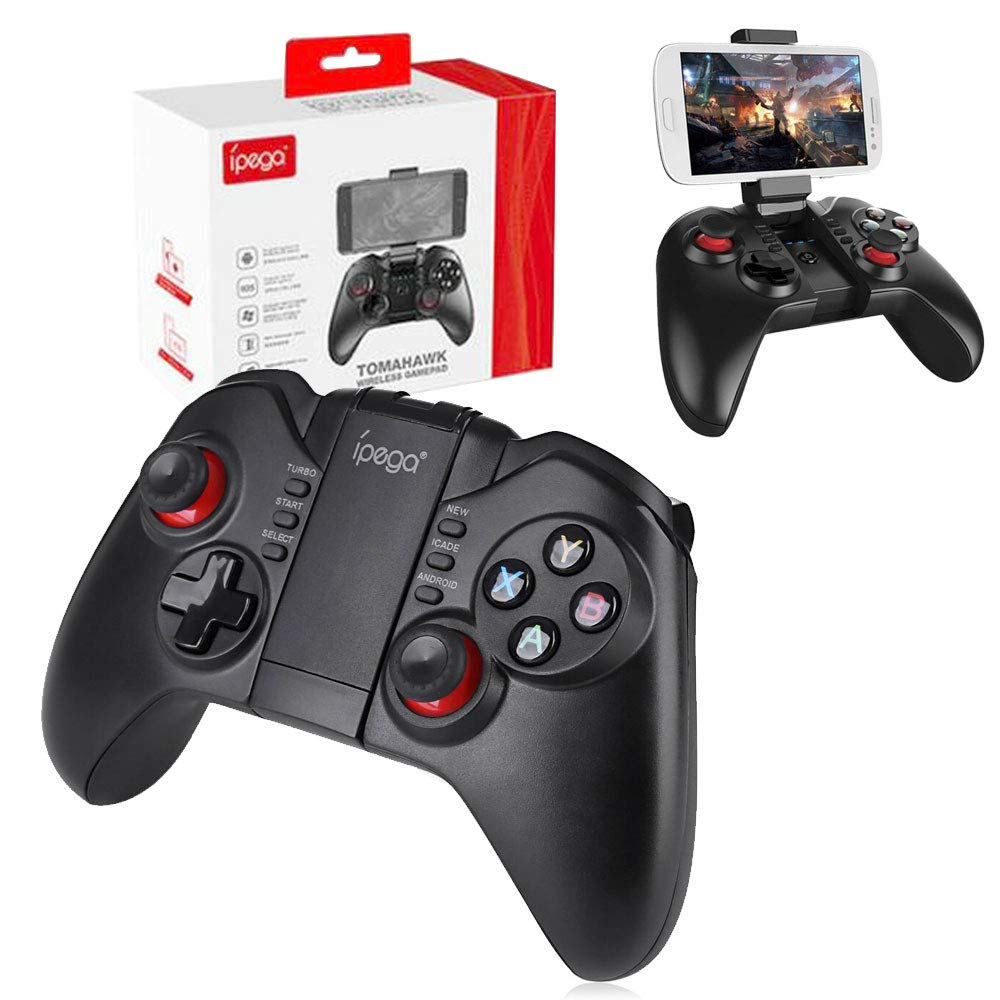
Image: The Ipega PG-9068 Bluetooth Joystick Controller shown with its retail packaging. The controller is black with red accents on the joysticks and face buttons (Y, X, B, A).
Configuració
Follow these steps to connect your Ipega PG-9068 controller to your device via Bluetooth.
Carregant el controlador
Before initial use, ensure the controller is fully charged. Connect the provided USB charging cable to the micro-USB port on the controller and to a USB power source (e.g., computer, USB wall adapter). The LED indicator will show charging status and turn off when fully charged.
Emparellament Bluetooth
- Engegueu i entreu al mode d'emparellament: Press and hold the appropriate mode button (e.g., 'Y' for Android Standard, 'X' for Android Direct Play, 'B' for iCade, 'A' for iOS Direct Play) along with the CASA button simultaneously for 2 seconds. Release the buttons when the LED indicator lights flash rapidly.
- Activa el Bluetooth al teu dispositiu: On your smartphone or tablet, navigate to the Bluetooth settings and ensure Bluetooth is enabled.
- Cerca Dispositius: Your device will begin searching for available Bluetooth devices.
- Select the Controller: From the list of available devices, select "ipega media gamepad" or a similar name.
- Confirmeu la connexió: Once connected, the corresponding LED indicator on the controller will remain solid, indicating a successful pairing.
Note: Specific pairing modes (e.g., Android Standard, Android Direct Play, iCade, iOS Direct Play) may vary depending on your device and the game you intend to play. Refer to the game's instructions for controller compatibility.

Image: The Ipega PG-9068 controller, a USB charging cable, and a small instruction leaflet detailing pairing procedures and button functions.

Image: The Ipega PG-9068 controller with a smartphone securely mounted in its adjustable holder, ready for gameplay. The holder can be adjusted for optimal viewangles d'ajust.
Instruccions de funcionament
The Ipega PG-9068 controller offers various modes for compatibility with different operating systems and games.
Disseny del controlador
- Stick analògic esquerre: Per al moviment i la navegació.
- D-Pad: Entrada direccional.
- Stick analògic dret: For camera control or secondary actions.
- Face Buttons (Y, X, B, A): Action buttons, typically mapped to in-game functions.
- Botons d'espatlla (L1, R1) i gallets (L2, R2): Botons d'acció addicionals.
- START / SELECT / TURBO / NEW / ICADE / ANDROID Buttons: System and mode-specific functions.
- Botó HOME: Power on/off and pairing mode activation.
Selecció del mode
The controller supports different modes to ensure compatibility. To switch modes, power off the controller, then press and hold the desired mode button along with the HOME button to power on in that specific mode.
- Mode estàndard d'Android: Typically activated by pressing Y + HOME. Suitable for most Android games that support standard gamepad input.
- Android Direct Play Mode: S'activa prement X + INICI. Designed for specific Android games that require direct input mapping.
- iCade Mode (iOS): S'activa prement B + CASA. For iOS games that support the iCade protocol.
- iOS Direct Play Mode: S'activa prement A + CASA. For specific iOS games that require direct input mapping.
Always refer to the game's settings or documentation to confirm controller compatibility and recommended mode.

Image: The Ipega PG-9068 controller with a smartphone attached, showing a game being played. This illustrates the controller's primary use for mobile gaming.
Manteniment
Proper care will extend the life of your Ipega PG-9068 controller.
- Neteja: Feu servir un drap suau i sec per netejar el controlador. Per a la brutícia resistent, feu servir un drap lleugerament sec.amp es pot fer servir un drap, però assegureu-vos que no entri humitat al dispositiu. No utilitzeu productes químics agressius ni netejadors abrasius.
- Emmagatzematge: Store the controller in a cool, dry place away from direct sunlight and extreme temperatures. Avoid placing heavy objects on the controller.
- Cura de la bateria: To maintain battery health, avoid fully discharging the controller frequently. If storing for an extended period, charge the battery to approximately 50% every few months.
- Eviteu les gotes: Protegiu el controlador de caigudes i impactes, que poden danyar els components interns.
Resolució de problemes
If you encounter issues with your Ipega PG-9068 controller, refer to the following common solutions.
- El controlador no es connecta:
- Assegureu-vos que el controlador estigui carregat.
- Verifiqueu que el Bluetooth estigui habilitat al vostre dispositiu.
- Make sure the controller is in the correct pairing mode for your device (Android or iOS).
- Oblida't del dispositiu de la configuració de Bluetooth del telèfon i intenta emparellar-lo de nou.
- Reinicieu tant el controlador com el dispositiu.
- Buttons Not Responding / Incorrect Input:
- Confirm the controller is in the correct operating mode for the game you are playing.
- Check the game's settings for controller support and button mapping.
- Some games may require specific applications or configurations for optimal controller support.
- Retard o retard d'entrada:
- Ensure there are no obstructions between the controller and your device.
- Minimize other active Bluetooth devices or wireless interference.
- Tanca les aplicacions en segon pla innecessàries del dispositiu.
- El controlador no s'encén:
- Charge the controller for at least 30 minutes.
- Attempt to reset the controller (if a reset button is available, typically a small pinhole).
Especificacions
| Característica | Detall |
|---|---|
| Marca | Ipega |
| Model | PG-9068 |
| Dispositius compatibles | Android Smartphones and iPhone, Tablets |
| Tipus de controlador | Joystick |
| Tecnologia de connectivitat | Bluetooth 3.0 |
| Característiques especials | Sense fil |
| Nombre de botons | 9 (excluding analog sticks and D-pad) |
| Plataforma de maquinari | Smartphone, tauleta |
| Font d'alimentació | Funciona amb bateria |
| Dimensions de l'article (L x A x A) | 6.8 x 18.2 x 14 centímetres |
Informació de la garantia
Specific warranty details for the Ipega Tomahawk PG-9068 controller are not available in the provided product data. Please refer to the product packaging or contact your retailer for warranty terms and conditions.
Suport
For technical support or further assistance with your Ipega PG-9068 controller, please consult the manufacturer's official website or contact their customer service department. Contact information is typically found on the product packaging or within the included documentation.