
Introducció
The Roland SPD-SX-SE Special Edition Percussion Sampling Pad is designed for triggering custom samples, loops, and backing tracks. This special edition features an expanded 16 GB internal memory, allowing for extensive storage of studio-quality WAV samples. It integrates seamlessly into various musical workflows, from sound production to live performance, supported by bundled software. The unit is distinguished by its sparkling Red finish.
Les característiques clau inclouen:
- Unique sampling-pad concept for versatile audio manipulation.
- 16 GB internal memory for up to 50 hours of mono sampl'emmagatzematge.
- Nine velocity-sensitive rubber pads with LED illumination for clear visibility.
- Multi-Pad Sampling for direct sample capture into the SPD-SX-SE.
- Three onboard multi-effects processors (master effect and two kit effects) with real-time control.
- USB connectivity for easy sample import, assignment, and organization using Wave Manager software.
- Bundled Ableton Live Lite license for advanced sample creation.
Configuració
Before operating your Roland SPD-SX-SE, ensure all necessary connections are made. The rear panel provides various input and output options for integration with your existing setup.
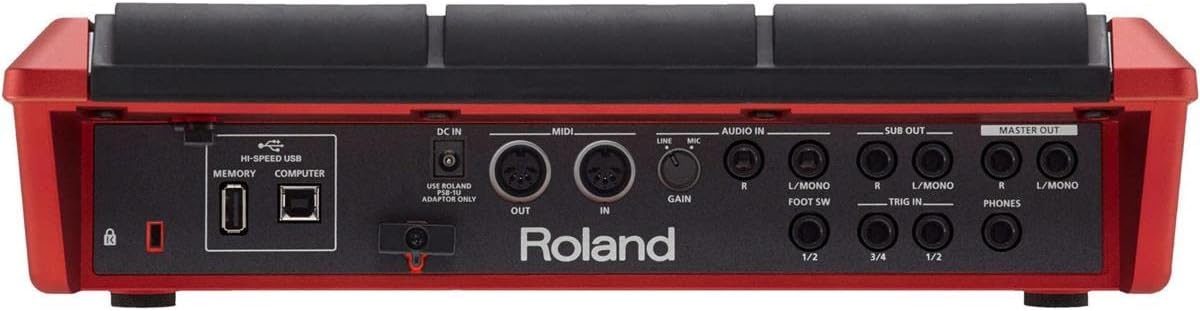
Image: Rear Panel Connections. This image displays the rear panel of the Roland SPD-SX-SE, highlighting the various ports for power, USB, MIDI, audio input, trigger inputs, and audio outputs. Key connections include DC IN, HI-SPEED USB (Memory and Computer), MIDI IN/OUT, AUDIO IN (Line/Mic with Gain), FOOT SW, TRIG IN (1/2, 3/4), SUB OUT (R, L/MONO), MASTER OUT (R, L/MONO), and PHONES.
Connexió d'alimentació
- Connect the included Roland PSB-1U adaptor to the DC IN port and then to a power outlet.
Connexions d'àudio
- Entrada d'àudio: Utilitza el AUDIO IN (Line/Mic) jacks to connect external audio sources. Adjust the GUANYA knob to set the input level appropriately for either line-level devices or microphones.
- Sortida mestra: Connecteu el MESTRES FORA (R, L/MONO) jacks to your mixer or ampmés viu.
- Subsortida: Utilize the assignable SUB OUT (R, L/MONO) jacks for routing specific sounds to separate destinations.
- Auriculars: Connecteu els auriculars a la TELÈFONS jack for private monitoring.
External Trigger and Control
- Entrades de disparador: Connect external pads or acoustic drum triggers to the ENTRADA (1/2, 3/4) jacks to expand your playing surface.
- Interruptor de peu: Connect a foot switch to the PEU SO jack for hands-free control of various functions.
Computer and MIDI Connectivity
- USB (Computer): Connect the SPD-SX-SE to your computer via the HI-SPEED USB COMPUTER port for MIDI and audio data transfer.
- USB (Memory): Utilitza el HI-SPEED USB MEMORY port to connect a USB flash drive for data backup and transfer.
- MIDI: Connect external MIDI devices using the standard MIDI IN i FORA preses.
Operating the SPD-SX-SE
The SPD-SX-SE is designed for intuitive operation, featuring velocity-sensitive pads and a clear display.

Imatge: Superior View of SPD-SX-SE. This image shows the top surface of the Roland SPD-SX-SE, featuring its nine black velocity-sensitive pads with red divider lines, and the control panel with an LCD screen and various buttons and knobs.
Pads and Visual Feedback
- The nine velocity-sensitive rubber pads, including three shoulder pads, respond to your playing dynamics.
- Each pad has an accompanying LED that illuminates when struck. The illumination strength varies with the audio level being triggered.
- LEDs can also be set to stay on continuously for enhanced visibility in low-light conditions.
- High-contrast red divider lines clearly define the pad zones.
Tauler de control i pantalla
- The control panel features illuminated function and navigation buttons for easy operation.
- A large 128x64 backlit LCD display provides clear visual feedback on settings and parameters.
Click Output and Tempo Control
- The click output can be routed individually to Master, Sub Out, or Phones Only for convenient and discreet monitoring.
- A dedicated knob controls the click level.
- Use the Start/Stop click button to activate or deactivate the metronome.
Multi-Effects Processors
- The SPD-SX-SE includes three multi-effects engines.
- Effects can be controlled in real-time using the four effect select buttons and two control knobs, allowing for dynamic sound shaping during performance.
Sampling Functions
- Multi-Pad Sampling: Stream audio from an external source (via audio inputs) or a computer (via USB) directly into the unit. The SPD-SX-SE will automatically truncate and assign the sampled sounds to specific pads.
- This feature allows for quick assignment of song sections to pads for real-time song arrangement in live performances.
- The 16 GB internal memory can store up to 50 hours of mono audio samples.
Wave Manager Software
- The included Wave Manager software simplifies the process of importing, assigning, and organizing your samples and kits when connected to a computer via USB.
Video: Roland Sampling Percussion Pad (SPD-SX) Overview. Aquest vídeo ofereix una descripció completaview of the Roland SPD-SX Sampling Pad, demonstrating its key features such as velocity-sensitive pads with LED indicators, multi-effects, USB connectivity, and multi-pad sampling capabilities. It showcases the unit in various musical settings, highlighting its versatility for live performance and studio use.
Manteniment
To ensure the longevity and optimal performance of your Roland SPD-SX-SE, follow these general maintenance guidelines:
- Mantingueu la unitat neta netejant-la amb un drap suau i sec. Eviteu utilitzar productes de neteja o dissolvents abrasius.
- Protect the unit from dust, moisture, and extreme temperatures.
- Avoid placing heavy objects on the pads or control surface.
- When not in use, store the unit in a safe place to prevent physical damage.
Resolució de problemes
If you encounter any issues with your Roland SPD-SX-SE, please refer to the comprehensive troubleshooting section in the full product manual available on the Roland website. For persistent problems, contact Roland customer support for assistance.
Especificacions
| Nom del model | SPD-SX-SE |
| Marca | Roland |
| Color | Red (Sparkling Red finish) |
| Material | Rubber (pads), Plastic (body) |
| Memòria interna | 16 GB (up to 50 hours mono sample storage) |
| Coixinets | 9 velocity-sensitive pads (including 3 shoulder pads) |
| Dimensions (L x A x A) | 18.11 x 16.02 x 6.61 polzades |
| Pes de l'article | 3.61 quilos |
| Tipus de connector | USB |
| Fabricant | Roland |
| UPC | 736724297524, 761294512340, 660845730540 |
| Número de part | SPD-SX-SE |

Imatge: Dimensions del producte. This image provides a visual reference for the dimensions of the Roland SPD-SX-SE, showing its width as 13 inches (34 cm) relative to a human silhouette.
Garantia
The Roland SPD-SX-SE Special Edition Percussion Sampling Pad comes with a Garantia de per vida. Please retain your proof of purchase for warranty claims. For detailed terms and conditions, refer to the official Roland warranty documentation.
Suport
For further assistance, technical support, or to download the full user manual and software updates, please visit the official Roland website or contact Roland customer service. You can also visit the Roland Store on Amazon per a informació sobre productes i accessoris.