
1. Introducció
This manual provides detailed instructions for the installation, operation, and maintenance of your YangDiana GT06N LTE A 4G GPS Vehicle Tracker. This device is designed to offer real-time location tracking, security features, and various alerts for vehicles such as cars, motorcycles, trucks, and scooters. Please read this manual thoroughly before using the device to ensure proper function and safety.
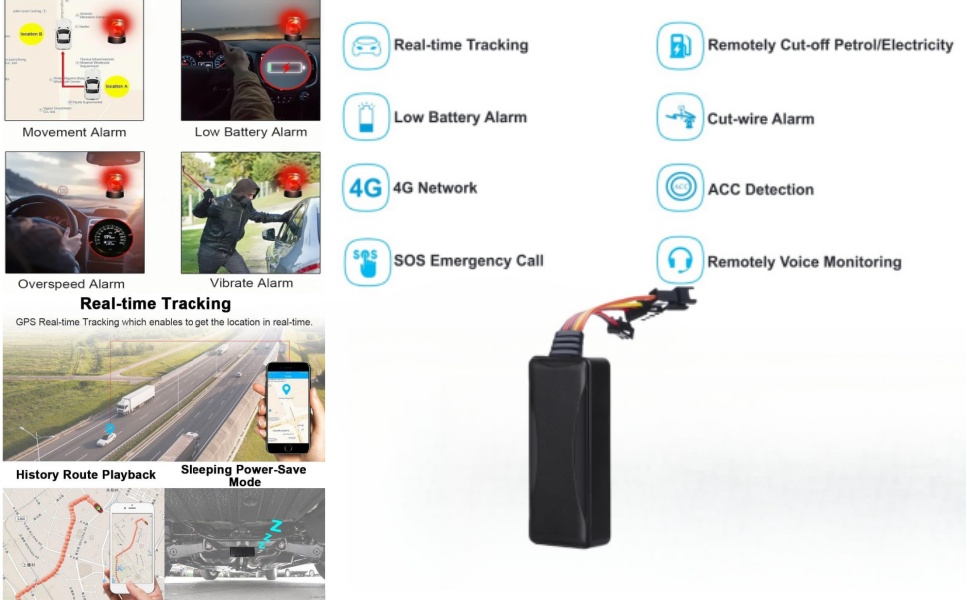
Figure 1.1: Application overview of the 4G GPS Vehicle Tracker across various modes of transport.
2. Què hi ha a la caixa
En obrir el paquet, comproveu que hi hagi tots els elements següents:
- YangDiana GT06N LTE A 4G GPS Tracker Unit
- Manual d'usuari
- Arnès de cablejat
- Relleu
- Botó SOS
- Micròfon

Figura 2.1: Tots els components inclosos al paquet del producte.
Vídeo d'unboxing
Video 2.1: An unboxing demonstration of the GT06N 4G LTE GPS Tracker, showing all included items and initial handling.
3. Especificacions
| Característica | Detall |
|---|---|
| Número de model | GT06N LTE A |
| Dimensions | 5.6 x 4.3 x 2.8 polzades |
| Pes de l'article | 8.8 unces |
| Bateria | 1 bateria de polímer de liti (inclosa) |
| Connectivitat | Cellular (LTE, GSM, GPRS) |
| Color | Gris clar |
| Característiques especials | Battery Life, Constant Updates, Killswitch functionality, Location Accuracy, Speed Monitoring |
| Aplicació compatible | Text Messaging, Voice Assistant, Voice Calling, Web Search, Alarm |
| Usos específics | Real-Time Location Tracking, Voice Monitor, SOS function, Fuel and Power Cut-off |
4. Configuració
4.1. Instal·lació de la targeta SIM
The device requires a 4G SIM card with full balance for proper operation. Ensure the SIM card is activated and has data, SMS, and call services enabled. Remove the device cover, insert the SIM card into the designated slot, and ensure it is securely seated. Power on the device after inserting the SIM card.
4.2. Cablejat i instal·lació
Proper wiring is crucial for the tracker's functionality. Refer to the wiring diagram below and consult a professional if you are unsure about the installation process. The device supports a wide voltage range (9-95V DC) making it suitable for various vehicles.
- Fil vermell: Connecteu-lo al terminal positiu de la bateria del vehicle.
- Fil negre: Connecteu-lo al terminal negatiu (terra) de la bateria del vehicle.
- Cable taronja (ACC): Connect to the vehicle's ACC (Accessory) power, which is live when the ignition is on.
- Yellow Wire (Relay): Connect to the relay for remote engine cut-off functionality.
- Green Wire (Oil Pump): Connect to the oil pump wire via the relay for fuel/power cut-off.
- SOS Cable: Connect the SOS button to the designated port.
- Micròfon: Connect the microphone to the designated port for voice monitoring.
Figure 4.1: Recommended installation positions for the GPS tracker in various vehicles.
4.3. App/Platform Setup
To utilize the full features of your GPS tracker, download the official tracking application or access the web platform. You will need to register an account and add your device using its IMEI number.
- Download the tracking app from your device's app store (iOS/Android) or visit the web plataforma.
- Register a new account using your cell-phone number.
- Log in and add your device by entering the IMEI number found on the tracker unit.
- Set a secure password for your account.

Figura 4.2: Example of sending commands via SMS for monitoring.
Account Registration Video
Video 4.1: A step-by-step guide on how to register an account for the GT06 GPS tracker.
5. Instruccions de funcionament
5.1. Seguiment en temps real
The YangDiana GT06N LTE A provides precise real-time location tracking using LTE, GSM, GPRS networks, and GPS satellites. You can view your vehicle's current location on a map via the mobile app or web plataforma.

Figure 5.1: Real-time tracking interface on the mobile application, including history route playback.
Real-time Tracking Video
Video 5.1: Demonstration of GPS tracker route history and speed monitoring for family or fleet management.
5.2. Remote Engine Control
In case of theft or unauthorized use, you can remotely cut off the vehicle's engine via SMS command or the mobile app. The vehicle will remain immobilized until you send a

