
1. Introducció
Thank you for choosing the Generic Rolton T50 Portable World Band Radio and MP3 Player. This device combines a multi-band radio (FM/MW/SW) with an MP3 player, supporting SD/TF cards for versatile audio entertainment. Its compact design and battery power make it ideal for portable use. Please read this manual carefully to ensure proper operation and to maximize your listening experience.
2. Informació de seguretat
- No exposeu el dispositiu a la pluja, la humitat ni a temperatures extremes.
- Eviteu deixar caure o sotmetre el dispositiu a forts impactes.
- No desmunteu ni intenteu reparar la unitat vosaltres mateixos. Envieu totes les tasques de manteniment a personal qualificat.
- Mantingueu el dispositiu allunyat de camps magnètics forts.
- Eliminar les bateries correctament d'acord amb la normativa local.
- Netegeu el dispositiu amb un drap suau i sec. No utilitzeu netejadors líquids.
3. Contingut del paquet
Si us plau, comproveu el paquet per veure si hi ha els elements següents:
- Rolton T50 Portable Radio and MP3 Player
- Cable de càrrega USB
- Manual d'usuari
Nota: Els accessoris específics poden variar.
4. Producte acabatview
Familiarize yourself with the various parts and controls of your Rolton T50 device.
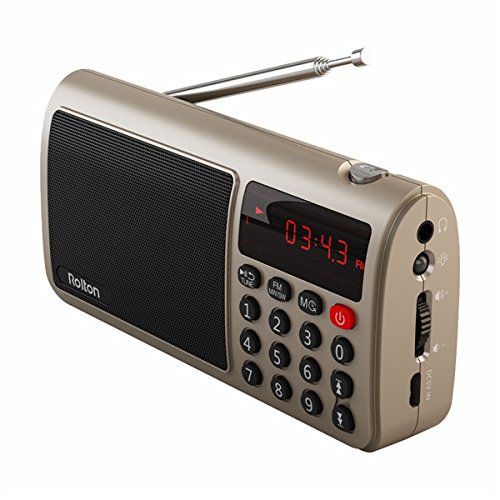
Figura 1: Frontal view of the Rolton T50 Portable Radio (Red variant). This image displays the main speaker grille, the digital time/frequency display, the numeric keypad for direct tuning, and the power button. The telescopic antenna is extended from the top right side.
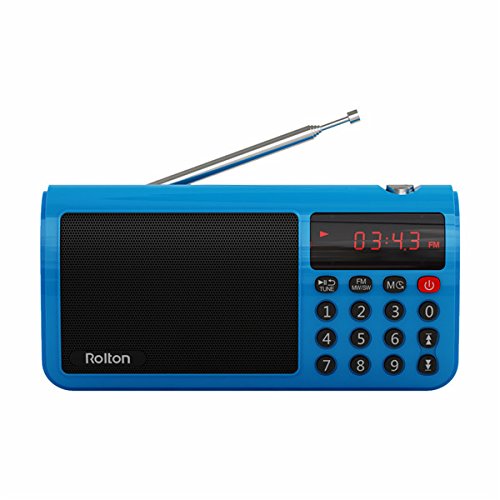
Figura 2: Frontal view of the Rolton T50 Portable Radio (Blue variant). Similar to the red model, this image highlights the speaker, digital display, and control buttons, including the numeric keypad and power button. The telescopic antenna is also visible.
Components clau:
- Reixa de l'altaveu: Per a la sortida d'àudio.
- Pantalla digital: Shows time, frequency, and mode information.
- Teclat numèric (0-9): Per a l'entrada directa de freqüència o la selecció de pista.
- Botó d'encesa: Encén/apaga el dispositiu.
- Mode Button (FM/MW/SW/MS): Switches between radio bands and MP3 mode.
- Tune/Scan Buttons: For manual tuning or automatic station scanning.
- Control de volum: Ajusta el nivell de sortida d'àudio.
- Presa d'auriculars (3.5 mm): Per a una escolta privada.
- Entrada DC 5V: Per carregar la bateria interna.
- Ranura per a targetes SD/TF: For inserting memory cards with MP3 files.
- Antena telescòpica: Per a una millor recepció de ràdio.
5. Configuració
5.1. Carregant la bateria
- Connect the small end of the provided USB charging cable to the DC 5V input port on the side of the radio.
- Connecteu l'extrem més gran del cable USB a un adaptador de corrent USB estàndard (no inclòs) o al port USB d'un ordinador.
- El llum indicador de càrrega (si n'hi ha) s'il·luminarà, normalment en vermell, durant la càrrega i s'apagarà o canviarà de color quan estigui completament carregat.
- Normalment, una càrrega completa triga entre 2 i 3 hores.
5.2. Inserting an SD/TF Card
- Locate the SD/TF card slot on the side of the device.
- Insert a compatible SD or TF (MicroSD) card with the metal contacts facing downwards, gently pushing until it clicks into place.
- To remove the card, gently push it in again until it springs out.
6. Instruccions de funcionament
6.1. Encendre/apagar
- Per encendre la ràdio, premeu i manteniu premut el botó Poder botó.
- Per apagar la ràdio, manteniu premut el botó Poder botó de nou.
6.2. Ajust de volum
- Utilitza el Volume Dial/Buttons on the side of the device to increase or decrease the audio level.
6.3. Radio Mode (FM/MW/SW)
- Selecciona la banda: Premeu el botó Mode button repeatedly to cycle through FM, MW (AM), and SW (Shortwave) bands. The selected band will be displayed on the screen.
- Amplia l'antena: For optimal FM and SW reception, fully extend the telescopic antenna. For MW (AM) reception, the internal antenna is typically sufficient, but adjusting the radio's orientation may improve signal.
- Escaneig automàtic: En mode de ràdio, manteniu premut el botó Tune/Scan button (often labeled with arrows or 'SCAN') to automatically scan for and save available stations.
- Sintonització manual: Premeu breument Tune/Scan botons per ajustar la freqüència pas a pas.
- Entrada de freqüència directa: Use the numeric keypad to directly enter the desired frequency (e.g., for 98.7 FM, enter 9-8-7). Press the 'Tune' or 'Enter' button (if available) to confirm.
6.4. MP3 Player Mode
- Enter MP3 Mode: If an SD/TF card is inserted, press the Mode button until 'MP3' or 'CARD' is displayed. The device will automatically start playing the first track.
- Reproduir/pausa: Premeu el botó Reproduir/Pausa button (often combined with the power button or a dedicated button) to pause or resume playback.
- Seguiment anterior / següent: Utilitza el Següent/Anterior track buttons (often combined with Tune/Scan buttons) to skip tracks.
- Selecció directa de pista: Use the numeric keypad to enter the track number and press 'Enter' (if available) to jump to that track.
6.5. Ús d'auriculars
- Plug any standard 3.5mm stereo headphones into the headphone jack on the side of the device for private listening. The external speaker will automatically mute.
7. Manteniment
- Neteja: Wipe the exterior of the radio with a soft, dry, lint-free cloth. Do not use abrasive cleaners, waxes, or solvents.
- Emmagatzematge: Quan no la feu servir durant períodes prolongats, guardeu la ràdio en un lloc fresc i sec, allunyat de la llum solar directa i de temperatures extremes.
- Cura de la bateria: Per allargar la durada de la bateria, eviteu descarregar-la completament amb freqüència. Carregueu el dispositiu regularment, fins i tot si no l'esteu fent servir.
8. Solució De Problemes
| Problema | Causa possible | Solució |
|---|---|---|
| La ràdio no s'encén. | La bateria està esgotada. | Carregueu la bateria amb el cable USB proporcionat. |
| No hi ha so de l'altaveu. | El volum és massa baix o està silenciat. Hi ha auriculars connectats. | Augmenta el volum. Desconnecta els auriculars. |
| Mala recepció de ràdio. | Antenna not extended. Weak signal area. | Esteneu completament l'antena telescòpica. Intenteu reposicionar la ràdio. |
| MP3 fileno està jugant. | SD/TF card not inserted correctly or corrupted. Unsupported file format. | Reinsert the SD/TF card. Ensure files are in MP3 format. Try a different card. |
| Els botons no responen. | Dispositiu congelat. | Turn off the device and turn it back on. If possible, remove and reinsert the battery. |
9. Especificacions
- Marca: Genèric
- Número de model: FFC-BG-1130644
- Tecnologia del sintonitzador: FM, MW (AM), SW
- Interval de freqüència: FM (up to 108 MHz), MW, SW (specific ranges may vary by model)
- Font d'alimentació: Funciona amb bateria (recarregable)
- Interfície de maquinari: 3.5mm Audio Jack, USB Charging Port, SD/TF Card Slot
- Característica especial: Portable, MP3 Player
- GTIN: 764022219719
- ASIN: B077MHGW3W
10. Garantia i Suport
This product is covered by a standard manufacturer's warranty. Please refer to the warranty card included in your package for specific terms and conditions. For technical support or service inquiries, please contact your retailer or the manufacturer's customer service department.