
1. Producte acabatview
The TTEC 2KM102S Tone Bluetooth Headset is designed for wireless communication, offering convenience and clear audio. This manual provides instructions for setting up, operating, and maintaining your headset.
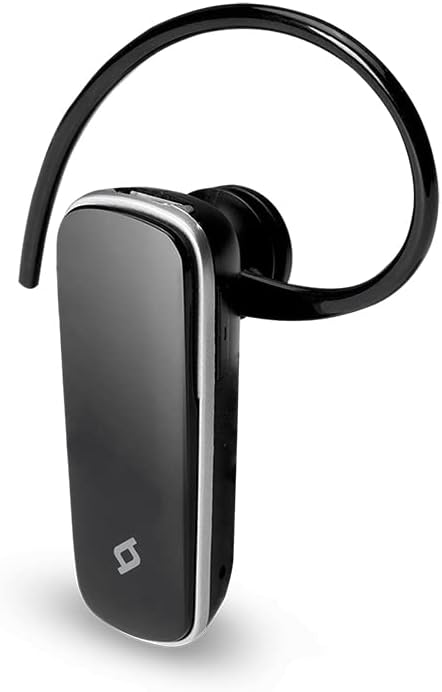
Figura 1: Frontal view of the TTEC 2KM102S Tone Bluetooth Headset.
2. Contingut del paquet
Assegureu-vos que tots els elements siguin presents al paquet:
- TTEC 2KM102S Tone Bluetooth Headset
- Ganxo per l'orella
- Cable de càrrega USB
3. Guia de configuració
3.1 Càrrega dels auriculars
Before first use, fully charge the headset. Use the provided USB charging cable.
- Connecteu l'extrem petit del cable de càrrega USB al port de càrrega dels auriculars.
- Connecteu l'extrem més gran del cable USB a una font d'alimentació USB (per exemple, un port USB de l'ordinador o un adaptador de paret USB).
- The LED indicator on the headset will show the charging status. Refer to the "LED Indicator" section for details.
- Un cop estigui completament carregat, desconnecteu el cable de càrrega.
Nota: The headset features an integrated rechargeable battery. Charging time may vary.
3.2 Vinculació amb un dispositiu
To use the headset wirelessly, it must be paired with a Bluetooth-enabled device.
- Assegureu-vos que els auriculars estan apagats.
- Press and hold the multi-function button on the headset until the LED indicator flashes red and blue alternately. This indicates pairing mode.
- Al dispositiu (telèfon intel·ligent, tauleta, etc.), activeu el Bluetooth i cerqueu els dispositius disponibles.
- Select "TTEC Tone" or "2KM102S" from the list of found devices.
- Once paired, the LED indicator will flash blue periodically, and you may hear a confirmation tone.
Consell: For iPhone and iPad users, the battery status of the headset can be monitored on your device's screen.
3.3 Multi-Device Pairing
The TTEC Tone headset supports simultaneous connection with two different Bluetooth devices.
- Pair the headset with the first device as described in section 3.2.
- Desactiveu el Bluetooth al primer dispositiu.
- Put the headset back into pairing mode (LED flashes red and blue).
- Emparella els auriculars amb el segon dispositiu.
- Torneu a activar el Bluetooth al primer dispositiu. Els auriculars s'haurien de connectar automàticament als dos dispositius.
The headset will manage audio from both connected devices, prioritizing incoming calls.
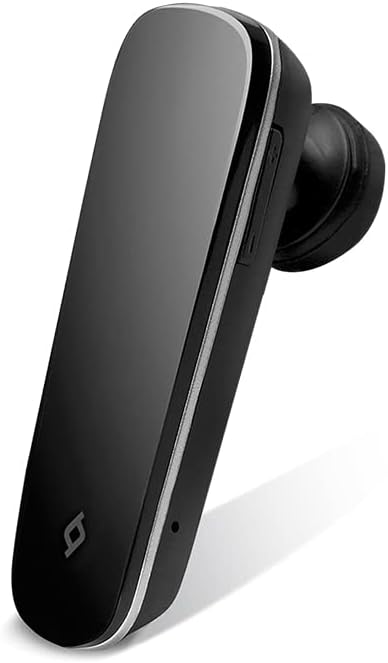
Figura 2: lateral view of the TTEC 2KM102S Tone Bluetooth Headset, showing control buttons.
4. Instruccions de funcionament
4.1 Encès/Apagat
- Encès: Premeu i manteniu premut el botó multifunció durant aproximadament 3 segons fins que el LED parpellegi en blau.
- Apagar: Premeu i manteniu premut el botó multifunció durant aproximadament 5 segons fins que el LED parpellegi en vermell i després s'apagui.
4.2 Gestió de trucades
The multi-function button controls call functions:
- Respon a la trucada: Premeu el botó multifunció una vegada quan rebeu una trucada.
- Finalitzar la trucada: Premeu el botó multifunció una vegada durant una trucada.
- Rebutja la trucada: Premeu i manteniu premut el botó multifunció durant aproximadament 2 segons quan rebeu una trucada.
- Torna a marcar l'últim número: Premeu dues vegades el botó multifunció quan no esteu fent una trucada.
4.3 Control de volum
Use the dedicated volume buttons on the headset:
- Augmenta el volum: Premeu el botó d'augmentar el volum (+).
- Disminueix el volum: Premeu el botó per baixar el volum (-).
4.4 Estat dels indicadors LED
The LED indicator provides visual cues for the headset's status:
- Flashing Red & Blue: Mode de sincronització.
- Flashing Blue (slowly): Connected/Standby.
- Vermell sòlid: Carregant.
- LED Off (after solid red): Totalment carregat.
- Flashing Red (rapidly): Bateria baixa.
5. Manteniment
Una cura adequada garanteix la longevitat dels auriculars.
- Neteja: Use a soft, dry cloth to clean the headset. Do not use abrasive cleaners or immerse in water.
- Emmagatzematge: Guardeu els auriculars en un lloc fresc i sec, allunyat de la llum solar directa i de temperatures extremes.
- Cura de la bateria: Per allargar la durada de la bateria, eviteu descarregar completament els auriculars amb freqüència. Carregueu-los regularment, fins i tot si no els feu servir durant períodes prolongats.
6. Solució De Problemes
| Problema | Possible solució |
|---|---|
| Els auriculars no s'encenen. | Ensure the headset is charged. Connect it to a power source using the USB cable. |
| No es pot emparellar amb un dispositiu. |
|
| No hi ha àudio o hi ha mala qualitat d'àudio. |
|
| Els auriculars es desconnecten sovint. |
|
7. Especificacions del producte
| Nom del model: | To |
| Número de model: | 2KM102S |
| Marca: | TTEC |
| Connectivitat: | Bluetooth |
| Tipus de dispositiu: | Auriculars Bluetooth |
| Temps de conversa: | Fins a 4 hores |
| Temps d'espera: | Fins a 100 hores |
| Connexió multipunt: | Yes, connect to 2 devices simultaneously |
| Dimensions (L x A x A): | 4.5 x 1.7 x 2 cm |
| Color: | Negre |
| Port de càrrega: | USB |
8. Garantia i Suport
For warranty information and customer support, please refer to the warranty card included with your product or visit the official TTEC weblloc web. Conserveu el rebut de compra com a comprovant de compra.
Fabricant: ttec