
1. Introducció
This manual provides essential instructions for the safe and effective use of your FUJIFILM Instax Mini 9 Instant Camera. Please read this manual thoroughly before using the camera and keep it in a safe place for future reference. The Instax Mini 9 is designed for instant film photography, offering ease of use and immediate print results.
2. Contingut del paquet
Verifiqueu que tots els elements siguin presents al vostre paquet:
- Instax Mini 9 Camera Body
- Close-up Lens Adapter
- Corretja de canell
- Bateries AA (2)
- Manual d'usuari (aquest document)
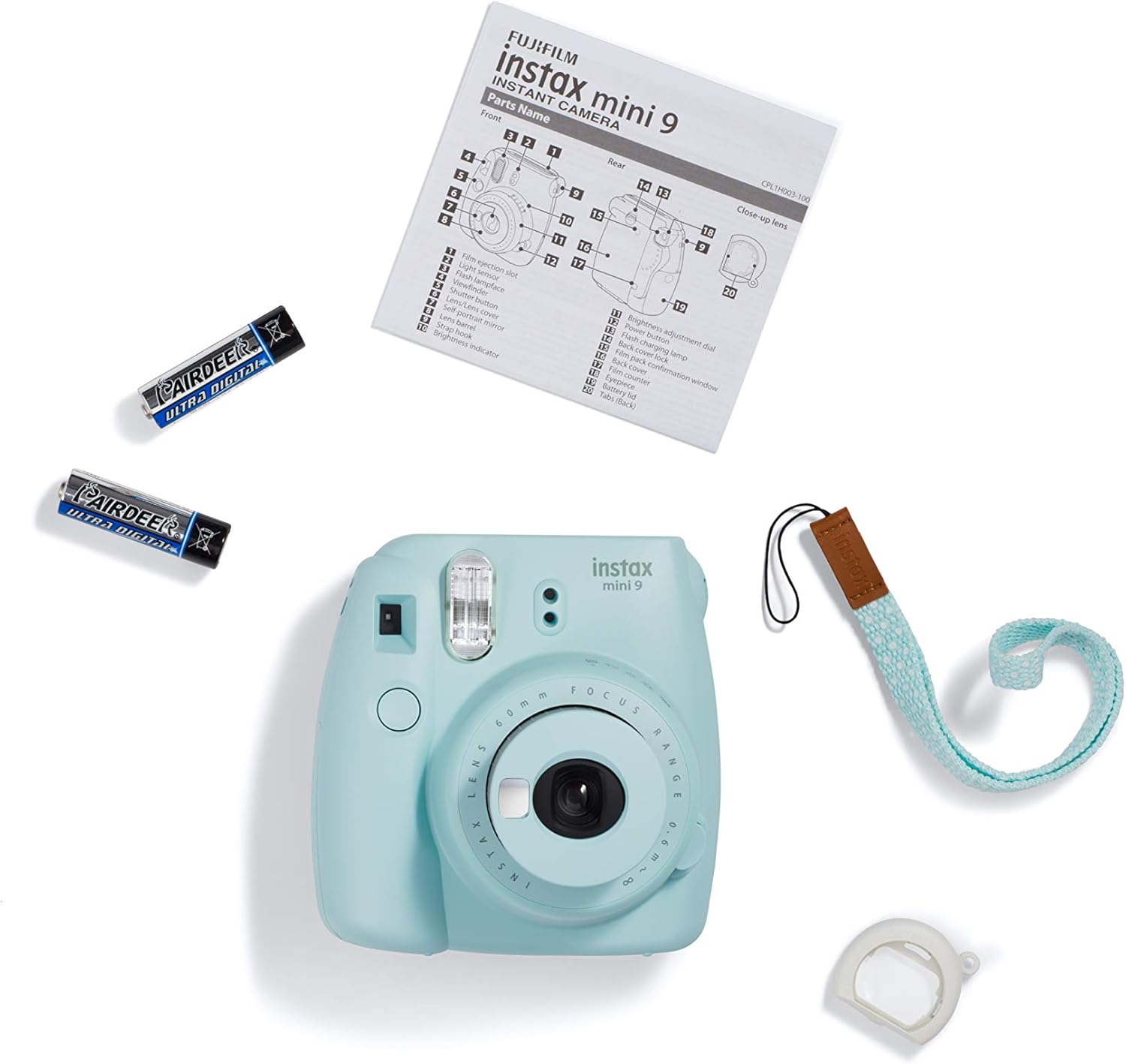
Image: Package contents of the Instax Mini 9 camera.
3. Camera Parts
Familiarize yourself with the main components of your Instax Mini 9 camera.

Imatge: Frontal view of the Instax Mini 9 camera.
- Lent: Capta la imatge.
- Flash: Proporciona il·luminació en condicions de poca llum.
- Botó de l'obturador: Premeu per fer una foto.
- Dial d'ajust de brillantor: Used to select the appropriate exposure setting.
- Viewcercador: Per compondre les teves fotos.
- Mirall per a selfies: Located next to the lens for self-portraits.
- Ranura d'expulsió de pel·lícules: On emergeixen les fotos impreses.
- Compartiment de la bateria: Conté dues piles AA.
- Film Cover Lock: Secures the film compartment.

Imatge: Enrere view of the Instax Mini 9 camera.
4. Configuració
4.1. Instal·lació de bateries
- Obriu la tapa del compartiment de la bateria que es troba al lateral de la càmera.
- Insert two new AA 1.5V alkaline batteries, ensuring correct polarity (+/-).
- Tanqueu bé la tapa del compartiment de la bateria.
4.2. Càrrega de la pel·lícula
- Open the film cover on the back of the camera by sliding the film cover lock.
- Alineeu la marca groga del paquet de pel·lícules amb la marca groga del compartiment de pel·lícules de la càmera.
- Insert the film pack straight into the compartment. Do not press down on the film pack.
- Close the film cover. The film counter will display "S".
- Press the shutter button once to eject the black film cover. The film counter will then display "10", indicating 10 printable photos remaining.
Important: Never open the film cover after loading film until all 10 photos have been taken and ejected. Doing so will expose the film and render it unusable.
4.3. Col·locació de la corretja de canell
Thread the included wrist strap through the strap eyelet on the side of the camera to prevent accidental drops.
4.4. Attaching the Close-up Lens Adapter
For close-up shots (35-50 cm), attach the close-up lens adapter to the camera lens. Ensure it clicks into place securely. Remove it for normal shooting distances.
5. Funcionament de la càmera
5.1. Encès / apagat
- To power on, press the button next to the lens. The lens will extend, and the flash charging lamp s'il·luminarà.
- To power off, push the lens back into the camera body.
5.2. Adjusting Brightness (Exposure)
The camera automatically detects the ambient light and indicates the recommended brightness setting with a flashing LED on the brightness adjustment dial.
- Turn the brightness adjustment dial to align the mark on the dial with the flashing LED.
- Available settings include:
- Interior/Nit: For dark environments.
- Ennuvolat/Ombra: For overcast days or shaded areas.
- Assolellat/Lleugerament ennuvolat: For bright outdoor conditions.
- Molt assolellat: Per a condicions exteriors extremadament brillants.
- High-Key: Per a imatges més brillants amb un aspecte suau, ideal per a retrats.

Image: Instax Mini 9 camera with an example instant photo.
5.3. Fer una foto
- Enceneu la càmera.
- Adjust the brightness dial to the recommended setting indicated by the flashing LED.
- Mira a través del viewfinder to compose your shot. For selfies, use the selfie mirror next to the lens.
- Press the shutter button. The flash will fire, and the photo will eject from the top slot.
- Allow the photo to develop naturally. Do not shake or bend the print.
6. Manteniment
6.1. Neteja de la càmera
- Netegeu el cos de la càmera amb un drap suau i sec.
- Per a la lent i viewfinder, use a lens cleaning cloth. Avoid abrasive materials.
- Do not use organic solvents such as thinner or alcohol to clean the camera.
6.2. Cura de la bateria
- Replace both AA batteries simultaneously when the flash charging lamp takes longer to light up or does not light up at all.
- Traieu les piles si no fareu servir la càmera durant un període prolongat.
6.3. Film Storage
Store Instax Mini film in a cool, dry place, away from direct sunlight and high temperatures.
7. Solució De Problemes
| Problema | Causa possible | Solució |
|---|---|---|
| La càmera no s'encén. | Les piles estan gastades o incorrectament inserides. | Substituïu-les per piles AA noves, assegurant-vos de la polaritat correcta. |
| Photos come out completely black. | Film compartment was opened after film was loaded; incorrect exposure setting; film expired or damaged. | Ensure film compartment remains closed. Check brightness dial setting. Use fresh film. Allow film to develop in room temperature. |
| Photos are too dark or too bright. | Incorrect brightness adjustment dial setting. | Adjust the brightness dial to match the recommended LED indicator for the lighting conditions. |
| La pel·lícula no s'expulsa. | No film loaded; film jam; batteries low. | Load a new film pack. Check for obstructions in the film ejection slot. Replace batteries. |
| El flaix no es dispara. | Batteries low; flash charging. | Replace batteries. Wait for the flash charging lamp to stop blinking before taking a photo. |
8. Especificacions
| Característica | Detall |
|---|---|
| Marca | Fujifilm |
| Nom del model | Instax Mini 9 |
| Format de pel·lícula | Instax Mini |
| Lent | 60 mm, f / 12.7 |
| Interval d'enfocament | 0.6m - ∞ (infinity) |
| Close-up Lens Adapter | 35 cm - 50 cm |
| Velocitat d'obturació | 1/60 seg. |
| Control de l'exposició | Automatic, with manual switching system (LED indicator) |
| Flash | Constant firing flash (automatic light adjustment) |
| Font d'alimentació | Two AA-size 1.5V alkaline batteries |
| Dimensions (A x A x P) | Aprox. 3 x 5 x 5.5 polzades |
| Pes | Approx. 0.8 Pounds (without batteries, strap, and film pack) |
| Característiques especials | Selfie Mirror, High-Key Mode |
9. Garantia i Suport
9.1. Informació de la garantia
This FUJIFILM Instax Mini 9 camera comes with a 90-day limited warranty. Please retain your proof of purchase for any warranty claims. The warranty covers manufacturing defects under normal use. It does not cover damage caused by misuse, accidents, or unauthorized repairs.
9.2. Política de devolució
Eligible for a refund or replacement within 90 days of purchase, subject to the retailer's return policy.
9.3. Atenció al client
For further assistance, technical support, or warranty service, please contact FUJIFILM customer support through their official weblloc web o la informació de contacte proporcionada amb la compra.


