
1. Introducció
This manual provides comprehensive instructions for the proper setup, operation, maintenance, and troubleshooting of your Konus 5307 Binocular Microscope. Please read this manual thoroughly before using the microscope to ensure safe and optimal performance. This microscope is designed for educational and hobbyist use, offering magnification up to 1000x for detailed observation of specimens.
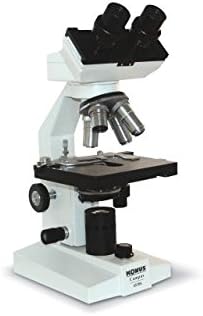
An image showing the Konus 5307 Binocular Microscope from a front-right angle, highlighting its binocular eyepieces, objective lenses, stage, and focus knobs. This is the primary component discussed in this manual.
1.1. Package Contents (Typical)
While specific contents may vary, a typical Konus 5307 Binocular Microscope package includes:
- Konus 5307 Binocular Microscope body
- Pair of eyepieces (e.g., WF10x)
- Objective lenses (e.g., 4x, 10x, 40x, 100x)
- Power adapter/cord
- Funda antipols
- Immersion oil (for 100x objective)
- Manual d'usuari (aquest document)
2. Instruccions de seguretat
Observe the following safety precautions to prevent injury and damage to the microscope:
- Manejar amb cura: The microscope contains delicate optical and mechanical components. Avoid sudden impacts or rough handling.
- Font d'alimentació: Use only the specified power adapter. Ensure the power outlet voltage matches the microscope's requirements. Disconnect power before cleaning or servicing.
- Col·locació: Place the microscope on a stable, level surface away from direct sunlight, high temperatures, dust, and vibrations.
- Neteja: Use only approved cleaning methods and materials for optical components. Avoid harsh chemicals.
- Nens: Supervise children when they are using the microscope.
- Seguretat elèctrica: Do not operate the microscope with wet hands or in wet environments. Never attempt to open the electrical components housing.
3. Configuració
3.1. Desembalatge i col·locació
- Carefully remove the microscope and all accessories from the packaging.
- Place the microscope on a sturdy, level workbench or table.
- Remove any protective plastic covers or foam inserts.
3.2. Eyepiece Installation
- Remove the protective caps from the binocular head and the eyepieces.
- Gently insert the eyepieces into the eyepiece tubes on the binocular head.
- Secure them by tightening the small set screws on the side of the eyepiece tubes (if present).
3.3. Connexió d'alimentació
- Locate the power input jack on the microscope body.
- Connect the power cord to the microscope and then to a suitable electrical outlet.
- Ensure the power switch is in the "OFF" position before connecting.
4. Instruccions de funcionament
4.1. Powering On and Illumination Adjustment
- Flip the main power switch to the "ON" position. The illumination lamp s’hauria d’encendre.
- Adjust the brightness using the dimmer control knob, typically located on the base of the microscope.
- Adjust the iris diaphragm and condenser for optimal contrast and resolution.
4.2. Placing a Specimen
- Rotate the revolving nosepiece to select the lowest power objective lens (e.g., 4x). Ensure it clicks into place.
- Obriu el stage clips and place your prepared specimen slide onto the mechanical stage.
- Utilitzeu el stage control knobs to center the specimen area you wish to observe directly under the objective lens.
4.3. Enfocament
- While looking through the eyepieces, slowly turn the botó d'enfocament aproximat to bring the specimen into approximate focus.
- Un cop enfocat a grans trets, feu servir el botó d'enfocament fi to achieve a sharp, clear image.
- Adjust the interpupillary distance (distance between eyepieces) by gently pushing or pulling the eyepiece tubes until you see a single, circular field of view.
- Adjust the diopter setting on one eyepiece (usually the left one) to compensate for differences in vision between your eyes.
4.4. Canvi d'augment
- After focusing at low power, rotate the revolving nosepiece to the next higher objective lens (e.g., 10x).
- The microscope is parfocal, meaning the image should remain nearly in focus. Use only the botó d'enfocament fi to sharpen the image.
- Repeat for higher magnifications (40x, 100x). When using the 100x oil immersion objective, apply a small drop of immersion oil directly onto the specimen slide before rotating the 100x objective into place.
5. Manteniment i cura
Proper maintenance ensures the longevity and performance of your microscope.
5.1. Neteja
- Lents òptiques: Use a soft lens brush to remove dust. For smudges, use lens cleaning solution and special lens paper or a microfiber cloth. Wipe gently in a circular motion. Never use abrasive materials or household cleaners.
- Microscope Body: Netegeu les superfícies exteriors amb un damp drap. Eviteu que la humitat entri en els components elèctrics.
- Oli d'immersió: After using the 100x objective, always clean the immersion oil from the objective lens and the specimen slide immediately using lens paper and lens cleaning solution.
5.2. Emmagatzematge
- Always rotate the lowest power objective (e.g., 4x) into the viewing position before storing.
- Baixa el stage completament.
- Cover the microscope with the provided dust cover to protect it from dust and debris.
- Emmagatzemar en un lloc fresc i sec, allunyat de la llum solar directa i de temperatures extremes.
6. Solució De Problemes
Consulteu la taula següent per veure els problemes habituals i les seves possibles solucions.
| Problema | Causa possible | Solució |
|---|---|---|
| Sense il·luminació | Power cord disconnected, power switch off, bulb failure. | Check power connection, turn on switch, replace bulb (if user-serviceable). |
| La imatge està borrosa o desenfocada | Incorrect focus knob used, objective not clicked into place, dirty lens, specimen upside down. | Use fine focus, rotate objective until it clicks, clean lenses, reorient specimen. |
| Camp fosc de view | Diaphragm closed, condenser too low, low illumination setting, objective not fully engaged. | Open diaphragm, raise condenser, increase brightness, rotate objective until it clicks. |
| Pols o taques al camp de view | Dust on eyepiece or objective lens, dust on specimen. | Netegeu els oculars i els objectius, netegeu el portamostres. |
7. Especificacions
Key technical specifications for the Konus 5307 Binocular Microscope:
- Número de model: 5307
- Marca: Konus
- Tipus: Microscopi binocular
- Ampliació màxima: 1000x
- Material: Plastic (main body components)
- Color: Multi
- Angle real de View: 30 Degrees (likely referring to eyepiece field of view)
- Fabricant: Konus, USA
- Dimensions del paquet: 30.48 x 30.48 x 15.24 cm
- Pes del paquet: 2.27 kg
- UPC: 698156053072
8. Garantia i Suport
Konus products are manufactured to high-quality standards. For specific warranty information, please refer to the warranty card included with your product or visit the official Konus website. If you encounter any issues not covered in this manual or require technical assistance, please contact Konus customer support through their official channels. Keep your purchase receipt as proof of purchase for warranty claims.
Per obtenir més ajuda, visiteu el Konus Official Weblloc.