
Edifier XM2BT
Edifier XM2BT Bluetooth 2.1 Multimedia Speaker System User Manual
Model: XM2BT
1. Introducció
Gràcies per la compraasing the Edifier XM2BT Bluetooth 2.1 Multimedia Speaker System. This manual provides essential information for the safe and efficient use of your new speaker system. Please read it thoroughly before operation and retain it for future reference.
2. Instruccions de seguretat importants
- Llegiu atentament aquestes instruccions.
- Conserveu aquestes instruccions per a referència futura.
- Compte amb totes les advertències.
- Seguiu totes les instruccions.
- No utilitzeu aquest aparell prop de l'aigua.
- Netegeu només amb un drap sec.
- No bloquegeu cap obertura de ventilació. Instal·leu-ho d'acord amb les instruccions del fabricant.
- No instal·leu a prop de cap font de calor com ara radiadors, registres de calor, estufes o altres aparells (inclosos amplificadors) que produeixen calor.
- Eviteu que el cable d'alimentació sigui trepitjat o pessigat, especialment als endolls, els endolls i el punt on surten de l'aparell.
- Utilitzeu només accessoris/accessoris especificats pel fabricant.
- Desendolleu aquest aparell durant les tempestes amb llamps o quan no l'utilitzeu durant llargs períodes de temps.
- Demaneu tot el servei a personal de servei qualificat. El manteniment és necessari quan l'aparell s'ha fet malbé d'alguna manera, com ara el cable d'alimentació o l'endoll està danyat, s'ha vessat líquid o han caigut objectes a l'aparell, l'aparell ha estat exposat a la pluja o la humitat, no funciona amb normalitat. , o s'ha deixat caure.
3. Contingut del paquet
Si us plau, assegureu-vos que tots els elements estiguin presents al paquet:
- Unitat de subwoofer
- Satellite speakers (2 units)
- Audio input cable (3.5mm to 3.5mm AUX)
- Comandament a distància
- Manual d'usuari
4. Producte acabatview
The Edifier XM2BT system consists of a subwoofer and two satellite speakers, designed to deliver a balanced audio experience. The subwoofer houses the main controls and connectivity ports.

Figura 4.1: posterior view of the Edifier XM2BT subwoofer, showing input ports, power switch, and control knobs.
- 1. Bass Control Knob: Ajusta el nivell de greus.
- 2. Speaker Out (L/R): Connects to the satellite speakers.
- 3. Entrada AUX: 3.5mm stereo input for external audio devices.
- 4. Port USB: Per a la reproducció des d'una unitat flaix USB.
- 5. SD Card Slot: Per a la reproducció amb targeta SD.
- 6. Interruptor d'alimentació: Activa o desactiva el sistema.
- 7. Cable d'alimentació: Connects to AC power outlet.
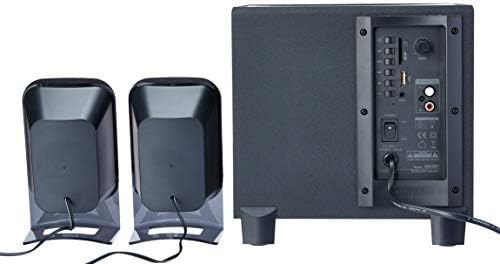
Figura 4.2: Complete Edifier XM2BT 2.1 speaker system from the rear, illustrating connections between subwoofer and satellite speakers.
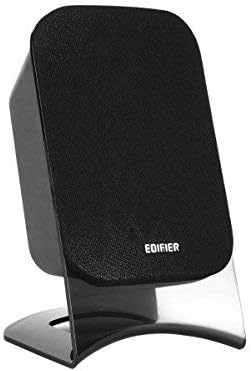
Figura 4.3: Close-up of a single Edifier XM2BT satellite speaker.
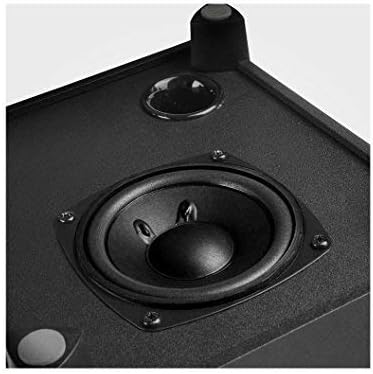
Figura 4.4: Primer pla view of the subwoofer driver, located on the side of the main unit.
5. Instruccions de configuració
- Posicionament dels altaveus: Place the subwoofer on a stable surface, preferably on the floor for optimal bass. Position the satellite speakers on either side of your listening area, facing towards you.
- Connecteu els altaveus satèl·lit: Connect the cables from the two satellite speakers to the "Speaker Out" (L/R) ports on the rear panel of the subwoofer. Ensure correct polarity if applicable (usually indicated by color or markings).
- Connecta la font d'àudio:
- Entrada AUX: Use the provided 3.5mm audio cable to connect your audio device (e.g., smartphone, computer) to the "AUX" input port on the subwoofer.
- Targeta USB/SD: Inseriu una unitat flash USB o una targeta SD que contingui àudio files into the respective port/slot. The system will automatically switch to USB/SD mode if detected.
- Bluetooth: For Bluetooth connection, proceed to the "Operating Instructions" section for pairing details.
- Connectar l'alimentació: Plug the power cord into a standard AC power outlet.
- Encès: Flip the "Power" switch on the rear panel of the subwoofer to the "ON" position. The system is now ready for operation.
6. Instruccions de funcionament
6.1 Encès/Apagat
To power on the system, switch the power button on the rear panel to the "ON" position. To power off, switch it to "OFF".
6.2 Selecció del mode
The XM2BT supports multiple input modes. Use the "MODE" button on the remote control or the main unit to cycle through the available inputs: Bluetooth, AUX, USB, and SD card.
6.3 Volume and Bass Control
- Volum: Adjust the master volume using the main volume knob on the subwoofer or the volume buttons on the remote control.
- Baix: Adjust the bass level using the "BASS" control knob on the rear panel of the subwoofer.
6.4 Vinculació Bluetooth
- Switch the speaker system to Bluetooth mode. The indicator light will flash, indicating it is in pairing mode.
- On your audio device (e.g., smartphone, tablet), enable Bluetooth and search for available devices.
- Select "EDIFIER XM2BT" from the list of found devices.
- Once paired, the indicator light on the speaker system will become solid, and you will hear a confirmation tone.
- You can now play audio from your device through the XM2BT speakers.
6.5 Reproducció des de targeta USB/SD
- Insert a USB flash drive or SD card into the corresponding slot on the subwoofer.
- The system will automatically detect the media and begin playback. If not, switch to USB or SD mode using the "MODE" button.
- Use the playback controls (Play/Pause, Next/Previous Track) on the remote control or main unit to manage your music.
7. Manteniment
- Neteja: Use a soft, dry cloth to clean the surfaces of the speakers. Do not use liquid cleaners, aerosols, or abrasive materials.
- Emmagatzematge: Si guardeu el sistema durant un període prolongat, desendolleu-lo de la presa de corrent i guardeu-lo en un lloc fresc i sec, allunyat de la llum solar directa i de temperatures extremes.
- Ventilació: Ensure that the ventilation openings on the subwoofer are not blocked to prevent overheating.
8. Solució De Problemes
| Problema | Causa possible | Solució |
|---|---|---|
| Sense so |
|
|
| Problemes de connexió Bluetooth |
|
|
| La targeta USB/SD no es reprodueix |
|
|
9. Especificacions
| Característica | Detall |
|---|---|
| Marca | Edificador |
| Número de model | XM2BT |
| Tipus d'altaveu | 2.1 Sistema d'altaveus multimèdia |
| Tecnologia de connectivitat | Cablejat, Bluetooth |
| Característica especial | Bluetooth, USB, SD Card, AUX Input |
| Font d'alimentació | Elèctric amb cable |
| Potència màxima de sortida de l'altaveu | 21 watts |
| Dimensions del producte | 32.3 x 31 x 27.7 cm (aprox. 12.7 x 12.2 x 10.9 polzades) |
| Pes de l'article | 3.55 kg (aprox. 7.8 lliures) |
| Dispositius compatibles | Tauleta, ordinador portàtil, telèfon intel·ligent |
| Color | Negre |
10. Garantia i Suport
Edifier products are designed with quality and reliability in mind. For detailed warranty information, please refer to the warranty card included with your product or visit the official Edifier website. For technical support, product inquiries, or service, please contact Edifier customer service or visit the Edifier Brand Store.
Documents relacionatsXM2BT


Ask a question about this manual
Ask about setup, troubleshooting, compatibility, parts, safety, or missing instructions. Manuals+ will review the question and use this page’s manual context to help answer it.