
Introducció
The Maxpro Duo 120 is a high-performance, dual-channel AC/DC professional balance charger and discharger. It is designed for charging and discharging various battery types, including LiPo, LiFe, LiHV, NiMH, NiCd, and Pb batteries. This device offers precise control over charging parameters, ensuring optimal battery health and safety. Please read this manual thoroughly before operating the charger to ensure safe and efficient use.
Instruccions importants de seguretat
- Feu servir sempre el carregador en una zona ben ventilada, allunyada de materials inflamables.
- Never leave the charger unattended while it is in operation.
- Ensure the correct battery type and cell count are selected before starting any charge or discharge cycle. Incorrect settings can lead to battery damage, fire, or explosion.
- Use only the appropriate charging cables and connectors.
- Do not attempt to charge damaged or swollen batteries.
- Mantingueu el carregador allunyat de la humitat, la pols i la llum solar directa.
- Aquest dispositiu no és una joguina. Mantenir fora de l'abast dels nens.
Contingut del paquet
Verifiqueu que tots els elements siguin presents al vostre paquet:
- Maxpro Duo 120 Charger/Discharger Unit
- Cable d'alimentació CA
- Cable d'entrada de CC
- Balance Boards (2x)
- Charging Cables (various types)
- Manual d'usuari (aquest document)
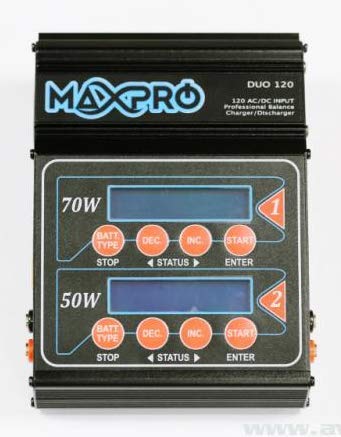
Image: The Maxpro Duo 120 AC/DC Professional Balance Charger/Discharger unit. This image shows the overall appearance of the charger, including its dual-channel design and display screen.
Producte acabatview
Panell frontal
The front panel features two independent charging channels, each with its own LCD display, navigation buttons, and output ports. Each channel includes a main output port for connecting the battery and a balance port for multi-cell battery balancing.
Panell posterior
The rear panel houses the AC power input, DC power input, and cooling fan vents. Ensure these vents are not obstructed during operation to prevent overheating.
Configuració
Connexió a l'alimentació
- Alimentació CA: Connect the supplied AC power cord to the AC input port on the rear of the charger, then plug the other end into a suitable wall outlet (100-240V AC).
- Potència CC: Alternatively, connect the supplied DC input cable to the DC input port on the rear of the charger, and the other end to a 11-18V DC power source (e.g., a car battery or regulated DC power supply).
- The charger will power on, and the LCD display will illuminate.
Connexió de bateries
- Identify the correct charging cable for your battery.
- Connect the main charging lead of the battery to the main output port of the desired channel (CH1 or CH2).
- For multi-cell batteries (LiPo, LiFe, LiHV), connect the battery's balance lead to the appropriate balance board, then connect the balance board to the balance port on the charger.
- Ensure all connections are secure and correct polarity is observed.
Instruccions de funcionament
Navegant pel menú
Each channel has dedicated buttons for navigation:
- BATTERY TYPE/STOP: Used to select battery type and stop current operation.
- INC (+): Increases values or moves forward in menus.
- DEC (-): Decreases values or moves backward in menus.
- START/ENTER: Confirms selections and starts operations.
Carregant una bateria
- Seleccioneu el tipus de bateria: Premeu el botó BATTERY TYPE/STOP button repeatedly until the correct battery chemistry (e.g., LiPo, NiMH) is displayed.
- Seleccioneu el mode de funcionament: Ús INC (+) or DEC (-) to select the desired operation (e.g., Balance Charge, Fast Charge, Storage, Discharge). Press INICI/ENTRAR per confirmar.
- Establir paràmetres: Adjust the charge current (Amps) and cell count/voltagi utilitzant el INC (+) i DEC (-) botons. Premeu INICI/ENTRAR to move between parameters.
- Comença a carregar: Once all parameters are set, press and hold the INICI/ENTRAR button for 3 seconds to begin the charging process. The charger will perform a battery check before starting.
- Supervisar el progrés: The display will show real-time charging data.
- Atura la càrrega: Premeu el botó BATTERY TYPE/STOP button at any time to stop the operation.
Discharging a Battery
- Follow steps 1-2 from 'Charging a Battery' to select battery type and then select 'Discharge' mode.
- Set the discharge current and final discharge voltagi utilitzant el INC (+) i DEC (-) botons.
- Mantén premut INICI/ENTRAR for 3 seconds to begin discharging.
Storage Mode (for LiPo/LiFe/LiHV)
Storage mode charges or discharges the battery to a specific voltage level optimal for long-term storage, preserving battery health. Select 'Storage' mode and confirm with INICI/ENTRAR.
Manteniment
- Neteja: Disconnect the charger from all power sources and batteries. Use a soft, dry cloth to clean the exterior. Do not use solvents or abrasive cleaners.
- Emmagatzematge: Guardeu el carregador en un lloc fresc i sec, allunyat de la llum solar directa i de temperatures extremes.
- Inspecció del cable: Regularly inspect all cables and connectors for signs of wear or damage. Replace any damaged components immediately.
Resolució de problemes
- "CONNECTION BREAK": Check all battery connections, including main leads and balance leads. Ensure they are secure and correctly plugged in.
- "CELL ERROR": Indicates an issue with the battery's cell count or voltage. Verify the selected cell count matches the battery, and check individual cell voltages if possible.
- "INPUT VOLTAGE ERROR": La potència d'entrada voltage is outside the acceptable range (100-240V AC or 11-18V DC). Check your power source.
- "OVER TEMP": The charger is overheating. Disconnect power, allow it to cool down, and ensure proper ventilation.
- El carregador no s'encén: Check the power cable connection and the power source. Ensure the AC/DC input is within the specified range.
Especificacions tècniques
| Característica | Especificació |
|---|---|
| Marca | Maxpro |
| Número de model | 1000MAX1006 |
| Entrada Voltage | CA 100-240V / DC 11-18V |
| Interval de corrent de càrrega | 0.1-10.0A (per channel) |
| Interval de corrent de descàrrega | 0.1-2.0A (per channel) |
| Potència de càrrega màxima | 100W x 2 (200W en total) |
| Potència de descàrrega màxima | 10W x 2 (20W en total) |
| Tipus de bateries compatibles | LiPo/LiFe/LiHV (1-6S), NiMH/NiCd (1-15S), Pb (2-20V) |
| Corrent de saldo | 500 mA/cel·la |
| Pes | 2.2 lliures (aprox. 1 kg) |
| Normes de seguretat | Conforme a UL |
Garantia i Suport
The Maxpro Duo 120 charger is covered by a manufacturer's warranty against defects in materials and workmanship. For specific warranty terms and duration, please refer to the documentation included with your purchase or contact the retailer. For technical support, troubleshooting assistance, or spare parts inquiries, please contact your point of purchase or the Maxpro customer service department.