
1. Introducció
Thank you for choosing the Hanwha Techwin Wisenet QND-6020R 2 Megapixel Network Camera. This manual provides essential information for the safe and efficient installation, operation, and maintenance of your new surveillance camera. Please read this manual thoroughly before using the product and retain it for future reference.
2. Informació de seguretat
Observeu les següents precaucions de seguretat per evitar lesions o danys al producte:
- Font d'alimentació: Use only the specified power adapter (AC/DC) for this device. Incorrect voltagi pot causar incendi o descàrrega elèctrica.
- Instal·lació: Ensure the camera is securely mounted to prevent it from falling. Wall mounting is recommended.
- Aigua i humitat: This camera has an IP65 waterproof rating, meaning it is protected against dust and low-pressure water jets. However, avoid submerging the camera in water or exposing it to high-pressure water.
- Neteja: Desconnecteu l'alimentació abans de netejar. Feu servir un drap suau i sec. No utilitzeu netejadors líquids ni en aerosol.
- Temperatura de funcionament: Do not operate the camera outside its specified temperature range.
- Manteniment: No intenteu atendre aquest producte vosaltres mateixos. Consulteu tots els serveis a personal de servei qualificat.
3. Contingut del paquet
Verifiqueu que tots els elements siguin presents al paquet:
- Hanwha Techwin Wisenet QND-6020R Network Camera
- Cargols i ancoratges de muntatge
- Guia d'instal·lació
- Adaptador d'alimentació (AC/DC)
4. Producte acabatview
The Hanwha Techwin Wisenet QND-6020R is a 2-megapixel network dome camera designed for reliable surveillance. It features advanced video compression (H.264, H.265, Motion JPEG), 1080p video capture, and a 3.60 mm lens. Key features include night vision up to 65.62 ft and motion detection capabilities.
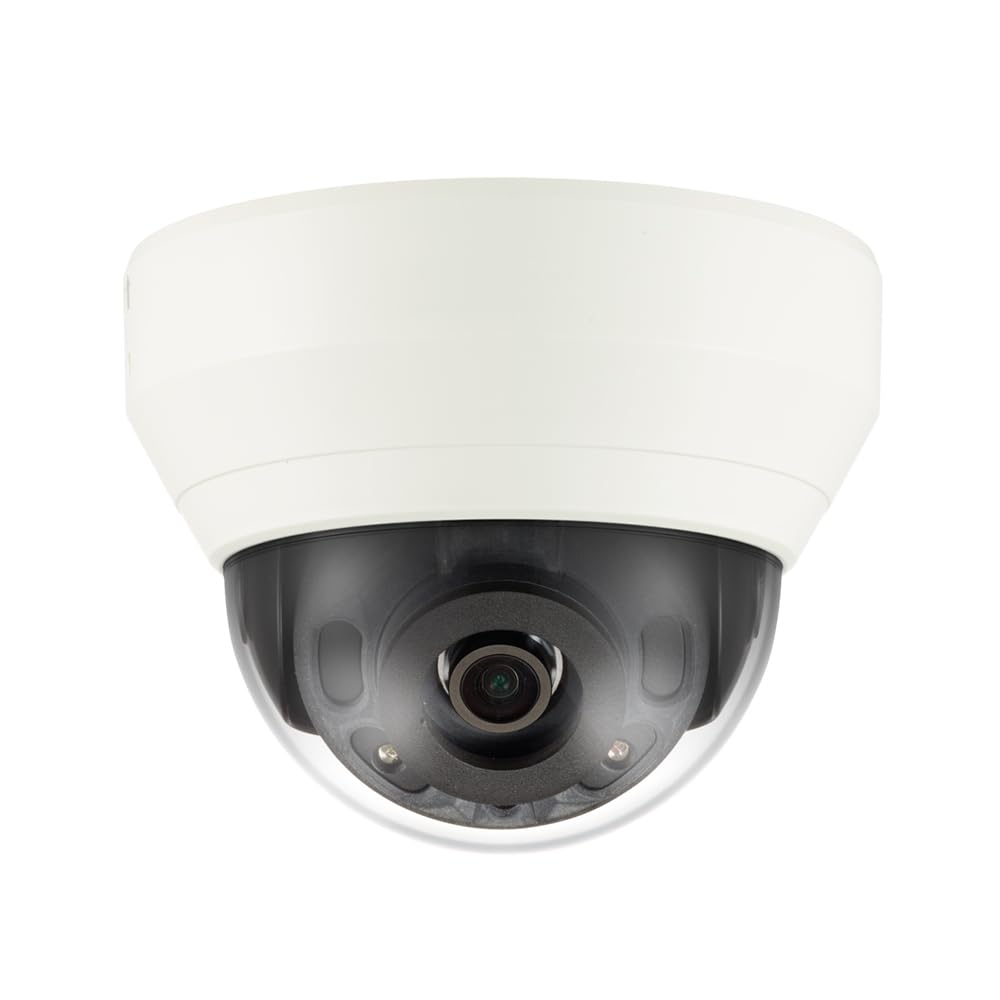
Figura 4.1: Davant view of the Hanwha Techwin Wisenet QND-6020R 2 Megapixel Network Dome Camera. This image shows the compact dome design, suitable for discreet surveillance installations. The camera features a dark housing and a clear dome covering the lens, indicating its robust construction for various environments.
5. Configuració
5.1 Muntatge de la càmera
- Seleccioneu una ubicació: Choose a suitable wall location for optimal surveillance coverage. Ensure the surface is strong enough to support the camera.
- Forats: Use the provided mounting template (if applicable) to mark and drill pilot holes for the mounting screws.
- Assegura la muntura: Attach the camera's mounting base to the wall using the screws and anchors.
- Ajust d'angle: Once mounted, adjust the camera's viewangle segons sigui necessari.
5.2 Connexió d'alimentació i xarxa
- Connexió d'alimentació: Connect the supplied AC/DC power adapter to the camera's power input port and then to a power outlet.
- Connexió de xarxa (per cable): For a wired connection, connect an Ethernet cable from the camera's network port to your network router or switch.
- Connexió de xarxa (Wi-Fi): For Wi-Fi connectivity, refer to the camera's initial setup wizard or the dedicated network configuration section in the full digital manual for pairing instructions. The camera supports Wi-Fi connectivity.
5.3 Configuració inicial
After connecting power and network, the camera will boot up. Access the camera's web interface via a browser using its IP address (refer to your network's DHCP client list or use the manufacturer's discovery tool). Follow the on-screen prompts to set up administrator credentials, network settings, and initial video configurations.
6. Instruccions de funcionament
6.1 Viu View i Enregistrament
Access the camera's live view through its web interface or a compatible network video recorder (NVR) / surveillance software. Configure recording schedules, motion-triggered recording, and continuous recording settings as desired. Video is captured at 1080p resolution in MP4 format.
6.2 Detecció de moviment
The camera features a motion sensor. Configure motion detection zones and sensitivity settings within the camera's web interface. You can set up alerts (e.g., email notifications) to be triggered upon motion detection.
6.3 Visió nocturna
The QND-6020R is equipped with night vision capabilities, providing clear images in low-light conditions up to 65.62 ft. The camera automatically switches between day and night modes based on ambient light levels. Night vision is in color.
7. Manteniment
7.1 Neteja
Regularly clean the camera's lens and housing with a soft, dry cloth to ensure optimal image quality. Avoid using harsh chemicals or abrasive materials.
7.2 actualitzacions de microprogramari
Periodically check the Hanwha Techwin weblloc web per a actualitzacions de firmware. Mantenir el firmware de la càmera actualitzat garanteix un rendiment òptim, seguretat i accés a noves funcions.
8. Solució De Problemes
- Sense energia: Assegureu-vos que l'adaptador de corrent estigui connectat correctament tant a la càmera com a una presa de corrent que funcioni. Verifiqueu que la presa de corrent tingui corrent.
- Sense vídeo/Fora de línia: Check network cable connections (if wired) or Wi-Fi signal strength (if wireless). Verify the camera's IP address and network settings. Restart the camera and your network router.
- Mala qualitat d'imatge: Netegeu la lent de la càmera. Assegureu-vos que no hi hagi obstruccions en el camp de visió de la càmera. view. Check lighting conditions.
- La detecció de moviment no funciona: Review motion detection zone settings and sensitivity in the camera's web interface. Ensure the feature is enabled.
- No es pot accedir Web Interfície: Verify the camera's IP address. Ensure your computer is on the same network segment as the camera. Try a different web navegador.
9. Especificacions
| Característica | Descripció |
|---|---|
| Número de model | QND-6020R |
| Marca | HANWHA |
| Usos recomanats | Vigilància |
| Característiques especials | Sensor de moviment, visió nocturna |
| Font d'alimentació | AC/DC |
| Protocol de connectivitat | Wi-Fi |
| Tipus de controlador | H.264 |
| Tipus de muntatge | Muntatge de paret |
| Tipus d'alerta | Només moviment |
| Classificació impermeable | IP65 |
| Tecnologia sense fils | Wi-Fi |
| Tecnologia del sensor fotogràfic | CMOS |
| Resolució de captura de vídeo | 1080p |
| Format de captura de vídeo | MP4 |
| Visió nocturna | Color nocturn |
| Fabricant | Hanwha Group |
10. Garantia i Suport
This Hanwha Techwin product is covered by a manufacturer's warranty provided by Hanwha Group. For detailed warranty terms and conditions, please refer to the warranty card included with your product or visit the official Hanwha Techwin website. For technical support, troubleshooting assistance, or service inquiries, please contact Hanwha Techwin customer support through their official channels.