
DIGITEN DTC101
DIGITEN Temperature Controller DTC101 User Manual
Comprehensive guide for setup, operation, and maintenance of your DTC101 Thermostat Outlet.
1. Producte acabatview
The DIGITEN DTC101 Temperature Controller is a versatile thermostat outlet designed for precise temperature regulation in various environments. It supports both heating and cooling modes, making it ideal for applications such as greenhouses, aquariums, reptile breeding, home brewing, and more.
Les característiques clau inclouen:
- Wide temperature control range: -40°F to 248°F (-40°C to 120°C).
- Plug-and-play operation with intuitive 3-button setup.
- Illuminated LED display for easy readability in low light.
- High and low temperature alarm functions.
- Compressor delay protection for refrigeration equipment.
- Switchable Fahrenheit/Celsius display.

Figura 1.1: Frontal view of the DIGITEN DTC101 Temperature Controller, showing the display and control buttons.
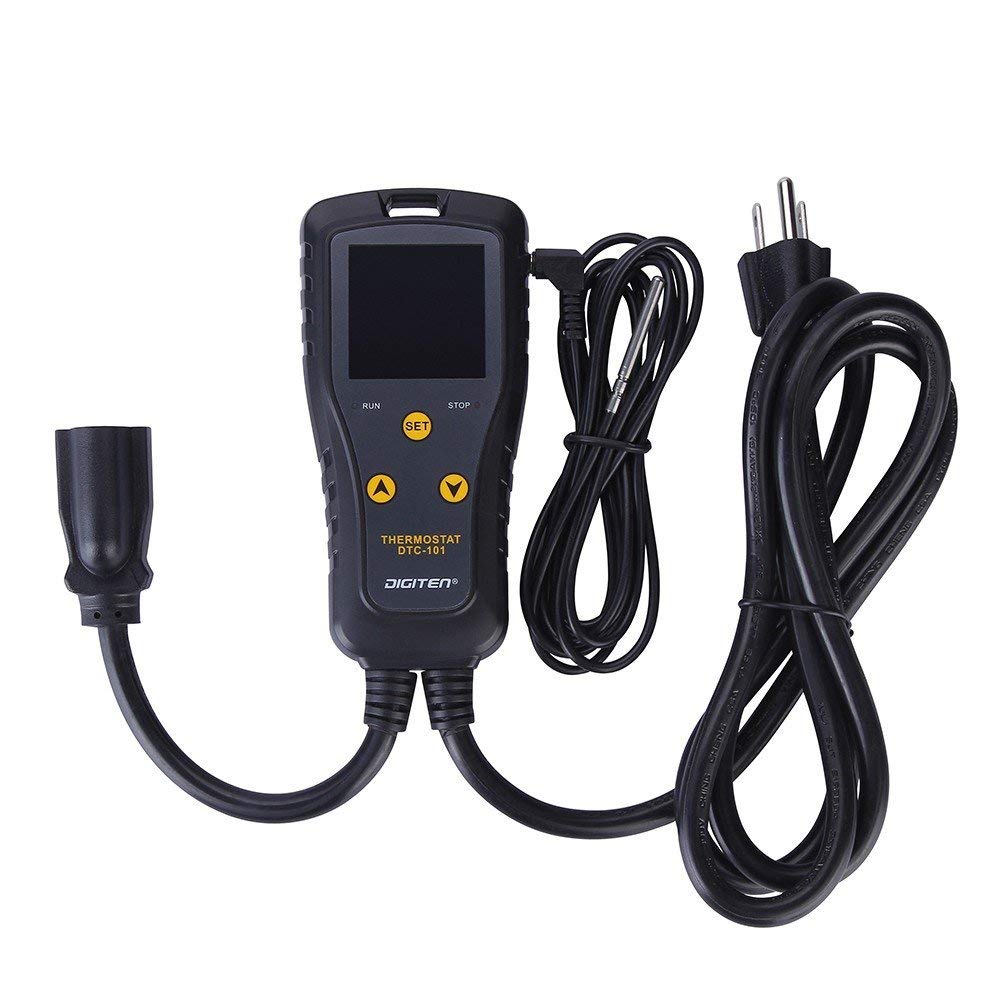
Figure 1.2: All components of the DTC101 Temperature Controller, including the main unit, temperature probe, and power cables.
2. Configuració
Follow these steps to set up your DIGITEN DTC101 Temperature Controller:
- Desempaquetar el dispositiu: Carefully remove the temperature controller, temperature probe, and power cables from the packaging.
- Connect the Temperature Probe: Insert the 3.5mm jack of the temperature probe into the designated port on the side of the controller unit. Ensure it is securely connected.

Figure 2.1: The temperature probe, which connects to the main unit to measure ambient temperature.
- Position the Probe: Place the metal tip of the temperature probe in the environment where you wish to monitor and control the temperature (e.g., inside a greenhouse, aquarium, or fermentation chamber). Ensure the probe is not directly exposed to heating or cooling elements, but rather measures the ambient temperature of the target area.
- Plug in the Controller: Insert the power plug of the DTC101 controller into a standard 110V AC electrical outlet. The display will illuminate.
- Connecteu el vostre electrodomèstic: Plug your heating or cooling appliance (e.g., heat mat, space heater, fan) into the controlled outlet on the DTC101 unit.

Figure 2.2: The DTC101 connected to a power source and ready to control an appliance.
- Muntatge (opcional): The controller can be hung on a wall or hook using the integrated hanging slot at the top of the unit to keep cords tidy.
3. Instruccions de funcionament
The DTC101 features a clear LED display and three main buttons: SET, UP (▲), and DOWN (▼).
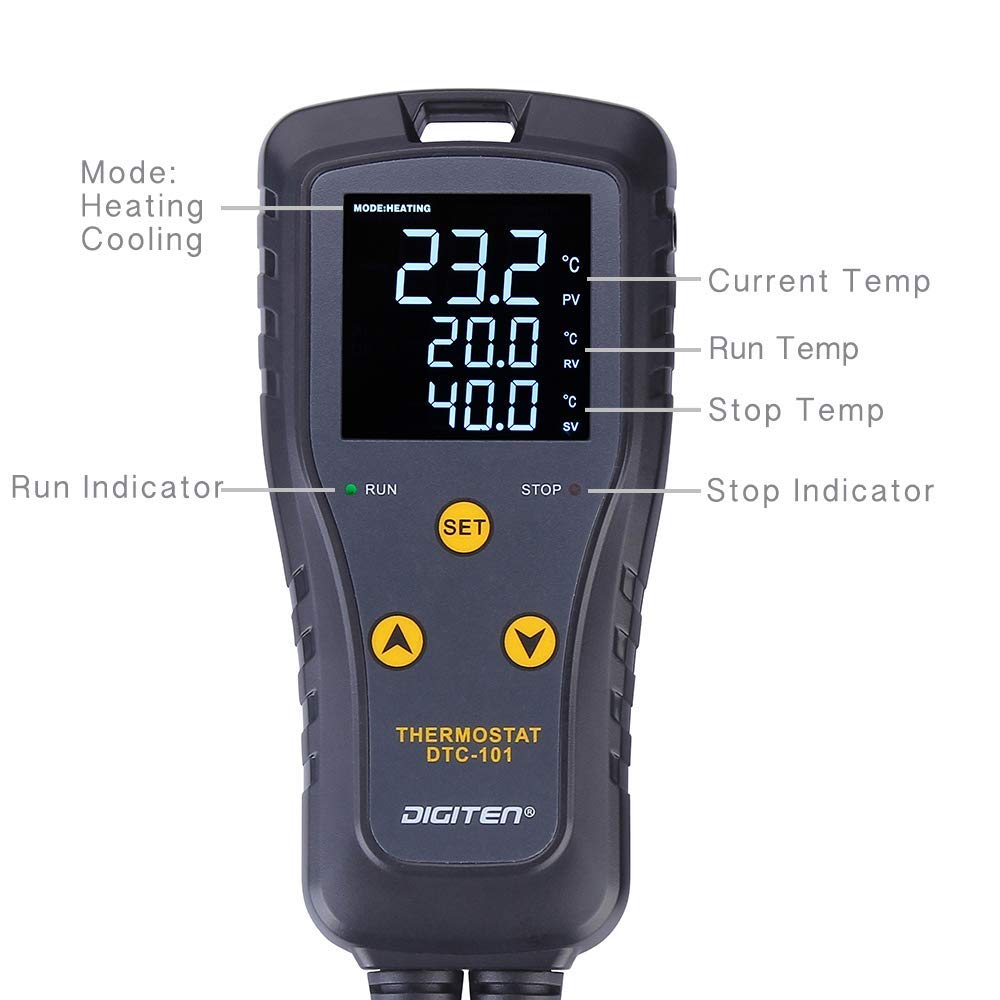
Figure 3.1: Labeled display of the DTC101, showing Current Temp (PV), Run Temp (RV), Stop Temp (SV), and mode indicators.
3.1. Mostra informació
- VA (Valor del Procés): Displays the current temperature measured by the probe.
- RV (Run Value): The temperature at which the connected appliance will turn ON.
- SV (Stop Value): The temperature at which the connected appliance will turn OFF.
- Indicador de mode: Shows "MODE: HEATING" or "MODE: COOLING".
- RUN/STOP Indicators: Green "RUN" light indicates the appliance is active; Red "STOP" light indicates the appliance is off.
3.2. Switching Temperature Units (°C/°F)
Per canviar entre Celsius (°C) i Fahrenheit (°F):
- Press and hold the UP (▲) and DOWN (▼) buttons simultaneously for approximately 3 seconds. The display will switch units.
3.3. Setting Heating Mode
In heating mode, the appliance turns ON when the temperature drops to the Run Value (RV) and turns OFF when it reaches the Stop Value (SV). For heating, the Stop Value (SV) must be més alt than the Run Value (RV).
- Ensure the unit is in Heating Mode. If not, adjust the RV and SV values as described below until SV > RV.
- Press the SET button once. The RV (Run Value) will flash. Use the UP (▲) and DOWN (▼) buttons to set your desired ON temperature.
- Press the SET button again. The SV (Stop Value) will flash. Use the UP (▲) and DOWN (▼) buttons to set your desired OFF temperature. Remember, SV must be higher than RV for heating.
- Press the SET button a third time to save your settings and exit. The display will return to showing the current temperature.
Example: To maintain a temperature around 78-83°F for heating, set RV to 78°F and SV to 83°F. The heater will turn on at 78°F and turn off at 83°F.
Video 3.1: Demonstrates how to set the temperature and switch between heating and cooling modes on the DTC101. This video also shows the unit controlling a heating appliance.
3.4. Setting Cooling Mode
In cooling mode, the appliance turns ON when the temperature rises to the Run Value (RV) and turns OFF when it drops to the Stop Value (SV). For cooling, the Stop Value (SV) must be inferior than the Run Value (RV).
- Ensure the unit is in Cooling Mode. If not, adjust the RV and SV values as described below until SV < RV.
- Press the SET button once. The RV (Run Value) will flash. Use the UP (▲) and DOWN (▼) buttons to set your desired ON temperature.
- Press the SET button again. The SV (Stop Value) will flash. Use the UP (▲) and DOWN (▼) buttons to set your desired OFF temperature. Remember, SV must be lower than RV for cooling.
- Press the SET button a third time to save your settings and exit. The display will return to showing the current temperature.
Example: To maintain a temperature around 82-86°F for cooling, set RV to 86°F and SV to 82°F. The cooler will turn on at 86°F and turn off at 82°F.
For a more detailed explanation of setting heating and cooling modes, including the logic behind Run Value (RV) and Stop Value (SV) for both heating and cooling, please refer to the diagram below. This diagram illustrates how the temperature oscillates between the set RV and SV to maintain the desired range.

Figure 3.2: Diagram illustrating the relationship between Run Value (RV) and Stop Value (SV) for both heating and cooling operations to maintain a stable temperature.
4. Manteniment
To ensure optimal performance and longevity of your DIGITEN DTC101 Temperature Controller, follow these maintenance guidelines:
- Neteja: Regularly wipe the unit and probe with a soft, dry cloth. Do not use abrasive cleaners or immerse the unit in water.
- Cura de la sonda: Keep the temperature probe clean and free from debris. Avoid bending or kinking the probe cable excessively.
- Emmagatzematge: Quan no l'utilitzeu, guardeu el controlador en un lloc fresc i sec, allunyat de la llum solar directa i de temperatures extremes.
- Inspecció: Periodically inspect the power cords and probe cable for any signs of damage (fraying, cuts, exposed wires). If damage is found, discontinue use immediately and contact support.
5. Solució De Problemes
This section provides solutions to common issues you might encounter with your DTC101 Temperature Controller.
| Problema | Causa possible | Solució |
|---|---|---|
| La pantalla està en blanc. | Sense poder. | Ensure the controller is securely plugged into a live electrical outlet. Check the outlet with another device. |
| Appliance not turning ON/OFF. | Incorrect RV/SV settings; Appliance not plugged in; Appliance malfunction. | Verify RV and SV settings are correct for heating/cooling mode (SV > RV for heating, SV < RV for cooling). Ensure appliance is properly plugged into the controller. Test the appliance directly in a wall outlet. |
| La lectura de temperatura és inexacta. | Probe not properly connected; Damaged probe; Probe placed incorrectly. | Check probe connection. Ensure probe tip is in the desired measurement area and not near direct heat/cold sources. If suspected damaged, contact support for a replacement probe. |
| L'alarma sona amb freqüència. | Temperature exceeding set alarm limits. | Adjust alarm limits if necessary, or investigate why the temperature is fluctuating outside the desired range. |
If you encounter issues not listed here or if the suggested solutions do not resolve the problem, please contact DIGITEN customer support.
6. Especificacions
| Característica | Detall |
|---|---|
| Número de model | DTC101 |
| Interval de control de temperatura | -40 °F a 248 °F (-40 °C a 120 °C) |
| Voltage | 110 V |
| Actual | 10A |
| Dimensions | 8.23 x 8.11 x 1.65 polzades |
| Pes | 13.8 unces |
| Fabricant | DIGITEN |
7. Garantia i Suport
DIGITEN provides a one-year warranty for any product quality problems. For detailed warranty information and to register your product, please visit the official DIGITEN weblloc web o consulteu la targeta de garantia inclosa amb la compra.
For technical support, troubleshooting assistance, or to inquire about replacement parts, please contact DIGITEN customer service:
- Assistència en línia: Visita el DIGITEN Store on Amazon per a preguntes freqüents i opcions de contacte.
- Manual d'usuari (PDF): A comprehensive PDF user manual is available for download aquí.
The product has a standard 30-day return/replacement policy through Amazon.
Documents relacionatsDTC101

Ask a question about this manual
Ask about setup, troubleshooting, compatibility, parts, safety, or missing instructions. Manuals+ will review the question and use this page’s manual context to help answer it.