
Introducció
This manual provides detailed instructions for the assembly, operation, and maintenance of your FLEXISPOT E2B-B Height Adjustable Desk Frame. This electric sit-stand desk frame is designed to offer a flexible and ergonomic workspace, allowing seamless transitions between sitting and standing positions. Please read this manual thoroughly before assembly and use to ensure proper function and safety.

Image: The FLEXISPOT E2B-B Height Adjustable Desk Frame in black, shown with a black desktop and two monitors, illustrating a typical setup.
Informació de seguretat
Per garantir un funcionament segur i evitar danys, si us plau, seguiu les següents pautes de seguretat:
- Ensure all cables are properly connected and not pinched during movement.
- Keep hands and fingers clear of moving parts, especially during height adjustments.
- No sobrecarregueu l'escriptori. La capacitat màxima de pes és de 100 kg.
- No seure ni parar sobre el marc de l'escriptori.
- Only use the desk frame indoors in a dry environment.
- Unplug the power cord before cleaning or performing any maintenance.
- Children should not operate the desk without adult supervision.
Contingut del paquet
Abans de començar el muntatge, comproveu que hi hagi tots els components:
- 1 x Height Adjustable Desk Frame (Black)
- 1 x Desktop (Black, 55"x 27.5")
- Tot el maquinari necessari per al muntatge
- 1 x Digital Display Handset
Muntatge i muntatge
Assembly of the FLEXISPOT E2B-B desk frame is required. Please follow the instructions provided in the separate assembly guide included with your package. Ensure you have adequate space and the necessary tools before starting.
Key assembly considerations:
- The frame width is adjustable from 42" to 63" to accommodate various desktop sizes.
- The desk frame supports desktops ranging from 47.25" to 70.9" in width and 23.6" to 31.5" in depth.
- Ensure all screws are tightened securely after assembly.

Image: An illustration showing various components of the desk frame, including the legs, crossbar, and feet, indicating the assembly process.
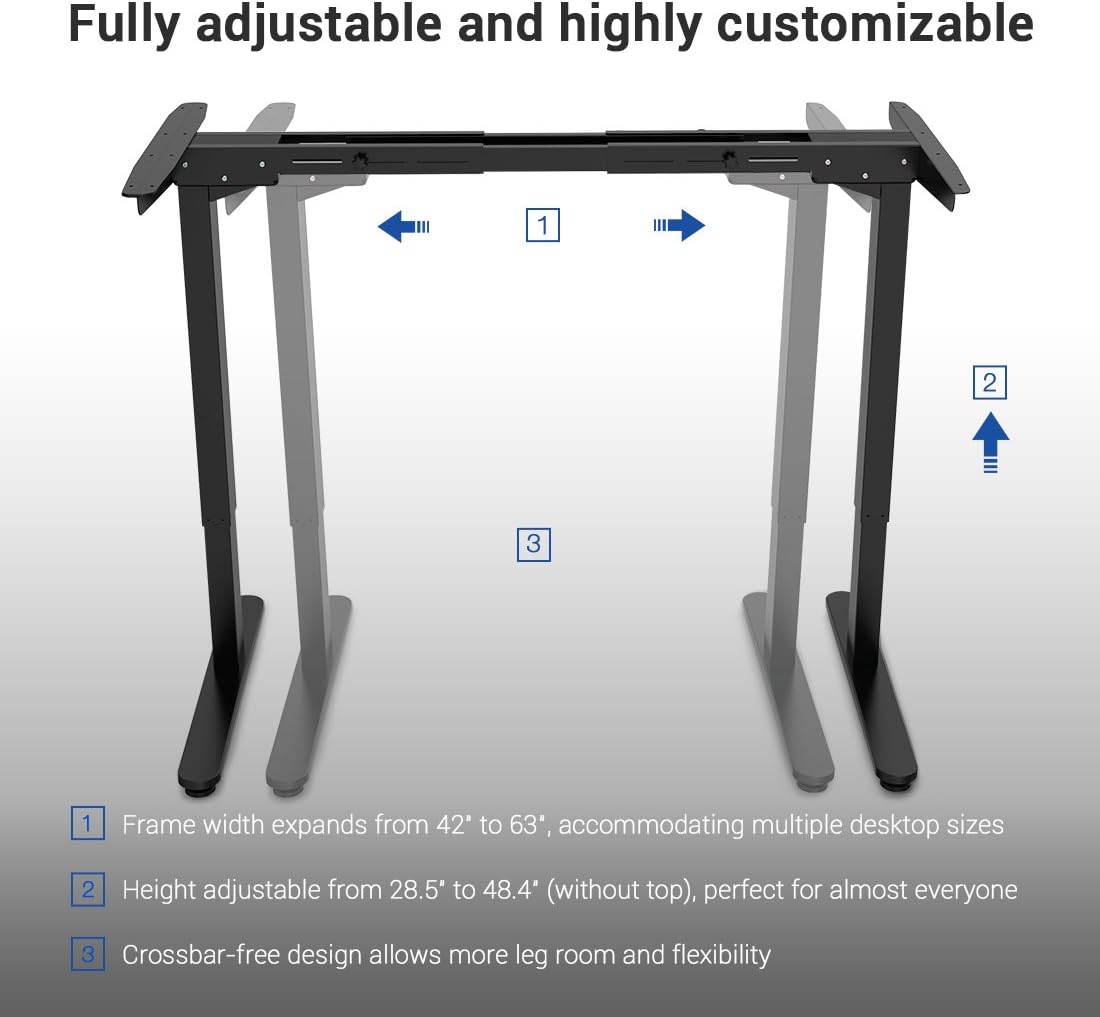
Image: A diagram illustrating the adjustable frame width (42" to 63") and height (28.5" to 48.4") of the FLEXISPOT desk frame, highlighting its customizable nature.
Instruccions de funcionament
The FLEXISPOT E2B-B desk frame features a 7-button digital display handset for easy height adjustment and memory presets.
- Ajust d'alçada: Use the up and down arrows on the handset to smoothly adjust the desk height. The desk moves at approximately 0.87 inches per second.
- Preajustos de memòria: The handset includes 3 customizable height preset options (buttons 1, 2, 3). To save a height, adjust the desk to your desired position, then press and hold one of the preset buttons until the display confirms the setting.
- Sit/Stand Reminder: A dedicated button allows you to set a reminder to switch between sitting and standing positions, promoting healthier work habits.
- Pantalla digital: The display shows the current height of the desk in inches.

Imatge: Un primer pla view of the FLEXISPOT digital control panel, showing the up/down arrows, memory preset buttons (1, 2, 3), and other function buttons.
Manteniment
Regular maintenance helps ensure the longevity and smooth operation of your desk frame.
- Neteja: Wipe the desk frame and desktop with a soft, damp drap. Eviteu productes de neteja o dissolvents abrasius.
- Gestió de cables: Periodically check that all cables are securely connected and not tangled or pinched.
- Comprovació de fixació: Cada pocs mesos, inspeccioneu tots els cargols i perns per assegurar-vos que estiguin ben ajustats. Torneu a apretar-los si cal.
Resolució de problemes
If you encounter issues with your desk frame, refer to the following common troubleshooting steps:
| Problema | Causa possible | Solució |
|---|---|---|
| L'escriptori no es mou. | Cable d'alimentació desconnectat; Sobrecàrrega; Error del motor. | Check power connection; Reduce weight on desk; Unplug for 10 seconds and plug back in to reset. |
| Uneven movement. | Unbalanced load; Loose fasteners. | Distribute weight evenly; Check and tighten all assembly fasteners. |
| Codi d'error a la pantalla. | Error específic del sistema. | Refer to the full troubleshooting guide in your assembly manual or contact customer support. |
Especificacions
Detailed specifications for the FLEXISPOT E2B-B Height Adjustable Desk Frame:
| Característica | Detall |
|---|---|
| Marca | FLEXISPOT |
| Model | E2B-B |
| Height Adjustment Range (without top) | 28.5" a 47.4" |
| Frame Width Expansion | 42" a 63" |
| Compatible Desktop Sizes | 47.25" to 70.9" (width), 23.6" to 31.5" (depth) |
| Capacitat de pes | Fins a 220 lliures (100 kg) |
| Tipus de motor | Dual Motor Lift Mechanism |
| Nivell de soroll | Under 50 dBs |
| Material d'escriptori | MDF (Medium Density Fiberboard) with scratch-resistant high-pressure laminate |
| Desktop Dimensions (Included) | 55" (W) x 27.5" (D) x 1" (Thickness) |
| Tauler de control | 7-button digital display handset with 3 memory presets and sit/stand reminder |
| Muntatge obligatori | Sí |
| Color | Black Frame + Black Top |
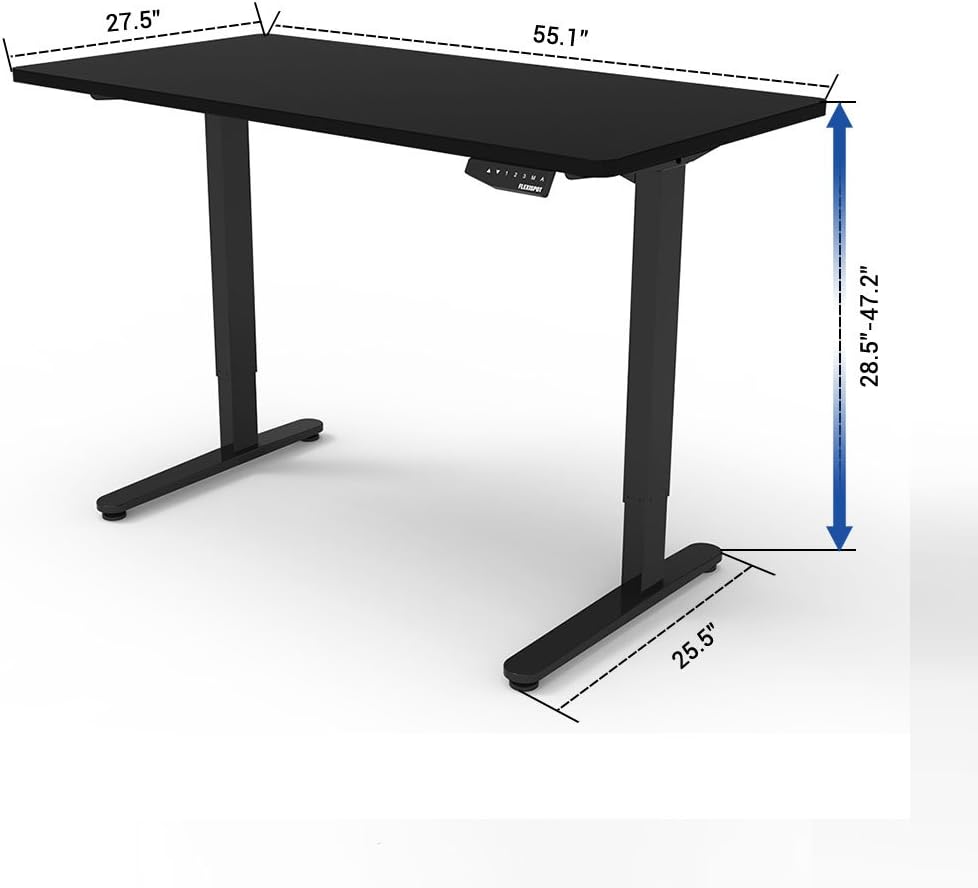
Image: A diagram illustrating the key dimensions of the FLEXISPOT desk, including desktop width (55.1"), depth (27.5"), and height adjustment range (28.5" to 47.2").
Garantia i Suport
The FLEXISPOT E2B-B Height Adjustable Desk Frame comes with a comprehensive warranty:
- Desk Frame: 5 any de garantia
- Motor: 3 any de garantia
For technical support, warranty claims, or any inquiries, please contact FLEXISPOT customer service. Refer to the contact information provided on the product packaging or the official FLEXISPOT weblloc.
Certificacions
The FLEXISPOT E2B-B desk frame meets various industry standards for quality and safety.
Image: Logos for FCC, UL, and BIFMA International certifications, indicating compliance with relevant standards for electronic devices, safety, and office furniture.