
1. Introducció
This manual provides instructions for the installation, operation, and maintenance of your VTech DS6151 DECT 6.0 2-Line Cordless Phone System. This system includes a main base unit and one DS6101 cordless handset. Please read this manual thoroughly before using your new telephone system.

Image 1.1: The VTech DS6151 DECT 6.0 2-Line Cordless Phone System, showing the main base unit and the cordless handset in its charging cradle.
2. Configuració
2.1 Contingut del paquet
Assegureu-vos que el vostre paquet contingui els elements següents:
- VTech DS6151 Base Unit
- DS6101 Cordless Handset
- Carregador de telèfon
- Adaptador d'alimentació per a la unitat base
- Power Adapter for Handset Charger
- Telephone Line Cord (2)
- Rechargeable Battery Pack for Handset
- Manual d'usuari (aquest document)
2.2 Instal·lació de la bateria
The cordless handset requires one AA rechargeable battery. Follow these steps to install the battery:
- Localitzeu la tapa del compartiment de la bateria a la part posterior del telèfon sense fil.
- Feu lliscar la coberta cap avall i aixequeu-la.
- Connect the battery pack connector securely into the jack inside the compartment, ensuring correct polarity.
- Col·loqueu el paquet de bateries al compartiment.
- Feu lliscar la tapa del compartiment de la bateria fins que faci clic.

Image 2.1: The VTech DS6101 cordless handset, showing its front display and keypad.
2.3 Connexió de la unitat base
Connect the base unit as follows:
- Plug one end of the power adapter into the power jack on the back of the base unit.
- Connecteu l'altre extrem de l'adaptador de corrent a una presa de corrent estàndard.
- Plug one end of the telephone line cord into the TEL LINE jack on the back of the base unit.
- Plug the other end of the telephone line cord into a telephone wall jack. If you have two phone lines, connect the second line cord to the LINE 2 jack and the second telephone wall jack.
2.4 Handset Charger Connection
Connect the handset charger as follows:
- Plug one end of the power adapter into the power jack on the back of the handset charger.
- Connecteu l'altre extrem de l'adaptador de corrent a una presa de corrent estàndard.

Image 2.2: The VTech DS6101 cordless handset placed in its charging cradle.
2.5 Càrrega inicial
Place the cordless handset in the base unit or handset charger. The handset will begin charging. Allow the handset to charge for at least 16 hours before initial use. The CHARGE indicator on the handset will illuminate during charging.
3. Instruccions de funcionament
3.1 Fer i rebre trucades
Fer una trucada:
- From the handset, press XERRADA / FLASH or PONENT. From the base, press LÍNIA 1 or LÍNIA 2.
- Marqueu el número de telèfon.
Recepció d'una trucada:
- Quan soni el telèfon, premeu XERRADA / FLASH or PONENT on the handset. From the base, press the flashing LÍNIA 1 or LÍNIA 2 botó.
Finalització d'una trucada:
- Premeu OFF on the handset or place the handset in the charger. From the base, press the active LÍNIA botó.
3.2 2-Line Operation
The DS6151 system supports two separate telephone lines. You can make or receive calls on either line independently. When a line is in use, its corresponding button (LÍNIA 1 or LÍNIA 2) on the base will be lit. If a call comes in on an idle line, its button will flash.
3.3 Identificador de trucades / Trucada en espera
If you subscribe to Caller ID service, the caller's name and number will appear on the handset and base display. If you subscribe to Call Waiting Caller ID, the incoming call information will display during an active call.
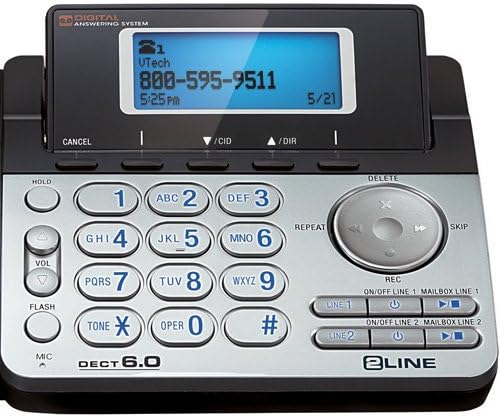
Image 3.1: Close-up of the VTech DS6151 base unit, highlighting the display and keypad for two-line operation.
3.4 Contestador digital
The base unit features a digital answering system with a 13-minute recording capacity and a dedicated mailbox for each line. You can access messages from the base unit or the cordless handset.
Reproducció de missatges:
- On the base, press PLAY/STOP.
- From the handset, press MENÚ/SELECT, scroll to 'Answering System', then 'Play Messages'.
Turning Answering System On/Off:
- On the base, use the ON/OFF LINE 1 i ON/OFF LINE 2 botons.
3.5 Agenda telefònica
The system can store up to 50 names and numbers in its phonebook directory. You can easily store frequently called numbers for quick dialing.
Adding a Phonebook Entry:
- Premeu MENÚ/SELECT al telèfon.
- Scroll to 'Phonebook' and press MENÚ/SELECT.
- Select 'Add New Entry' and follow the on-screen prompts to enter the name and number.
3.6 Altaveu
Both the base unit and the cordless handset feature a dual speakerphone function, allowing hands-free communication. Press the PONENT button on the handset or the speakerphone button on the base during a call to activate.
3.7 Remarcació
The system stores the last few numbers dialed. Press RECOMANTA on the handset to access the redial list.
3.8 Handset Locator / Paging
Si perdeu el telèfon, premeu la tecla PÀGINA button on the base unit. All registered handsets will ring, helping you locate them.
4. Manteniment
4.1 Cleaning Your Telephone
Clean the telephone and handset with a soft, slightly damp cloth. Do not use cleaning agents or abrasive materials, as these can damage the finish. Avoid getting moisture into any openings.
4.2 Cura de la bateria
Per garantir un rendiment òptim de la bateria:
- Charge the handset for 16 hours before first use.
- Avoid overcharging by not leaving the handset on the charger for extended periods after it is fully charged.
- Replace the battery pack when the handset indicates low battery or when talk time significantly decreases. Use only the specified rechargeable battery pack.
5. Solució De Problemes
If you experience issues with your VTech DS6151 system, try the following common troubleshooting steps:
- Sense to de marcatge:
Ensure all power adapters and telephone line cords are securely plugged in. Check if your telephone service is active. Try plugging a different phone into the wall jack to confirm the line is working. - El telèfon no es carrega:
Verify the handset is correctly seated in the charger. Ensure the charger's power adapter is plugged into a working electrical outlet. Clean the charging contacts on both the handset and charger with a dry cloth. - Poor Call Quality / Static:
Move the handset closer to the base unit. Avoid placing the base unit near other electronic devices (e.g., microwaves, Wi-Fi routers) that may cause interference. Check for loose telephone line cord connections. - Handset Display is Blank:
Ensure the battery pack is correctly installed and fully charged. Place the handset on the charger for at least 30 minutes. - El contestador automàtic no grava:
Ensure the answering system for the respective line is turned ON. Check if the memory is full; delete old messages if necessary.
If problems persist, refer to the full troubleshooting section in the comprehensive user manual available on the VTech support website or contact VTech customer support.
6. Especificacions
The following are key specifications for the VTech DS6151 DECT 6.0 2-Line Cordless Phone System:
| Característica | Descripció |
|---|---|
| Tecnologia | DECT 6.0 (1.9GHz) |
| Línies compatibles | Funcionament de 2 línies |
| Expandabilitat | Fins a 12 telèfons |
| Sistema de contestador | 13 Minute Digital Answering System with dedicated mailbox per line |
| Mostra | Large Backlit LCD Display (Handset & Base) |
| Altaveu | Dual Speakerphone (Base & Handset) |
| Teclat | Teclat retroil·luminat |
| Memòria d'identificació de trucades | 50 Station Name / Number |
| Directori telefònic | 50 Station Name / Number |
| Bateries | 1 AA rechargeable battery required per handset |
| Material | Plàstic |
| Pes de l'article | 4.13 lliures (sistema total) |
| Dimensions del paquet | 12.09 x 9.84 x 6.73 polzades |
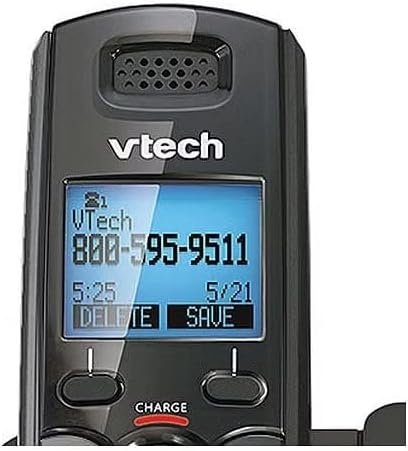
Image 6.1: Close-up of the VTech DS6101 cordless handset display, showing caller ID information.
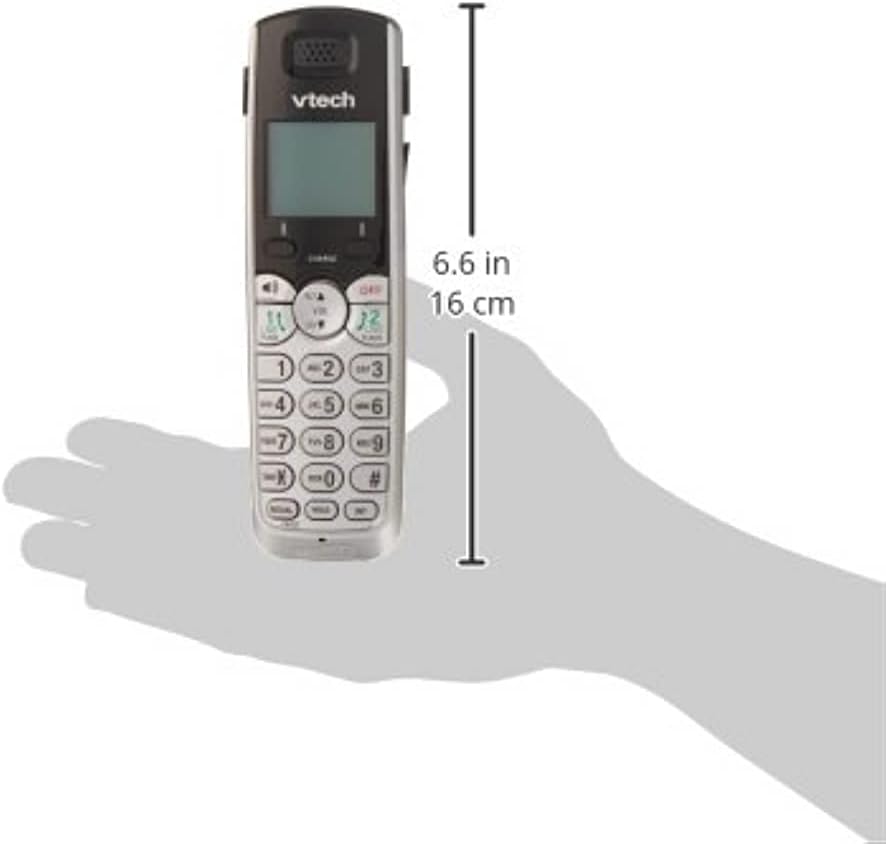
Image 6.2: The VTech DS6101 cordless handset with approximate dimensions indicated, showing its compact size.
7. Garantia i Suport
For warranty information, please refer to the warranty card included with your product or visit the official VTech website. VTech provides customer support for product assistance, troubleshooting, and service inquiries.
Per obtenir més ajuda, visiteu el Botiga VTech a Amazon or the official VTech support weblloc.