
Introducció
Thank you for choosing the MeeTion K9310 Gaming Keyboard. This manual provides detailed instructions for setting up, operating, and maintaining your new keyboard. The K9310 is designed for an enhanced gaming experience with features such as multicolor backlighting, anti-ghosting, and dedicated shortcut keys.
Contingut del paquet
- MeeTion K9310 Gaming Keyboard
- Manual d'usuari (aquest document)
Configuració
Follow these steps to connect your MeeTion K9310 Gaming Keyboard to your computer:
- Desembaleu el teclat del seu embalatge.
- Localitzeu un port USB disponible al vostre ordinador.
- Connecteu el connector USB del teclat al port USB.
- Your operating system (Windows XP/Vista/7/8/10) will automatically detect and install the necessary drivers. No additional software installation is typically required.
- The keyboard is ready for use once the drivers are installed.

Imatge: Superior view of the MeeTion K9310 Gaming Keyboard with its USB cable, ready for connection.
Instruccions de funcionament
Característiques clau
- Multicolor Key Backlit: The keyboard features vibrant multicolor backlighting for enhanced visibility and aesthetic appeal, especially in low-light conditions.
- Comfortable and Soft Keys: Designed with membrane keys offering tactile feedback, providing a comfortable typing and gaming experience.
- 19 Keys Anti-Ghosting: This feature ensures that up to 19 keys can be pressed simultaneously without any input loss, crucial for complex gaming commands.
- Win Lock Function with LED Indication: Prevents accidental presses of the Windows key during gameplay, which can interrupt your game. An LED indicator shows when this function is active.
- 12 FN Shortcut Buttons: Access various multimedia and system functions quickly using the Function (FN) key in combination with the F1-F12 keys.
Control de la llum de fons
The K9310 keyboard features a multicolor backlight. Specific key combinations may be used to adjust brightness or switch lighting modes. Refer to the keyboard's markings for dedicated backlight control keys, often indicated by a sun or light bulb icon, or through FN key combinations.
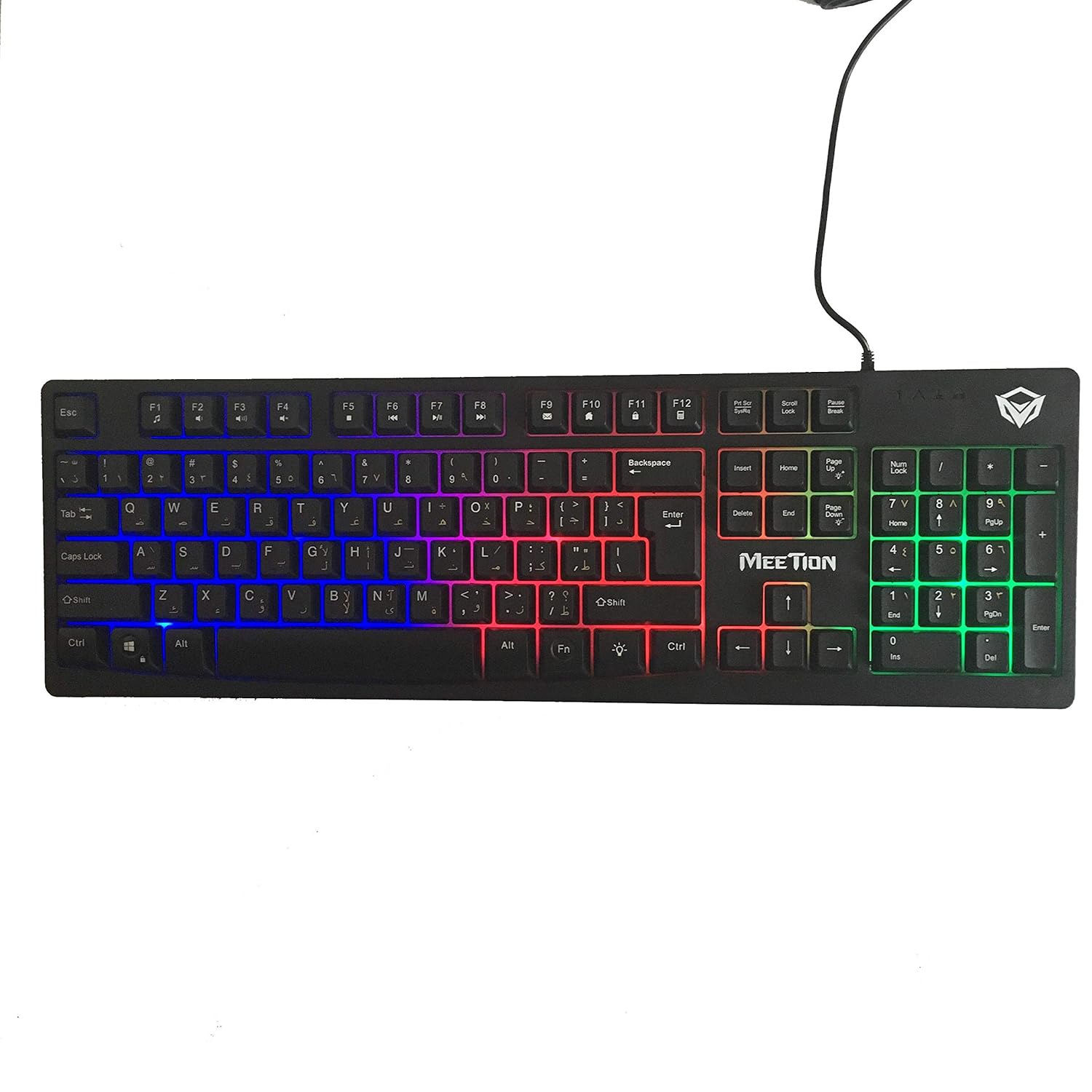
Imatge: Superior view of the MeeTion K9310 Gaming Keyboard with its multicolor backlighting illuminated.
FN Shortcut Functions
The keyboard includes 12 FN (Function) shortcut buttons. To activate these functions, press and hold the FN key, then press the desired F-key (F1-F12).
| Combinació de tecles | Funció |
|---|---|
| FN + F1 | Reproductor multimèdia |
| FN + F2 | Baixa el volum |
| FN + F3 | Puja el volum |
| FN + F4 | Silenciar |
| FN + F5 | Atureu-vos |
| FN + F6 | Pista anterior |
| FN + F7 | Reproduir/Pausa |
| FN + F8 | Pista següent |
| FN + F9 | Correu electrònic |
| FN + F10 | Web Navegador |
| FN + F11 | El meu ordinador |
| FN + F12 | Calculadora |
Win Lock Function
To activate or deactivate the Windows key lock function, press FN + tecla Win. When active, the Windows key will be disabled, preventing accidental presses during gaming. An LED indicator on the keyboard will typically illuminate to show the Win Lock status.
Manteniment
Un manteniment adequat garanteix la longevitat i el rendiment òptim del teclat.
- Neteja: Feu servir un drap suau i sec per netejar la superfície del teclat. Per a una neteja més profunda, netegeu lleugeramentamp Es pot utilitzar un drap amb sabó suau, assegurant-se que no entri líquid als interruptors clau ni als components interns.
- Eliminació de pols: Feu servir aire comprimit per eliminar la pols i les restes que hi ha entre les tecles.
- Eviteu líquids: Do not spill liquids on the keyboard. If a spill occurs, immediately disconnect the keyboard from the computer and allow it to dry completely before reconnecting.
- Emmagatzematge: Guardeu el teclat en un lloc fresc i sec, allunyat de la llum solar directa i de temperatures extremes quan no l'utilitzeu durant períodes prolongats.

Imatge: Part inferior view of the MeeTion K9310 Gaming Keyboard, showing the product label and rubber feet.
Resolució de problemes
If you encounter issues with your MeeTion K9310 Gaming Keyboard, refer to the following troubleshooting steps:
- El teclat no respon:
- Assegureu-vos que el cable USB estigui ben connectat a un port USB que funcioni de l'ordinador.
- Prova de connectar el teclat a un port USB diferent.
- Reinicieu l'ordinador.
- Prova el teclat en un altre ordinador per determinar si el problema és del teclat o de l'ordinador.
- Keys Not Working (e.g., 'W' key):
- Check for any debris or foreign objects lodged under the affected key. Use compressed air to clear it.
- If only specific keys are not responding, and the keyboard is otherwise functional, it might indicate a hardware issue.
- La retroiluminació no funciona o parpelleja:
- Assegureu-vos que el teclat estigui connectat correctament.
- Check if the backlight brightness is set to minimum or turned off via FN key combinations.
- Si el problema persisteix, pot indicar un mal funcionament del maquinari.
- Win Lock Function Not Working:
- Ensure you are using the correct key combination (FN + Win Key) to toggle the function.
- Check the LED indicator for Win Lock status.
Especificacions
| Característica | Detall |
|---|---|
| Marca | REUNIÓ |
| Model | K9310 |
| Tipus de teclat | Teclat per a jocs |
| Contacte clau | Membrane with tactile feedback |
| Disseny | Cyrillic alphabet layout (Windows Keys) |
| Anti-fantasma | 19 claus |
| Llum de fons | Tecla multicolor retroil·luminada |
| Win Lock Function | Sí, amb indicació LED |
| FN Shortcut Buttons | 12 |
| Error-Free Running Time | More than 10 million strokes |
| Compatibilitat amb SO | Windows XP/Vista/7/8/10 |
| Dimensions | 17.5 × 5.5 x 1.5 inches (approximate) |
| Pes | 1.2 lliures (aproximadament) |
| Dispositius compatibles | Ordinador portàtil (i ordinadors d'escriptori) |
Garantia i Suport
For warranty information or technical support, please refer to the documentation provided at the time of purchase or visit the official MEETION weblloc web. Conserveu el comprovant de compra per a qualsevol reclamació de garantia.


